



 Continue with Google
What a TIPS ladder is US
A TIPS ladder is a set of Treasury Inflation-Protected Securities that you hold until they mature, with bonds maturing in each year you need money. Each year, the bonds that mature plus the interest on the bonds you still hold give you an income you know in advance, in today's dollars: TIPS principal rises with inflation, so the income keeps its buying power. Many people build one to cover the years before Social Security, or a cost they know is coming.
The planner models a ladder you already own inside an IRA, in three parts:
- An account that holds only the ladder: a TIPS Ladder IRA on Accounts & Assets, with the ladder's value today as its balance.
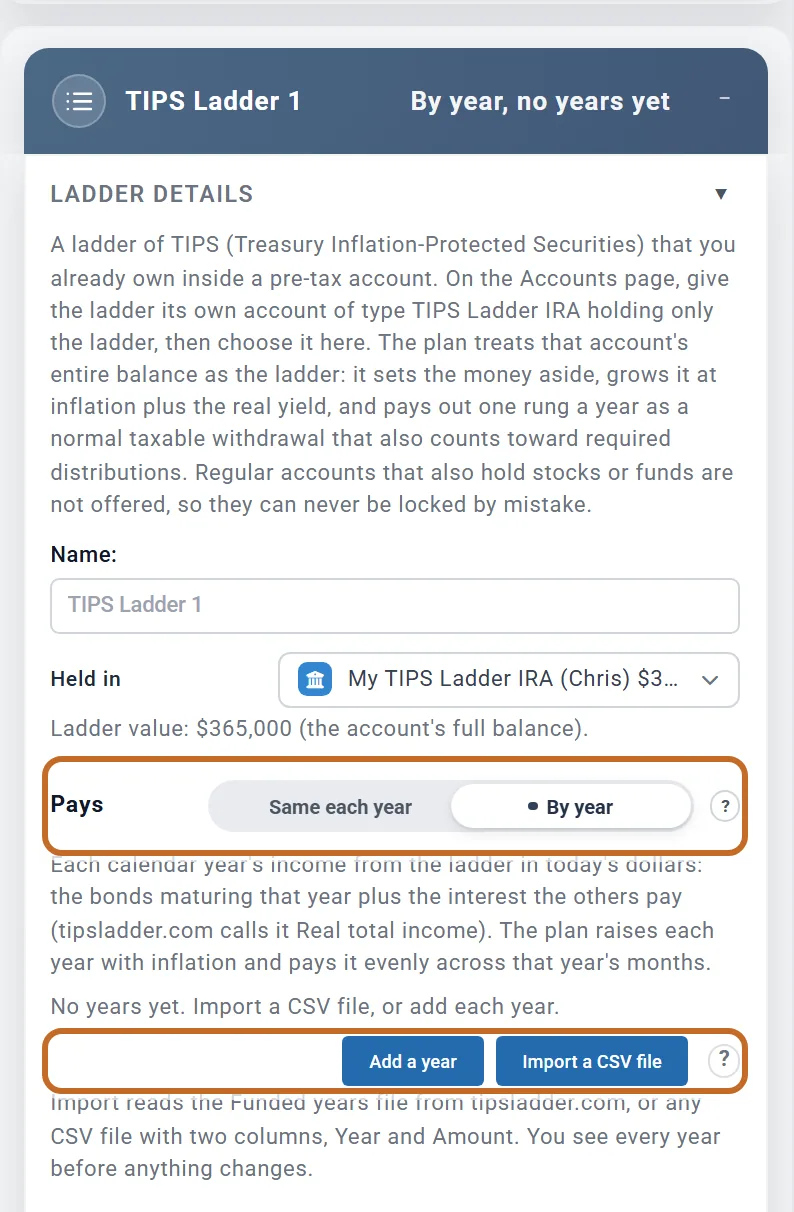
- A TIPS Ladder box that says what the ladder pays: Same each year, one amount between two ages, or By year, a different amount for each calendar year, which you can type in or import from tipsladder.com or a spreadsheet.
- The plan sets the account aside and pays the ladder out as income, year by year, raised with inflation and taxed like any IRA withdrawal.
Why an account and not just an income box? Because the ladder is money you own. It is part of your net worth, its payments count toward your required minimum distributions, and whatever is left after the last year is still yours.
Set up the account and the box
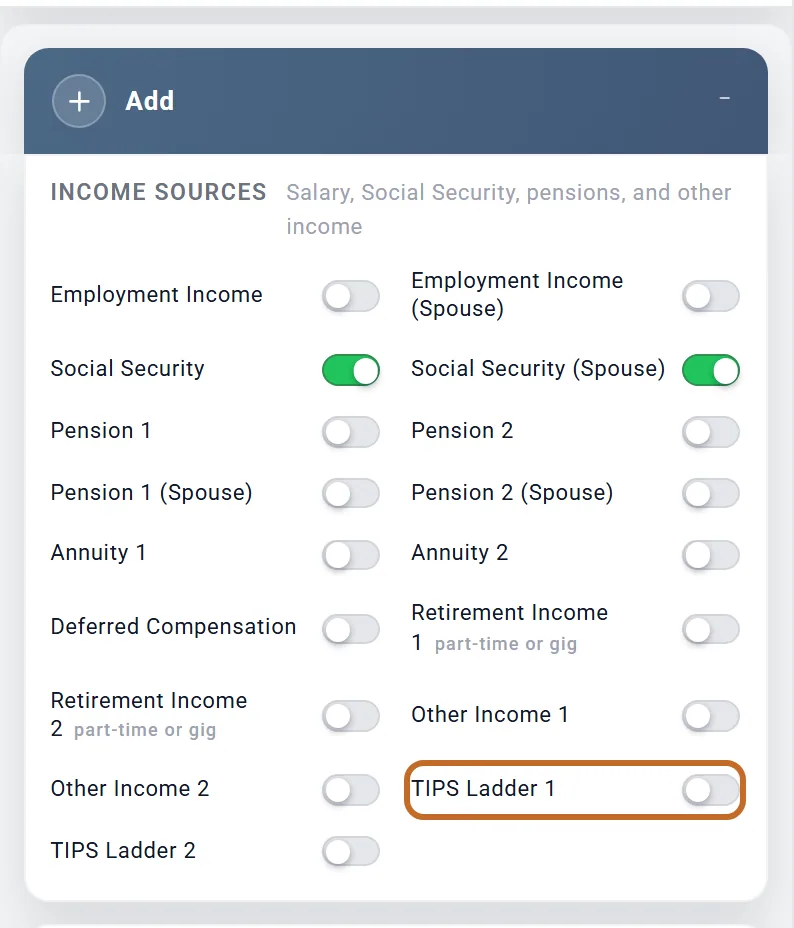
- In the Add box, under Income Sources, switch on TIPS Ladder 1. A second ladder, such as your spouse's, goes in TIPS Ladder 2, with its own account.
The box appears below the Add box; choose it in Jump to to go straight there.
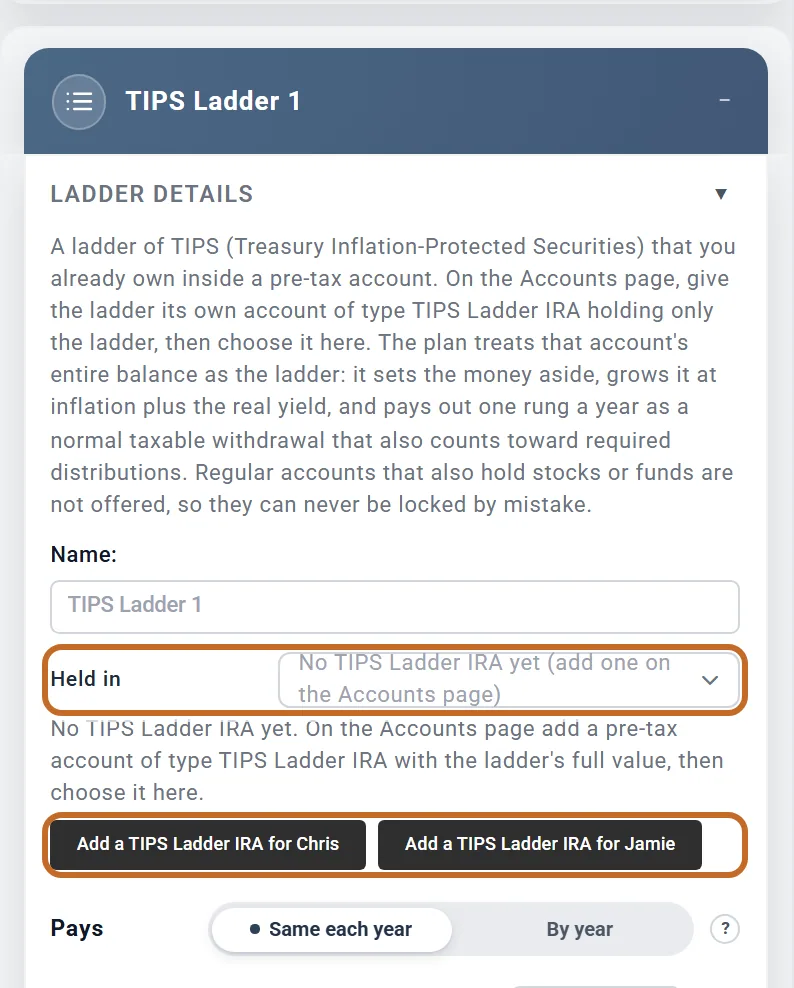
- The new box shows "No TIPS Ladder IRA yet (add one on the Accounts page)" under Held in. Choose Add a TIPS Ladder IRA. With your spouse on the plan there is one button for each of you, such as Add a TIPS Ladder IRA for Chris, so the account has the right owner.
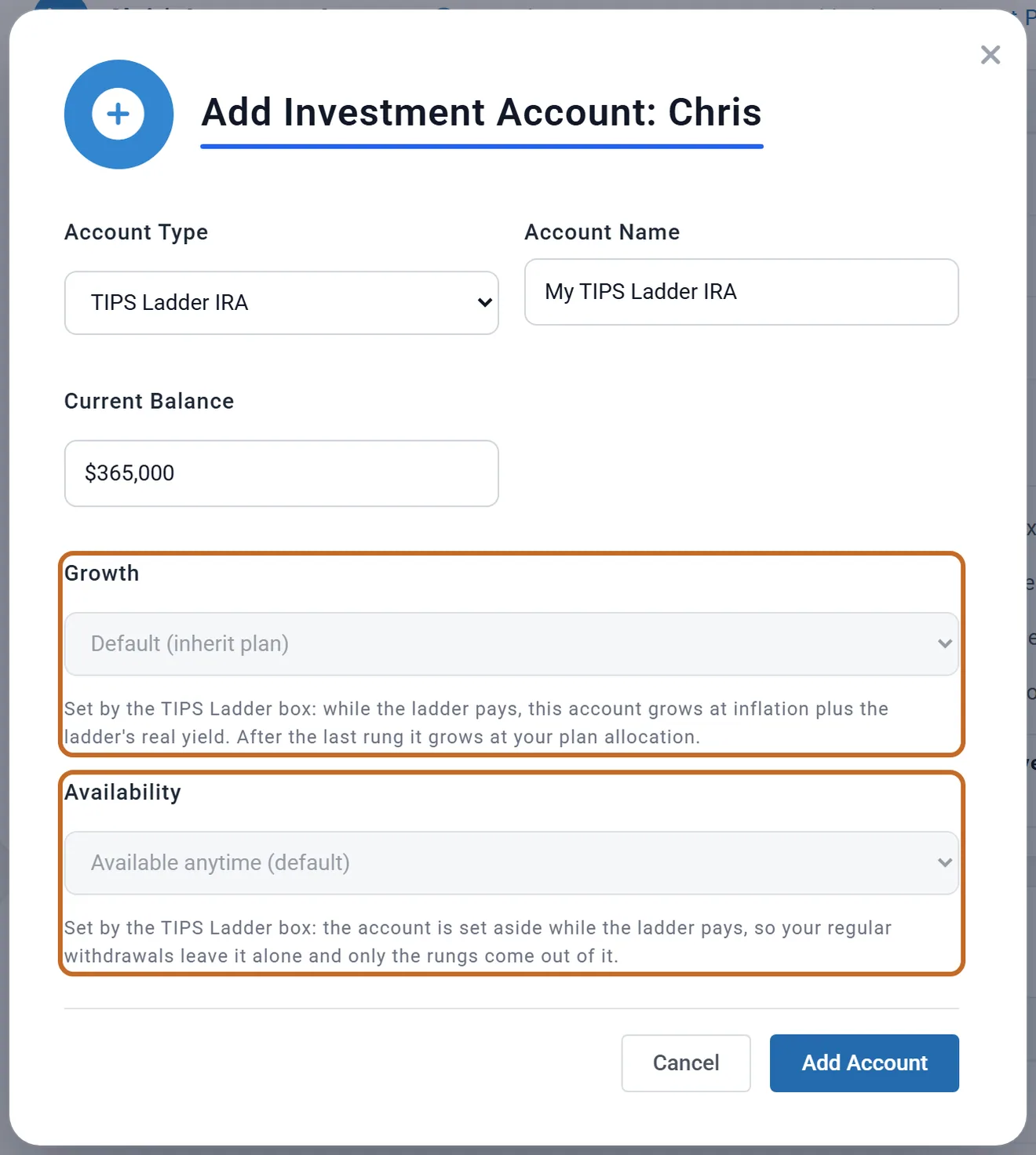
- The Accounts page opens with Add Investment Account: Chris at its last step and TIPS Ladder IRA already chosen as the Account Type.
- Enter the ladder's value today as Current Balance: the market value your broker or tipsladder.com shows. Change Account Name if you like, then choose Add Account.
- Back in the box, Held in shows the new account. Its whole balance is the ladder.
On a TIPS Ladder IRA, Growth and Availability are greyed out, each with a note: the box sets both. While the ladder pays, the account grows at inflation plus the ladder's real yield, and it is set aside from your regular withdrawals.
Pays: Same each year
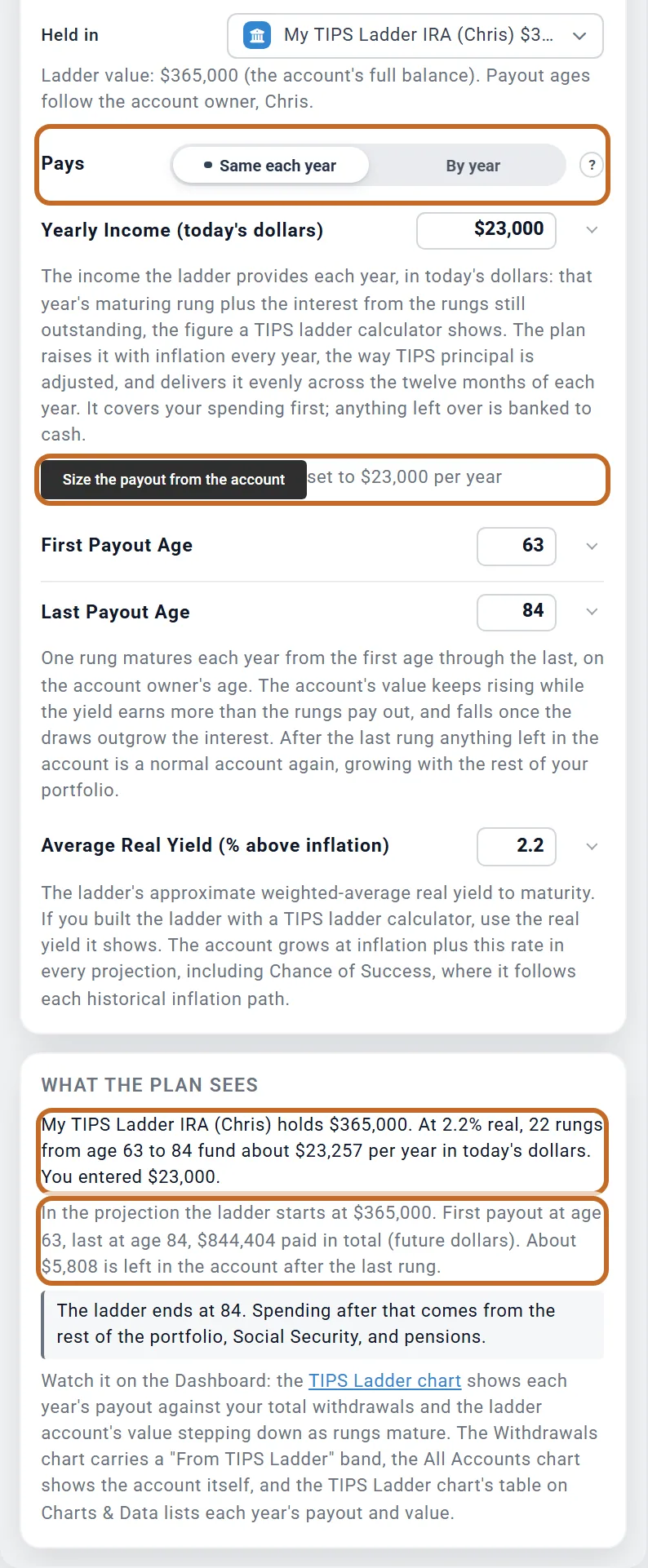
Pays has two choices. A new box starts on Same each year: one income for every year between two ages.
- Yearly Income (today's dollars): what the ladder gives you each year, in today's dollars: that year's maturing bonds plus the interest from the bonds still held, the figure a TIPS ladder calculator shows.
- First Payout Age and Last Payout Age: one rung a year, both ages included. They are the account owner's ages; the line under Held in says whose.
- Average Real Yield (% above inflation): the ladder's average real yield to maturity. The account grows at inflation plus this rate.
- Size the payout from the account works out the yearly income the balance can pay over those ages at that yield, and sets it to the nearest $500 below.
Chris's $365,000 ladder paying from 63 to 84 at 2.2% real funds about $23,257 a year in today's dollars, so the button sets $23,000. What the plan sees then reads the run: first payout at 63, last at 84, $844,404 paid in all (in future dollars, raised with inflation), and about $5,808 left after the last rung.
Pays: By year, a different amount each year
Real ladders are rarely level: larger rungs early to bridge the years before Social Security, a few years with no bond maturing, or rungs that rise for a cost that grows faster than inflation, such as a care community's rent. Set Pays to By year and give each calendar year its own income in today's dollars.
- Import a CSV file fills the table from tipsladder.com or a spreadsheet (see Import your ladder from a file). The ? beside it explains how.
- Add a year adds the year after the last one, with the same amount, ready to change.
- Change any year or amount in the table, or remove a year with its X. A year already in the table is not taken twice.
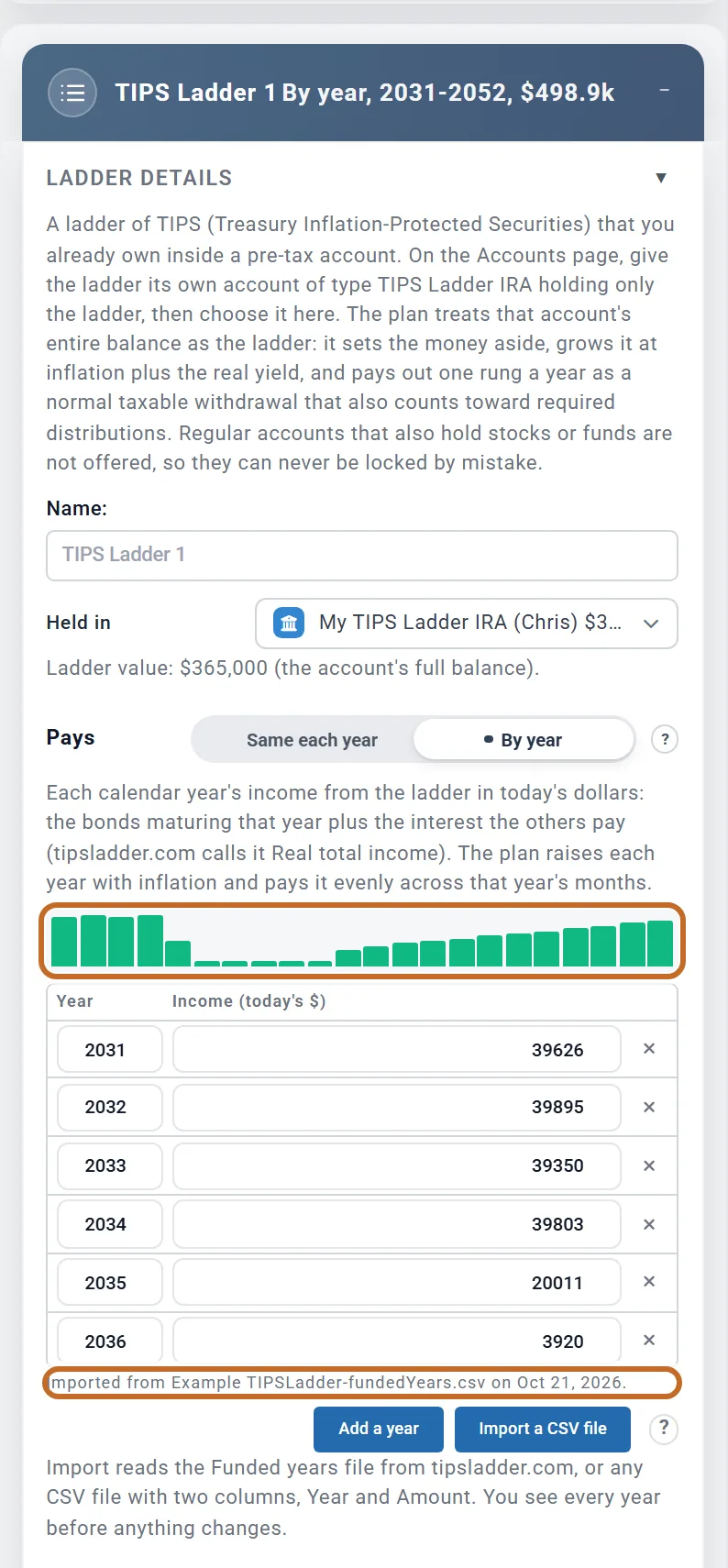
- The bars above the table sketch the amounts, so the shape of your ladder shows at a glance.
Each amount is that year's maturing bonds plus the interest the other bonds pay (tipsladder.com calls it Real total income). The years are calendar years because TIPS mature in a calendar year. In By year the payout ages and Yearly Income (today's dollars) are hidden: the first and last years with an amount are the ladder's life. There is no Size button either, because scaling your amounts would invent bonds you do not own. Average Real Yield (% above inflation) stays.
Switching back to Same each year brings back the single amount, and the table is kept for later. A table holds up to 60 years, from $0 to $1,000,000 a year each.
Import your ladder from a file
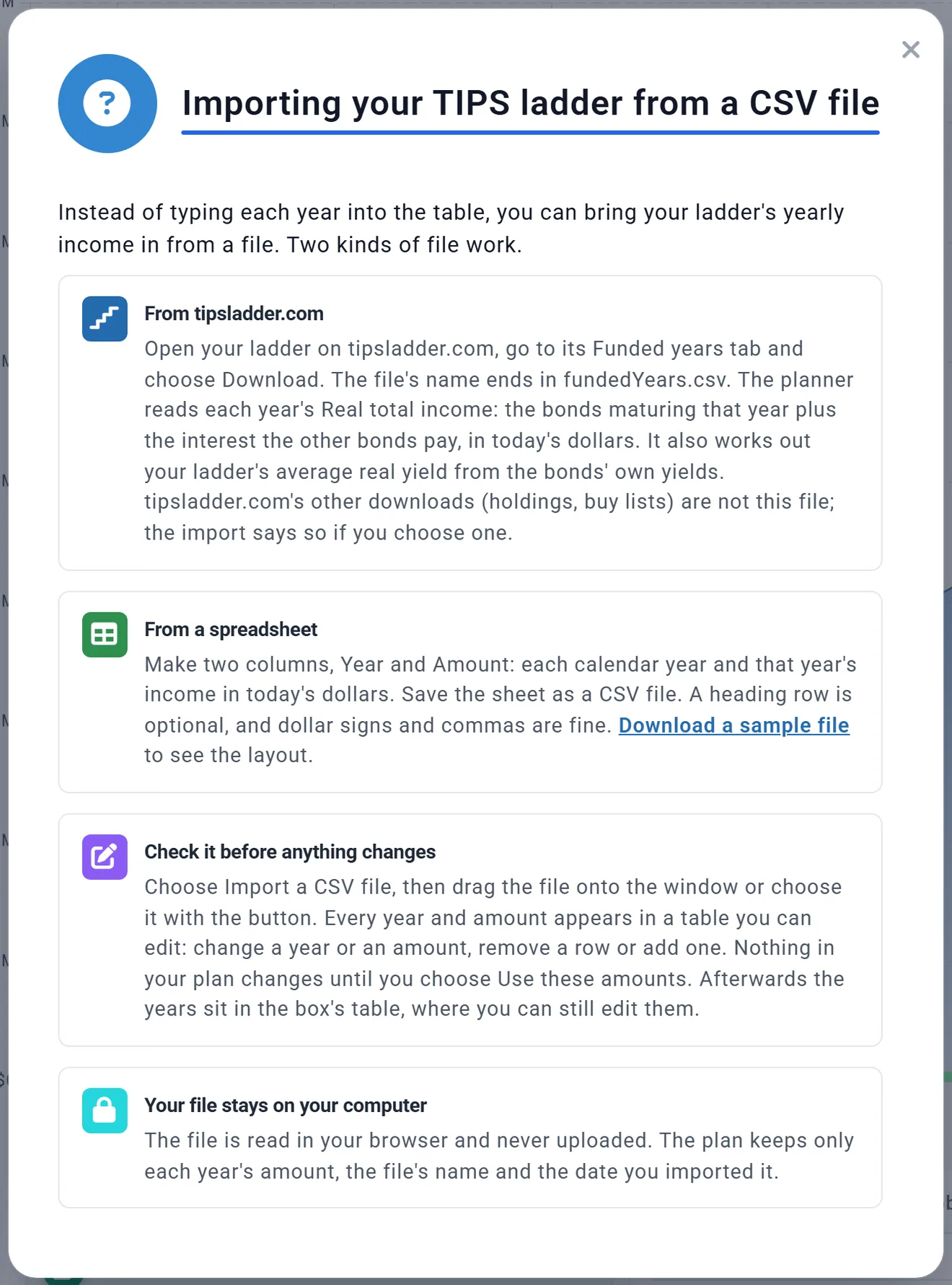
Typing 20 or 30 years is slow, so the box reads them from a file. Two kinds of file work.
tipsladder.com's Funded years file
- Open your ladder on tipsladder.com and go to its Funded years tab.
- Choose Download. The file's name ends in fundedYears.csv.
The planner reads each year's Real total income from it, one figure per year (a year with two bonds has a summary row, which is the one it takes). It also works out your ladder's average real yield from the bonds' own yields to maturity, each weighted by its principal, and offers it for the box. tipsladder.com's other downloads, such as holdings or a buy list, are not this file; the import says so if you choose one.
A spreadsheet
For a ladder you built elsewhere, make two columns, Year and Amount: each calendar year and that year's income in today's dollars. A heading row is optional, and dollar signs and commas are fine. Save the sheet as a CSV file. Download a sample file in the import window gives a five-year example to copy.
The import window
- In the box, with Pays on By year, choose Import a CSV file.
- Drag the file onto Drag your CSV file here, or use Choose a file.
- A file the planner cannot read stays on this step with the reason in red, such as "This is not the Funded years file." Choose the right one and the window moves on to the review.
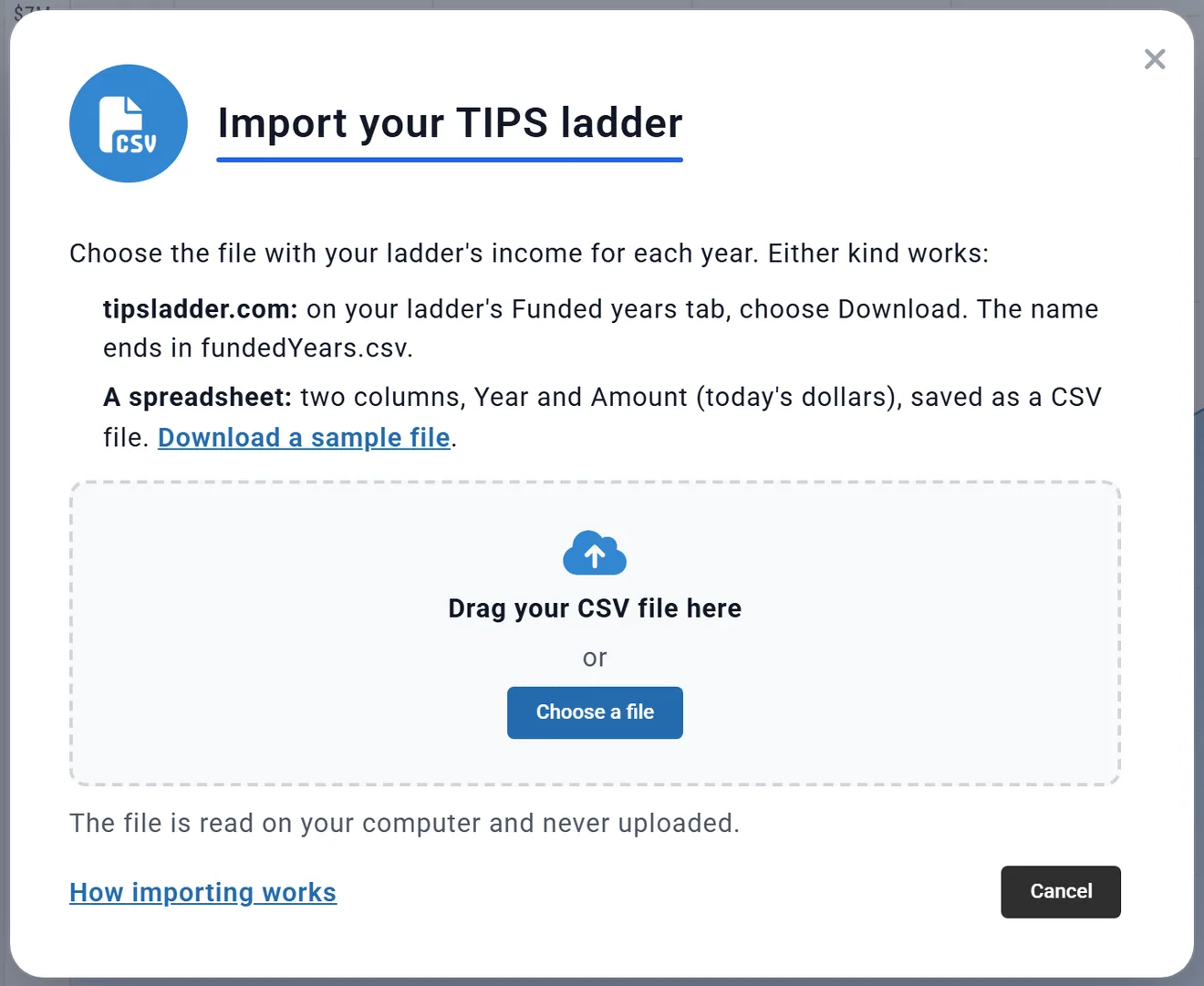
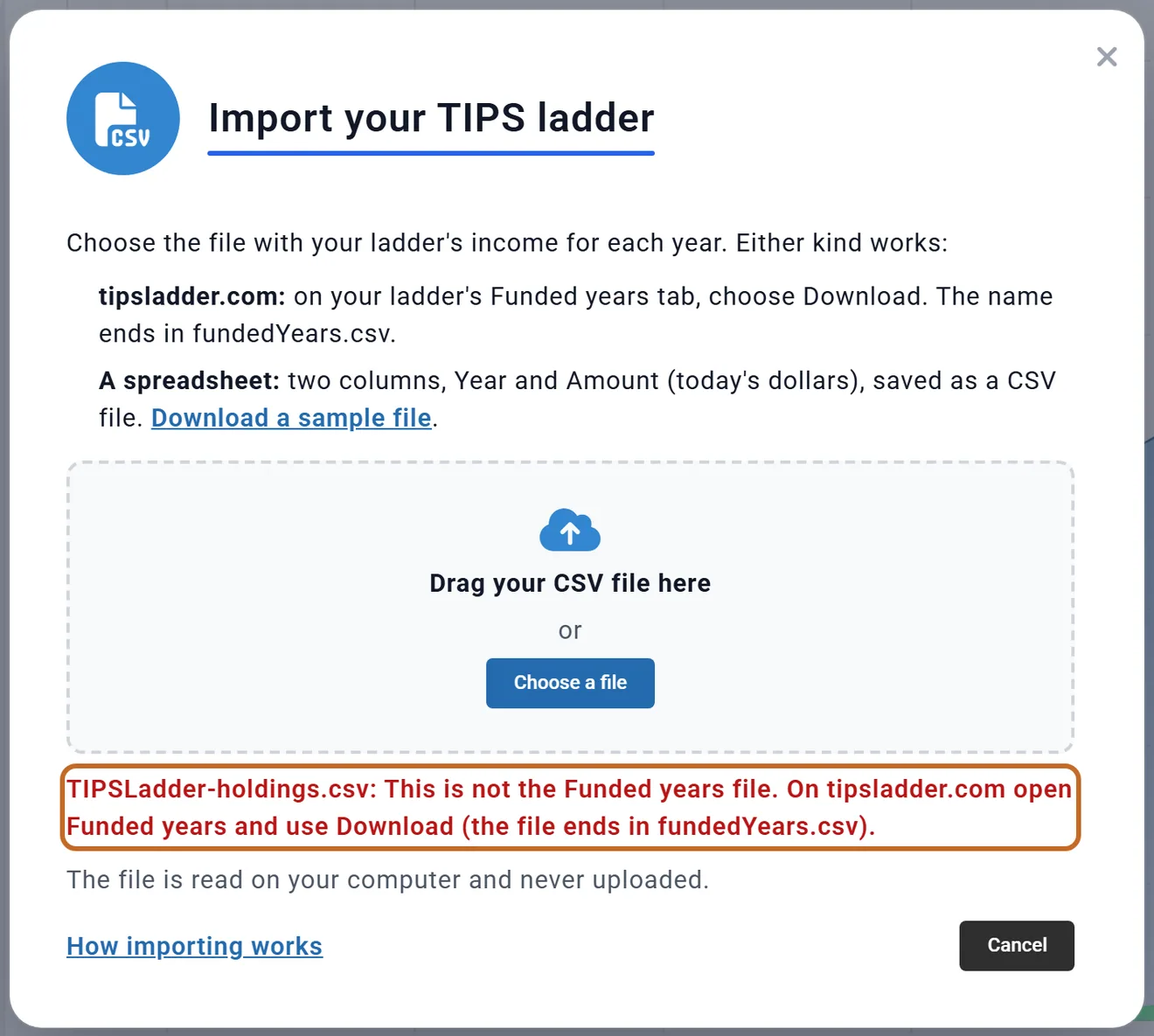
The file is read in your browser and never uploaded. The plan keeps only each year's amount, the file's name and the date you imported it. The ? beside the button, and How importing works in the window, open the same explanation.
Check the years, then use them
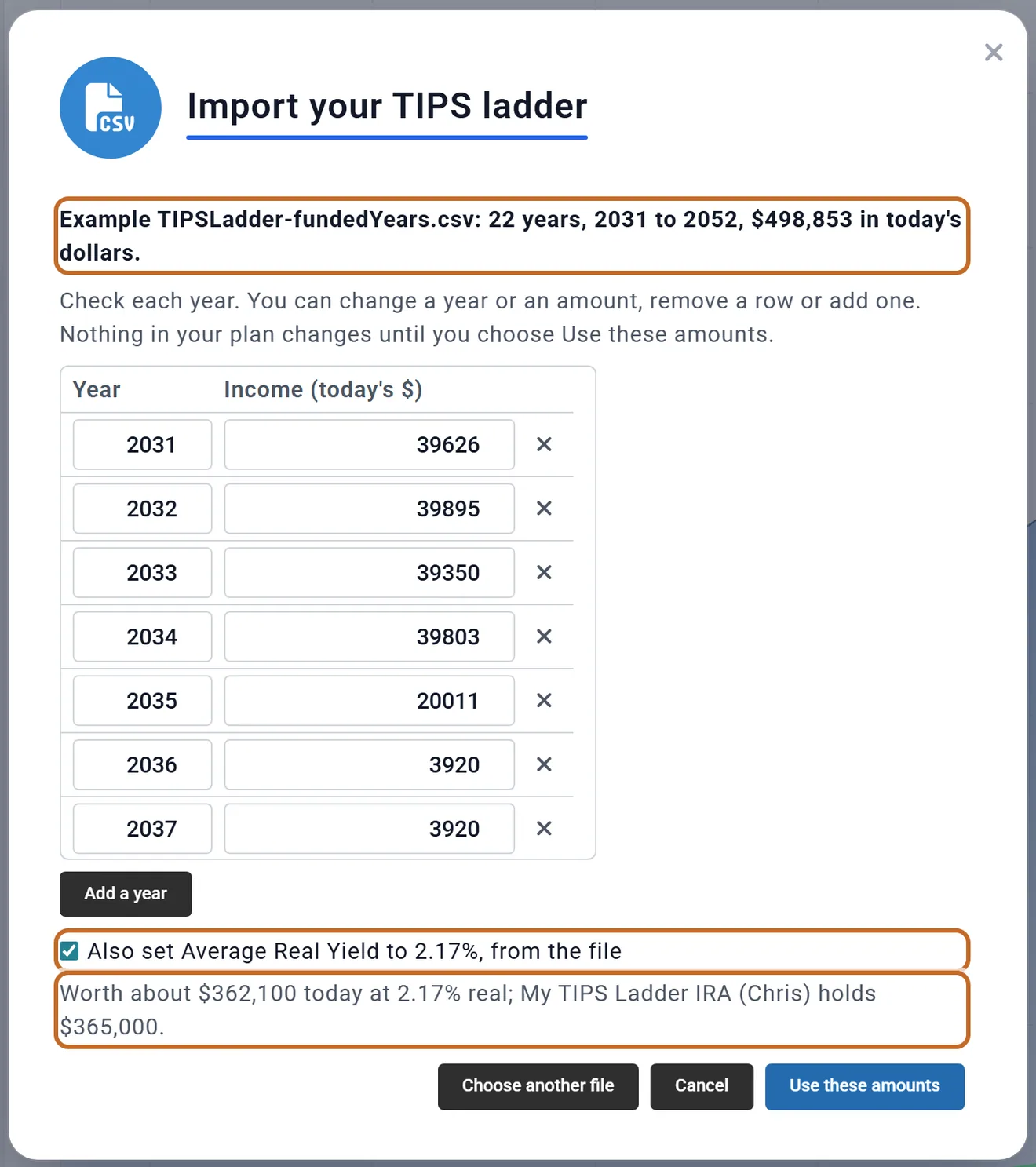
Once the file is read, the same window lists every year and amount. Nothing in your plan changes until you choose Use these amounts.
- The line at the top names the file and says how many years it holds, from when to when, and their total in today's dollars.
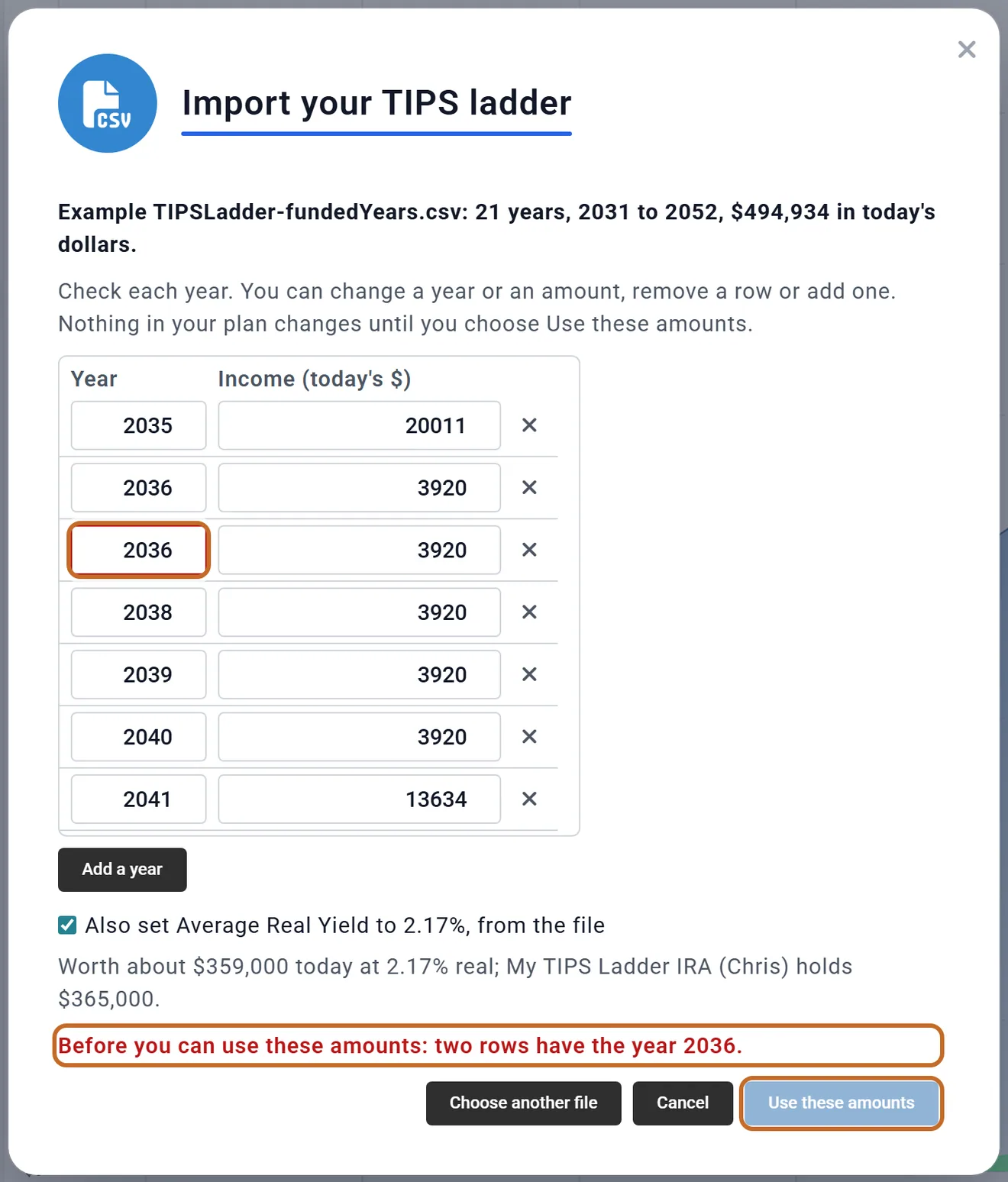
- The table can be edited: change a year or an amount, remove a row with its X, or Add a year. Each change is checked as you type. A missing or repeated year, or an amount outside $0 to $1,000,000, outlines the cell in red, says what is wrong, and Use these amounts waits until it is fixed.
- The yield tick box, "Also set Average Real Yield to 2.17%, from the file" in the example below, comes ticked: the box's yield then becomes the file's, rounded to one decimal place (2.2%). Untick it to keep yours. Only a tipsladder.com file has a yield.
- The value line, "Worth about ... today at ...% real", compares what the amounts are worth today at that yield with the balance of the account under Held in (see What the plan sees).
- Use these amounts puts the years in the box's table, replacing any years already there. Choose another file starts again; Cancel or the X leaves your plan as it was.
After Use these amounts the box shows the years in its table, the sketch above it, and the line "Imported from" with the file's name and the date. If you changed anything in the review it adds "with your changes". The box's header sums it up, here "By year, 2031-2052, $498.9k". Edit the table later whenever your ladder changes, or import a new file; once you edit the table in the box, the "Imported from" line goes away.
Chris's file had a yield of 2.17%, so the box's yield is now 2.2%.
What the plan does with each year
- Raised with inflation. Each amount is in today's dollars. The plan raises it with your plan's inflation, as TIPS principal is raised. In Chance of Success it follows each stretch of history's own inflation.
- Paid evenly over the year. On By year, each year's amount is spread over that calendar year's months; on Same each year, over the twelve months from the owner's birthday. Real bonds pay at maturity and their interest twice a year; spreading it evenly is how the plan budgets it.
- This year counts from this month on. On By year, only this year's remaining months are in the plan: the payments made earlier this year are already in your balances. Years before this one, and years after your plan ends, are left out, and the box lists them.
- Nothing is paid before the Primary retires. The plan draws from retirement accounts only in retirement. A year before then stays in the account and the later years do not pay more to make up for it, so it is left in the account after the last year. The box warns you.
- A year with no amount pays nothing, and the account stays set aside through it.
- The account is set aside from today until the last year of the ladder: your regular withdrawals and Roth conversions leave it alone, and only the ladder's payments come out. An Extra Withdrawals card that names the account still draws from it, because you chose it.
- It grows at inflation plus the real yield until the last year. After that, whatever is left is an ordinary pre-tax account again, growing with the rest of your portfolio.
- Taxes. Each payment is a pre-tax withdrawal: taxed as income, and it counts toward that person's required minimum distribution. It pays your spending first; anything left over goes to your cash. The planner charges no 10% penalty on payments before 59½, although a real IRA withdrawal at that age would owe it; the box notes it.
- If the account runs out, because the amounts are worth more than it holds, the payments stop when it is empty.
- Money saved into the account, through your contributions or an employer's, makes the ladder bigger, because the plan treats the whole balance as ladder money. The box says how much went in.
- A couple. A ladder can be in either person's account. On Same each year the payout ages are the owner's. If the owner dies first in the plan, the account passes to the survivor and the ladder keeps paying the same years.
What the plan sees: does the account cover the amounts?
What the plan sees, under the box's fields, answers two questions.
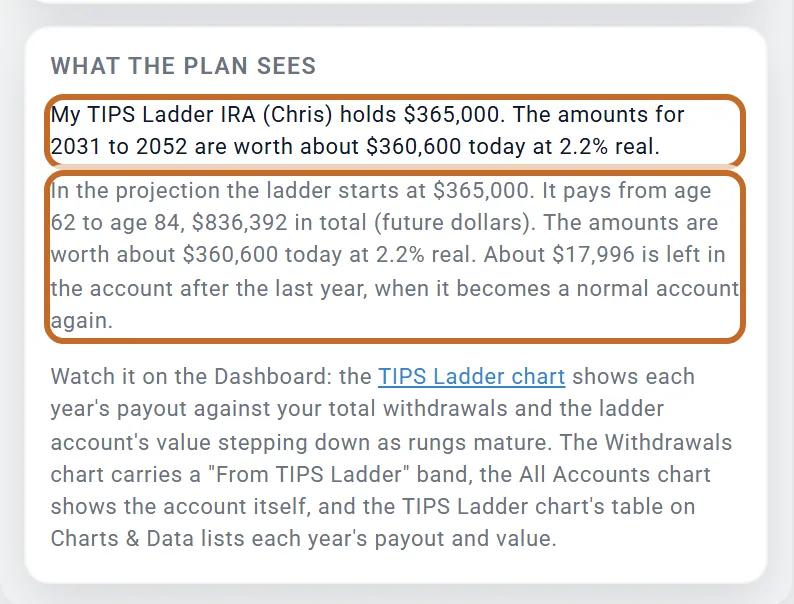
- The first line compares the account's balance with what your amounts are worth today: each month's share discounted at the ladder's real yield. When the two differ by more than 5%, it adds whether the account holds less (the plan pays the amounts until it runs out) or more (about how much would be left after the last year).
- The second paragraph comes from the last run: where the ladder starts, the ages it pays at, the total paid in future dollars, and either the age the account runs out or what is left after the last year.
Chris's account holds $365,000 and the amounts are worth about $360,600 at 2.2% real, so the plan pays every year from 2031 to 2052, $836,392 in all in future dollars, and about $17,996 is left after the last year.
The ages in the second paragraph are the Primary's ages in the months paid: Chris is 62 in January 2031, when the first year starts, and turns 63 that June.
See it in your results
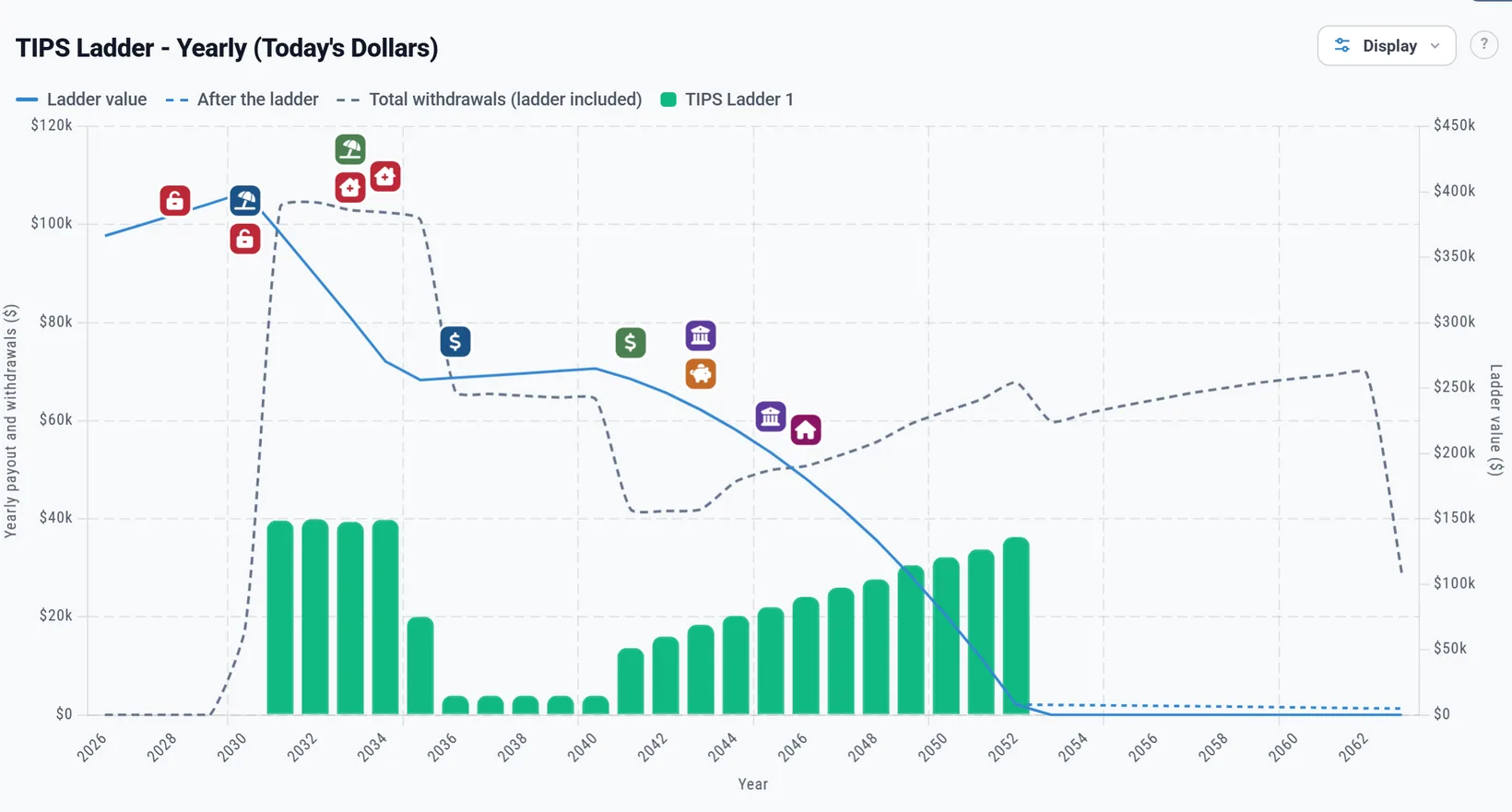
- The TIPS Ladder chart, in the Dashboard's More menu once a TIPS Ladder box is on (the box's TIPS Ladder chart link opens it): the bars are each year's payment, the dashed line is all your withdrawals that year, the ladder's included, and the line on the right axis is the ladder account's value. A dashed After the ladder line carries on with what is left, as ordinary savings.
- In Today's dollars, by year, the bars match your table, because the plan raises each amount with inflation and Today's dollars takes it back off (see Today's dollars and future dollars). In future dollars they rise with inflation.
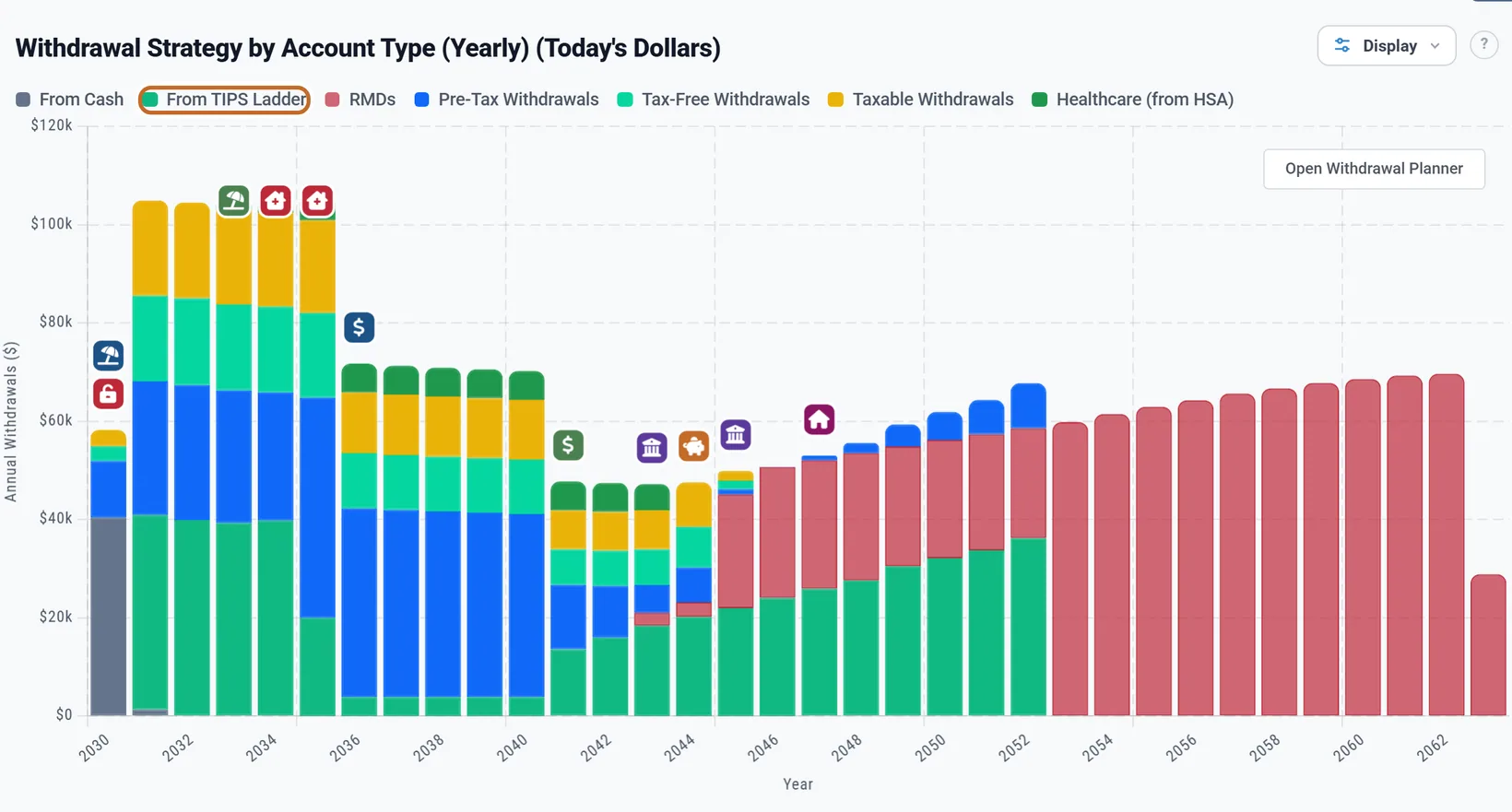
- The Withdrawals chart has a From TIPS Ladder band at the base of each year, so you can see how much of the year's money the ladder gave and what the rest of your accounts had to add.
- The All Accounts chart shows the ladder account itself, and Charts & Data has the TIPS Ladder chart's figures year by year (see More: taxes and withdrawals).
An example: a bridge, a gap and rising rungs
The screenshots on this page use an example tipsladder.com file for Chris, who is 58 and retires at 62 in June 2030. Its ladder has three parts: about $40,000 a year for 2031 to 2034 and $20,011 in 2035, a bridge to Social Security; five years, 2036 to 2040, when no bond matures and only the interest is paid, $3,920 a year; then rungs rising by about $2,000 a year from 2041, for a care community's rent that is expected to rise faster than inflation. Here is some of it, as the plan pays it:
| Year | In the table (today's dollars) | Paid in the plan (future dollars) |
|---|---|---|
| 2031 | $39,626 | $45,962 |
| 2034 | $39,803 | $50,744 |
| 2035 | $20,011 | $26,328 |
| 2036 | $3,920 | $5,322 |
| 2041 | $13,634 | $21,670 |
| 2046 | $24,068 | $44,778 |
| 2052 | $36,242 | $81,452 |
| All 22 years | $498,853 | $836,392 |
The account starts at $365,000 and, set aside and growing at inflation plus 2.2%, holds about $457,700 when the first year starts in January 2031. It then pays every year through 2052, and about $17,996 is left, which grows with the rest of Chris's savings. The future dollars follow the plan's inflation, so your figures will differ.
One thing to know about a ladder: its payments are fixed in today's dollars, so the plan cannot take more from it in a bad year or less in a good one. The rest of your portfolio absorbs the swings, and the ladder gives the years it covers a known income whatever the markets do.
On a Preview account
The TIPS Ladder box itself has no lock, but a ladder needs its own TIPS Ladder IRA, and adding an account needs Planner+. On a Preview account Add a TIPS Ladder IRA opens the upgrade window instead of the account form. Planner+
What the planner does not model
- Each bond on its own. The account grows at one average real yield, so a ladder priced at each bond's own yield drifts a little from the plan. What the plan sees shows how far.
- Selling bonds before they mature, or their market price moving in the meantime.
- Buying a ladder later. The box holds a ladder you own today.
- A ladder in a Roth IRA or a taxable account. The TIPS Ladder IRA is a pre-tax account. For a ladder held elsewhere, the closest today is that account's Growth set to Fixed rate, which applies to your Manual projection (see Settings on an account that belong to your plan). It pays out as part of your regular withdrawals, not on the ladder's schedule.
- The 10% penalty on payments taken before 59½.
- The deflation floor. In a Chance of Success trial with falling prices, the payments fall with prices; real TIPS repay at least their original principal at maturity.
- The timing of interest. Each year's money is spread evenly over its months, not paid on the bonds' interest and maturity dates.
- Outside the US. The TIPS Ladder boxes appear only for a plan in the United States.