


 Continue with Google
What is shared and what belongs to a plan
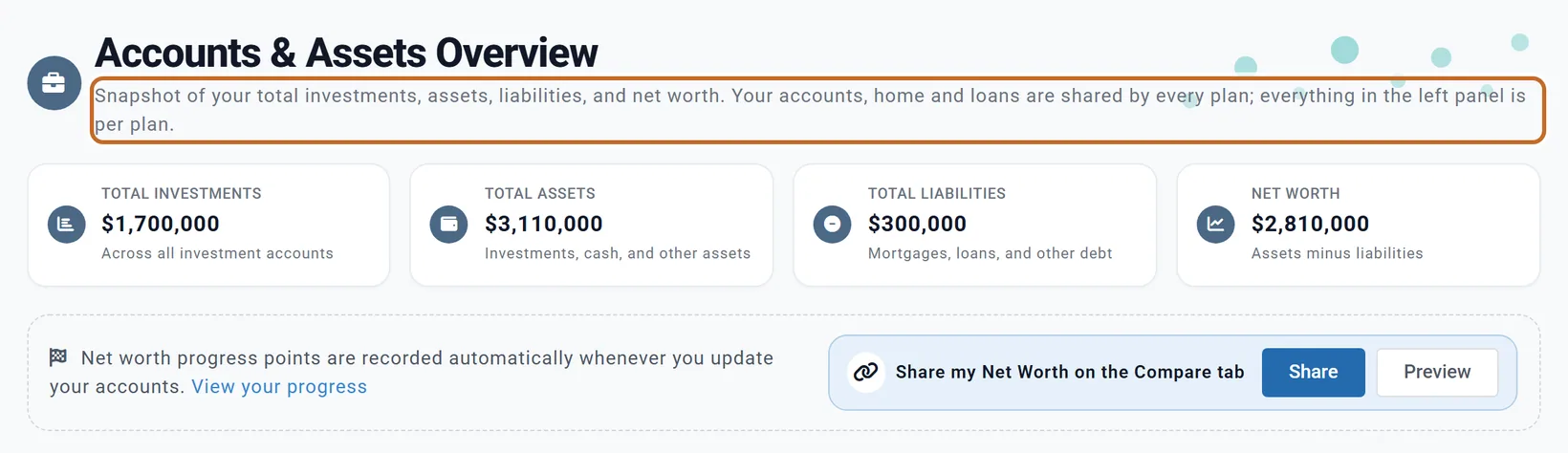
Everything on the Accounts & Assets page is saved once for you, not in a plan: your accounts and their balances, your home, your loans, other assets and life insurance. Every plan starts from the same accounts, so a balance you change there, or in the settings panel, changes in all your plans.
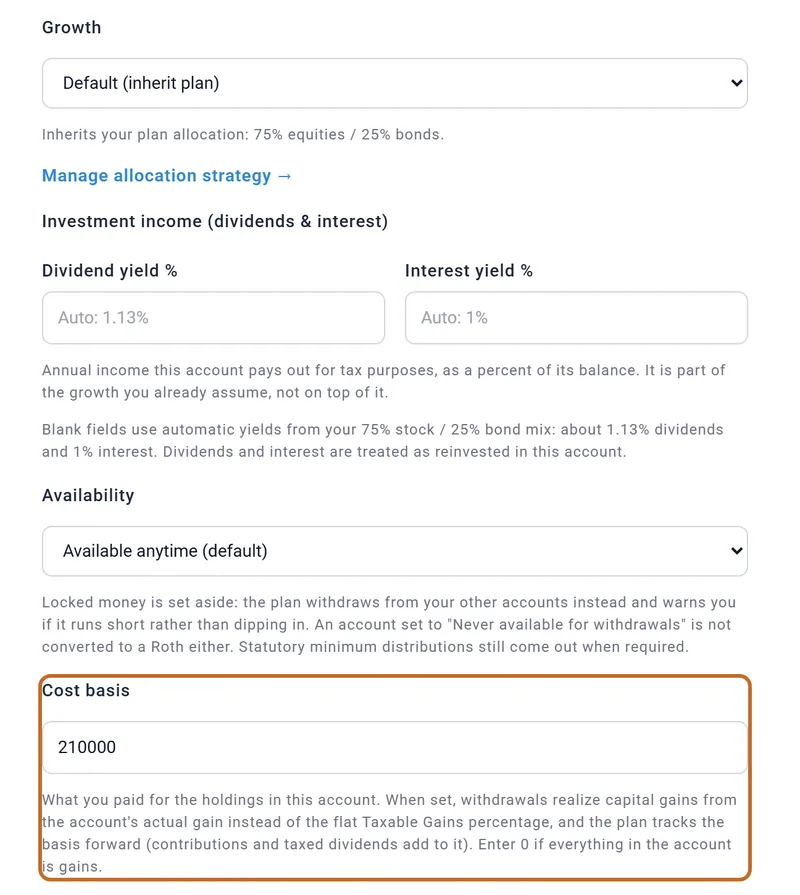
A few settings inside an account's window belong to the plan you have open, even though you set them there: Growth, Investment income (dividends & interest), Cost basis, Past contributions, Availability and Rule of 55 applies to this account. A copy of a plan keeps them; a plan you start fresh starts without them. Leaving a home's rent or a planned sale out of one plan is a per-plan choice too (see A rental property and Selling a property).
Your spouse's accounts count only in plans with Include spouse on. See Whose accounts.
Add an account
- On Accounts & Assets, choose + Add Primary Account (or + Add Spouse Account for your spouse's). Planner+
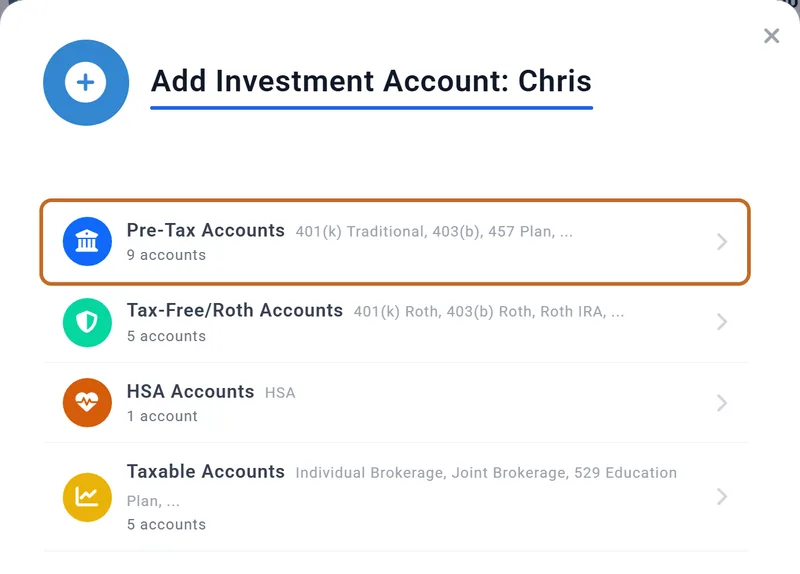
- Pick the kind of account: Pre-Tax Accounts, Tax-Free/Roth Accounts, HSA Accounts or Taxable Accounts, then the type.
- Name it and enter its Current Balance. The other settings are optional (see Settings that belong to your plan).
From the Dashboard, Add Account under your accounts in the settings panel opens the same window.
Checking and savings, other assets, real estate and debts each have their own section on the page, with + Add Primary and + Add Spouse.
Account types and the buckets they go in
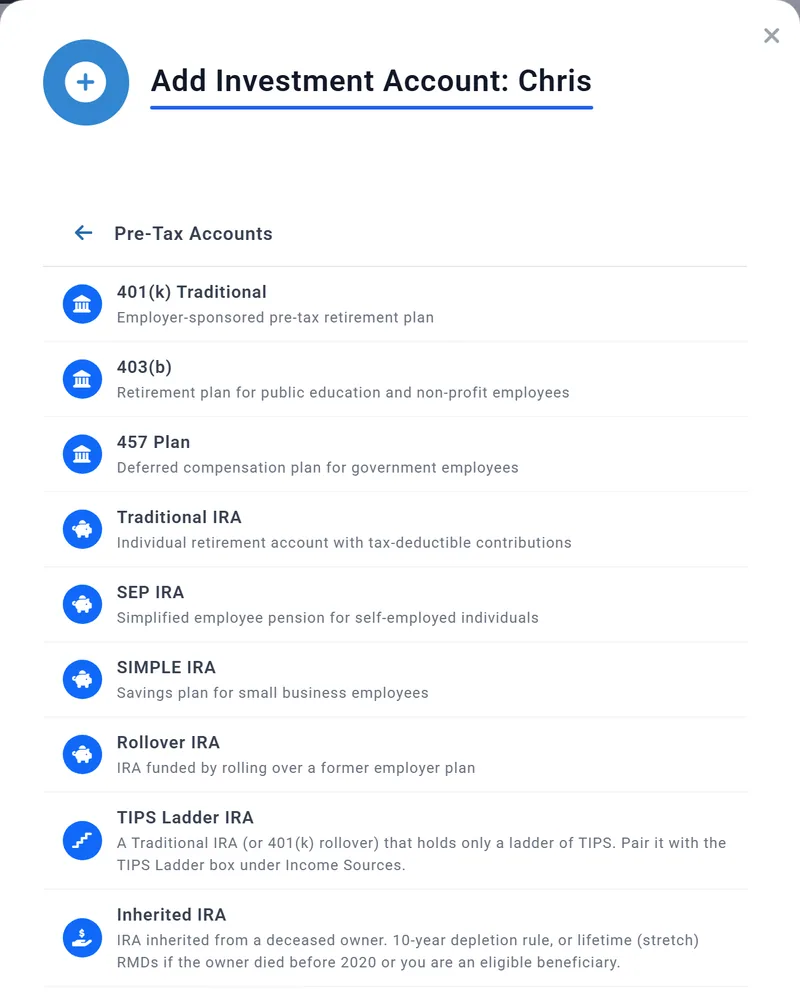
The type decides how withdrawals are taxed, when required minimum distributions start, and whether an early withdrawal is penalized. The planner groups accounts into buckets by how they are taxed: (US)
| Bucket | Types | Good to know |
|---|---|---|
| Pre-Tax | 401(k) Traditional, 403(b), 457 Plan, Traditional IRA, SEP IRA, SIMPLE IRA, Rollover IRA, TIPS Ladder IRA | Taxed as income when drawn. Required minimum distributions apply. |
| Tax-Free | 401(k) Roth, 403(b) Roth, Roth IRA, Roth Crypto IRA | Not taxed when drawn. |
| Taxable | Individual Brokerage, Joint Brokerage, 529 Education Plan, Crypto Wallet - Taxable, Trust Account | Only the gains are taxed. A 529's draws for college are not taxed. |
| HSA | HSA | Used for health costs. See Your HSA. |
| Inherited Pre-Tax, Inherited Roth | Inherited IRA, Inherited Roth IRA | Follow the inherited-account rules from Original Owner Details: see An inherited IRA. |
- A Joint Brokerage still belongs to one of you in the plan: the one you added it for.
- CDs and money market accounts are cash, not investments: add them under Checking & Savings.
- A TIPS Ladder IRA is the account the TIPS Ladder box draws its income from.
- Learn how your accounts are used by the Retirement Planner, beside your accounts, shows your buckets with your own balances.
Settings on an account that belong to your plan
These sit in the account's window, below the balance, and are saved with the plan you have open. Each shows only for the account types it applies to. Planner+
- Growth: Default (inherit plan) follows the plan's mix of stocks and bonds. You can give one account its own mix, a fixed rate or no growth. Custom mix (equities / bonds) counts in Chance of Success too, which replays history at that mix; Fixed rate and No growth change only your projection, and in Chance of Success that account grows like the rest of its type. Accounts set differently grow apart: the plan never moves money between them to rebalance. On a Preview account, growth already set keeps working; changing it needs Planner+.
- Investment income (dividends & interest) (taxable accounts, US and Canada): the part of the growth paid out as dividends and interest each year, taxed as it is paid. Leave the fields blank for automatic yields.
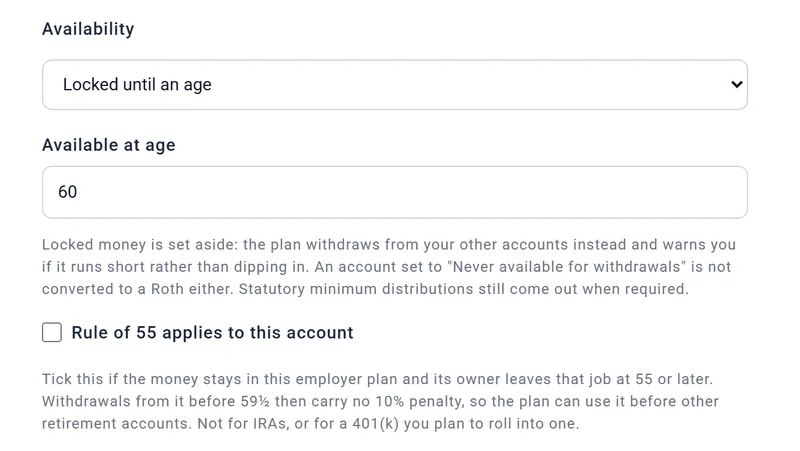
- Availability: lock an account until an age, or never draw from it. The plan then draws from your other accounts, and required minimum distributions still come out.
- Cost basis (taxable accounts): what you paid for the holdings. With it, withdrawals are taxed on the account's real gain instead of the flat Taxable Gains (%) in the Taxes box. Enter 0 if it is all gains. Schwab Brokerage's $210,000 is entered here.
- Past contributions (Roth accounts, US): what you put in, which can come out before 59½ without the 10% penalty.
- Rule of 55 applies to this account (401(k) and 403(b)): tick it if the money stays in that employer's plan and its owner leaves the job at 55 or later. The plan can then use it before 59½ with no 10% penalty. The tick does nothing if that person's Retire at age is under 55.
An inherited IRA
If you inherited an IRA or a Roth IRA from someone who has died, add it as an Inherited IRA (under Pre-Tax Accounts) or an Inherited Roth IRA (under Tax-Free/Roth Accounts), for whichever of you inherited it. The plan then takes the withdrawals the inherited-account rules require, every year, whether or not you need the money. Planner+ US
Original Owner Details
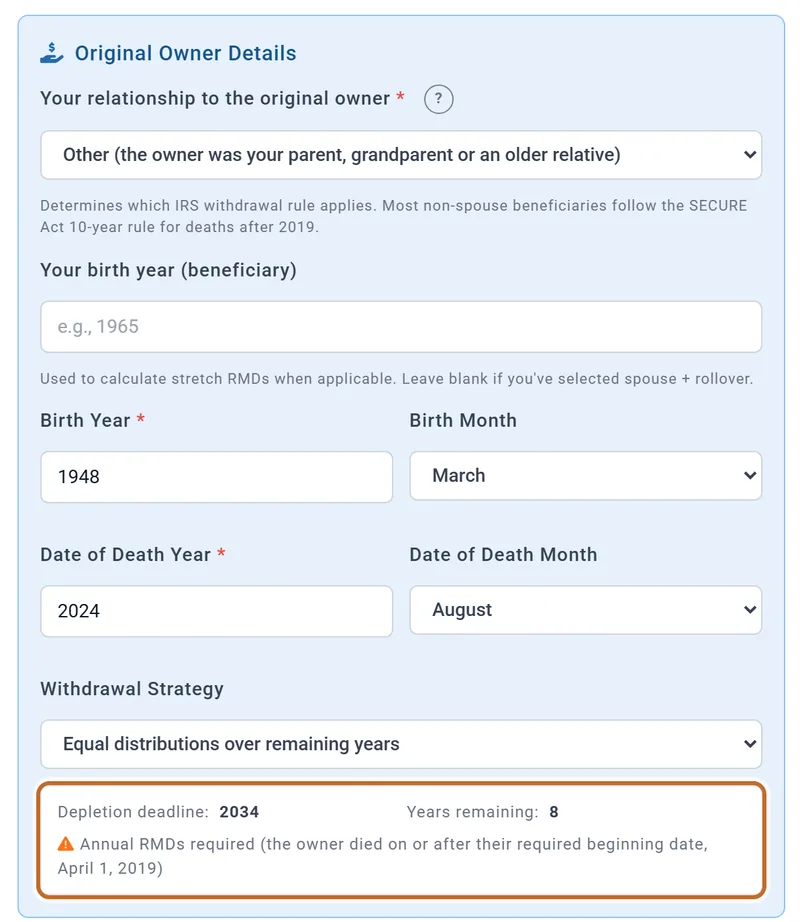
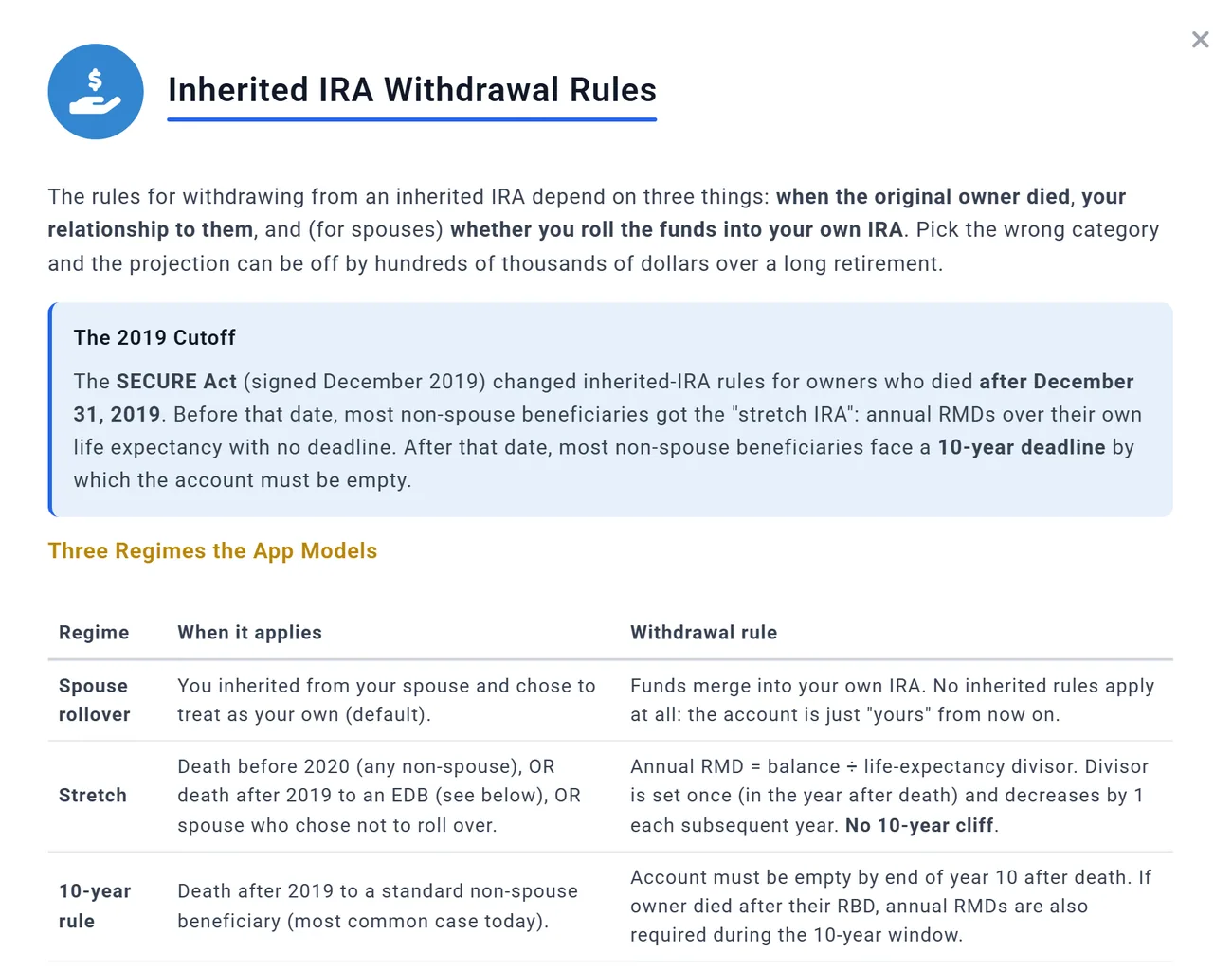
The account's window adds Original Owner Details. They decide which rule applies:
- Your relationship to the original owner: most people inheriting from a parent or grandparent who died in 2020 or later keep Other (the owner was your parent, grandparent or an older relative): the account must be empty by the end of the 10th year after the death. The other choices are below.
- The owner's Birth Year and Birth Month, and Date of Death Year and Date of Death Month: they set the deadline, and whether a minimum must come out every year before it. It must when the owner died on or after their required beginning date (April 1 of the year after they reached their RMD age: 73 for someone born 1951 to 1959).
- Your birth year (beneficiary): needed when your withdrawals follow your life expectancy. Left blank, the plan uses the birth year in your profile.
The box at the bottom shows the result, and so does the account's row on the page. For an IRA inherited from a parent born in March 1948 who died in August 2024: "Depletion deadline: 2034", and annual RMDs required because the parent died after April 1, 2019.

What the other relationship choices do:
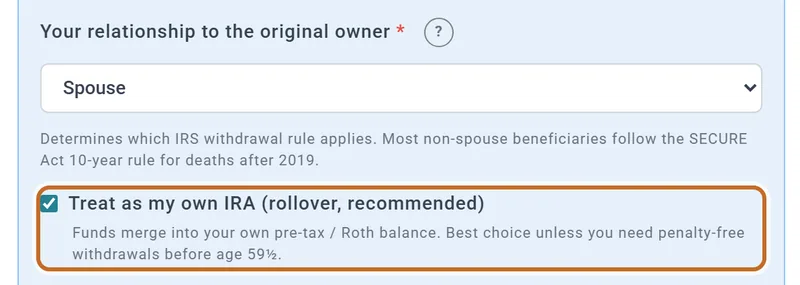
- Spouse, with Treat as my own IRA (rollover, recommended) ticked (it starts ticked): the money joins your own IRA balance and no inherited rules apply; your own required minimums apply later. Chris's own pre-tax balance went from $650,000 to $1,050,000 with no inherited withdrawals. Untick it to keep the account as inherited: then a minimum comes out each year over your life expectancy, starting no earlier than the year your spouse would have reached their RMD age.
- Disabled (qualifies as Eligible Designated Beneficiary), Chronically ill (qualifies as Eligible Designated Beneficiary), and Sibling, partner, or anyone not more than 10 years younger than the owner: a minimum each year over your life expectancy, with no 10-year deadline. Born in 1968, Chris would take $14,507 in 2027 and $28,899 in 2037, with $517,450 still in the account.
- Minor child of the original owner: yearly minimums until you turn 21, then the account must be empty within 10 years.
- An owner who died before 2020: yearly minimums over your life expectancy whatever your relationship, apart from a spouse who treats it as their own.
The "?" beside the relationship opens Inherited IRA Withdrawal Rules, which explains the rules and the eligible beneficiaries in more detail.
Withdrawal Strategy: when the money comes out
Under the 10-year rule, Withdrawal Strategy sets the pace (for the yearly-minimum cases above it changes nothing):
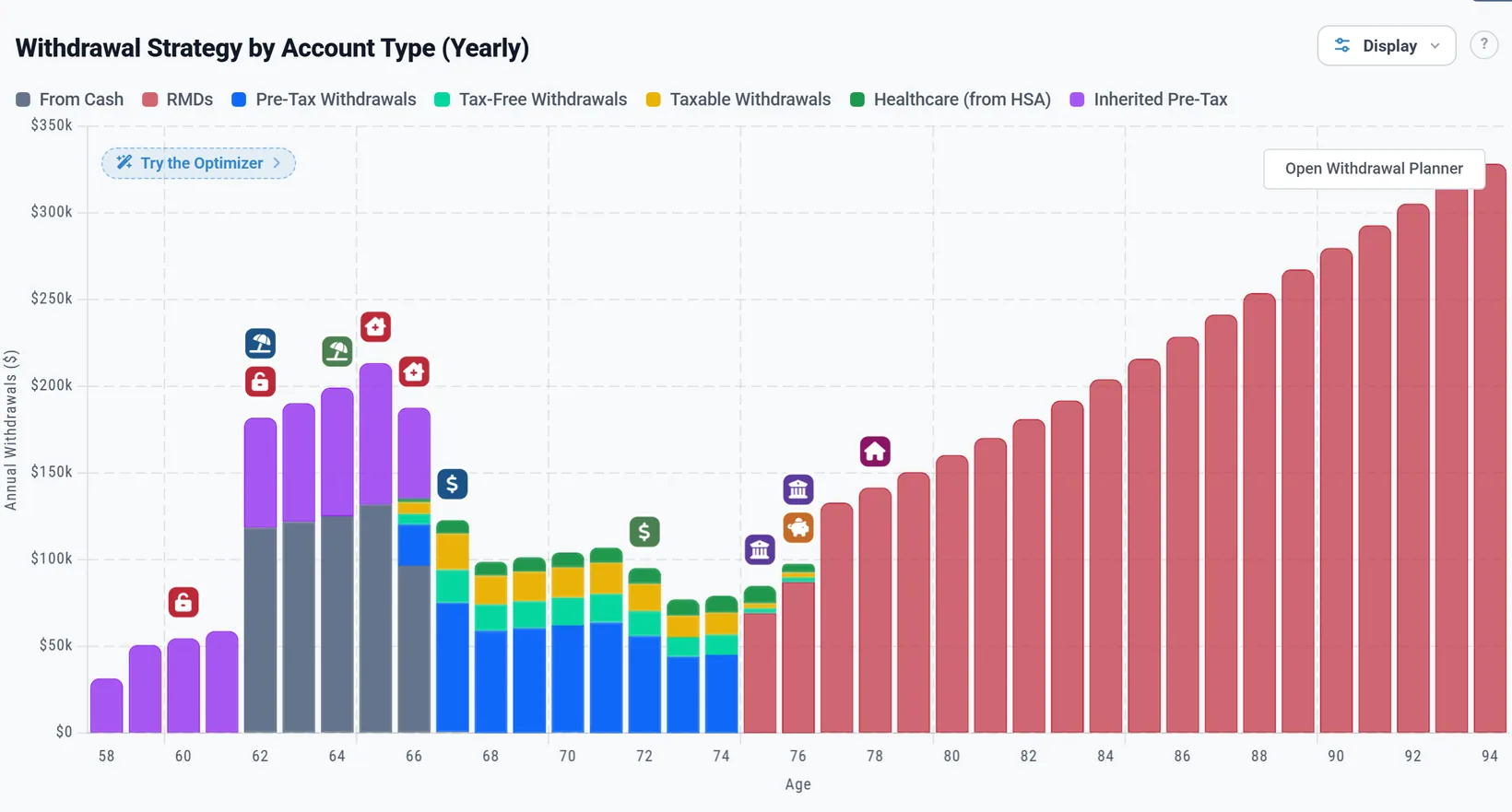
- Equal distributions over remaining years (the starting choice): each January, the balance divided by the years left to the deadline, paid monthly, and never less than a minimum that is owed. Chris's $400,000: $49,447 in 2027, rising with growth to $88,471 in 2034, when the account is empty.
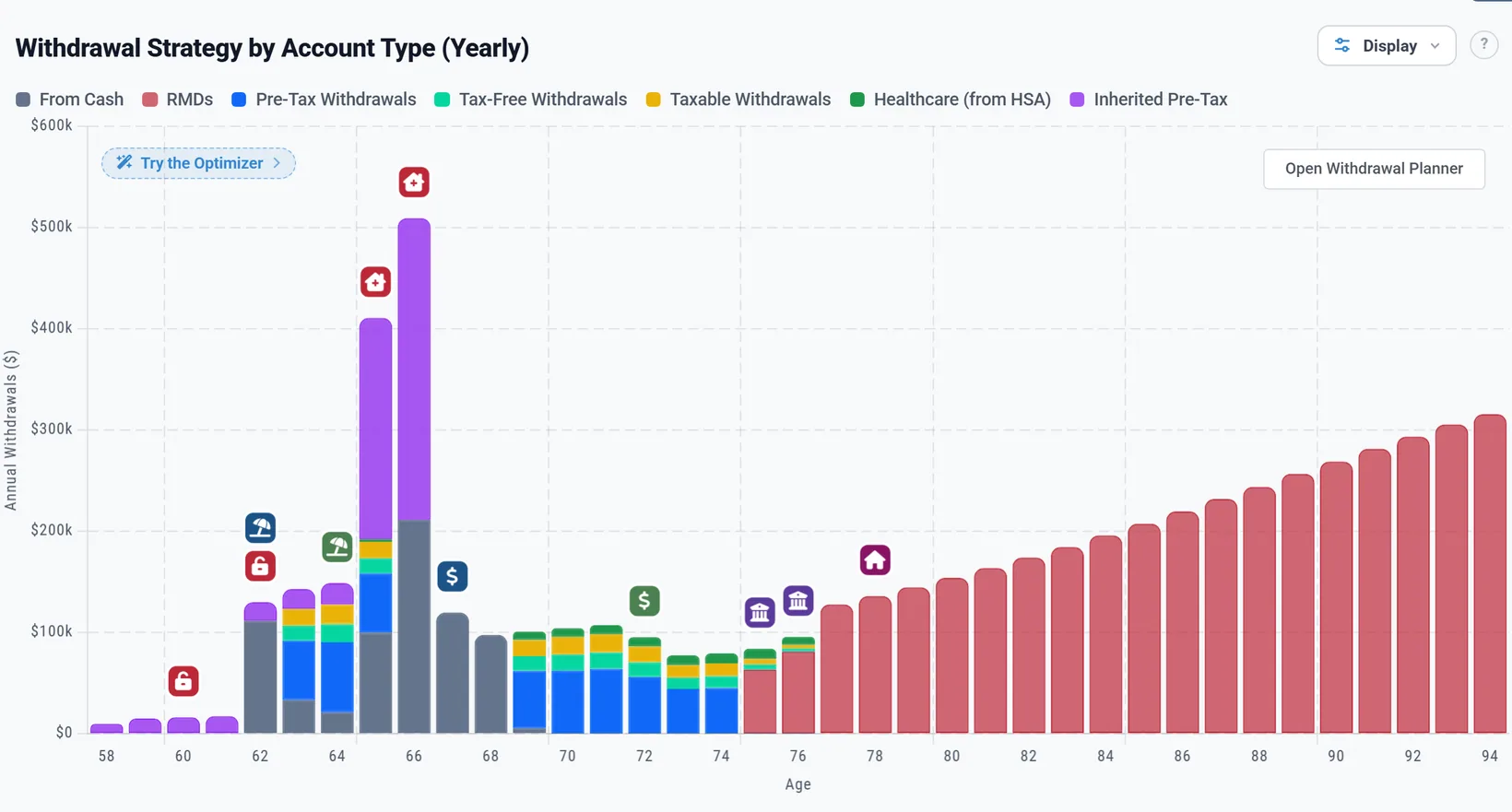
- Minimum required only (defer to year 10): only the yearly minimums, then everything left in the deadline year. For Chris: $14,507 in 2027 up to $21,920 in 2033, then $503,945 in 2034, which adds $137,456 of tax that year. If the owner died before their required beginning date there are no minimums: nothing comes out until 2034, then $673,341 at once, with $212,145 of tax.
- In the plan's first year only the months left count: a plan starting in October took $11,111, three months of the year's share.
- In the deadline year the rest comes out over the months left, so the account is empty by 31 December.
- A Date of Death Year in the future models an inheritance you expect: the account joins the plan in that year at the balance you typed, and its withdrawals start the next January.
How the withdrawals are taxed, and where the money goes
- Inherited IRA: every withdrawal is taxed as income in the year it comes out, on the return of whoever inherited it.
- No 10% early-withdrawal penalty, at any age: Chris, at 58 and 59, paid none.
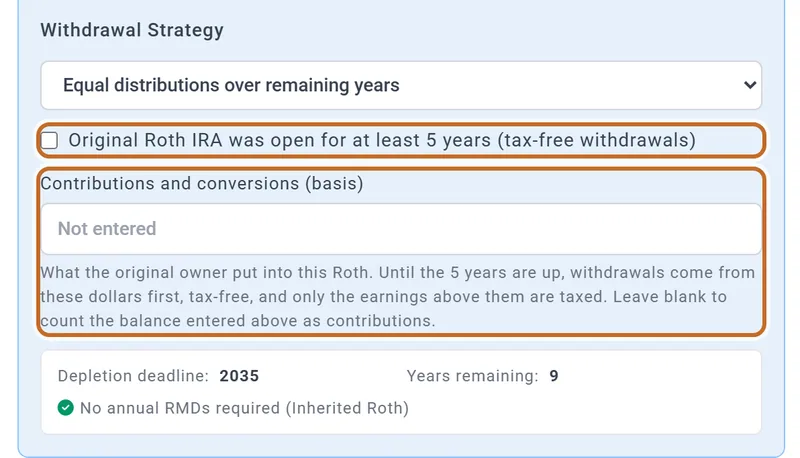
- Inherited Roth IRA: no income tax while Original Roth IRA was open for at least 5 years (tax-free withdrawals) is ticked. Untick it if the owner's first Roth contribution was less than five years before the death: then Contributions and conversions (basis) appears. Until the five years are up, withdrawals come from that amount first and only the earnings above it are taxed; left blank, the whole balance you entered counts as contributions.
- The money goes to your cash. Before you retire it builds up there (Chris's cash was $163,674 higher by the end of 2029). Once you retire, your spending is paid from that cash first, so the plan takes less from your own accounts: $120,286 less in 2031.
- If your own investments run out in retirement, the plan uses the inherited accounts too.
- The withdrawals show on the Dashboard's Withdrawals chart as Inherited Pre-Tax or Inherited Roth. Anything still in the account when your plan ends is on the Estate tab.
Cash and the Master Cash Account
Checking, savings, CDs and money market accounts go under Checking & Savings Accounts. Every account also has a Master Savings Account, made for you; it cannot be deleted, but you can set its balance to $0.
- The plan treats all your cash as one pot. It does not track which account money comes from or goes to.
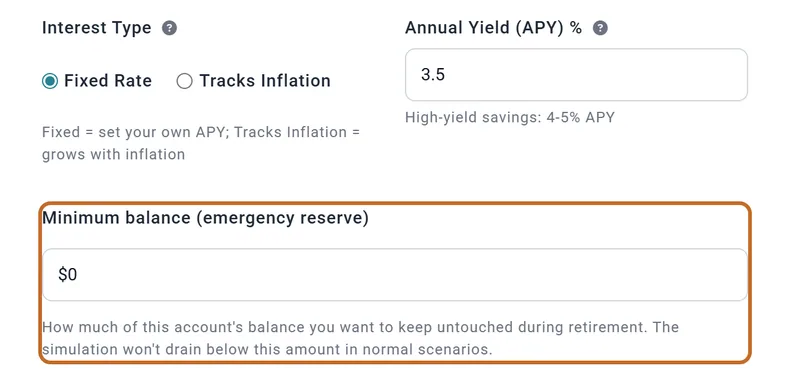
- Interest Type: Fixed Rate earns the Annual Yield (APY) % you enter; Tracks Inflation earns the plan's inflation rate.
- Minimum balance (emergency reserve): cash the plan keeps untouched in retirement. It spends from your investments instead and uses the reserve only when they run out. With $40,000 on Chase Checking, Chris and Jamie's cash never falls below $40,115 in retirement; without it, it is spent to $0.
The minimum is a fixed dollar amount, and like the balance it is the same in every plan.
Your accounts in the settings panel
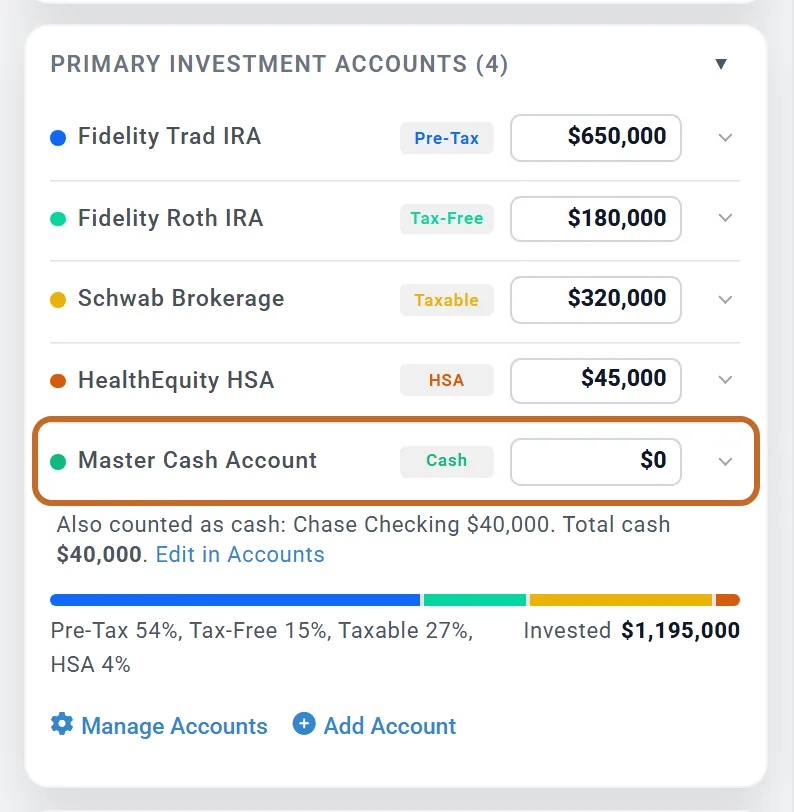
Your profile box on the Dashboard lists your investment accounts, then a Master Cash Account row. Moving a row's slider, or typing a balance, changes that account's balance on Accounts & Assets, so it changes it in every plan.
- The Master Cash Account row is your Master Savings Account only. Your other cash is listed under it ("Also counted as cash"), with the total.
- The bar below shows your mix by bucket. Cash is not in it.
- Homes, debts and other assets are not in the panel: they are on Accounts & Assets.
- To add, rename or change an account's type, use Manage Accounts or Add Account.
Your home
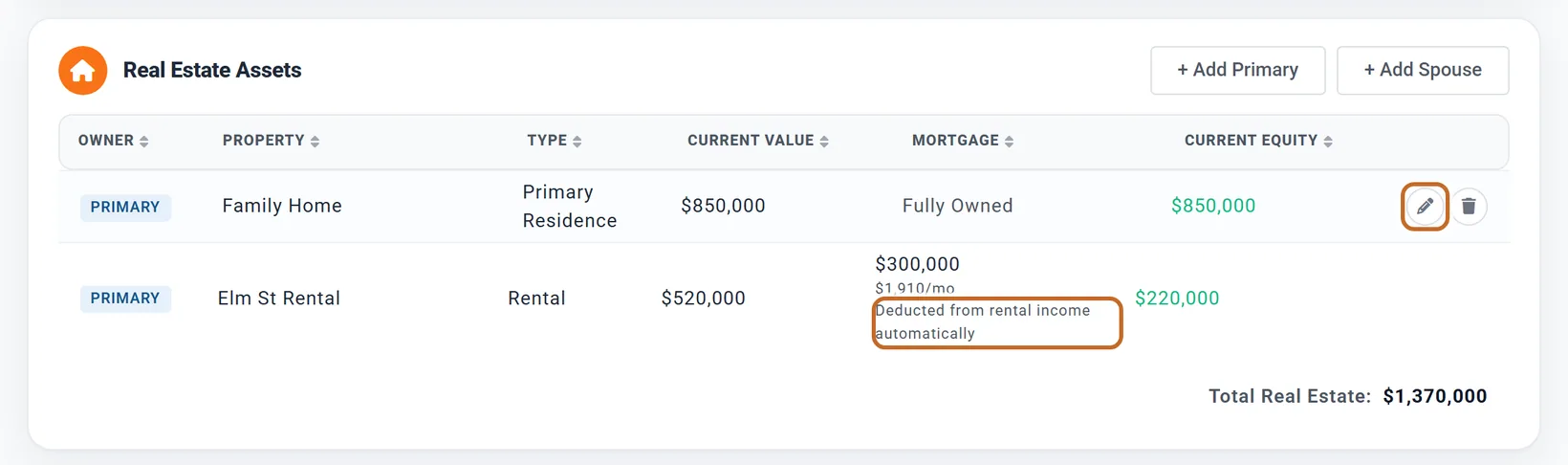
- Under Real Estate Assets, choose + Add Primary (or + Add Spouse), then Home. To change a home later, use the pencil at the end of its row.
- Enter its Current Value and Annual Appreciation %.
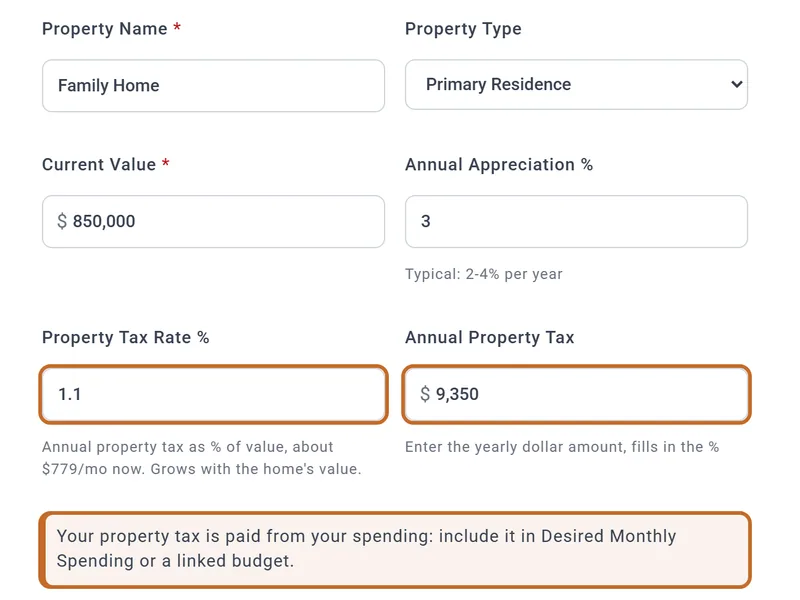
- Enter your property tax: the rate, or the yearly bill in Annual Property Tax, which fills in the rate. A new home starts at 1.2% of its value.
- Choose Fully Owned or Financed (next section).
Your home counts in your net worth, and its value grows each month. It never pays for your retirement unless you plan a sale or borrow against it.
A mortgage you are part-way through
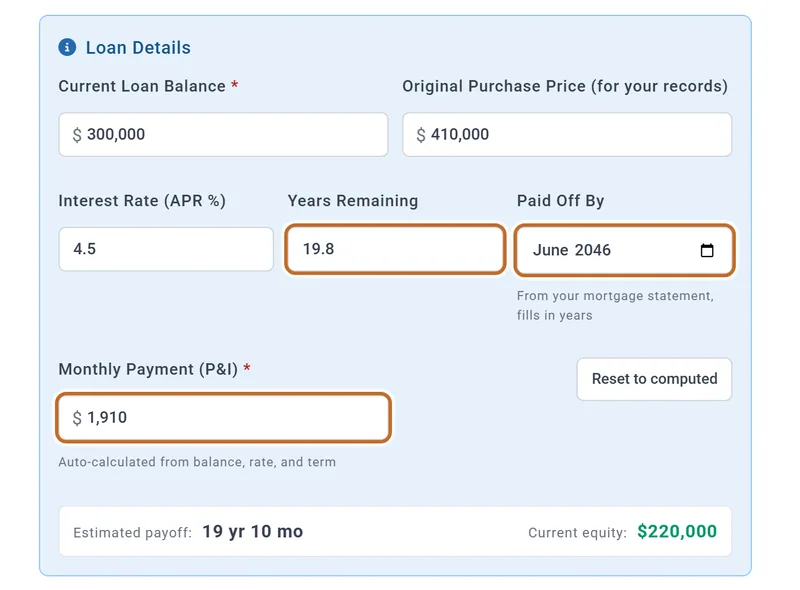
Choose Financed and fill in Loan Details from your latest mortgage statement:
- Current Loan Balance: what you owe today, not what you borrowed.
- Years Remaining is the years LEFT on the loan, not its original term. A 30-year loan taken out 10 years ago has 20 left. The easiest way is to type the payoff month in Paid Off By: the years fill in.
- Monthly Payment is worked out from the balance, rate and years. Enter principal and interest only, not the tax and insurance an escrow payment includes: the plan pays the loan down with whatever payment you enter.
The loan is listed under Liabilities as "Elm St Rental - Mortgage", linked to the property: change it on the property, not there. Do not also add the same mortgage as a separate debt.
Switching a home back to Fully Owned removes its mortgage.
Paying for your home: mortgage, property tax and the Budget
- With a linked budget, saving a financed home offers to add the payment: Add to Budget?, then Add It. The row is marked Synced from Accounts: it follows the loan's payment and ends when the loan is paid off (or the month before a planned sale). If you said Not Now, the Budget tab's Suggestions from your linked accounts still offer it. Linking a budget is Planner+. Planner+
- Without a budget, include your mortgage payment and property tax in Desired Monthly Spending, and remember to lower it when the mortgage ends (or use a budget, whose rows can stop at an age). With no budget linked, the home's window says this in a note under the property tax.
- Enter your own property tax. The 1.2% a new home starts with is a typical rate, not yours: type your yearly bill in Annual Property Tax. The tax grows with the home's value.
- Home insurance, HOA fees and upkeep have no field on the home: put them in your spending or budget.
Where the property tax shows: the Taxes chart's property band, Your Taxes, the Summary's lifetime taxes and the Property Tax line in Tax Details, outside Total Tax.
A rental property
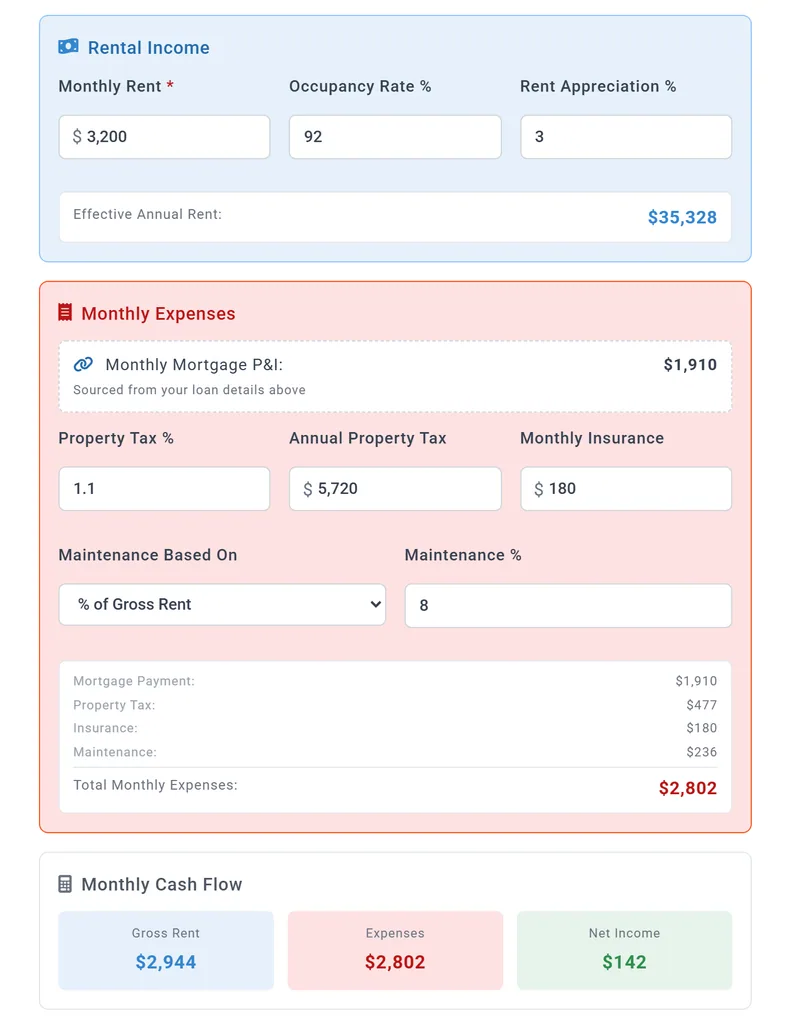
Add it like a home, choosing Rental Property. A rental is the opposite of a home: its costs ARE paid by the plan, out of its rent. Each month the plan takes the rent collected (Monthly Rent times Occupancy Rate %), takes off the property tax, insurance, maintenance and the whole mortgage payment, and counts what is left as income (or a loss).
- Elm St Rental: $3,200 rent, 92% occupied, so $2,944 collected; less $2,802 of costs, $142 a month. The row says so: Deducted from rental income automatically. Do not budget a rental's mortgage or tax.
- Tax: the net rent is income, with only the INTEREST on the loan deducted, so $927 a month of Elm St's rent is taxed. A loss lowers your other income. Depreciation is not modeled.
- Before you retire, net rent is added to your pay when Employment Income is on.
To leave the rent out of one plan, use the row's Not counted button (or the What's Counted box). You still own the property and pay its costs, so its net rent turns negative. Other plans are not affected.
Selling a property, and where the money goes
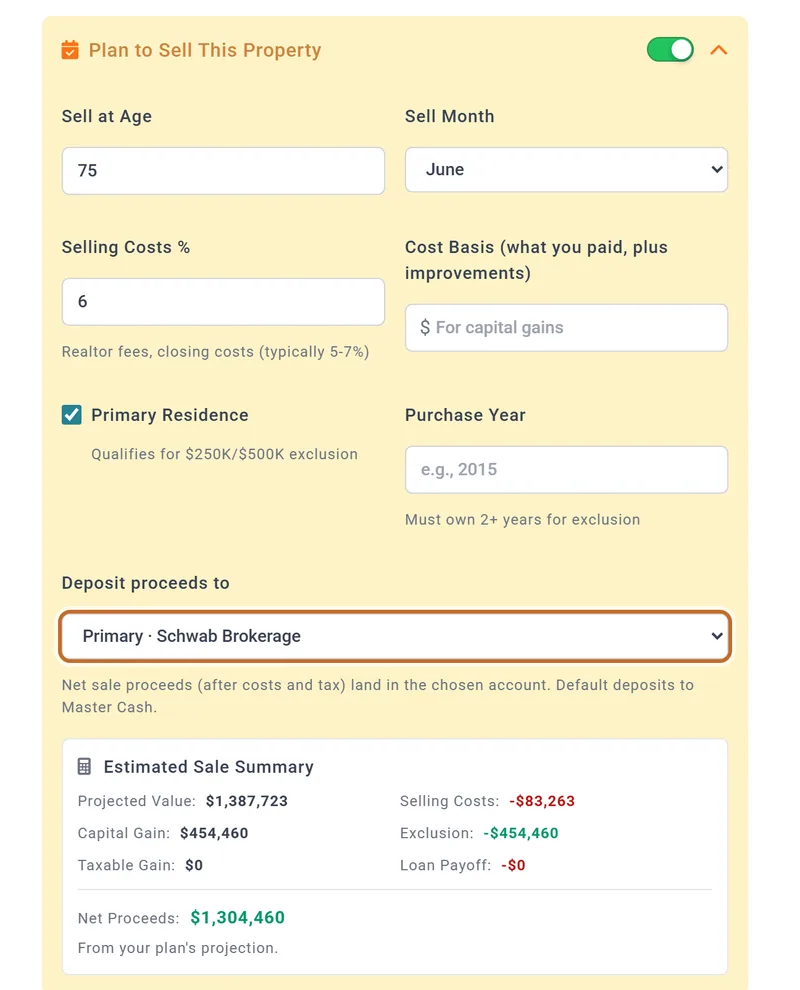
- In the property's window, switch on Plan to Sell This Property.
- Set Sell at Age (the owner's age) and Sell Month.
- Check Selling Costs % and, for the tax, Cost Basis (what you paid, plus improvements). Left blank, the plan uses the Original Purchase Price if you entered one, else today's value.
- Tick Primary Residence for your main home: in the US up to $250,000 of gain is excluded ($500,000 for a couple). Purchase Year is optional: a sale less than 2 years after it gets no exclusion.
- Choose Deposit proceeds to: the Master Cash default, or a brokerage account.
Chris and Jamie sell the Family Home at 75, in June 2043, into Schwab Brokerage: it sells for $1,387,723, less $83,263 of costs; the $454,460 gain is all excluded, and $1,304,460 lands in Schwab.
- Cash or a brokerage account. The list offers your cash accounts and your taxable investment accounts only: sale money cannot go into a retirement or education account in the plan. A plan that named an IRA or Roth before this list changed shows that choice as "Taxable savings", which is where the money goes.
- Tax on the gain: sent to an investment account, the proceeds pay the sale month's tax on the gain first (without the exclusion, $114,115 of Chris and Jamie's proceeds would). Sent to cash, the tax is paid with the year's other taxes.
- The mortgage, and any HELOC or reverse mortgage, is paid off from the sale. If the sale does not cover the loan, the rest comes from cash.
- A sale age you have already passed is dropped.

A planned sale can be switched off in one plan with the row's "do not sell" button (or What's Counted): the row then shows Sale off in this plan. Worked example.
Buying later, refinancing, a HELOC or a reverse mortgage
Each of these is set in the property's window: the pencil at the end of its row under Real Estate Assets, or + Add Primary for a home you do not own yet. Like the property, they are saved with your accounts, so every plan uses them. A HELOC and a reverse mortgage are for a home, not a rental.
Buying a home later
- Under Real Estate Assets, choose + Add Primary, then Home (or Rental Property, which also asks for the rent you expect).
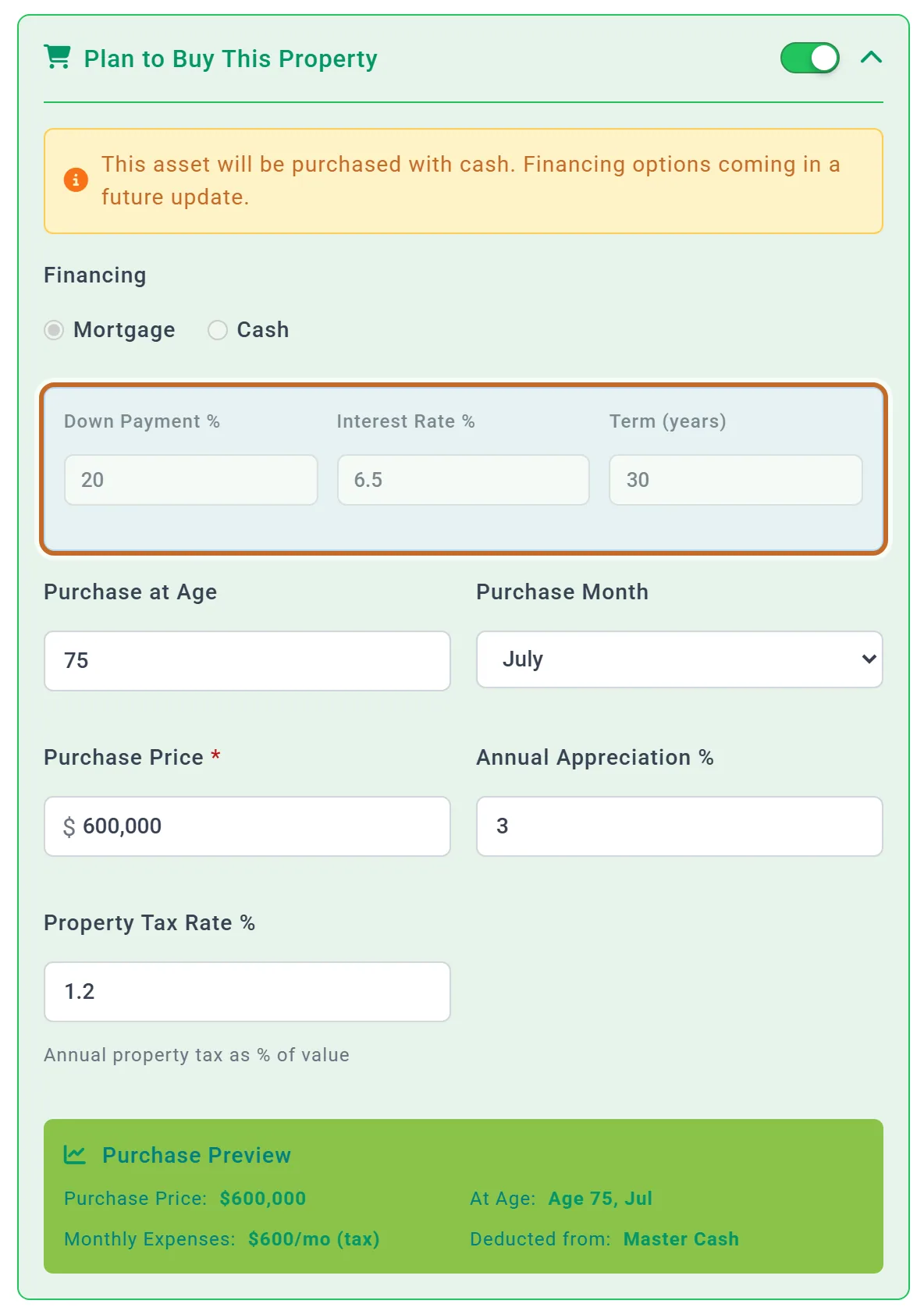
- Switch on Plan to Buy This Property. The window hides the value, the loan and the sale sections: a property you plan to buy cannot also have a loan or a planned sale.
- Set Purchase at Age, Purchase Month and the Purchase Price, then its Annual Appreciation % and property tax rate.
- The full price comes out of your cash in the purchase month. Financing a planned purchase is not modeled yet: the window says so, and its Financing choices are greyed out.
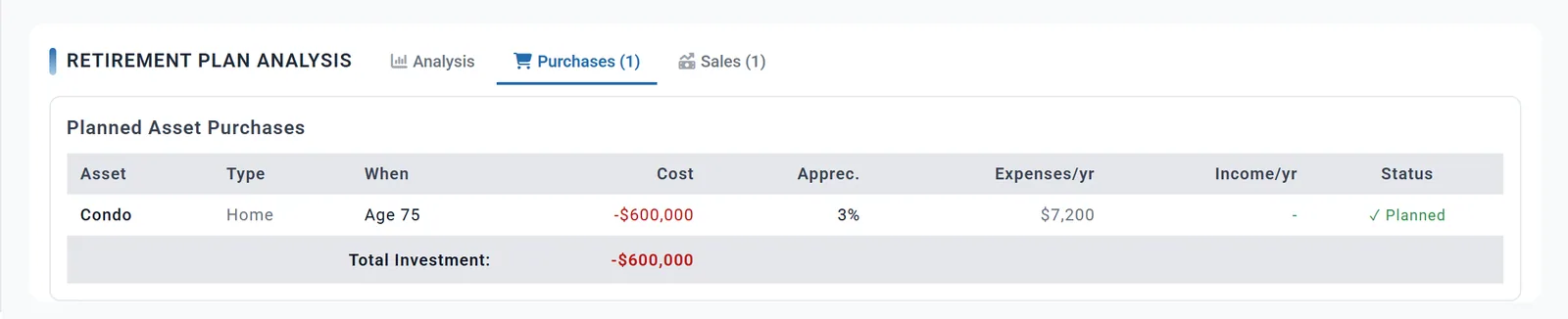
- If there is not enough cash, the purchase does not happen, and Retirement Plan Analysis under the Dashboard chart opens on its Purchases (1) tab marked "Insufficient Funds". The plan never draws on your investments for it: build up the cash first, for example with an Extra Withdrawal to cash, or a sale.
Downsizing. Chris and Jamie sell the Family Home at 75 in June 2043, with the sale money going to Master Cash, and buy a $600,000 condo in July. The sale puts $1,304,460 in their cash in June, so the purchase goes through. Without the sale their cash then is $0, and the purchase is marked Insufficient Funds. Send the money from a sale that pays for a purchase to cash: money sent to a brokerage account cannot pay for a purchase.
Refinancing a mortgage
- In the window of a home or rental with a mortgage (Financed), switch on Plan to Refinance This Mortgage.
- Set Refinance at Age (the owner's age, later than today) and Refinance Month, then the New Interest Rate (%) and New Loan Term (years).
- For a cash-out refinance, enter the Cash Out Amount and choose the Cash Out Deposit Account: Master Cash to start with, or a cash or brokerage account. An IRA, Roth IRA, 401(k) or HSA chosen there still lands in that person's taxable savings.
- Enter any Closing Costs: Roll into loan adds them to the new loan, Pay in cash takes them from the same account as the cash out.
In the refinance month the plan replaces the loan: what is owed then, plus the cash out and any rolled-in costs, repaid at the new rate over the new term. A refinance cannot be on with Plan to Buy This Property, and it must come before a planned sale.
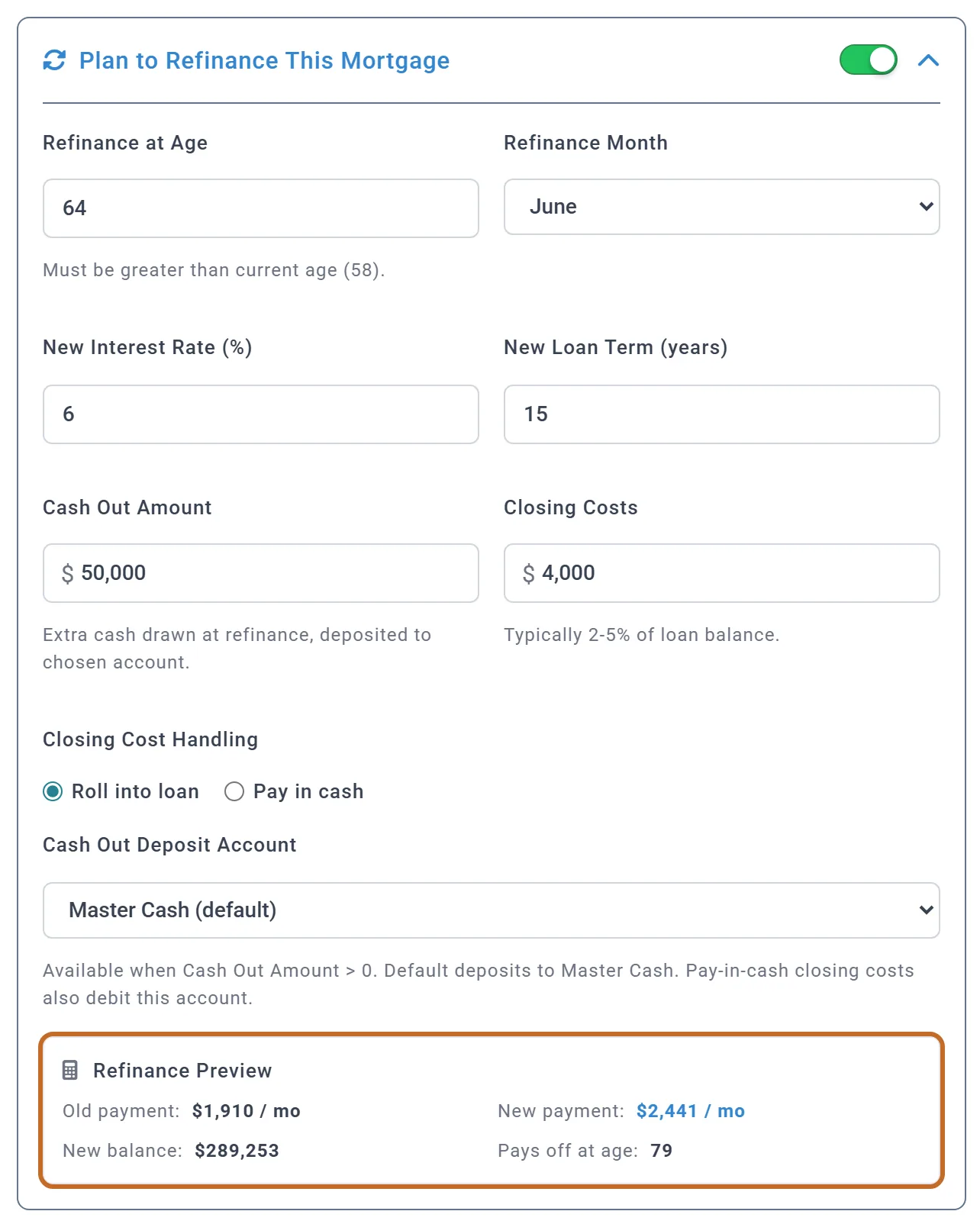
Chris refinances Elm St Rental at 64, in June 2032, at 6% for 15 years, taking $50,000 out and rolling in $4,000 of costs. The plan owes $239,326 then, so the new loan is $293,326 and the payment goes from $1,910 to $2,475 a month, paid off at 79. The $50,000 lands in their cash that month.
- The window's preview is an estimate: it carries today's balance forward to the refinance age by whole years, so it shows a new loan of $289,253 and a payment of $2,441. After a run, the Refinances (1) tab under the Dashboard chart shows the plan's own figures.
- A rental's new payment is paid from its rent, like the old one. Elm St's net rent in the year Chris is 64 falls from $7,018 to $235.
- A home's new payment, like its mortgage, is paid only through your spending or budget (see Paying for your home). With a linked budget, the synced row ends the month before the refinance and a second row, marked "(after refinance)", carries the new payment.

A HELOC
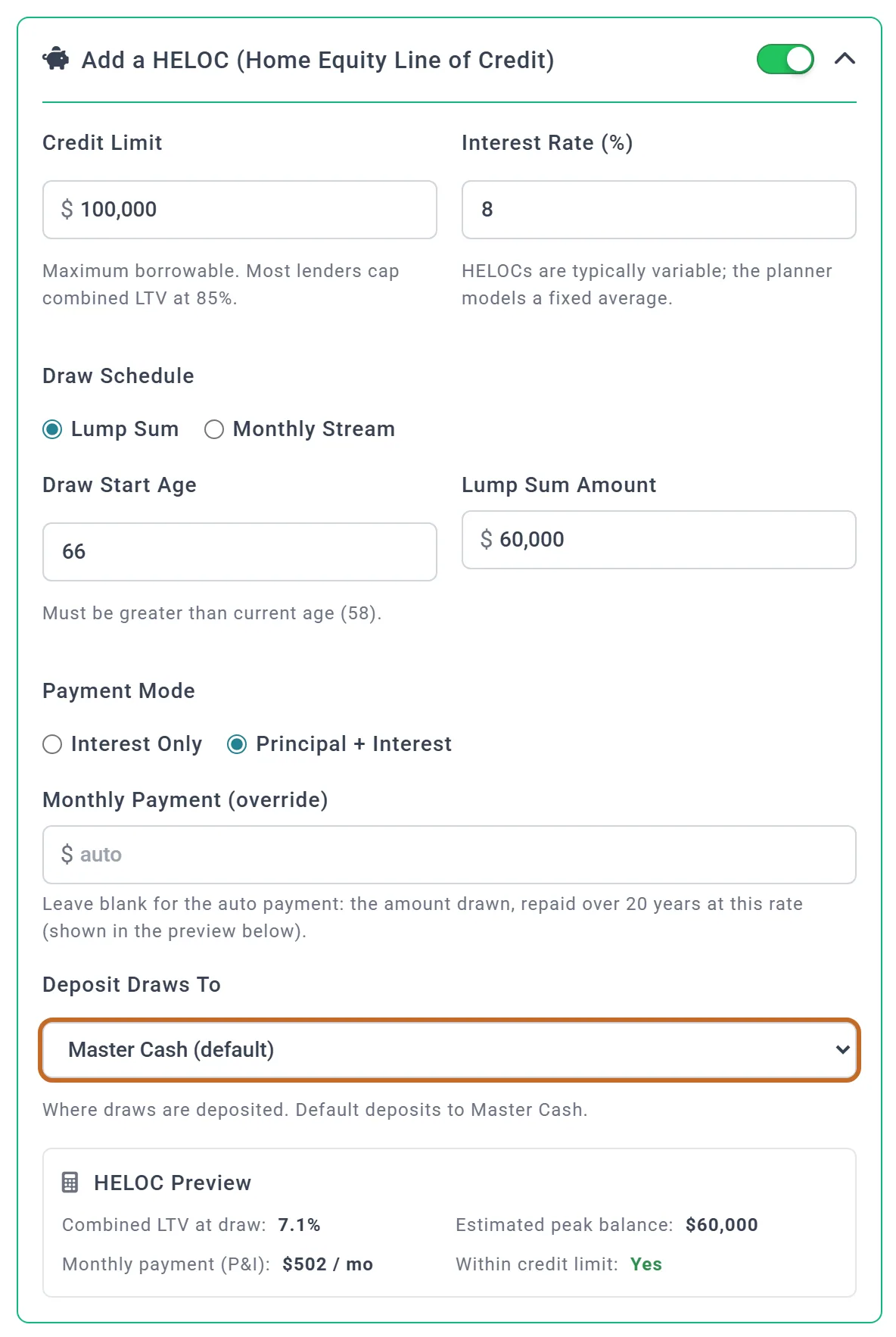
- In your home's window, switch on Add a HELOC (Home Equity Line of Credit).
- Enter the Credit Limit and the Interest Rate (%) (one average rate for the life of the line).
- Choose the Draw Schedule: Lump Sum at the Draw Start Age, or Monthly Stream, a Monthly Draw Amount from the start age through the Draw End Age, the last age with draws.
- Choose the Payment Mode: Principal + Interest, or Interest Only until the Repayment Start Age (leave the age blank to stay interest-only). Leave Monthly Payment (override) blank to repay the amount drawn over 20 years.
- Choose where the draws go in Deposit Draws To: Master Cash to start with.
A draw over the credit limit is cut to the limit, with a warning. A planned sale of the home pays the HELOC off.
A reverse mortgage
- In your home's window, switch on Add a Reverse Mortgage (US homeowners 62+), and read its How does this work?.
- Set Start at Age (62 or older) and Start Month.
- Choose the Payout Type: Lump Sum, Monthly, Line of Credit or Combo, and the amounts. The link beside an amount fills in an estimate.
- Check the Interest Rate (APR %) and the Origination Fee (2% of the home's value unless you type a dollar amount), and choose where payouts go in Deposit Payouts To.
- If the home will still have a mortgage at the start age, tick Roll existing mortgage into the reverse mortgage. The window will not save a reverse mortgage beside a mortgage still owed then, or beside a HELOC.
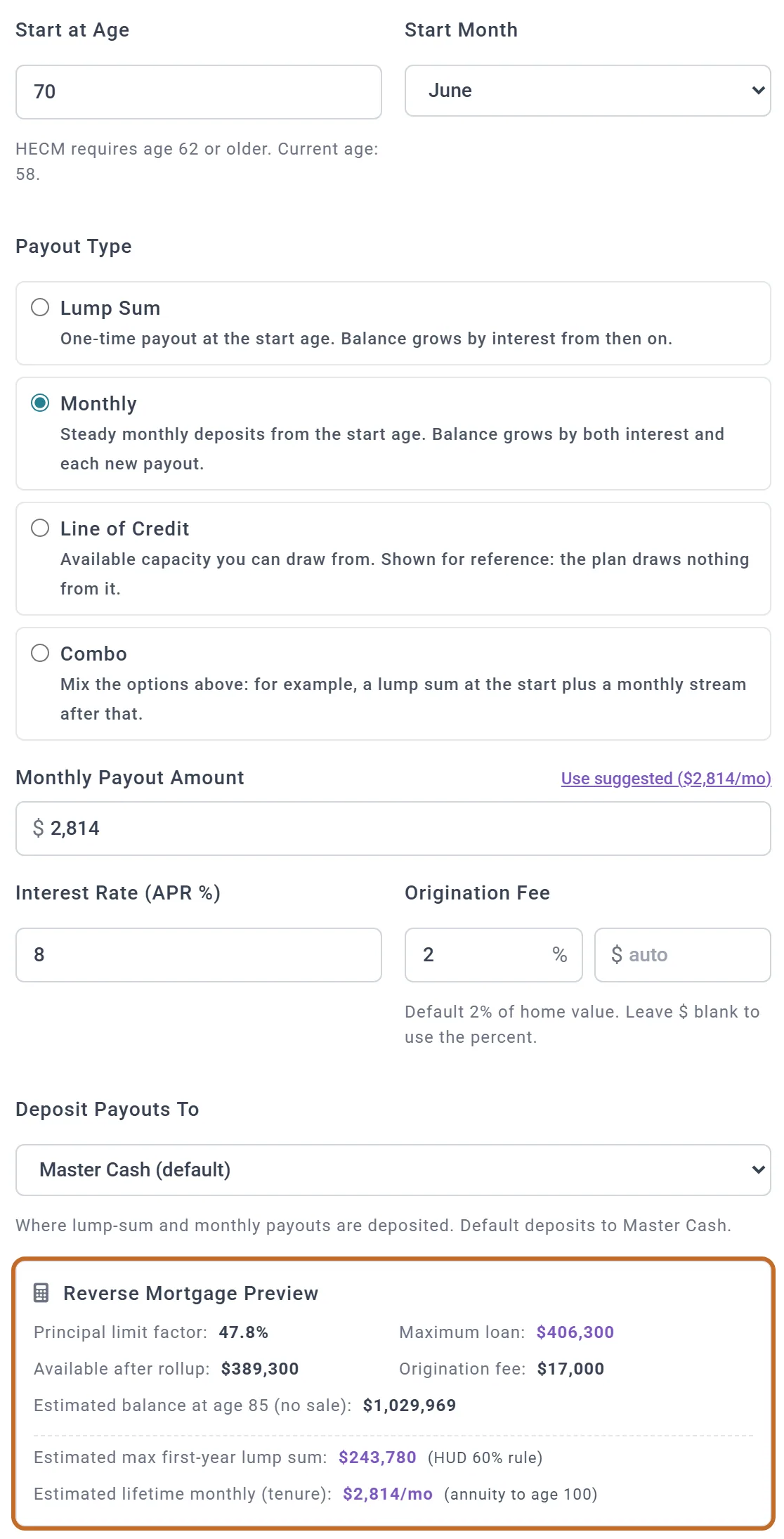
- How much can be borrowed. The plan works out a limit the way the US program (HECM) does: a share of the home's value that rises with the age of the younger of you, 40% at 62 up to 75%. The value counted is capped at the program's limit, $1,249,125 for 2026, raised with inflation. The window's preview works from today's value; the plan uses the home's projected value at the start.
- Payouts land in your cash (or the account you chose) and are not taxed: they are a loan. There are no payments. Interest, the fee and each payout are added to what is owed.
- Monthly payouts stop if the loan reaches its limit, which grows each month at the loan's rate. If that happens, the Coach lists "Reverse mortgage payouts stop early". Line of Credit is shown for reference: the plan draws nothing from it.
- The loan is repaid when the home is sold. With a planned sale it comes out of the sale; if it is more than the home sells for, less selling costs, the lender takes the loss. With no sale, what is owed lowers your home equity in net worth, never below $0.
Chris and Jamie take $2,814 a month from 70, in June 2038, from Use suggested ($2,814/mo). The preview shows a maximum loan of $406,300 on today's value. At the start, on a projected value of $1,200,015 and Jamie's age of 68, the plan's limit is $573,607 and the fee $24,000. All 300 payouts are made, to the end of the plan, and what they owe passes $1 million by 85. Taken as a $200,000 lump sum instead, the loan grows to $740,751 by 85; selling the home at 85 for $1,864,984 would repay it and leave $1,012,334 after $111,899 of selling costs.
Other assets
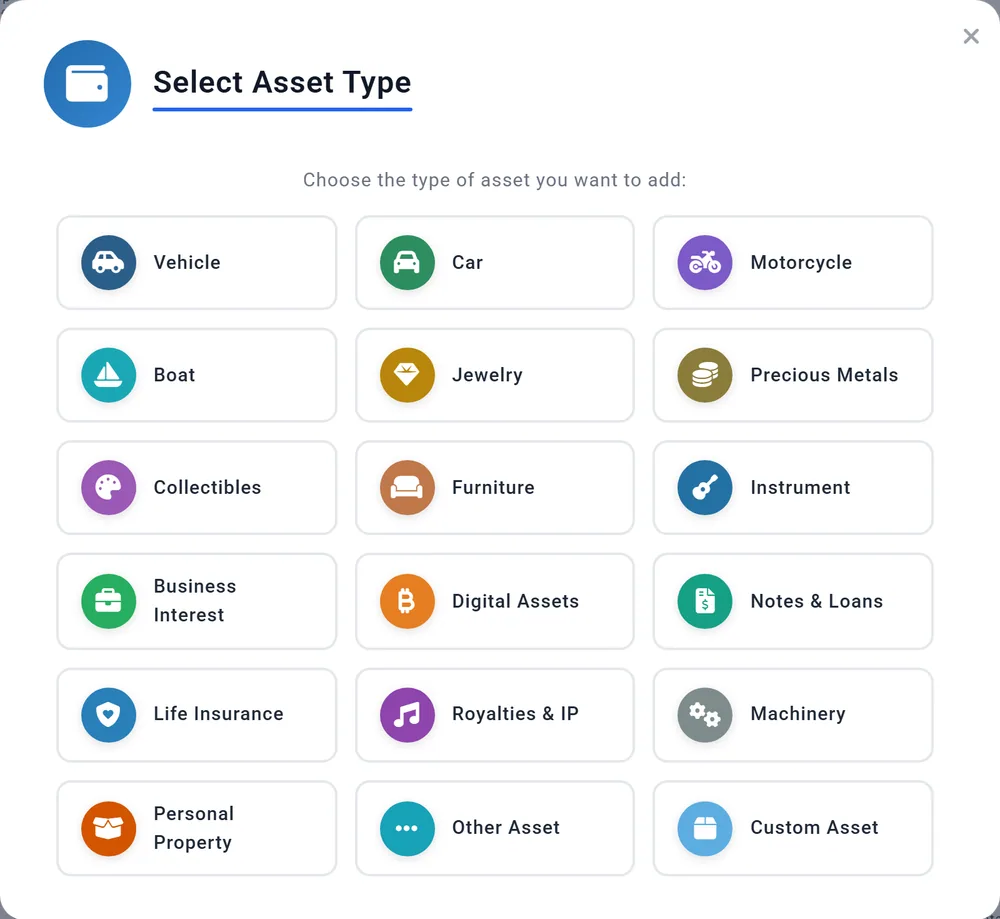
A car, a boat, jewelry, a business, collectibles: Other Assets, + Add Primary, then the type. Planner+
- Each type starts with a typical yearly change: a car loses 12% a year, a boat 8%, furniture 15%; collectibles grow 2%. Change it in Annual Appreciation %. Inflation keeps the asset level in today's dollars.
- Assets count in your net worth and are never spent, unless you plan a sale. Sale money always goes to cash.
- Financed adds a linked loan. Like other debts, its payment is not paid by the plan (see Debts).
Debts
Car loans, student loans, credit cards and other debts go under Liabilities, with the Current Balance, Monthly Payment and Interest Rate %. Planner+
- The plan pays the balance down but does not take the payment from your money. A debt only lowers your net worth. Put the payment in your spending or budget. We checked: a $10,000 credit card at 20%, $300 a month, is gone by December 2030, and the plan's spending and withdrawals do not change.
- The Budget tab offers payments as suggestions only for loans linked to a property or asset. Add any other debt's payment as a budget row yourself.
- A loan marked "Linked to" a property or asset is changed on that property or asset.
Life insurance
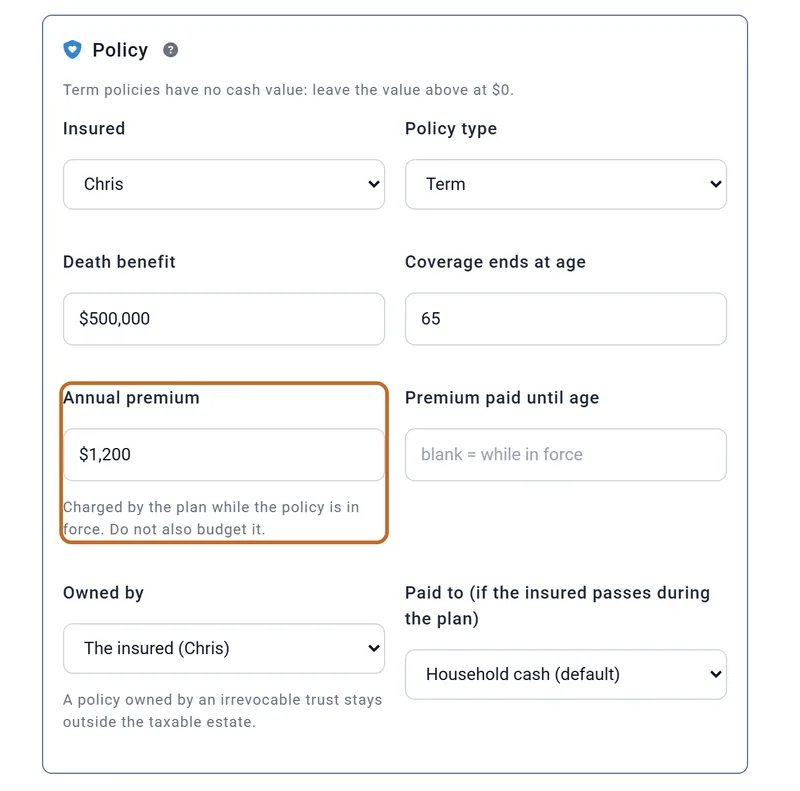
Add a policy as an other asset: Life Insurance. For term insurance leave the value at $0; for a permanent policy enter its cash value. Then fill in the Policy: who is insured, the type, the Death benefit, when coverage ends, and the Annual premium. Planner+
- The premium IS paid by the plan, unlike a mortgage: do not budget it as well. While you work it comes out of your pay, so it counts only with Employment Income on.
- The death benefit is paid only if the insured's Plan End comes before the plan ends (see separate Plan End ages): tax-free, the month after, into household cash or the account you choose. A policy owned by a trust is never paid into the plan.
- A permanent policy's cash value counts in net worth; the death benefit does not.
Net worth on this page and in your projection
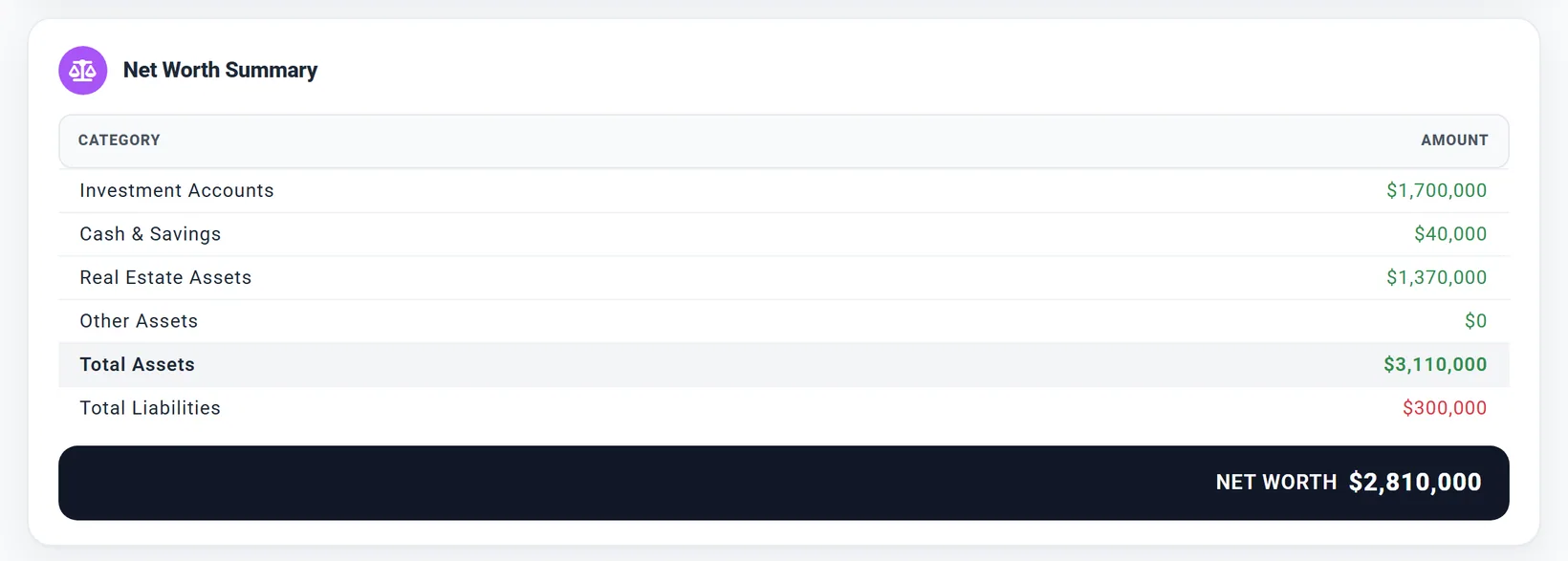
- The page lists your homes at full value and their mortgages under liabilities. The projection works with the equity (value less the loans). The net worth is the same either way.
- What can pay for retirement is your investments, HSA, inherited accounts and cash. Homes, other assets and policy cash values count in net worth only.
- These totals always include your spouse's accounts; a plan with Include spouse off leaves them out of its projection.
Progress points
Each day you change your accounts (on this page, or with a slider in the settings panel), the planner records that day's net worth as a progress point: one a day, the latest change wins. View your progress opens the Progress tab, which charts them. After two years, older points are thinned to one a month.
To add a point for a past date, choose Add Progress Point on the Progress tab. It records your accounts' values today against the date you pick.
Outside the US
- The account types follow the country in your profile: in Canada Registered, Tax-Free and Non-Registered (RRSP, RRIF, TFSA, FHSA and more); in the UK Pension/SIPP, ISA and GIA; in Australia super, pension phase and taxable. Canada UK
- Changing the country relabels your accounts to the nearest type, in every plan; the balances stay.
- US only: Past contributions, the HSA, the $250,000 / $500,000 home exclusion. Elsewhere a main home's whole gain is exempt. Per-account Growth is not available for UK plans yet.
- Rent from a spouse's property is taxed on the spouse's own return in Canada and the UK.
What the planner does not model
- Linking your bank or brokerage: balances are entered by hand.
- Separate cash accounts in the projection: all cash is one pot.
- Home insurance and HOA fields: budget them.
- Rental depreciation and its recapture, and a limit on passive losses.
- The higher tax rate on collectibles: their gains are taxed like any long-term gain.
- Sale money paid into an IRA or Roth.
- A mortgage on a planned purchase, and line-of-credit draws from a reverse mortgage.
- Life insurance loans, cash-value withdrawals, second-to-die policies and riders.
For the full list of what the planner includes and leaves out, see the Learning Library article What ReadyAimRetire Models.