



 Continue with Google
What Chance of Success does
Chance of Success replays your whole plan through real market history: once starting in 1871, once starting in 1872, and so on, every month of each trial in the order it happened. Nothing is random, so the same plan gives the same answer every time. The history is US stocks, US bonds and US inflation, monthly, from January 1871. It comes from Robert Shiller's US market dataset.
- Each trial starts your plan today. The "1929 trial" is your plan from this month on, with the markets of January 1929 onward, through your working years and your retirement.
- Each trial uses that period's own inflation, for your spending, Social Security and tax brackets as well as prices. Your Inflation % and your stock and bond return settings are not used here; your mix of stocks and bonds and your Annual Investment Fees (%) are.
- How many trials: one for every start year whose whole plan fits in the data. Chris and Jamie's plan runs 37 years (Chris 58 to 95), so it gets 119 trials, starting 1871 to 1989. A shorter plan gets more: with a Plan End of 80, 134 trials, to 2004.
- A trial succeeds only if your savings never run dry along the way and the plan always pays its spending. A trial that runs out and later refills (when Social Security or a sale comes in) counts as a failure. Savings here means both of your investments, cash, HSAs and inherited accounts; your home does not count.
- The Chance of Success % is the trials that succeeded out of all the trials. Chris and Jamie's own plan succeeds in all 119.
There is no button to press. Opening the Chance of Success tab runs it ("Calculating Chance of Success" while it works), and it runs again when you change your plan. The Summary's "Chance of success" card and the Dashboard's Chance of Success box show the same result.
Why it differs from the Dashboard
Every other page (the Dashboard, Charts & Data, Your Taxes, the Optimizer) shows one projection, with the returns and inflation you entered, the same every year. Chance of Success is the only place that uses market history. The two can disagree, and both are right about what they measure:
- Order matters. A crash early in retirement does more damage than the same average return spread evenly, because you are selling while prices are low.
- Inflation differs. Your projection uses one rate every year; a 1970s trial lives through 1970s prices.
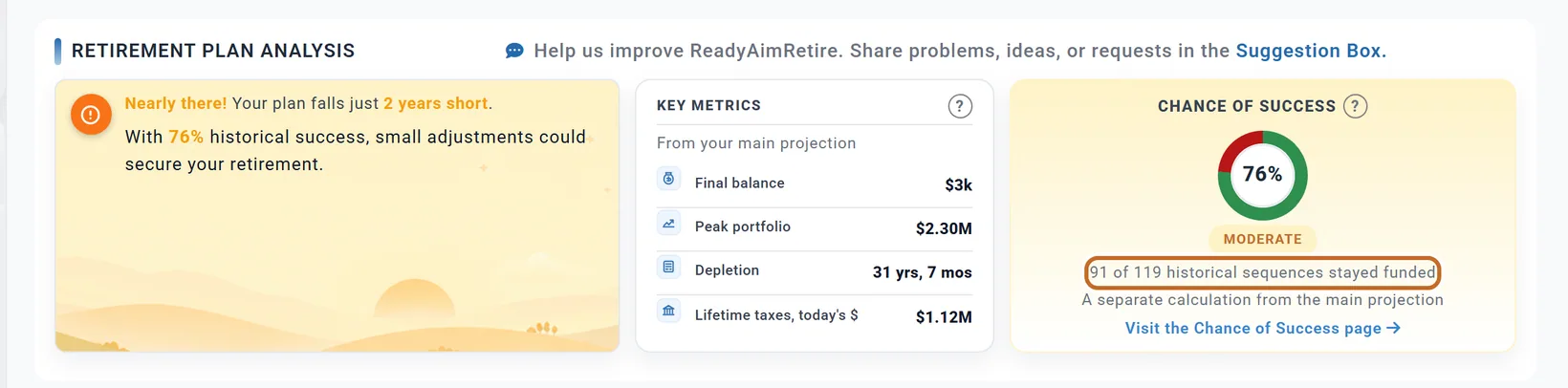
At $12,000 a month, Chris and Jamie's projection runs out after 31 years and 7 months, while 91 of their 119 trials stay funded. The "?" beside each box explains its number. A plan can also show Depletion "Never" on the Dashboard and still fail in some trials.
Reading the Retirement Outlook
The Retirement Outlook card stays at the bottom of the tab, whichever sub-tab is open.

- The ring is your Chance of Success, with "91 of 119 trials stayed funded." under it and a confidence label: High Confidence at 90% or more, Moderate Confidence from 70%, Low Confidence below.
- Outcome Distribution sorts every trial:
- Surplus: never ran dry, and ended with at least one and a half times the savings you have today.
- On Track: never ran dry, and ended with money left.
- Tight Finish: ran out, but only in the last tenth of the plan (about the last 4 years of Chris and Jamie's 37). It still counts as a failure.
- Ran Out: ran out earlier.
- Ending Portfolio Values: the lowest, middle (Median), average and highest of all the trials' ending savings. "Depleted" means nothing was left.
The % is all or nothing per trial: a trial that ends with $1 counts the same as one that ends with millions. Read the outcome bands and ending values beside it.
The sub-tabs
Portfolio
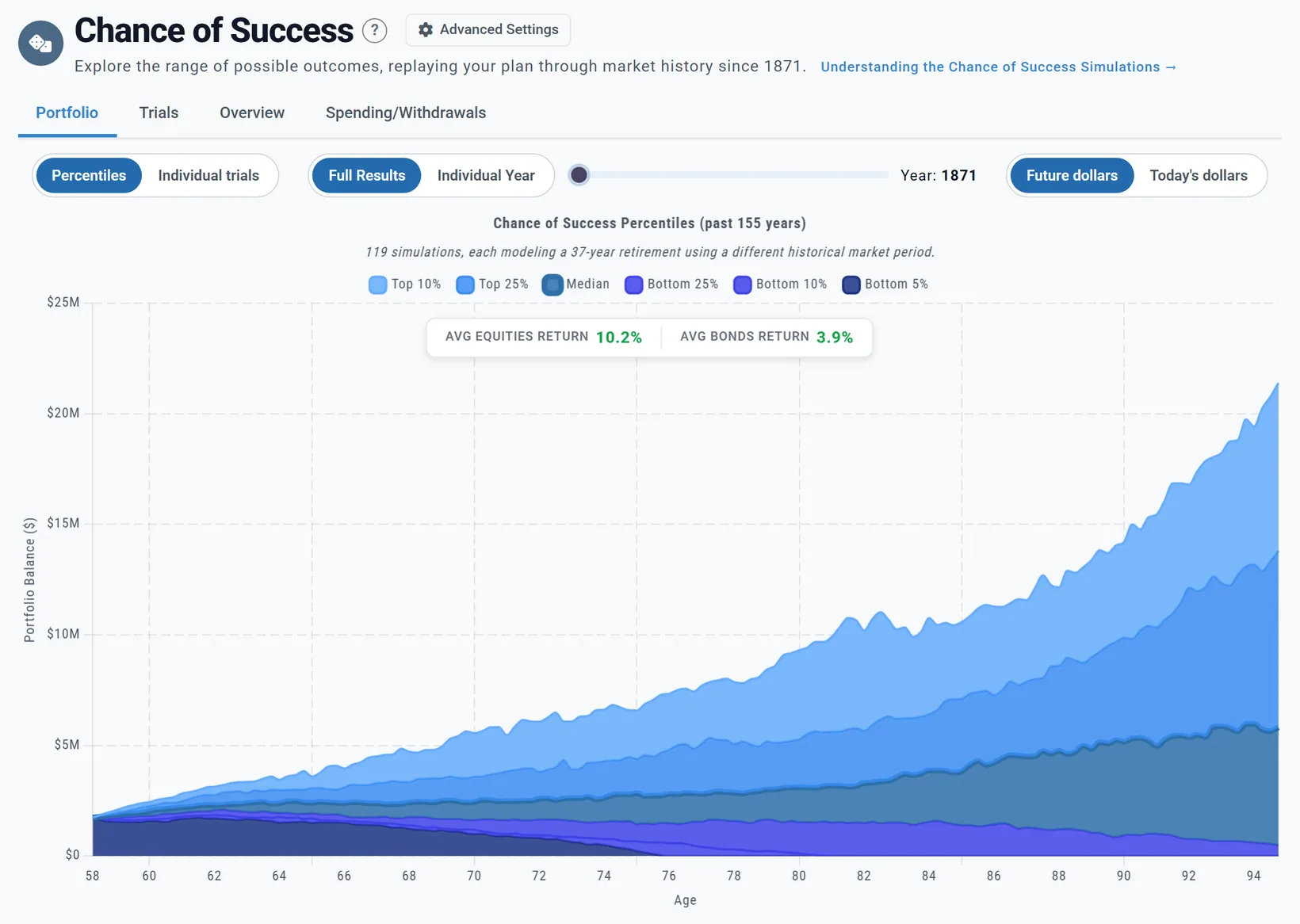
- Percentiles (the usual view) draws bands from Top 10% to Bottom 5%. "Top 10%" means one trial in ten was above that line at that age.
- Individual trials draws one line per trial. The bold Average line is the middle (median) trial at each age. With more than 100 trials, the three that end highest are left off this chart.
- Individual Year shows a single trial as an ordinary portfolio chart: move the slider until Year: shows the start year you want (next section).
Trials
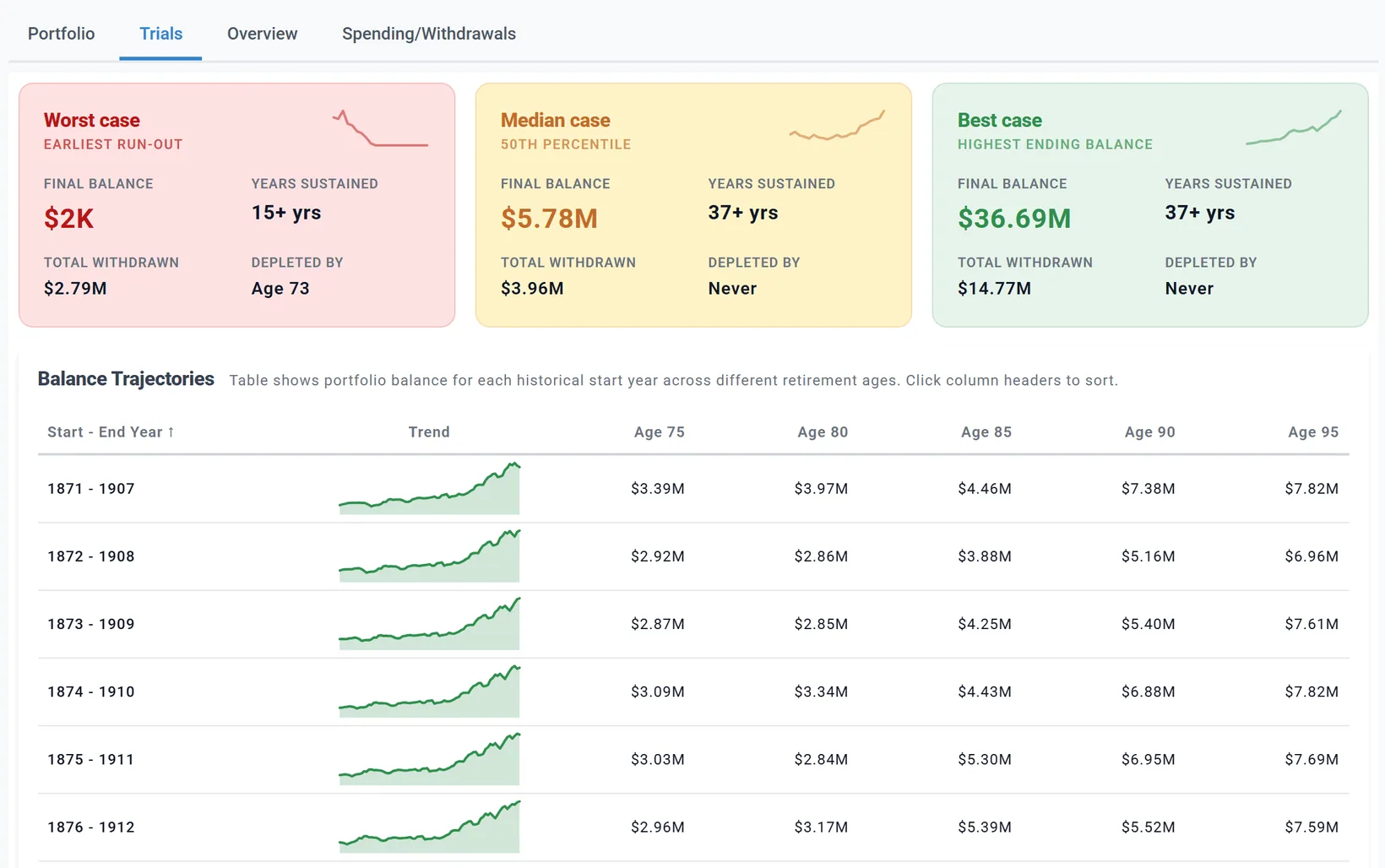
The three cards are the trial that ran out earliest (or, if none did, the lowest ending balance), the middle trial and the highest. Balance Trajectories lists every start year with its balance at later ages; click a column header to sort.
Overview
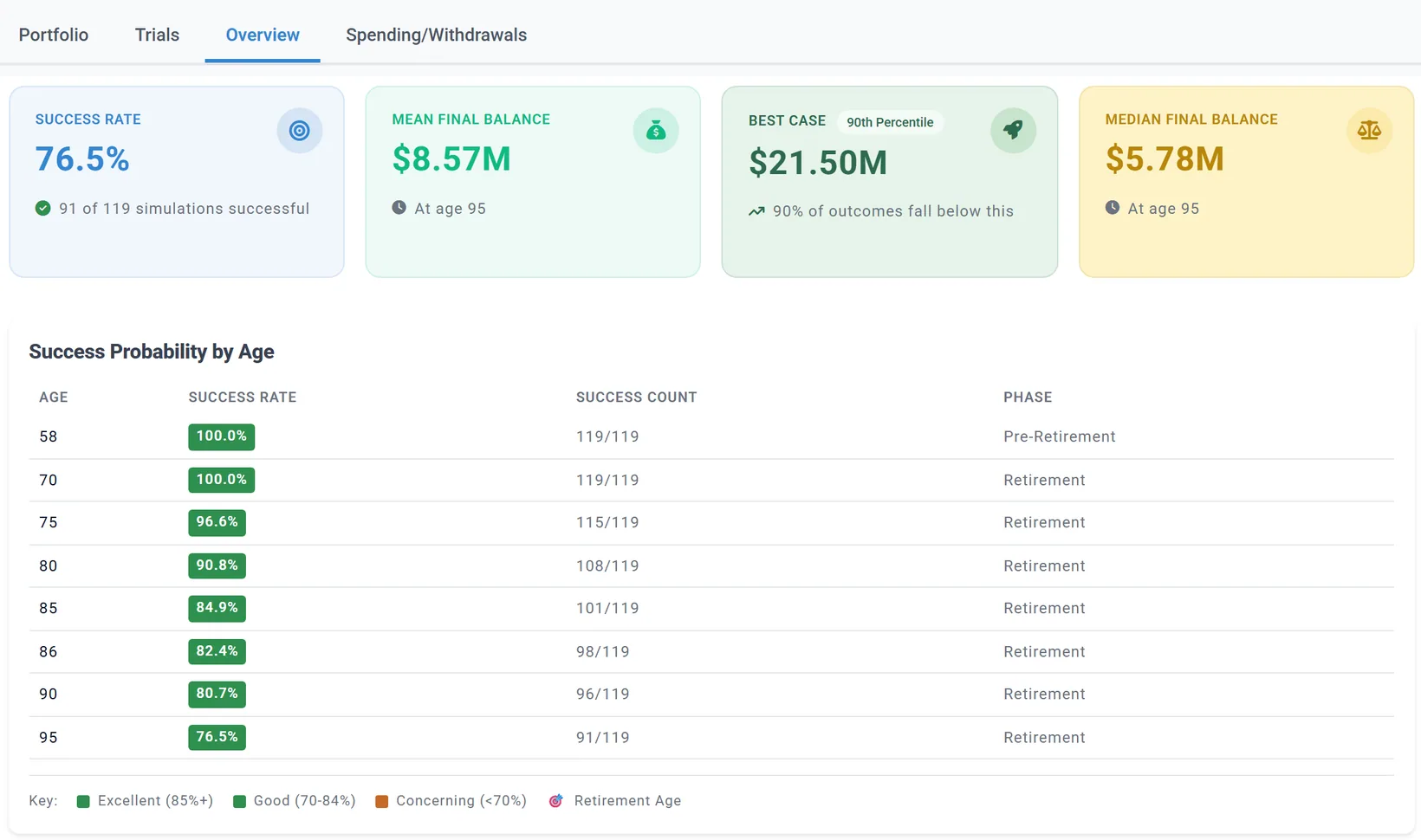
Success Probability by Age answers a different question: how many trials were still funded at each age. Note that the Overview's Best Case is the 90th percentile, while the Outlook's is the single highest trial.
Spending/Withdrawals
Spending Sensitivity Analysis finds the most you could spend each month and still keep at least a 95%, 90%, 85% or 80% chance of success, in today's dollars (in Monthly Income mode, the monthly withdrawal; with the 4% Rule, the withdrawal rate). Each level scales your spending, or your linked budget, from retirement on; taxes, Extra Withdrawals and your other costs stay as they are. Each amount is a level the analysis ran, so the exact edge can be a little higher. It does not run by itself: press Run Analysis. It runs about a dozen levels, so it takes a minute or so. After you change your plan it says Re-run needed.
Milestone outcomes
If you have milestones that fire on a condition (such as "when savings fall below an amount"), Milestone Outcomes under the Outlook shows how often each one happened across the trials, and at what ages. See Milestones in Chance of Success.
Today's dollars on this tab
The Future dollars / Today's dollars pills on the Portfolio sub-tab are the same setting as the Dashboard's. In today's dollars, each trial is converted with its own history of prices, so a 1970s trial is deflated by 1970s inflation. The ending values and charts change; the Chance of Success %, the outcome bands and the trial counts do not, because success is judged on the actual dollars. See Today's dollars and future dollars.
Stress years: 1929, 1966, 2000, 2008
All four crashes are in the data, but a year is a start year only if your whole plan fits before the data ends. For Chris and Jamie's 37-year plan the last start year is 1989, so 1929 and 1966 are start years and 2000 and 2008 are not. 2000 and 2008 are still inside many trials: every trial that starts from 1964 on lives through the 2000-2002 crash.
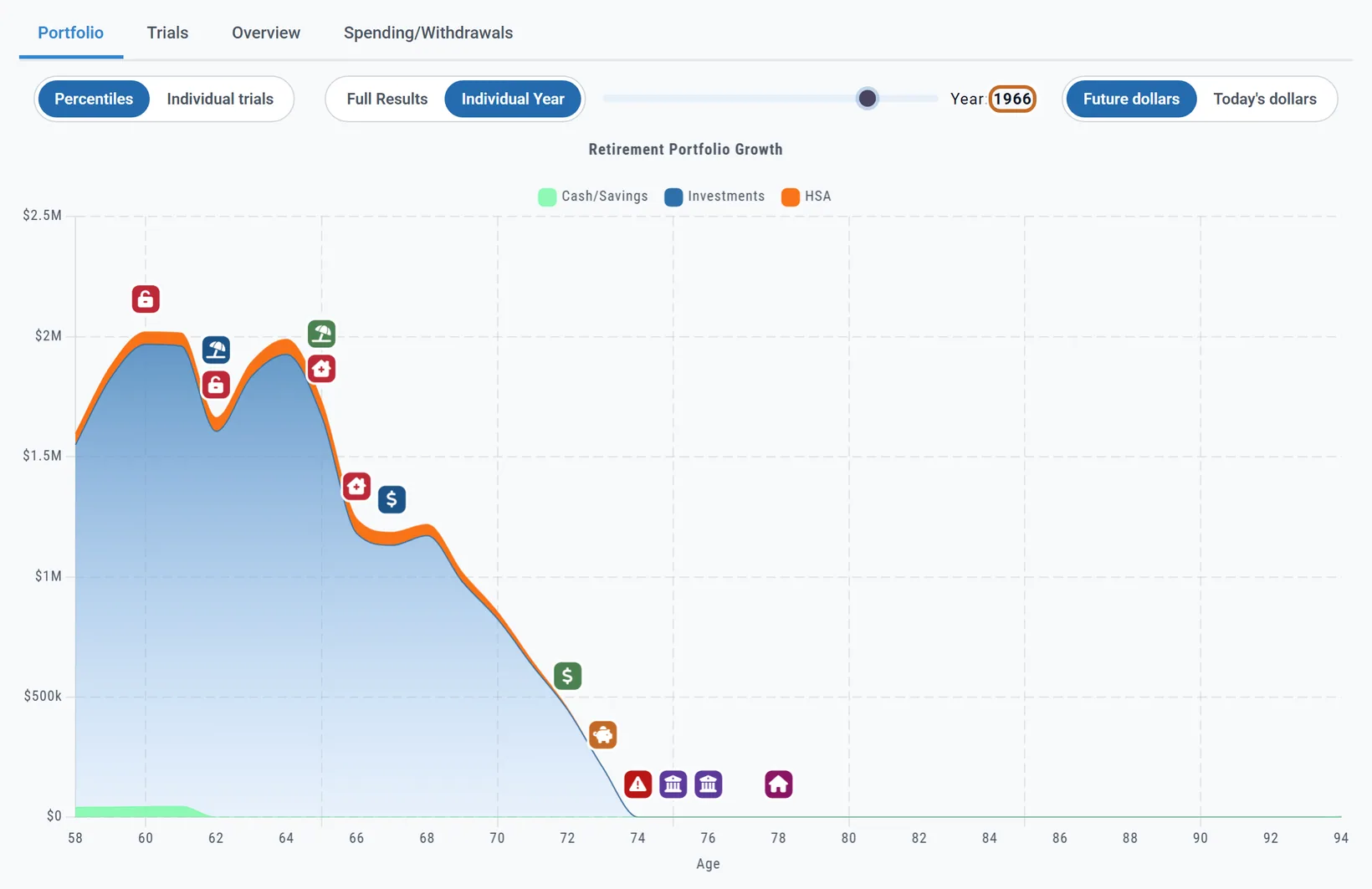
- On the Portfolio sub-tab, choose Individual Year. Planner+
- Move the slider until Year: shows the start year, here 1966.
A start year is the year your plan starts (today), not the year you retire. Chris retires in about 4 years, so the 1925 trial is the one that retires Chris into the 1929 crash, and 1966 into the early 1970s. To test a crash you would retire into, pick the start year that many years before it. There is no setting for a made-up crash; stress testing here uses real history.
Choosing the years it tests
The cog button Advanced Settings, beside the tab's title, shows your plan length and the number of trials, and holds Simulation range:
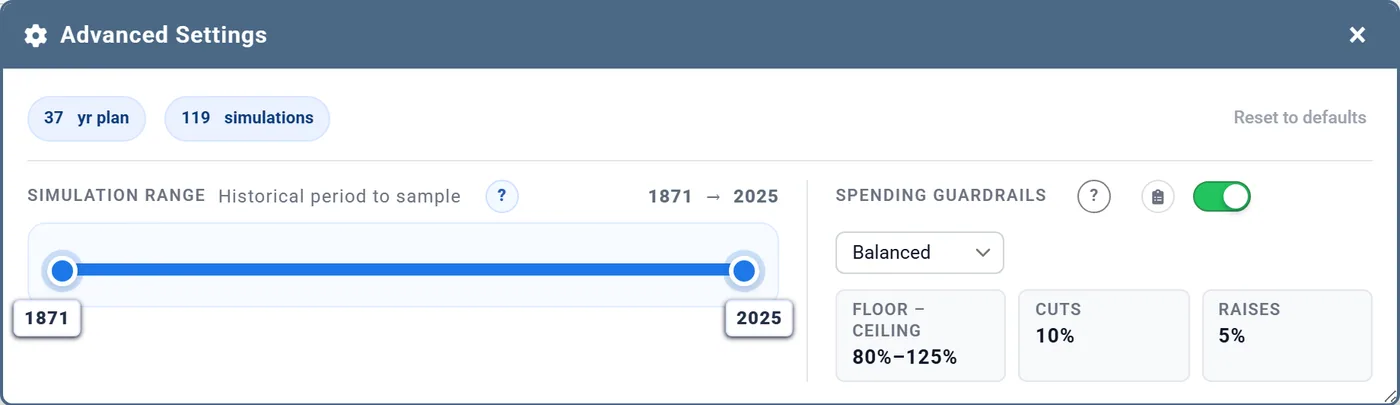
- The left handle is the first trial's start year; the right handle is the last trial's END year. The handles stay at least one plan length apart, so pulled together they run a single trial.
- Until you move a handle, the plan follows the newest data. Once you move one, the range is saved in that plan.
- Reset to defaults restores the full range and also switches Spending Guardrails off.
Spending Guardrails
Guardrails let spending bend with the markets: a small cut after a fall, a small raise after a rise, within limits. They are in Advanced Settings on the Chance of Success tab, not in the Retirement Spending box.
- Open Advanced Settings and switch on Spending Guardrails.
- Pick a style. The three boxes show what it does:
Style Floor - Ceiling Cuts Raises Trigger Conservative 85% - 115% 8% 4% 15% from the baseline Balanced 80% - 125% 10% 5% 20% from the baseline Flexible 70% - 140% 12% 6% 25% from the baseline
Every plan starts with guardrails off and the style on Balanced, a good first choice. Conservative reacts to smaller moves with smaller steps; Flexible waits for bigger moves, then changes your spending more.
How they work
- They watch one number: your yearly spending as a share of your invested savings (cash left out). This is not the withdrawal rate shown elsewhere in the app.
- The first check, at the start of your first tax year in retirement (January; April in the UK), records that share as the baseline. Each later year, if the share has risen past the trigger, spending is cut; if it has fallen past it, spending is raised; otherwise it just moves with inflation.
- Spending never goes below the floor or above the ceiling, a share of what you planned for that year.
- Only your lifestyle spending moves. One-time costs, milestone expenses, insurance premiums and taxes are never cut.
- The baseline resets when a big income change arrives: your Social Security starting, a pension or Other Income starting, required minimum distributions beginning, a milestone that cuts spending, or the change after a death.
- The trials assume you make every cut.
Where they apply
- Chance of Success only. The Dashboard and every other page keep your planned spending. The Summary card and the Dashboard's Chance of Success box show the guardrails result, because they show this tab's run.
- Only in Monthly Expenses mode (Retirement Spending, Mode:). In Monthly Income or the 4% Rule the switch is greyed and they do nothing; the Outlook then says they are on but not used.
At $12,000 a month, Balanced guardrails take Chris and Jamie from 91 to 115 of 119 trials. The Guardrails sub-tab, which appears when they are on, shows how:
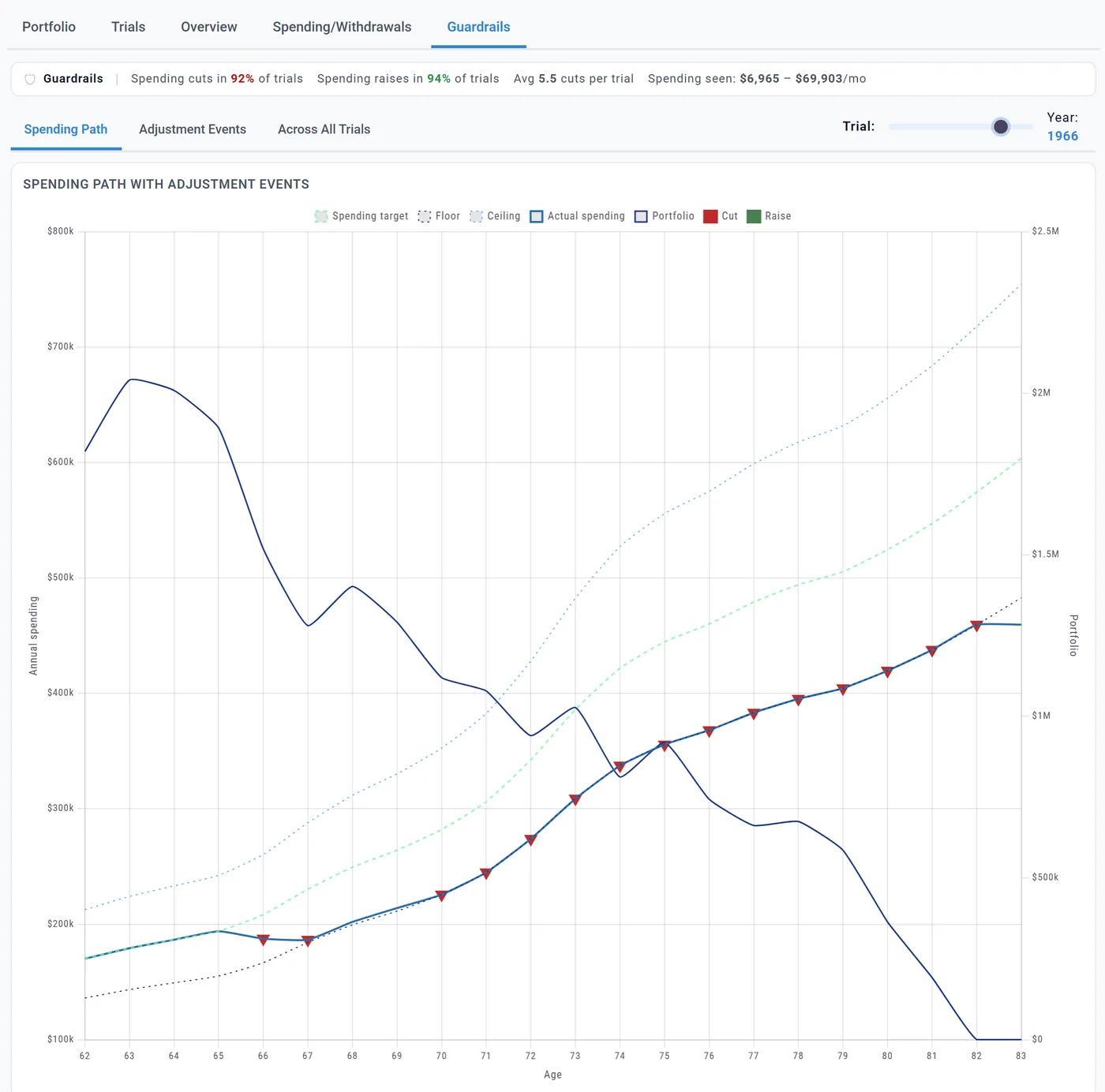
Use the Trial: slider to pick a start year. Adjustment Events lists each cut and raise; Across All Trials shows how often they happen. The Learning Library article Spending Guardrails compares your plan with and without them.
Words you will see
One replay of your plan is called a trial on this tab. The app also calls it a run (Outcome Distribution), a simulation (the Advanced Settings count, the Overview), a scenario (the Summary) and a sequence (the Dashboard box). They are the same thing. "Monte Carlo" in other planners usually means random returns; here every trial is real history, in order.
Preview and Planner+
On a Preview account you see your Chance of Success %, the Retirement Outlook, guardrails, the simulation range, Milestone Outcomes, the Summary card and the Dashboard box. The Portfolio chart, the Trials and the Overview are Planner+, so looking at one start year needs Planner+. Planner+
Outside the US
Every country uses the same US market history and US inflation; there is no Canadian, UK or Australian data yet. The Overview, Trials and Spending/Withdrawals sub-tabs say so in a note. Guardrails check at the start of the tax year: January in Canada, April in the UK. Canada UK
What Chance of Success does not model
- The future: it shows how your plan would have fared in US history since 1871.
- Independent futures: trials that start a year apart share most of their years, so 119 trials are not 119 separate answers. Treat percentages a few points apart as the same.
- Your own return and inflation settings, and an account's fixed growth rate: trials use history instead. (Cash accounts keep their own interest rate.)
- Partial guardrail cuts, or a cut you skip.
- Your home as savings: it counts only once a planned sale turns it into cash.