



 Continue with Google
Turn on Social Security
A new plan has no Social Security until you add it. If your results show none, this is why. US
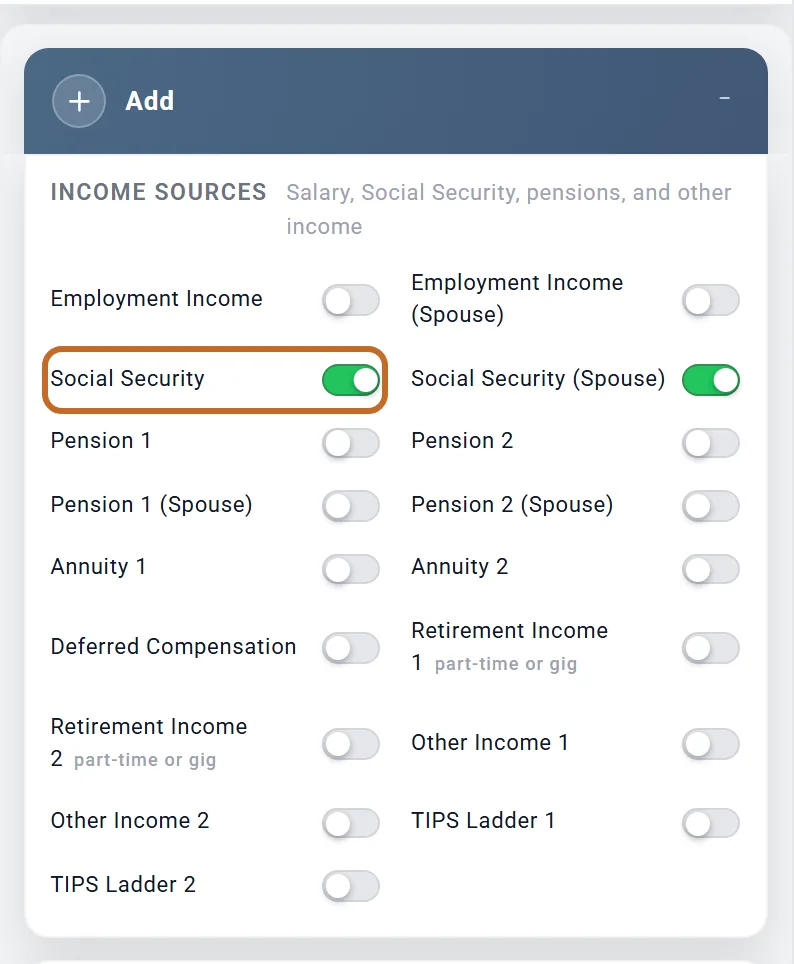
- Go to the Add box, under Income Sources.
- Switch on Social Security. For a couple, also switch on Social Security (Spouse) (it is listed once Include spouse is on).
- The box appears directly below the Add box, with the spouse's box after it.
- The boxes keep the titles "Social Security" and "Social Security (Spouse)". They do not take your names.
- Switching a box off keeps what you entered; switching it back on brings it back.
- To see your plan without Social Security for a moment, switch it off in What's Counted instead (see Leave something out of one plan).
Enter your benefit: one number
The box's first section, Your Benefit, has one amount for you to type:
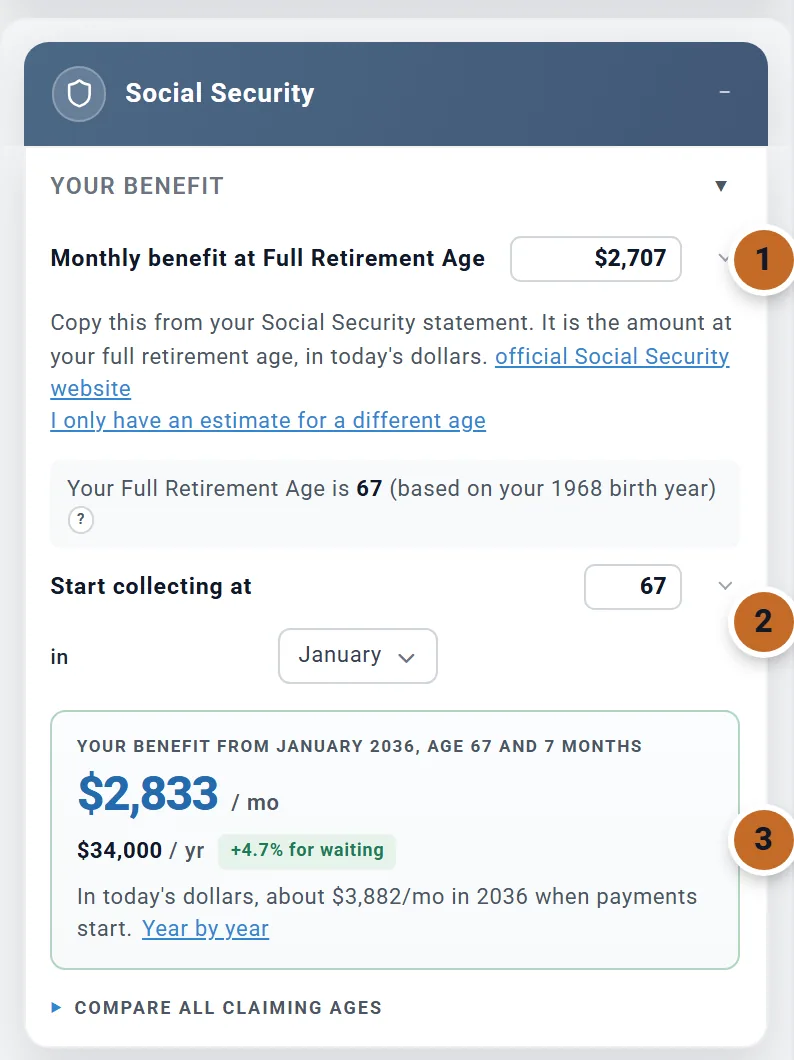
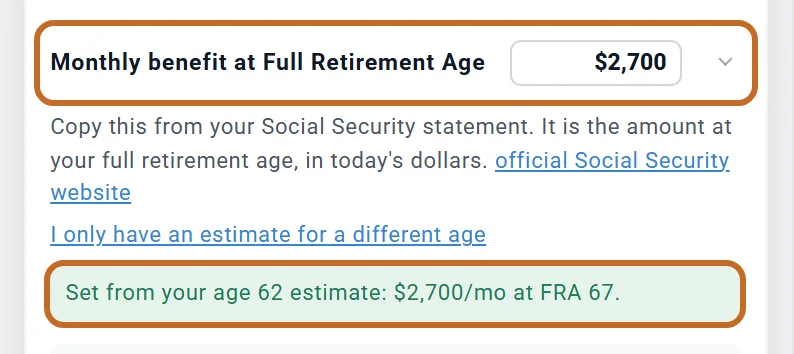
- Monthly benefit at Full Retirement Age. Copy it from your Social Security statement (sign in at ssa.gov; the box links to it). Use the full retirement age amount even if you plan to claim earlier or later: the box works out the amount at your claiming age. It is in today's dollars, so do not add inflation yourself.
- Start collecting at and in: the age and month you plan to claim (next section).
- The result: what you would receive from that month.
Under the amount, the box shows your full retirement age, for example "Your Full Retirement Age is 67 (based on your 1968 birth year)". It comes from your birth year and cannot be changed: 66 for 1943 to 1954, rising two months a year from 1955 (66 and 2 months) to 1959 (66 and 10 months), and 67 for 1960 or later. If it looks wrong, check the birth date in your profile; its "?" has a link there.
If you only have an estimate at another age
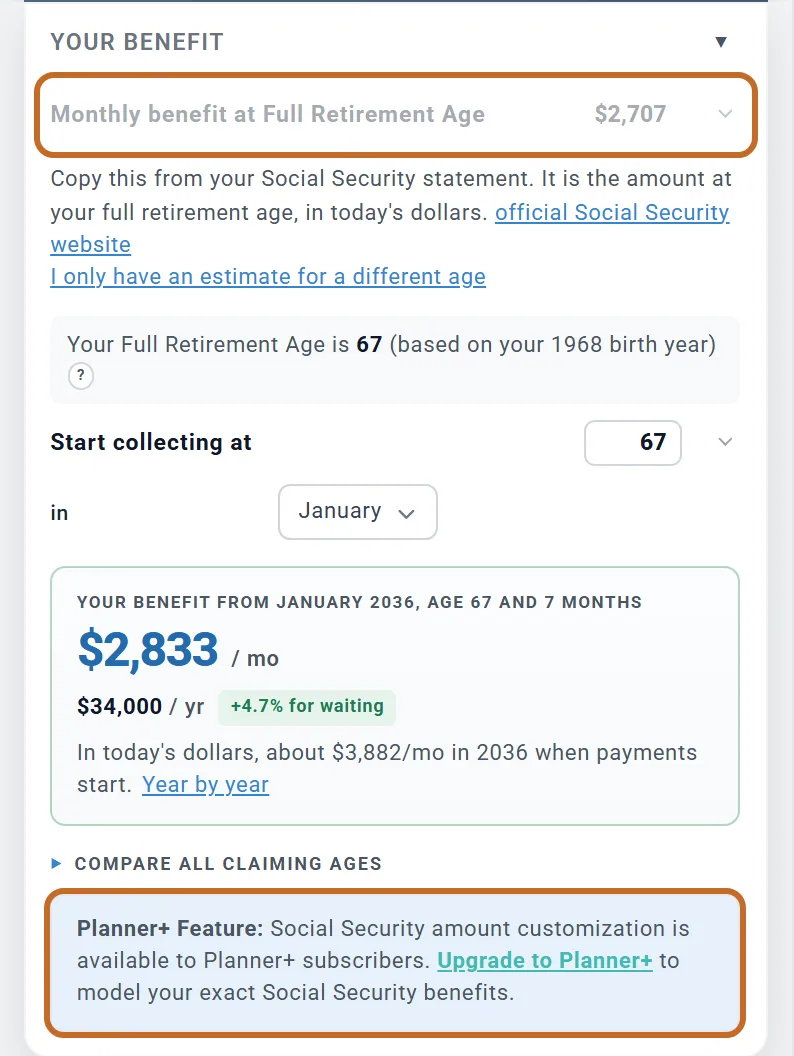
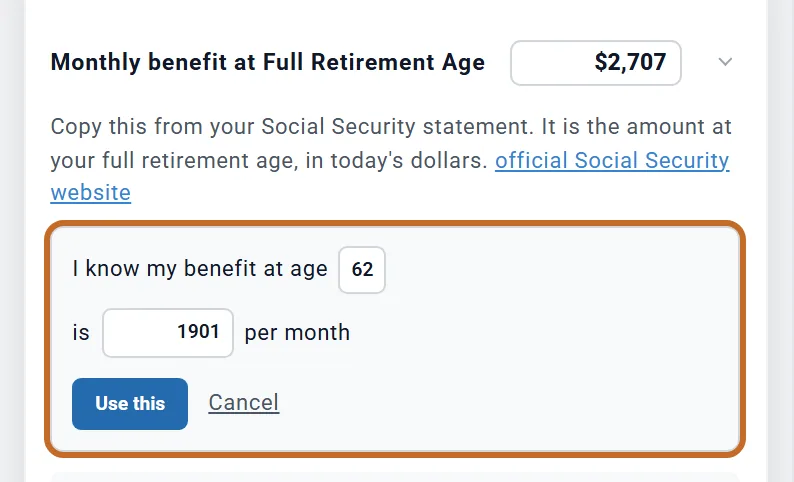
Your statement may show what you get at 62 or at 70 instead. Choose I only have an estimate for a different age, pick the age in "I know my benefit at age", type the monthly amount, and choose Use this. The box works out your full retirement age amount from it, as if you claimed at that age in your birthday month, and fills it in.
If you are already collecting
The box asks for the amount at full retirement age, not the payment you receive now. To enter a benefit you already get:
- Set Start collecting at and in to the age and month you started. If you started after 70, choose 70: the benefit stops growing at 70 anyway.
- Change Monthly benefit at Full Retirement Age until the result shows the payment you receive now, before Medicare is taken out.
A start date in the past is paid from your plan's first month, at the amount in the result, and rises each January. The result's note then reads just "In today's dollars."
Getting disability benefits instead? See If you get disability benefits (SSDI).
If you get disability benefits (SSDI)
Social Security Disability (SSDI) pays your full benefit, with no reduction for age, and at full retirement age it becomes your retirement benefit at the same amount. So there is no claiming age to choose.
- In the Social Security box, switch on I get Social Security Disability (SSDI) now.
- In Monthly disability benefit (SSDI), enter the monthly amount on your benefit letter, before Medicare is taken out.
The planner pays it from your plan's first month, at any age, and raises it each January. While the switch is on, Start collecting at and in step aside, and the result reads "Your disability benefit, paid now". It is taxed like any Social Security benefit, a survivor keeps it if you die first, and with the spousal benefit switched on your spouse's spousal benefit is worked out from it.
Before this switch existed, the way to enter SSDI was to raise the full-retirement-age amount until the result showed your payment. If your plan was set up that way, switching on keeps the payment you see and makes it the amount. Check it against your benefit letter.
Two rules to know
- Work. The earnings test does not apply to SSDI. Earning more than $1,690 a month in 2026 ($2,830 if you are blind) can end your benefits after a nine-month trial work period. The planner keeps paying the benefit, and warns you when your plan's work income is above that limit.
- Medicare. After 24 months of SSDI you have Medicare, even before 65. In the Health Care box, set Medicare starts at to the age it started (or starts): from then the planner charges Part B and D and any IRMAA, ends marketplace coverage, and stops HSA contributions (see Health care costs).
Choose when to start
Start collecting at runs from 62 to 70 (67 when you switch the box on). Beside it, in picks the month (January unless you change it). Payments start in the first month you chose that is on or after your birthday at that age.
- Before full retirement age the benefit is lower for good: 5/9 of 1% less for each of the first 36 months early, and 5/12 of 1% for each month beyond those 36. With a full retirement age of 67, claiming at 62 pays about 30% less.
- After full retirement age it grows by 2/3 of 1% a month (8% a year), up to 70. With a full retirement age of 67, that is 24% more at 70. Waiting past 70 adds nothing.
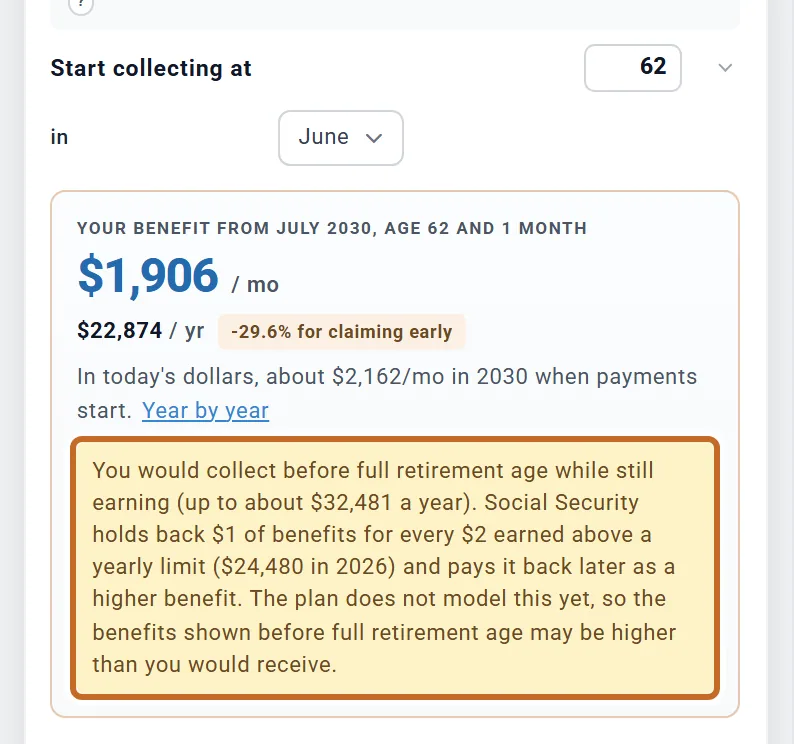
- At 62, unless you were born on the 1st or 2nd of the month, you cannot start in your birthday month: payments start the month after. Chris (born June 15) at "62 in June" starts in July 2030, at 62 and 1 month, 29.6% below the full amount.
- Your claiming age is separate from your retirement age. There is no "At retirement" choice; set the age yourself.
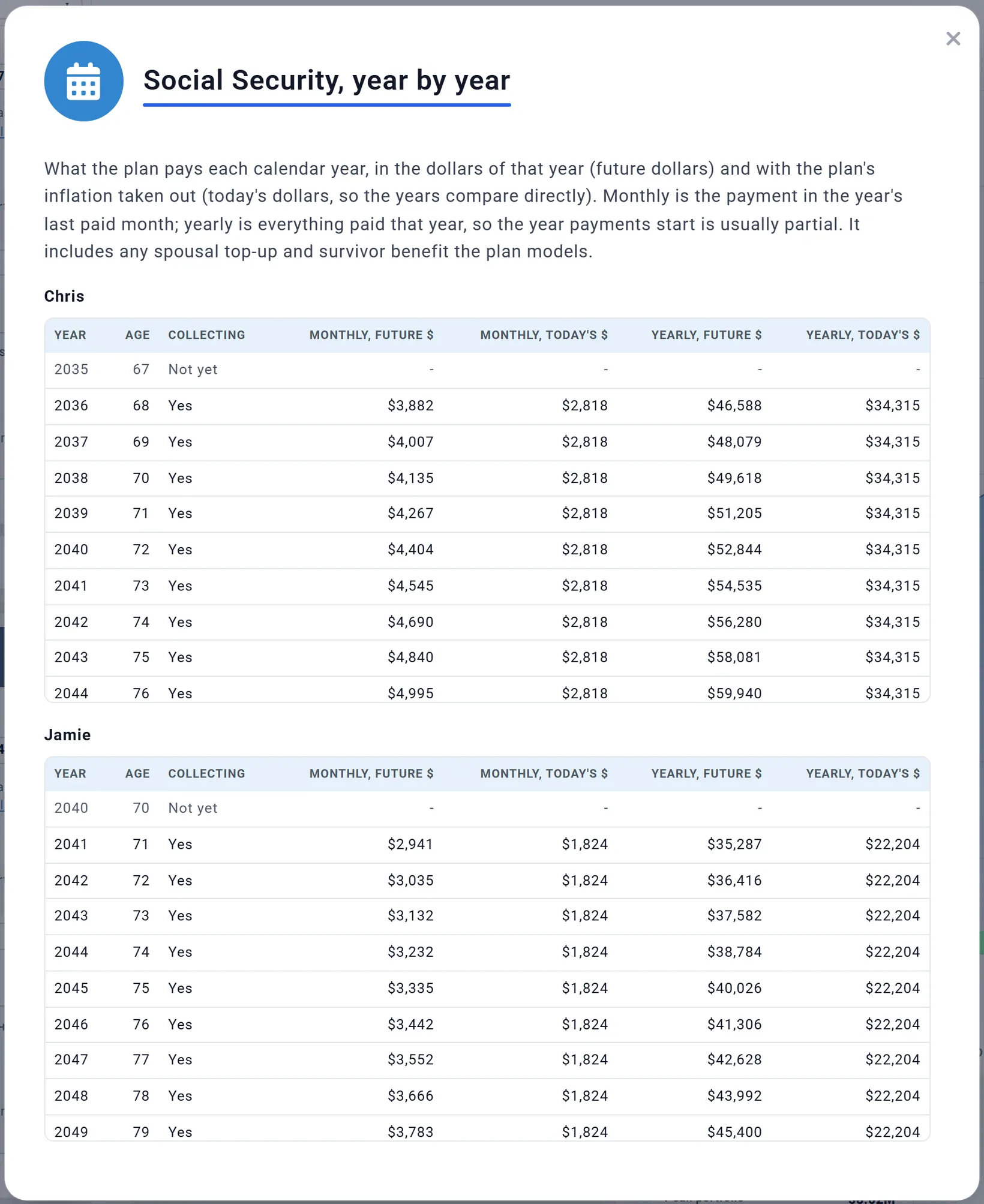
The result card names the first month and your exact age, the monthly and yearly amounts in today's dollars, and a tag such as "Full benefit", "+4.7% for waiting" or "-29.6% for claiming early". Its note gives the first payment in the dollars of that year: "about $3,882/mo in 2036" for Chris.
Pick the month with care
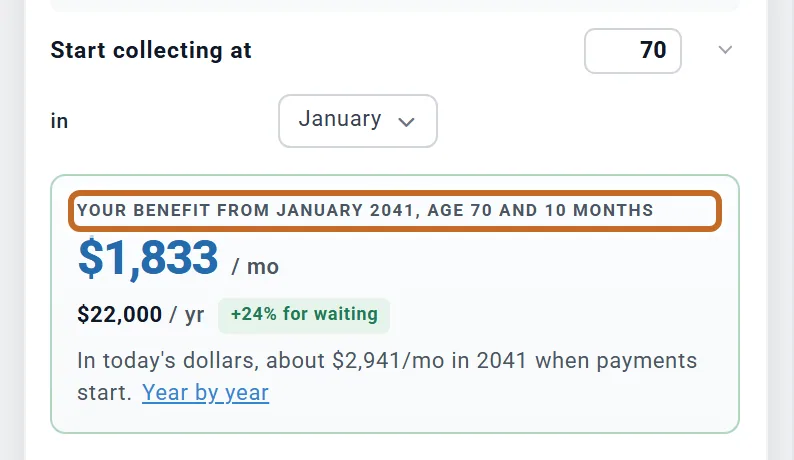
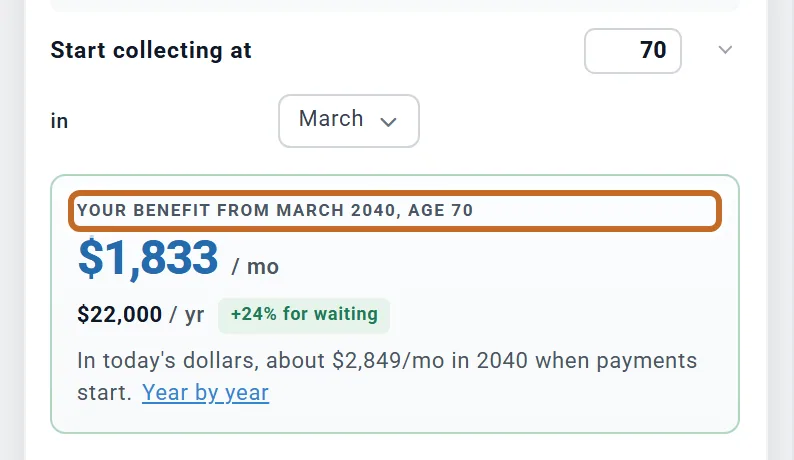
Because the month is a calendar month, "67 in January" means the January after your 67th birthday unless you were born in January. Chris, born in June, gets 7 more months of credits that way: $2,833 a month instead of $2,707 at "67 in June". At 70 a later month gains nothing, because credits stop at 70:
Compare ages, and see every year
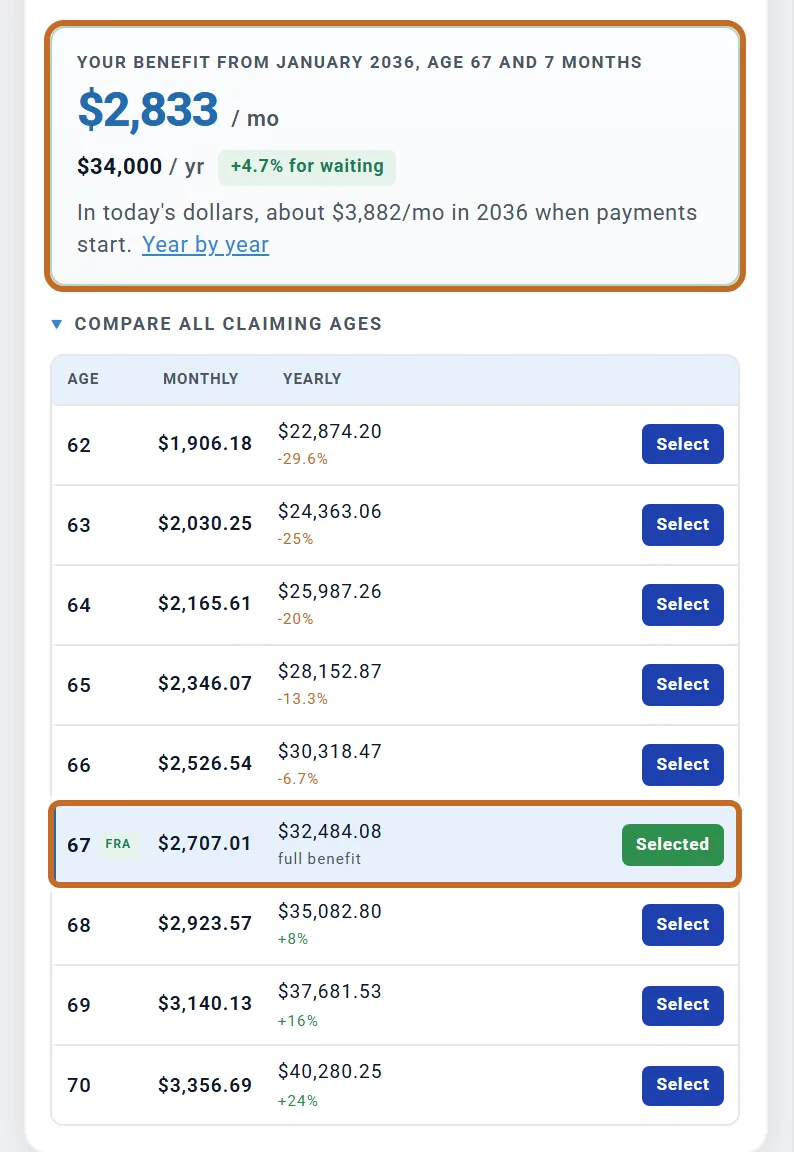
COMPARE ALL CLAIMING AGES, under the result, lists every age from 62 to 70 with the monthly and yearly amount and the change from your full benefit. "FRA" marks your full retirement age. Choose Select on a row to set Start collecting at to that age; the month stays as it is.
Each row is a claim in your birthday month. So when in is another month, the result above can differ from the row marked Selected: Chris's result is $2,833 (January), the 67 row $2,707.01 (June).
Year by year, in the result's note, opens "Social Security, year by year": one table for each of you, with what the plan pays each calendar year, monthly and yearly, in future dollars and in today's dollars. It includes any spousal top-up and survivor benefit. The year payments start is usually a partial year.
How your benefit grows
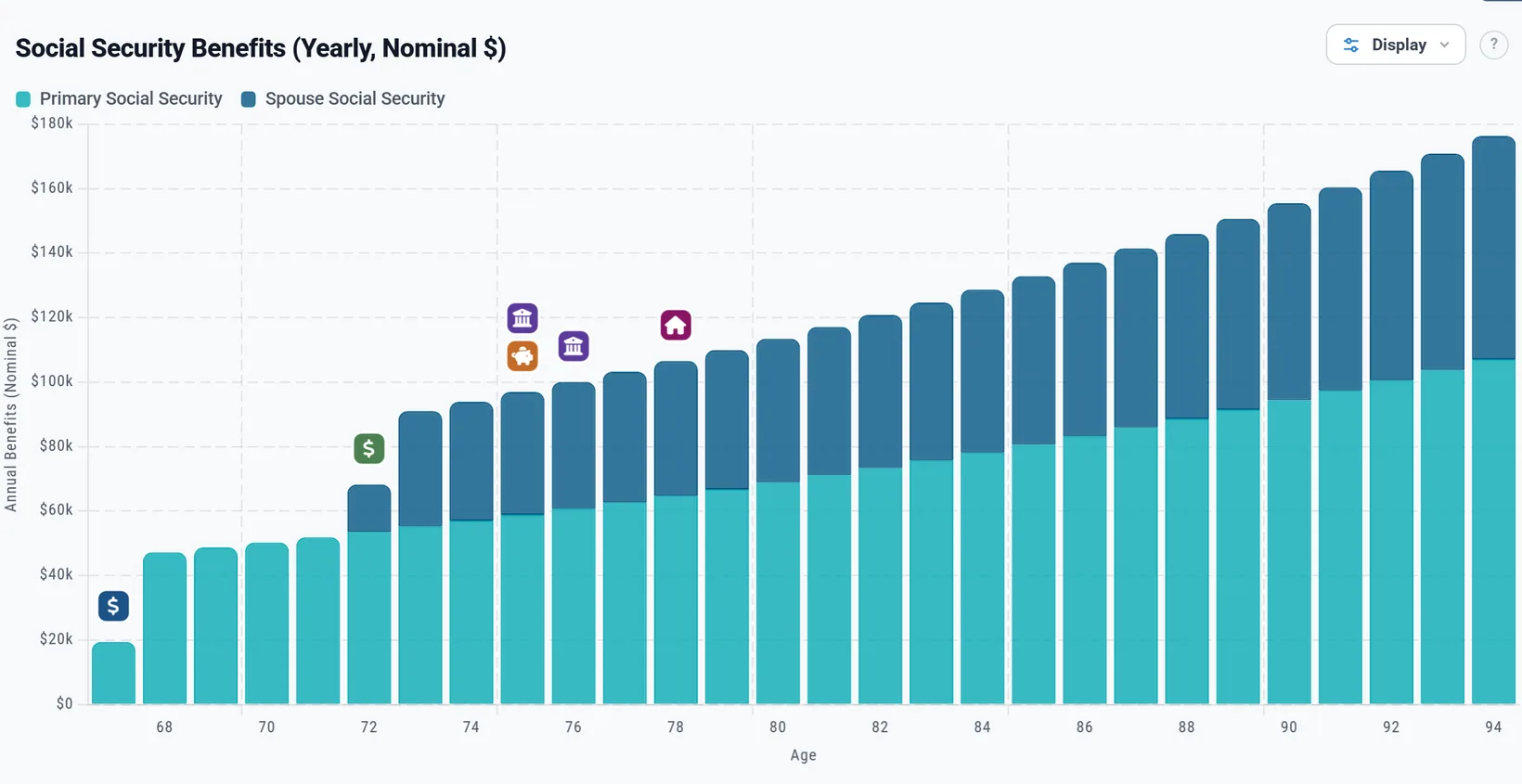
There is no cost-of-living setting in the box. Each January the plan raises your benefit by the plan's inflation over the past year, starting with the first January after today, including the years before you claim. So the amount you typed in today's dollars has grown by the time you start.
- Chris's plan uses 3.2% inflation. The $2,833 result (today's dollars) is a first payment of $3,882 in January 2036, after ten January raises.
- The inflation is your plan's: the Returns and Allocations box, section Inflation, Inflation %. On Chance of Success each market history uses its own inflation.
- In a year when prices fall, the benefit is not cut. It rises again once prices pass their old high.
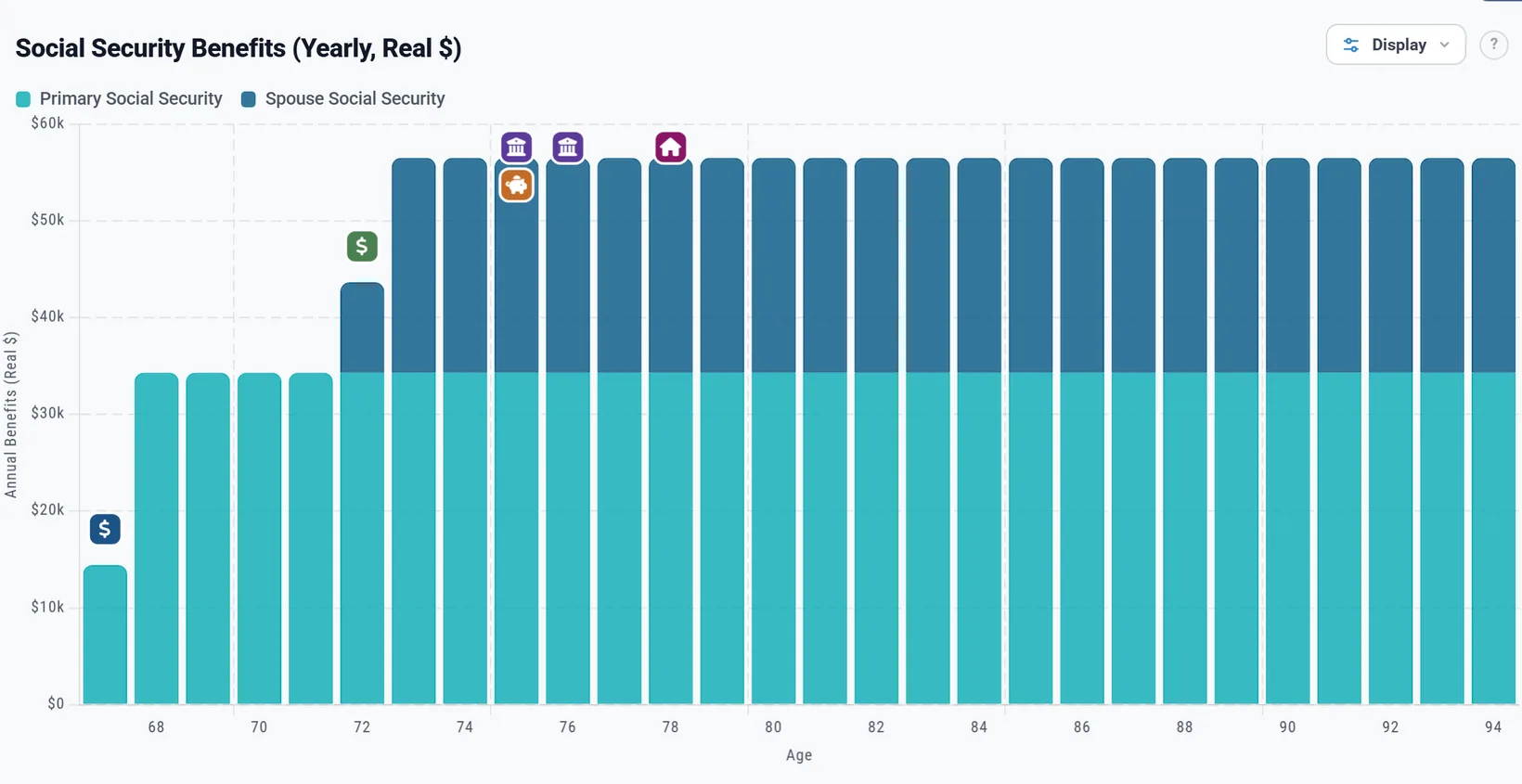
So in future dollars your Social Security climbs every year, and in today's dollars it stays level. That is the benefit keeping its buying power, not a missing raise. See Today's dollars and future dollars.
Planning for a benefit cut
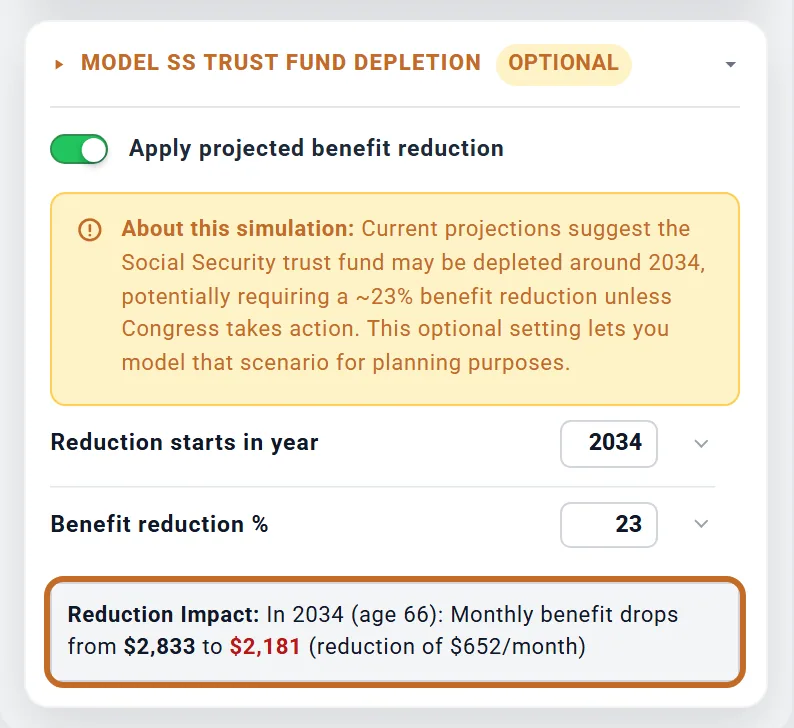
As the box's own note says, current projections suggest the Social Security trust fund may run short around 2034, which could mean a cut of about 23% unless Congress acts. To see your plan with lower benefits:
- In the box, open Model SS Trust Fund Depletion (marked Optional).
- Switch on Apply projected benefit reduction.
- Set Reduction starts in year (2030 to 2045, 2034 to start with) and Benefit reduction % (5 to 50, 23 to start with).
"Reduction Impact" shows the cut on your benefit in today's dollars. From January of that year, every payment to that person is cut by that share for the rest of the plan, including a claim that starts later. Chris claims in 2036, so every one of Chris's payments is 23% lower.
- The setting is per person: for a couple, switch it on in both boxes.
- A survivor benefit taken from a late spouse's record carries that spouse's cut.
Working while you collect
Before full retirement age, Social Security holds back $1 of benefits for every $2 you earn above a yearly limit ($24,480 in 2026) and pays it back later as a higher benefit. The planner does not model this: it pays the full benefit while you work.
Instead it warns you. When you collect in a calendar year before the year you reach full retirement age, and earn more than the limit (grown with your plan's inflation), a note appears under the result. The Summary tab lists it too, as "Working while collecting Social Security early".
Earnings counted: for each of you, your own salary in Employment Income plus any Retirement Income 1 or Retirement Income 2 you earn (the box's Who earns it; the Primary's unless set to your spouse).
Social Security for a couple
- Each of you has your own box, on your own birth date: your own full retirement age, claiming age and month.
- Spousal top-up. In Social Security (Spouse), open Spousal Benefit Coordination and switch on Apply the spousal benefit to whichever of you has the smaller benefit. It is off unless you switch it on, and needs both boxes on. See Social Security for two for how it is worked out.
- The top-up starts once both of you have claimed. It is smaller if the person receiving it is under their own full retirement age then.
- A spouse with no work record: switch on Social Security (Spouse) with an amount of $0, set their claiming age, and switch the top-up on. With Jamie at $0 claiming at 67, the plan pays Jamie half of Chris's full-retirement-age benefit, $1,354 a month in today's dollars, from January 2038, when the later of the two claims starts.
- When one of you dies, the survivor keeps the larger benefit, if your spouse has their own Plan End age. See If one of you dies first.
Taxes on your benefit
- Federal: up to 85% of your benefit can be taxed. The share depends on your other income plus half your benefit, and moves smoothly from 0% to 85%. The income thresholds are fixed in law and do not rise with inflation, so more of the benefit tends to be taxed over time.
- State: each state's own rule. Most do not tax it (California included); a few tax part of it under their own income or age tests.
- No payroll tax is charged on benefits, and the plan does not withhold tax from them: the tax is paid with the year's other taxes.
- For Medicare's IRMAA only the taxed part counts; for marketplace health insurance before 65 the whole benefit counts.
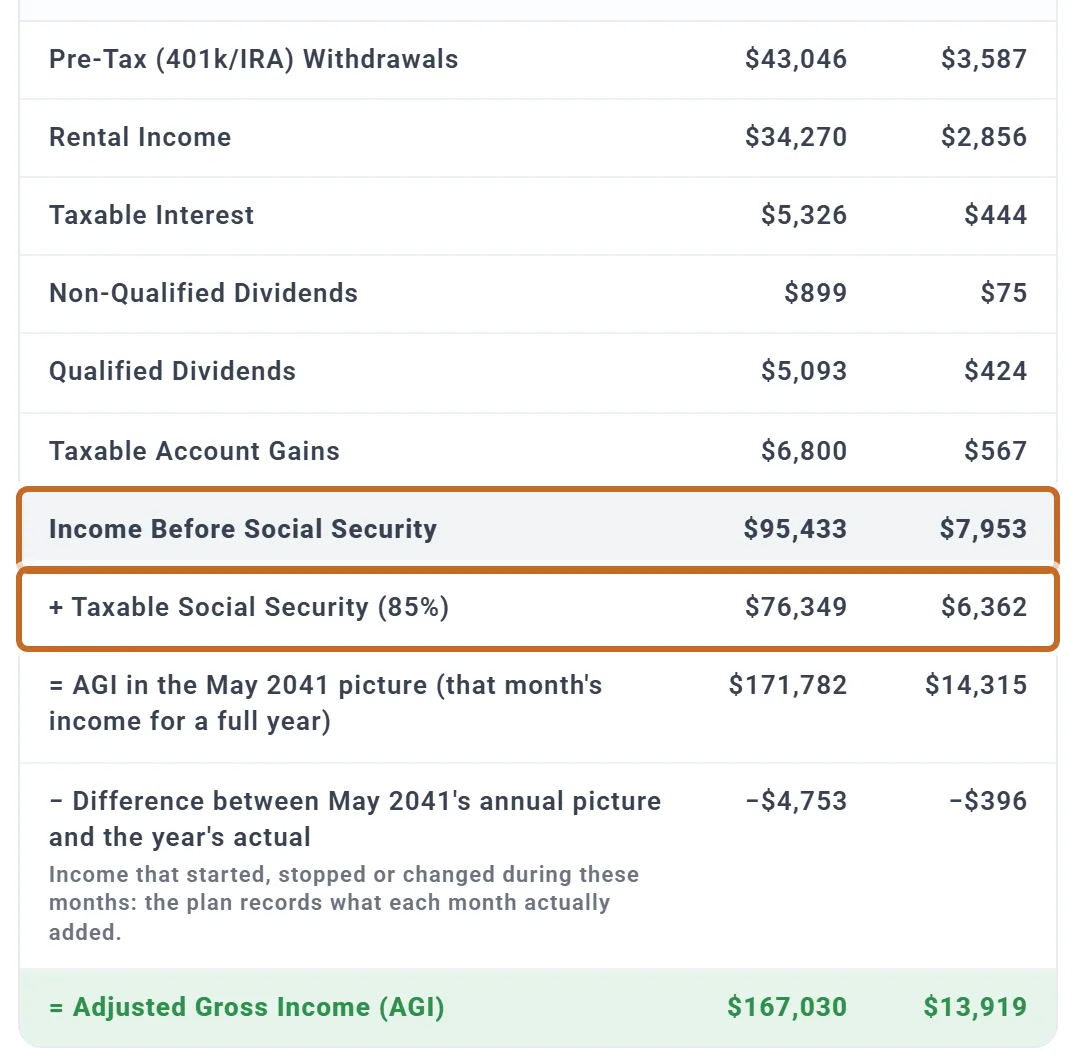
To see it for one year, open Tax Details (see Tax Details: how one year's tax was worked out). The Learning Library's When to Claim Social Security has a section on taxes.
See it in your results
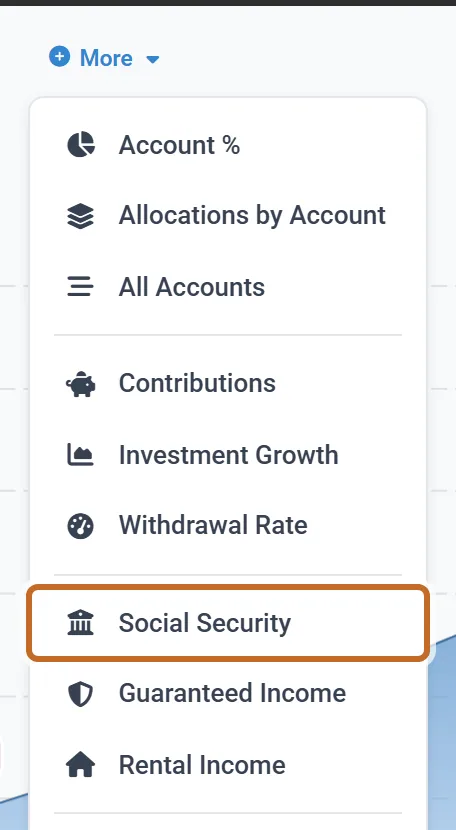
- The Social Security chart: on the Dashboard, More, then Social Security (listed while a Social Security box is on). It shows each of your benefits by year or month, in future or today's dollars (Reading your results). With the spousal top-up on, the spouse's bar splits into their own benefit and the top-up. Each claim is a marker on the charts.
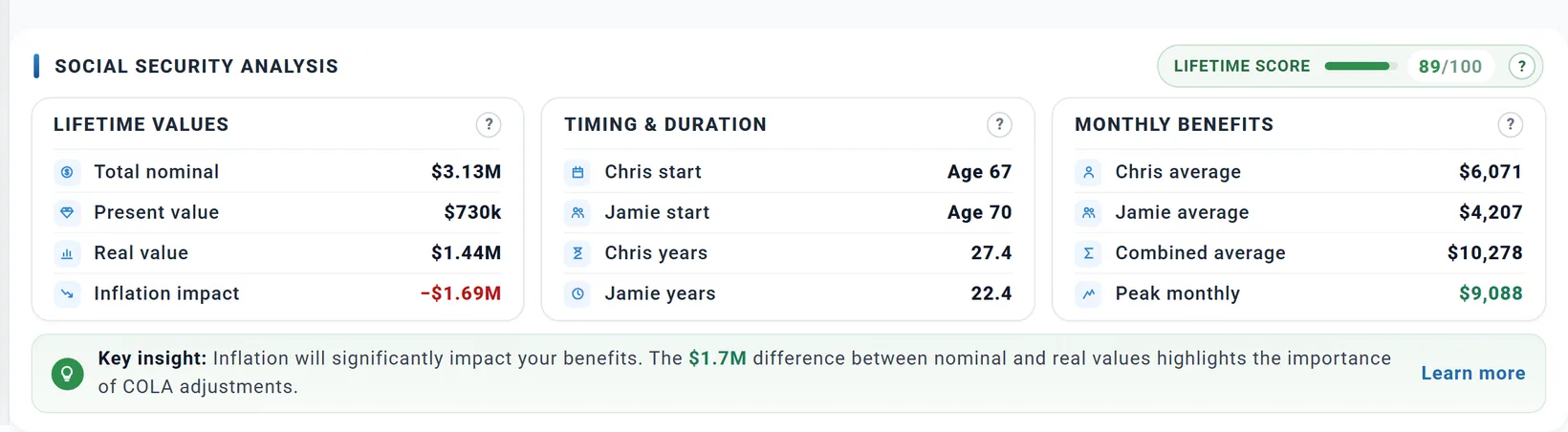
- Social Security Analysis, under the chart, sums up the benefits in your plan: lifetime totals, when each of you starts, monthly averages and a lifetime score. Every figure comes from your own plan; present value uses a fixed 3% discount.
- Summary: among the key assumptions, "Social Security starts" reads "Chris 67 · Jamie 70" for Chris and Jamie, and Upcoming milestones can list each claim.
Compare claiming ages on your whole plan
The box's table compares benefits; the What If chart compares what each claiming age does to your savings.
- On the Dashboard, choose the What If chart.
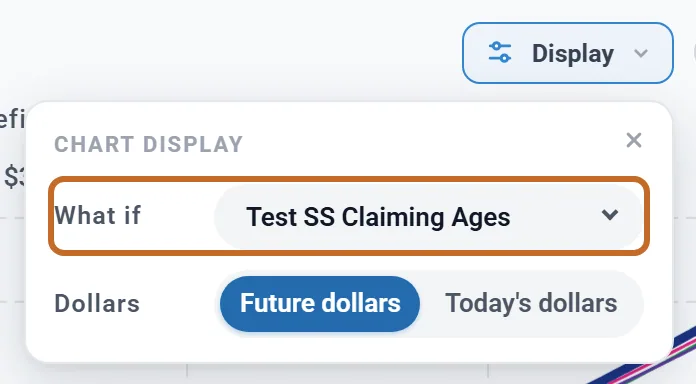
- Above the chart (in a narrower window, under Display), set What if to Test SS Claiming Ages.
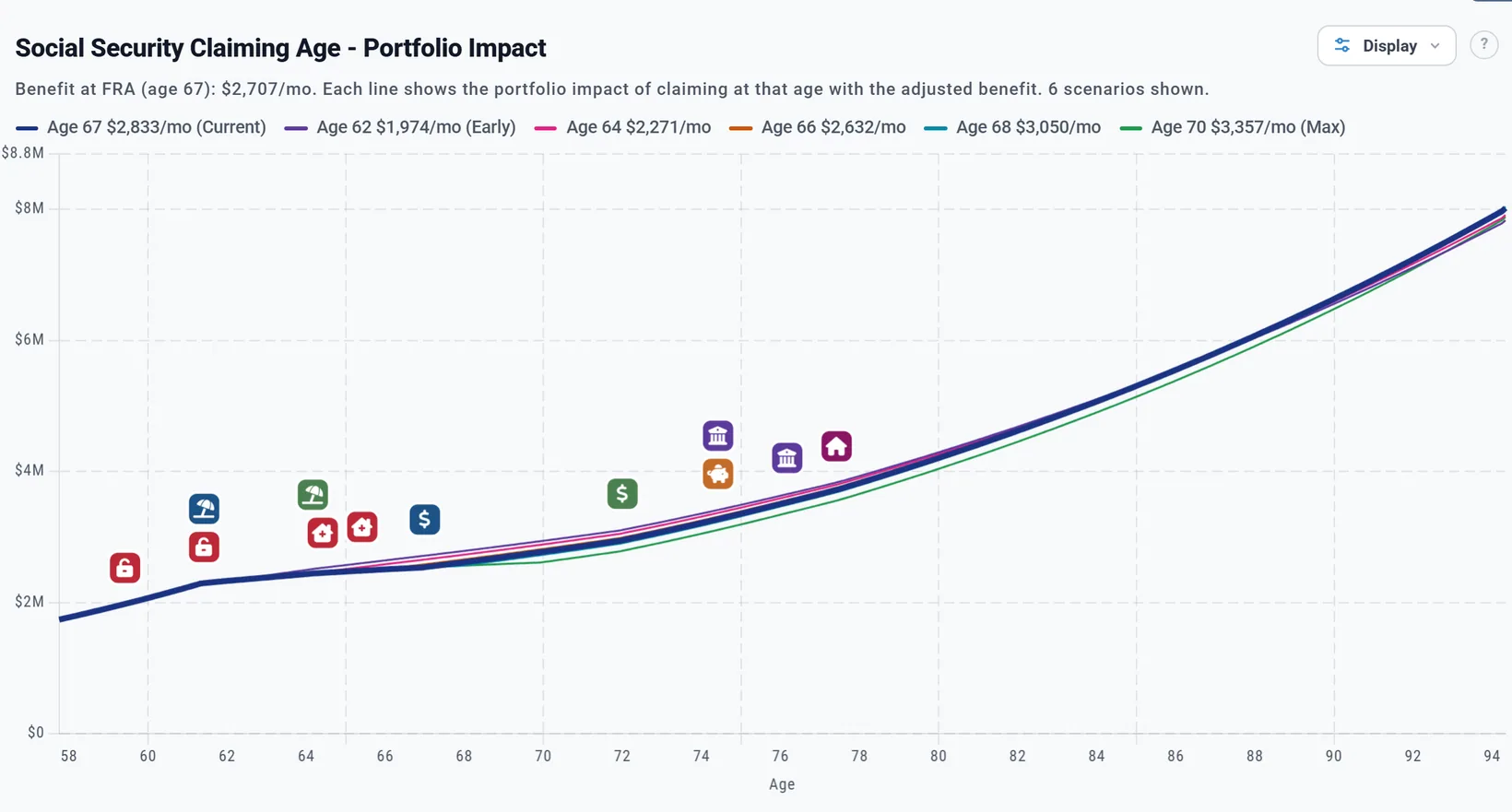
It runs your plan with the Primary claiming at 62, 64, 66, 67, 68 and 70 (leaving out ages already passed), in the month you chose, and draws your savings for each. The legend gives each age's monthly benefit in today's dollars. Only the Primary's claim changes.
- The Learning Library article When to Claim Social Security explains your full retirement age, the range from 62 to 70, break-even ages and the trust fund, and can apply a claiming age to your plan (the Primary's only).
- The Coach reminds you as your claiming age comes near, once a year to check your benefit amount, and when delaying may be worth a look.
Outside the US: government pensions
With your profile's Location set to another country, the Add box offers that country's government pension in place of Social Security, one box for each of you. Changing the country switches Social Security off and the government pension on. Each person's pension runs on their own age. There is no spousal top-up and no survivor benefit outside the US: when one of you dies, their payments stop.
Unlike the US box, these boxes have a tick, "Grow this amount with inflation before it starts" ("these amounts" in Canada), ticked for a new box. Leave it ticked when you enter today's amount from a statement or forecast.
Canada: CPP and OAS Canada
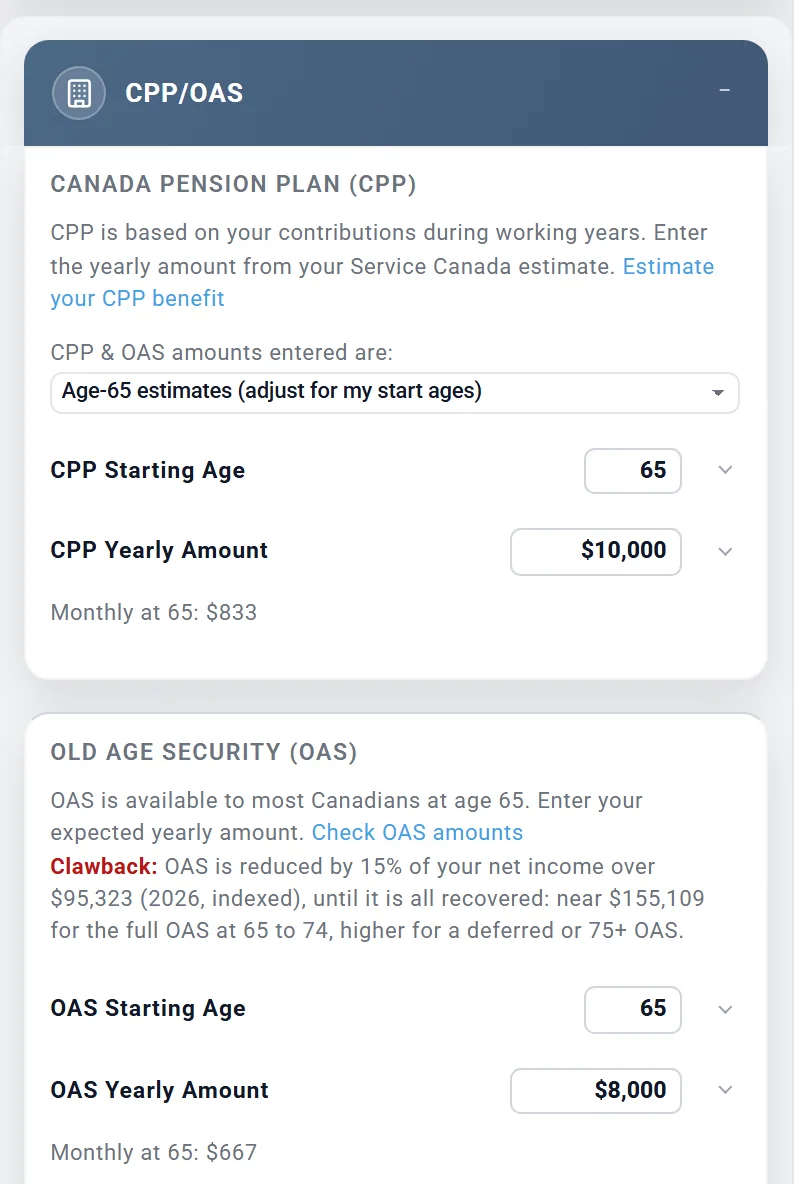
- The box is called CPP/OAS, with sections Canada Pension Plan (CPP) and Old Age Security (OAS). Enter each yearly amount from your Service Canada estimate.
- CPP & OAS amounts entered are: Age-65 estimates (adjust for my start ages) (the choice for a new box): the plan adjusts them for your start ages. Or What I will receive at my chosen start ages: paid as you type them.
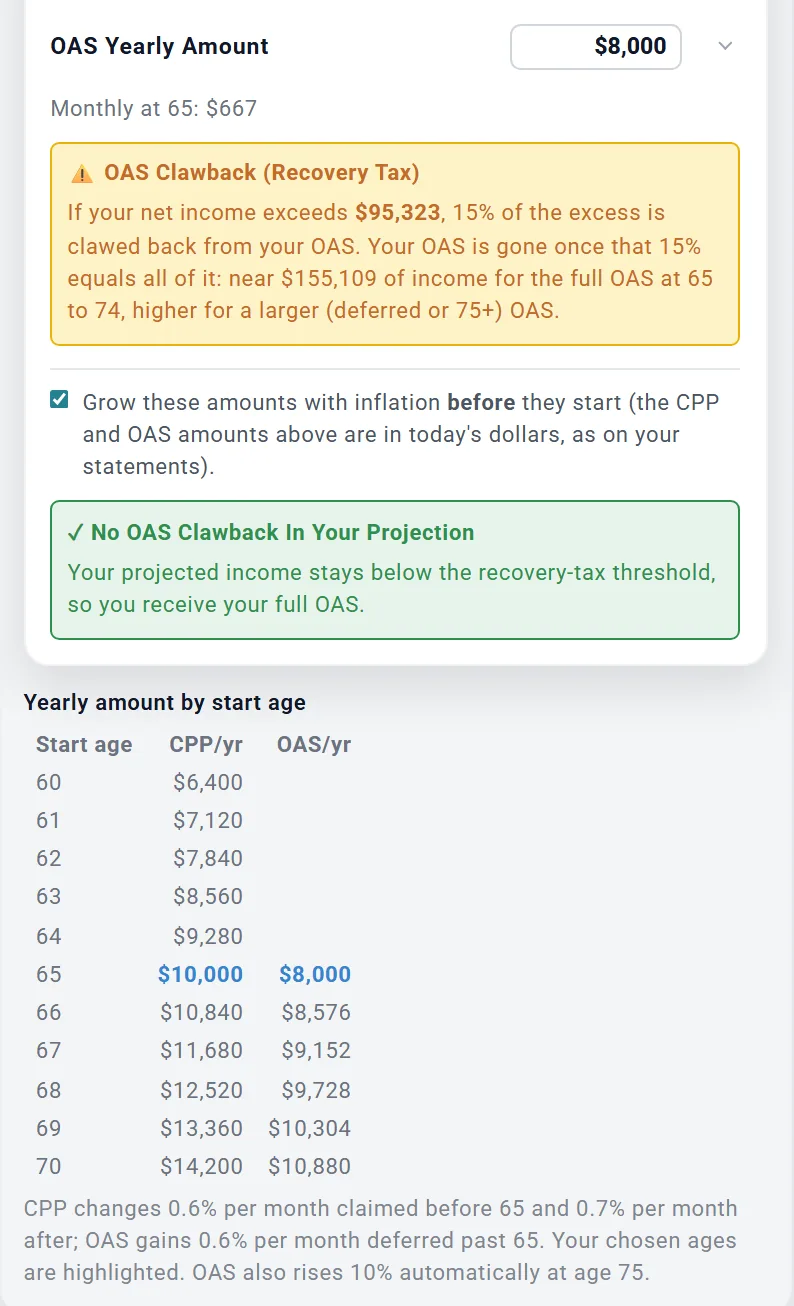
- CPP Starting Age 60 to 70 (72 in Quebec): 0.6% less for each month before 65, 0.7% more for each month after. OAS Starting Age 65 to 70: 0.6% more for each month after 65. The table "Yearly amount by start age" shows them. OAS also rises 10% once you are 75.
- Payments start the month after your birthday in the start-age year (there is no month to pick). CPP rises each January, OAS each quarter, with your plan's inflation.
- The OAS recovery tax (clawback) is worked out for each of you, and the box shows whether your plan meets it. The Guaranteed Income Supplement is added by itself for anyone 65 or older on OAS whose income is low enough; it has no setting.
- CPP and OAS are taxed as their owner's income and are not part of pension income splitting.
UK State Pension UK
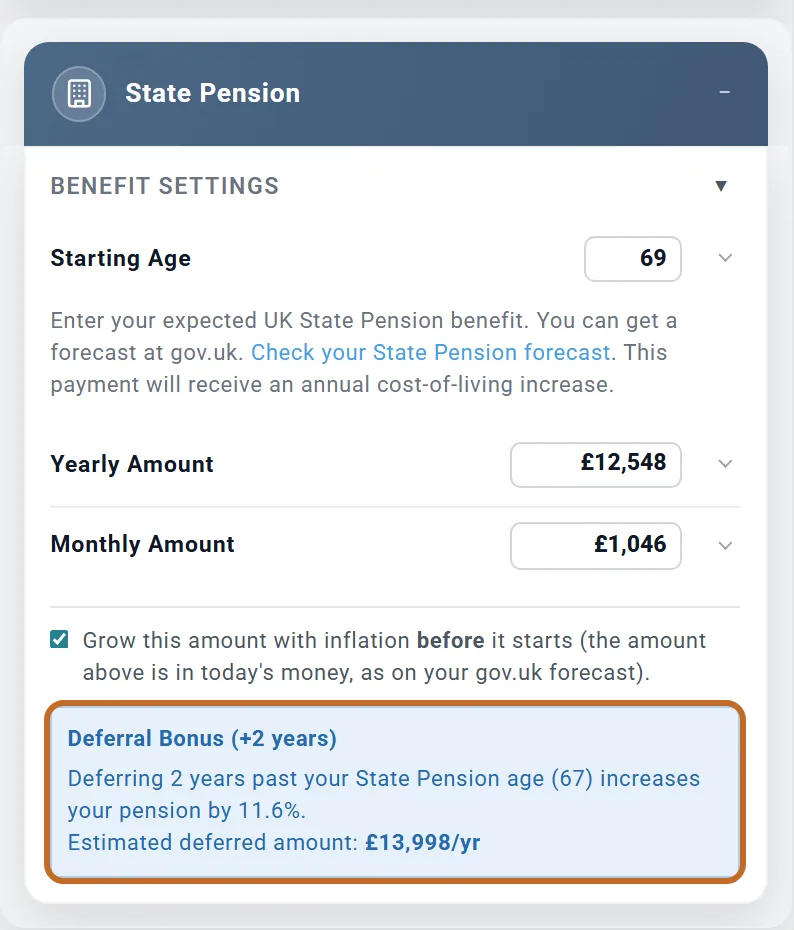
- The box is State Pension, section Benefit Settings: Starting Age and Yearly Amount (or Monthly Amount). Enter the amount from your State Pension forecast at gov.uk; there is no National Insurance record to enter.
- You cannot start before your State Pension age, which the planner works out from your birth date (67 for someone born in 1968). Payments start in your birthday month at the age you choose.
- Each year you put it off past State Pension age adds about 5.8% (1% for every 9 weeks); the box shows the "Deferral Bonus".
- Each April it rises by the triple lock: the highest of inflation, earnings growth and 2.5%. Earnings growth is a fixed 3.5% a year, so with inflation under 3.5% the State Pension grows 3.5% a year and slowly gains in today's money.
- It is taxed as income.
Australia: Age Pension Australia
- The box is Age Pension. From the month the Primary turns 67 the plan works out the Age Pension itself, with the Services Australia income and assets tests (on your combined assets, at the single-person rates and limits of September 2025, which are not raised with inflation), and works it out again each January. The amount you typed is never paid. A plan with large savings may get none.
- Age Pension (Spouse) is not means-tested: it is paid as you enter it and rises each year with the cost of living.
- It is taxed as income.
Other countries
In Germany, the Netherlands, Ireland and other countries the box is Government Pension: Starting Age (60 to 75) and the yearly amount you expect, paid as entered and raised each January. The planner does not work out your entitlement there. In Germany the statutory taxable share applies; in the Netherlands and Ireland it is taxed in full.
What the planner does not model
- The earnings test (you get a warning instead; see Working while you collect).
- A lower benefit because you stop working before you claim: the planner uses the amount you enter.
- Claiming strategies beyond one claim each: no restricted application or file-and-suspend, and no choice of when a survivor claims (the survivor benefit is an estimate).
- Benefits from a former spouse, and benefits for children.
- For disability benefits (SSDI): the family maximum that can lower a spouse's or child's benefit, and suspending the benefit at full retirement age to earn delayed credits.
- Medicare premiums taken out of your payment: the planner charges Medicare separately.
- Tax withheld from your benefit.
- The rule that someone born on January 1 uses the previous year's full retirement age.
- Outside the US: spousal and survivor government benefits, a UK National Insurance record, and a different earnings-growth figure for the UK triple lock.
For the full list of what the planner includes and leaves out, see the Learning Library article What ReadyAimRetire Models.