


 Continue with Google
How saving works in the planner
Getting Started showed the basics. This page covers the rest: your employer's money, how much you need to save, the Contribution Planner, contribution limits, and when saving stops.
Two boxes share the job:
- Retirement Contributions holds what each of you saves and which accounts it goes into. It is always in the settings panel, below Retirement Spending.
- Employment Income holds the facts about a job: the salary, when it stops, what your employer adds and the Roth catch-up rule. You switch it on in the Add box, one for each of you. Planner+ See Where to enter your income.
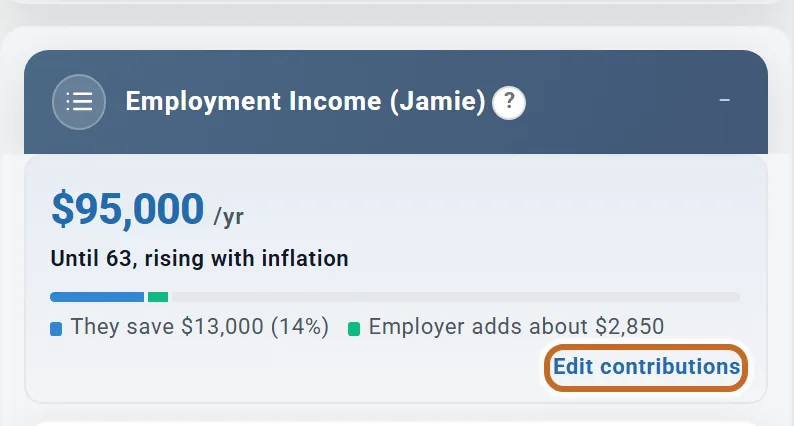
With Employment Income on, the top of that box shows what the plan saves from that pay and what the employer adds. Edit contributions opens Retirement Contributions on that person.
- Without Employment Income the planner does not model your pay. The amounts you save simply arrive in your accounts each month: they change no tax and nothing checks that you can afford them.
- With it on, your saving comes out of the pay the plan models, pre-tax saving lowers your income tax, and an employer match is added.
- Every amount is a yearly figure. It lands a twelfth each month, unless you choose January (see Set what you save).
For the ideas behind it (which accounts fill first, what stops saving, and the tax effect of saving before tax), read the Learning Library article How Contributions Work.
Set what you save (Simple)
A new plan starts in Simple, and most plans can stay there. You set everything in the box:
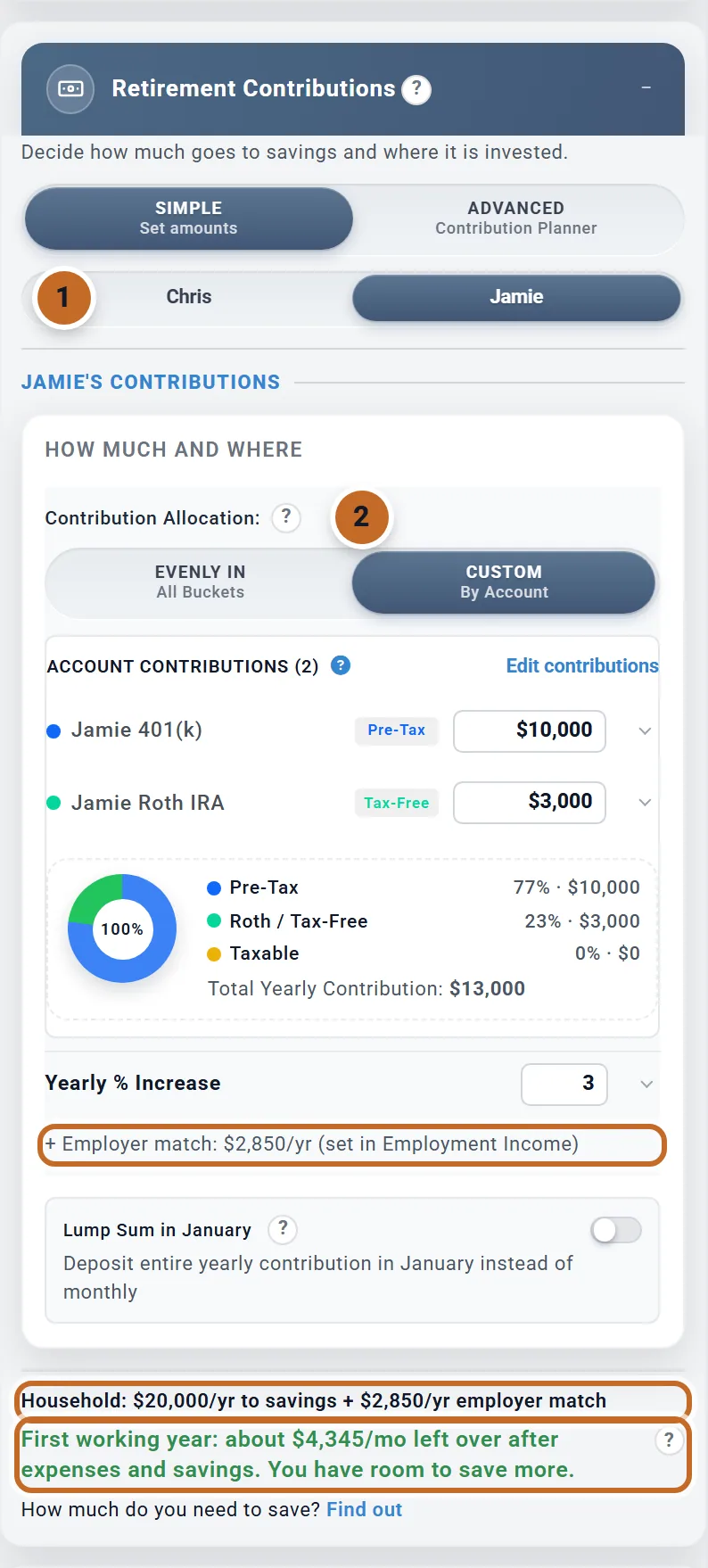
- Planning as a couple? The switch with your two names picks whose contributions the box shows.
- Under Contribution Allocation:, choose Evenly In to enter one Yearly Contribution, or Custom to type an amount for each account.
- Evenly In splits the amount evenly over the kinds of account that person holds (pre-tax, Roth, taxable), not always in thirds. Jamie has no taxable account, so it would split in two.
- Custom lists that person's accounts. The HSA is not one of them: HSA contributions are set in the HSA box (see Health care costs). Inherited accounts take no new money.
- Yearly % Increase raises the amount once every 12 months, counted from this month. Left at 0, the amount stays the same number of dollars every year, so it buys a little less each year as prices rise.
- Lump Sum in January puts the whole year's amount in each January. With the plan starting in October, Chris's first $7,000 would land in January 2027. In the year you retire, January still gets a full year's amount: Chris retires in June 2030, and January 2030 gets $7,649.
The lines at the bottom add up the household. With Employment Income on, they include the employer match and a take-home check (see Saving from your pay).
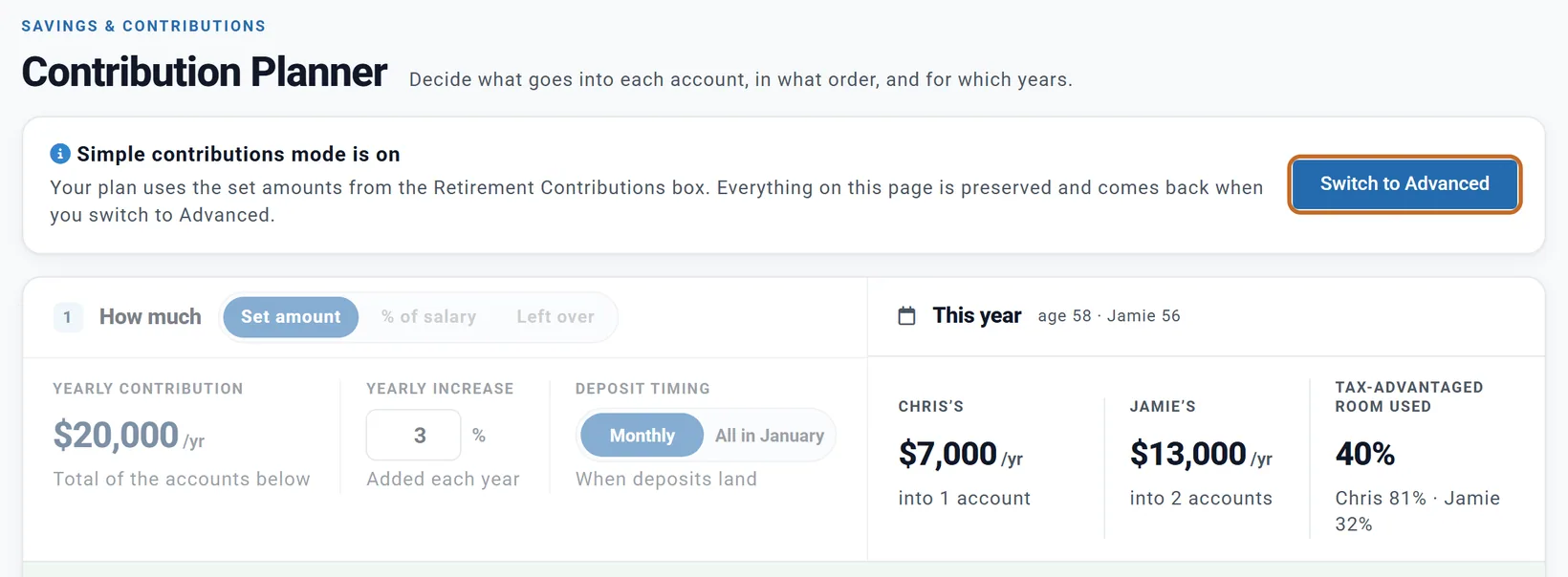
Edit contributions in the box opens the Contribution Planner on that person. While the plan is in Simple, the planner only shows your amounts: to edit there, switch to Advanced.
Your employer's money
Your employer's contribution is set in that person's Employment Income box, under Employer contribution. Planner+
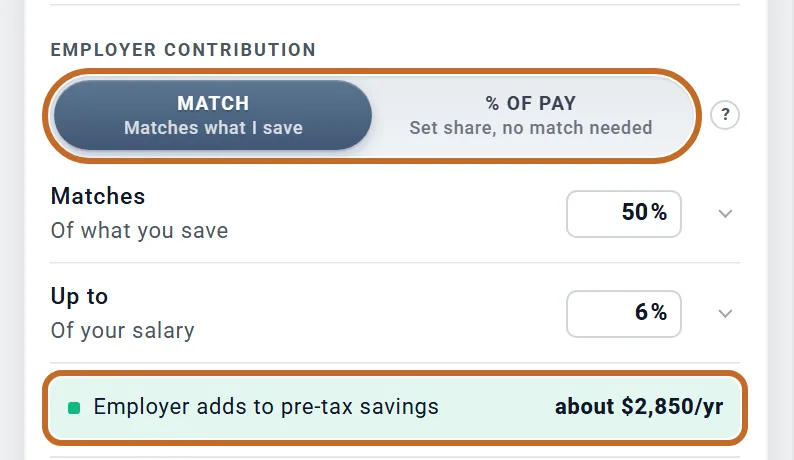
- Match: your employer adds a share of what you save. Matches is the share (50% for Jamie) and Up to the most of your salary it matches (6%).
- % of pay: your employer puts in a set share of your salary (Contributes), whether or not you save.
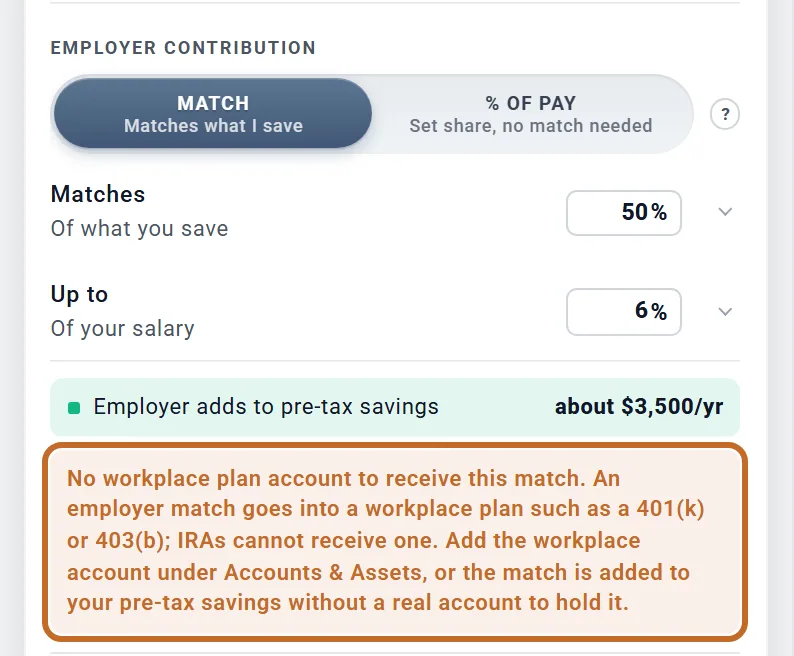
The line under it shows what that adds, here about $2,850 a year (50% of the first 6% of $95,000). If you save nothing from that pay, it says how much to save to get the whole match, with Set contributions.
- Where it goes: employer money always goes to that person's pre-tax savings, spread over their pre-tax accounts. You cannot point it at one account.
- What is matched: the money you put into your workplace plan (a 401(k), 403(b), 457(b) and the like). An IRA or brokerage account earns no match: with $2,000 in Jamie's 401(k) and $11,000 in the Roth IRA, the match is $1,000.
- A bonus kept in Other Income as "Wages or bonus" does not raise the match (see Bonuses and stock).
- Limits: employer money does not use up your own $24,500 limit. Your money and your employer's together stop at the overall limit for the year ($72,000 in 2026, or your pay if less, plus any catch-up); anything above is left out.
- Employer money is yours as soon as it lands: vesting is not modelled.
A match needs a workplace account to land in. Chris has only IRAs, so a match set for Chris shows a warning, and the plan works the match out on everything Chris saves and adds it to Chris's pre-tax savings without a real account to hold it. Add the 401(k) on Accounts & Assets first (see Accounts, your home and loans).
Saving from your pay: taxes and take-home pay
These need Employment Income on. Without it the plan has no pay to work from.
- Pre-tax saving lowers your income tax, not your Social Security and Medicare tax. Saving to a Roth, a taxable account or cash does not lower it. Jamie's $10,000 in the 401(k) instead of the Roth IRA lowers Chris and Jamie's federal and California income tax by about $3,200 in the first year; their payroll tax stays the same.
- The take-home check sits at the bottom of Retirement Contributions: "First working year: about $4,345/mo left over after expenses and savings. You have room to save more." It compares what your household takes home in its first twelve months of pay (pay plus any pensions, Social Security, rent or other income, after tax) with your spending and your savings. Its "?" opens Take-Home Pay Check.
- A shortfall never lowers your savings. If expenses and savings are more than what you take home, your contributions are still made as you set them. With Fund shortfalls from savings on (in the Primary's Employment Income box, on by default) the gap is drawn from cash, then investments. With it off, your balances are left alone and the Coach warns you. If the Primary has already retired while the other person still works, those months are retirement months: what is left over is added to cash, and a gap is paid the way any retirement month's is.
- A working-year gap is drawn from cash first, then taxable accounts, then pre-tax accounts, with Roth money last, whatever your withdrawal strategy.
Spending in your working years is covered in Spending and your budget.
How much do I need to save?
At the bottom of Retirement Contributions, How much do you need to save? Find out opens How much do I need to save?. The same window opens from the Contribution Planner. It works in Simple and Advanced.
- Retire at: the Primary's retirement age to test, from 3 years before your plan's age to 3 years after. Your spouse keeps their own.
- Plan lasts to: the end of your plan.
- Cushion: how much must still be in your accounts at the end: No cushion, 1 year of retirement spending (the default) or 2 years.
Chris and Jamie's plan is on track: they save $1,667 a month, and would still reach 62 with a year's cushion if they stopped saving today. To show a plan that falls short, we raised their spending to $12,000 a month for these pictures.
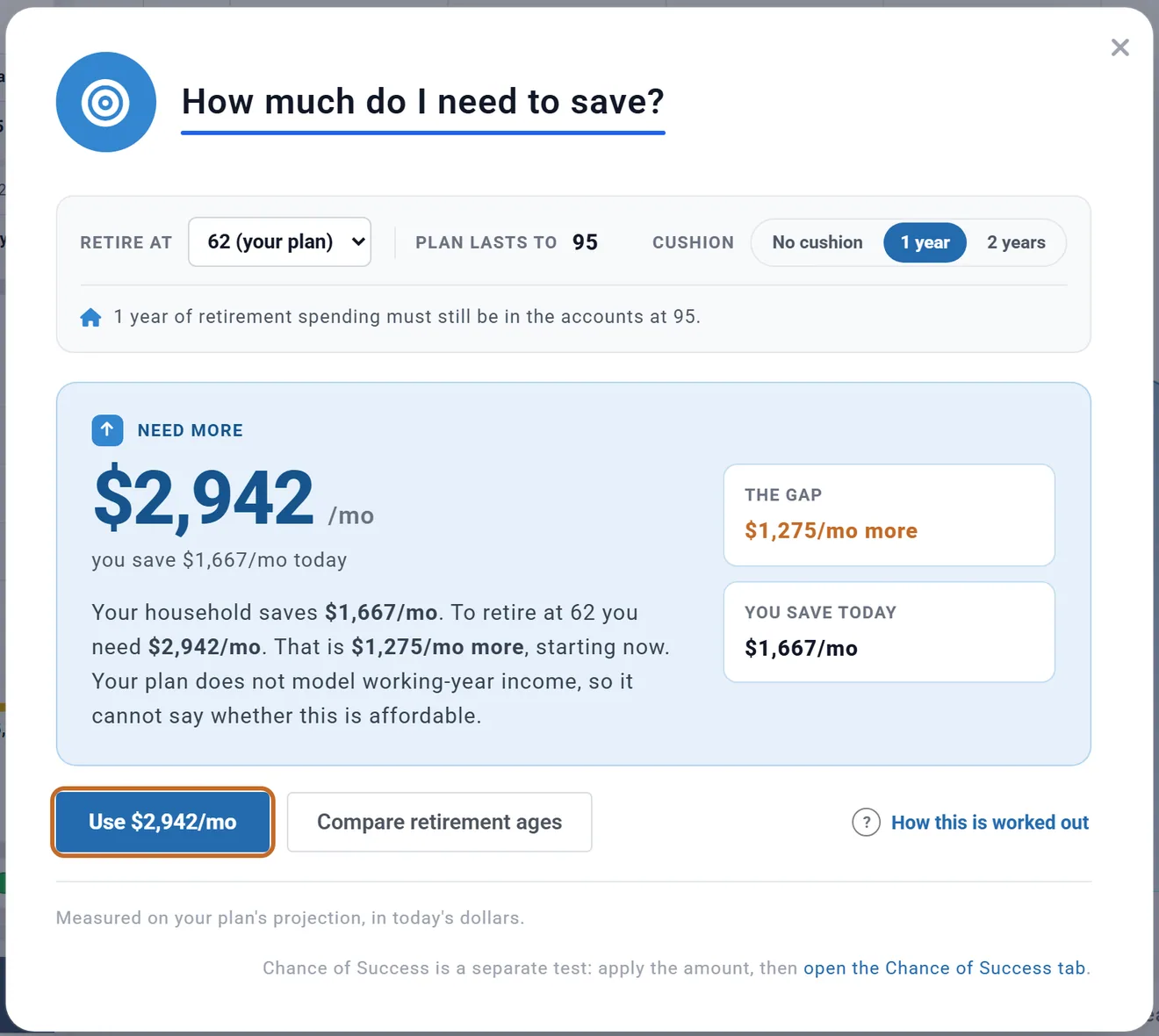
- How it works: the planner runs your plan about a dozen times, adding saving the way you save now (to each account in proportion to what it gets), until the money lasts to the end of your plan with the cushion left. The answer is rounded up to the next $25 a month that works.
- It is your plan's projection, in today's dollars, not Chance of Success. After you use the amount, check the Chance of Success tab too.
- The Use button (Use $2,942/mo here) writes the new amounts into Retirement Contributions, account by account: Chris's IRA went from $7,000 to $12,355 a year, Jamie's 401(k) from $10,000 to $17,650 and the Roth IRA from $3,000 to $5,295. It never changes your retirement age or how you fund your saving.
- A different Retire at is a what-if only. To retire at that age, change it in your profile.
- With Employment Income on, the answer also says what share of your pay it is.
- With Left over there is no amount to set, so the answer is the gap: cut your monthly expenses by that much, or add that much income. Open the Budget takes you to your budget.
- If your projection runs out of money, the Summary's verdict repeats a current answer: how much more a month would carry the plan to its end.
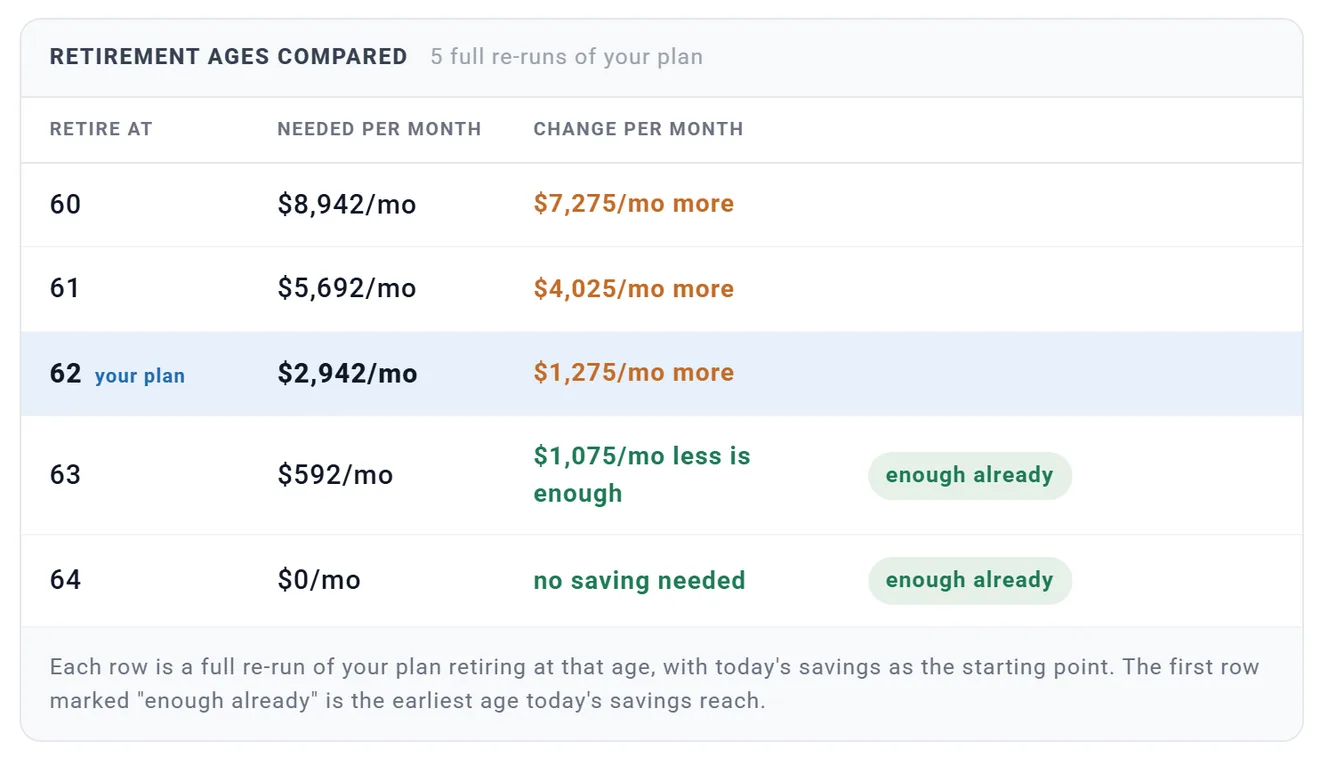
Compare retirement ages runs your plan again for two years either side of your plan's age. The first row marked "enough already" is the earliest age today's saving reaches: here, 63.
The box then shows the answer in one line ("Retire at 62: save about $1,275/mo more. Details") until you change the plan. After any change, or a reload, it goes back to Find out.
The Contribution Planner (Advanced)
Choose Advanced on the Retirement Contributions switch for amounts that change by year, filling an account to its limit, saving a share of pay, and the order your accounts fill in. The box then shows a summary and Open Contribution Planner. You also reach the planner from Contributions in the left menu.
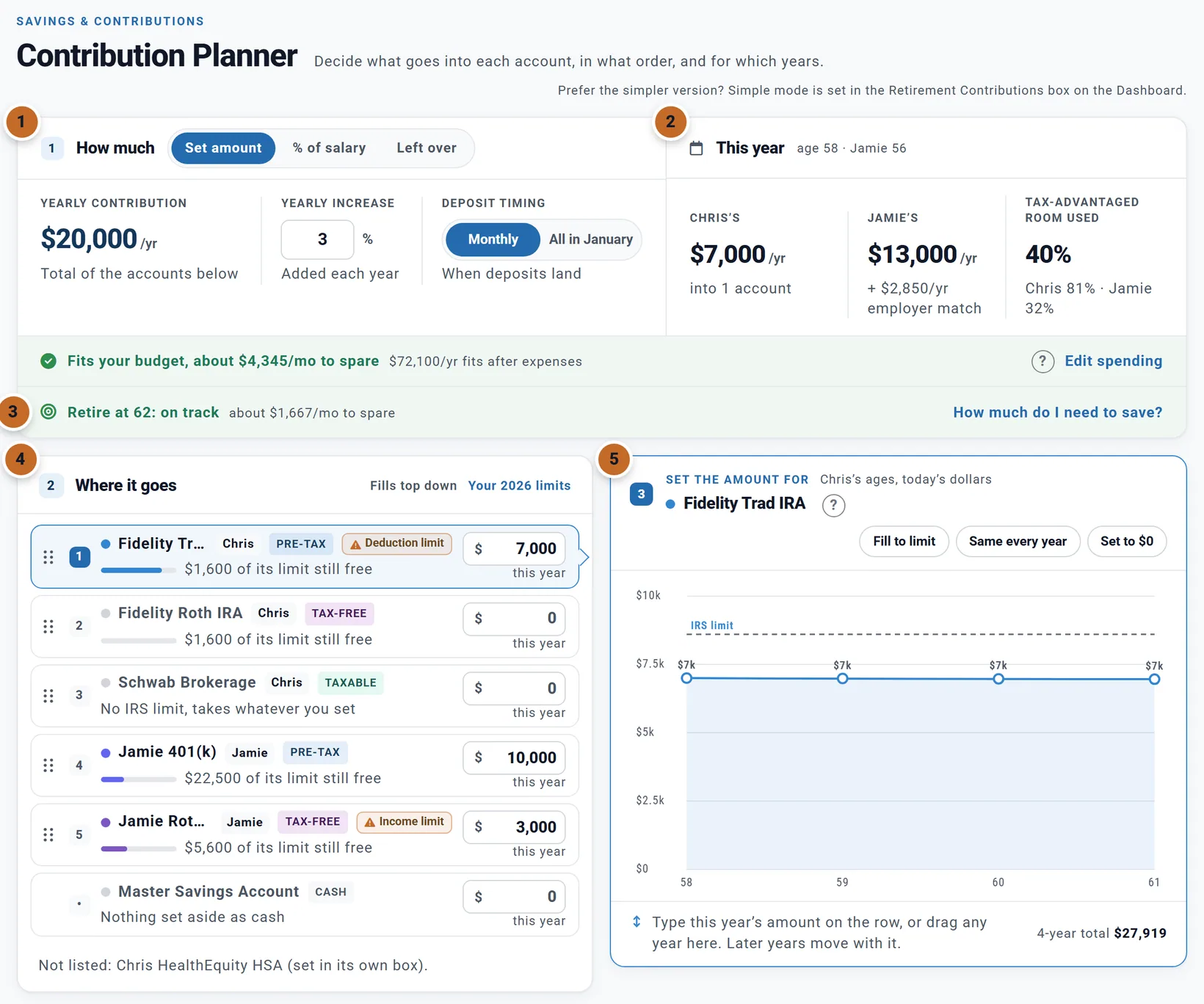
- How much: Set amount, % of salary or Left over, the yearly increase, and Monthly or All in January. In Advanced the yearly increase and deposit timing are one setting for both of you.
- This year: what each of you puts in this year, and how much of your tax-advantaged room that uses.
- The footer: the take-home check and How much do I need to save?
- Where it goes: both people's accounts in one list, filled from the top down. When two accounts share one IRS limit, the higher one takes its room first. Each row shows its owner, its kind, a bar against its limit, and the amount this year. Cash is always last. The HSA is not listed (it is set in its own box).
- Set the amount for: click a row to see its amount for every working year. See Amounts that change by year.
There is no Apply button: each change is part of your plan at once. Changing the order (drag a row by its handle) needs Planner+. Planner+
Going between Simple and Advanced
- Both keep their settings. Switch back to Simple and the plan uses the amounts in the box again; what you set on the planner comes back when you choose Advanced again.
- While the plan is in Simple, the planner says "Simple contributions mode is on" and its controls are dimmed, for everyone. Switch to Advanced turns them on.
- An Evenly In amount becomes an amount for each account the first time you choose Advanced, putting the same money in the same places.
- Advanced applies the contribution limits and Simple does not, so the same amounts can project differently. See Money above a limit.
Amounts that change by year, or fill to the limit
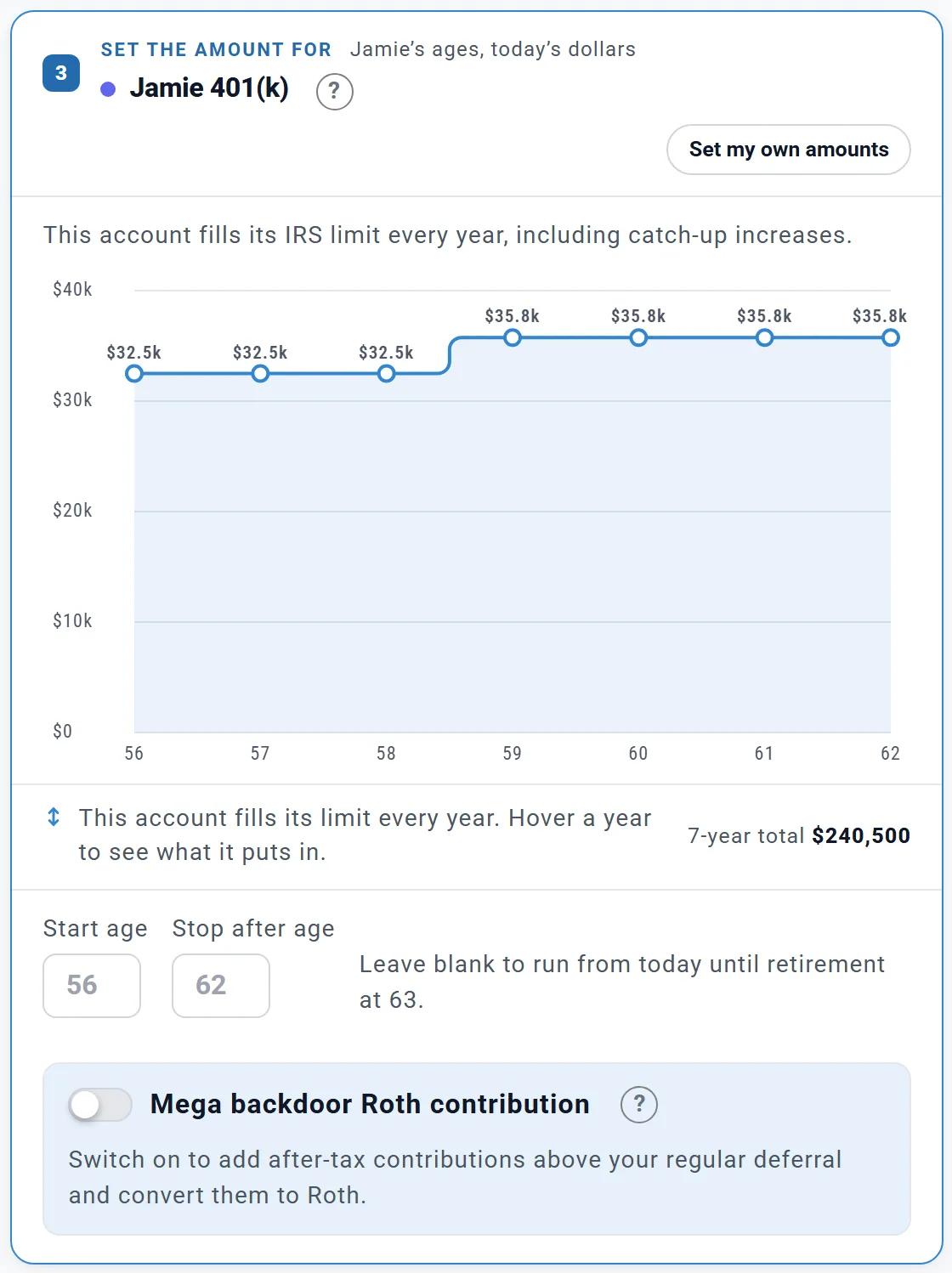
Click an account in Where it goes. The graph shows its amount for every working year, in today's dollars, on its owner's ages. Planner+
- Drag a year up or down; later years move with it. Or click the graph and use the arrow keys: left and right choose a year, up and down change it.
- Fill to limit: fill the account's IRS limit every year, catch-ups included.
- Same every year: keep this year's amount, rising with inflation.
- Set to $0: stop paying into the account.
On Fill to limit, Jamie's 401(k) takes $32,500 a year at 56 to 58, then $35,750 from 59, the plan year in which Jamie turns 60 and the larger catch-up starts. The graph's total for the 7 years is $240,500. Start age and Stop after age limit it to some years; left blank, it runs until Jamie retires. Set my own amounts goes back to amounts you set.
Amounts set year by year are in today's dollars and rise with inflation. The plan's yearly increase does not apply to that account.
Amounts by year, Fill to limit and age ranges work for US and Canadian plans. Elsewhere the planner says so, and your amounts apply for every working year.
Contribution limits and catch-ups US
The 2026 limits the planner uses, per person:
| Account | Limit | Catch-up |
|---|---|---|
| 401(k), 403(b), TSP (yours, traditional and Roth together) | $24,500 | +$8,000 from 50; +$11,250 instead at 60 to 63 |
| A governmental 457(b) | Its own $24,500 | As a 401(k) |
| IRA (traditional and Roth together) | $7,500 | +$1,100 from 50 |
| Everything in a workplace plan (yours, your employer's, after-tax) | $72,000, or your pay if less | Catch-ups on top |
- There is nothing to enter for a catch-up. The planner adds it from each person's age. In Advanced, a row's room already includes it and Fill to limit grows at 50 and at 60 by itself. In Simple, type the total you plan to save.
- Limits are per calendar year, and a catch-up counts for the whole calendar year in which you turn 50 (or 60). A plan year runs from this month to the same month next year, so it spans two calendar years.
- Later years rise with your plan's inflation assumption. The IRS sets the real figures each autumn.
- With Employment Income on, Advanced also checks pay: a 401(k), 403(b) or 457(b) cannot take more in a year than that person earns, and an IRA needs earned income in the household (your spouse's IRA can be funded from your pay).
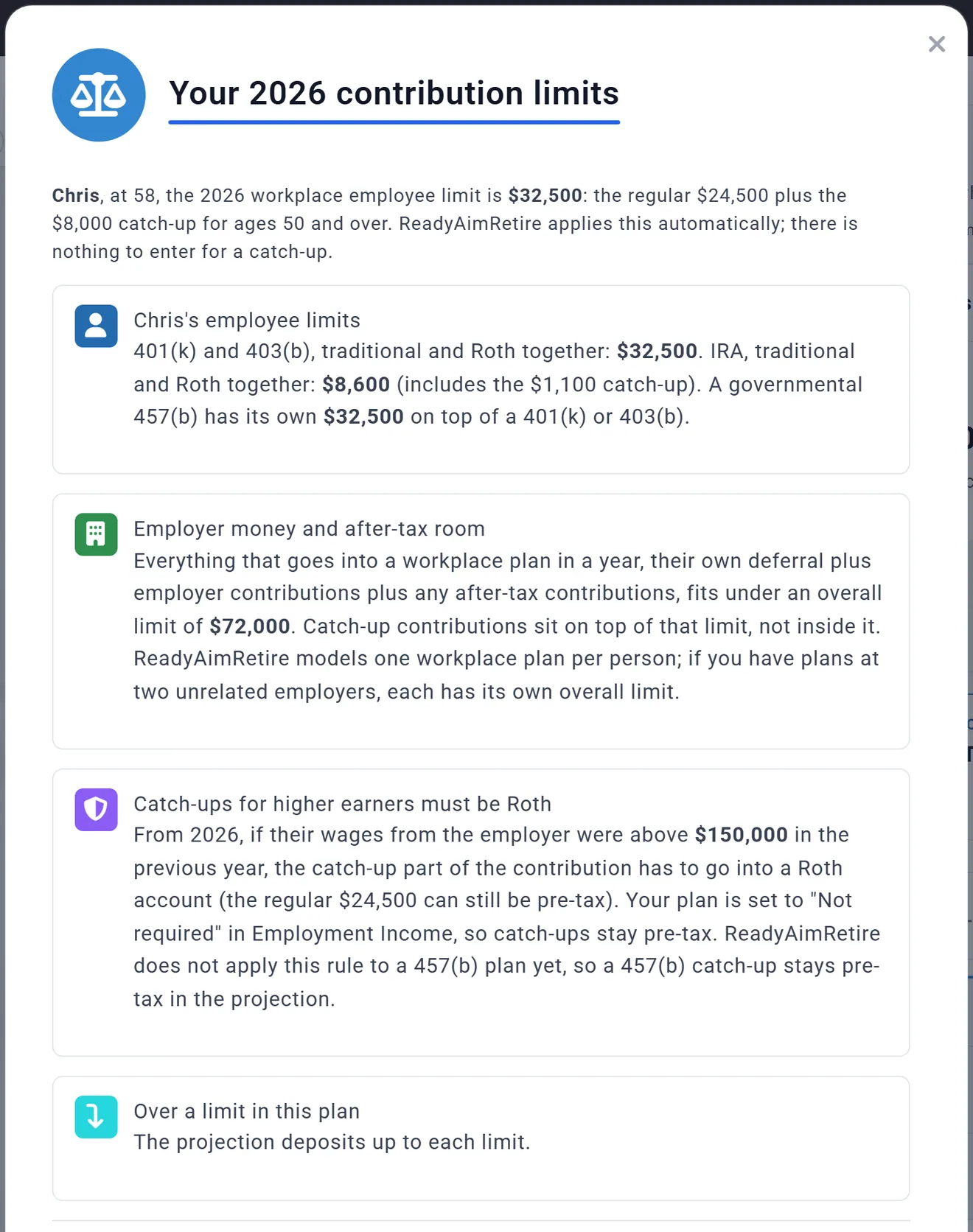
Your 2026 limits, beside Where it goes, opens Your 2026 contribution limits with each person's own figures.
Money above a limit
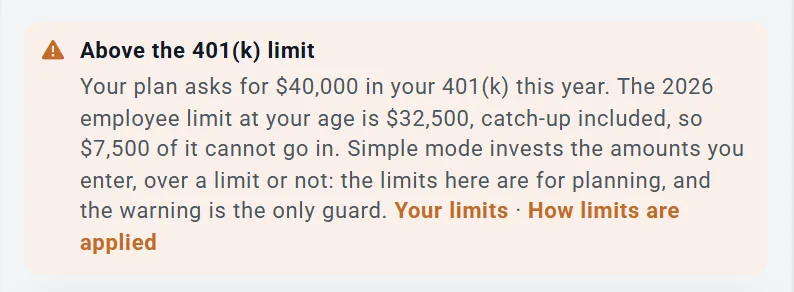
Suppose Jamie asks for $40,000 a year in the 401(k), $7,500 more than the $32,500 Jamie may put in at 56. What happens to the $7,500 depends on the mode.
In Simple: all of it is invested
Simple puts the whole $40,000 in the 401(k). The box warns you twice: under the accounts, and in a card, Above the 401(k) limit. The card's "$7,500 of it cannot go in" is what the IRS allows; the projection still invests it, as the card's next sentence says. Lower the amount, or move the extra to a brokerage account yourself.
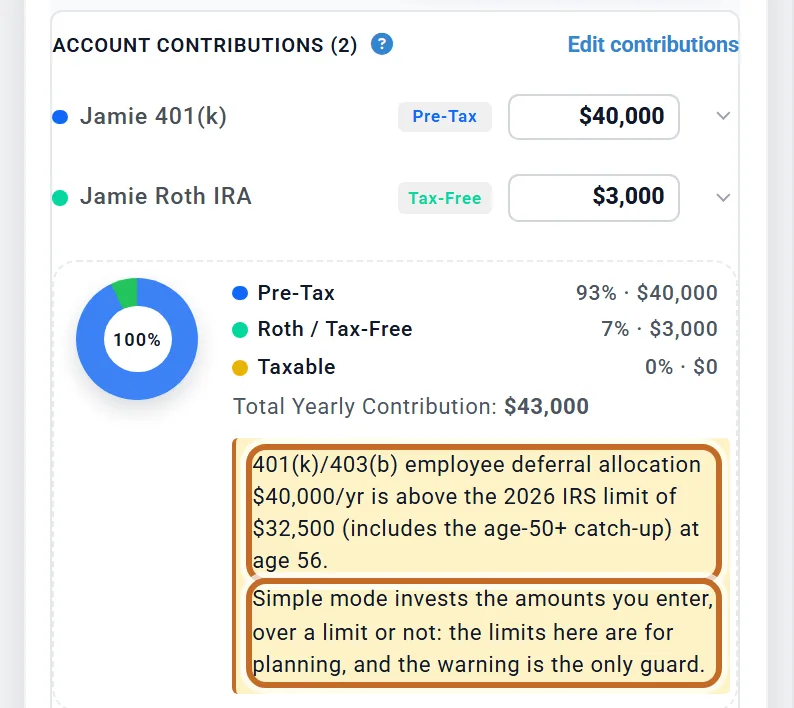
The card adds Your limits and How limits are applied.
In Advanced: taxable savings, or not saved
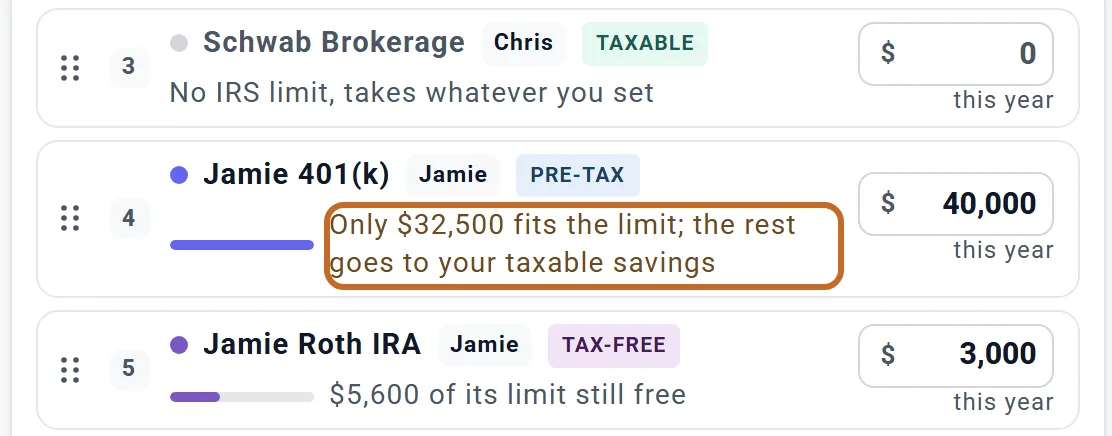
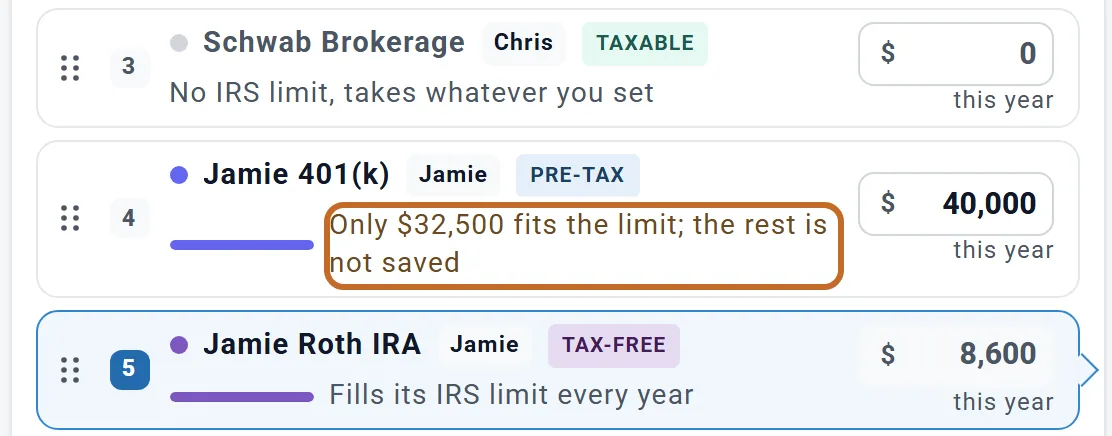
Advanced deposits up to the limit. The row's caption says where the rest goes, read from your plan's first year:
- Plain amounts (no year-by-year amounts, Fill to limit, age range or mega backdoor on any of that person's rows): the rest goes to that person's taxable savings: their taxable account, or, as for Jamie, who has none, taxable savings outside any account you entered.
- Once that person has one of those on any row (here Jamie's Roth IRA on Fill to limit): the rest is not saved, and Step 4 shows it as a grey band, Not invested (over limit).
- % of salary or Left over: the rest goes to the next account without a limit in the fill order, or to cash.
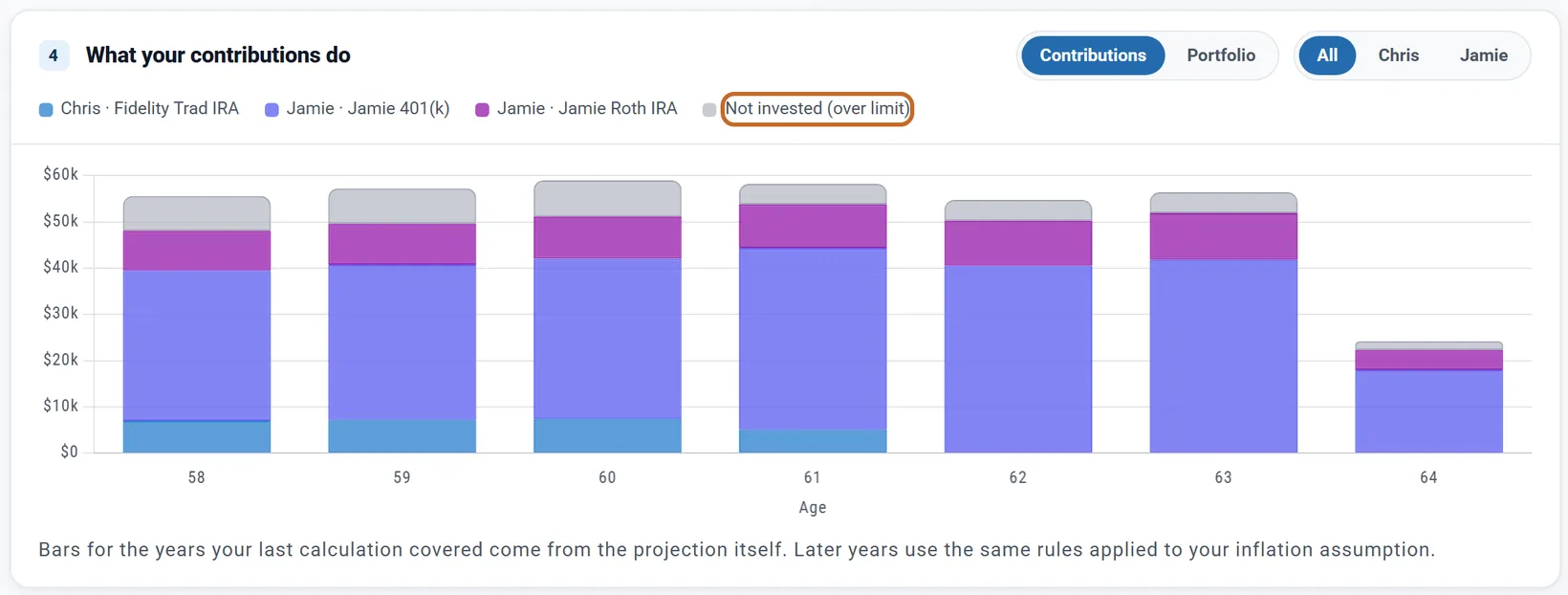
A yearly increase can carry an amount over its limit in later years, even when it fits today, so check the bars for every year. There is no setting to choose where the extra goes. Your employer's money above the overall limit is left out.
The Roth catch-up rule for higher earners US
From 2026, if your wages from the employer were above $150,000 the year before, your 401(k) or 403(b) catch-up has to go to a Roth account. Each Employment Income box has a Roth catch-up rule row. A new plan starts on Calculate automatically; a plan saved before the setting existed shows Needs a choice and keeps catch-ups pre-tax until you choose.
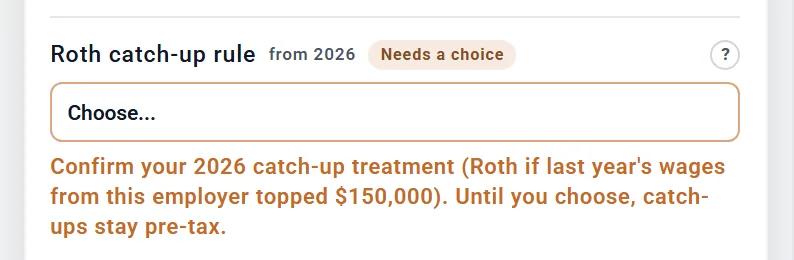
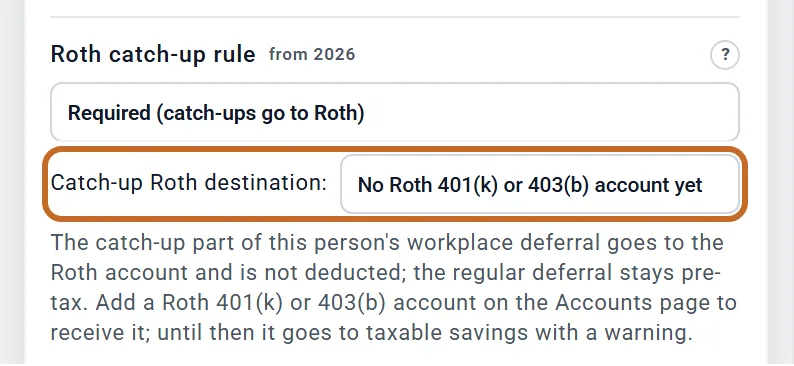
- Calculate automatically: the planner tests the previous calendar year's wages from this employer each year. For the first year enter Last year's wages from this employer:; left blank, this year's pay stands in.
- Required (catch-ups go to Roth) or Not required: you decide.
- My plan has no Roth option: when the rule applies, the catch-up goes to taxable savings.
When the rule applies, the 401(k) or 403(b) money above the regular $24,500 goes to the Catch-up Roth destination:, a Roth 401(k) or Roth 403(b) (picked for you when you have one), and is not deducted. A Roth IRA cannot take it. With no Roth 401(k) or 403(b) it goes to taxable savings with a warning; it never stays pre-tax. The rule needs Employment Income on and an amount for each account, and does not cover a 457(b).
The mega backdoor Roth US
Some workplace plans let you add after-tax money above your regular limit and move it to Roth straight away. In the Contribution Planner (Advanced, Set amount): Planner+
- Click a 401(k) or 403(b) row.
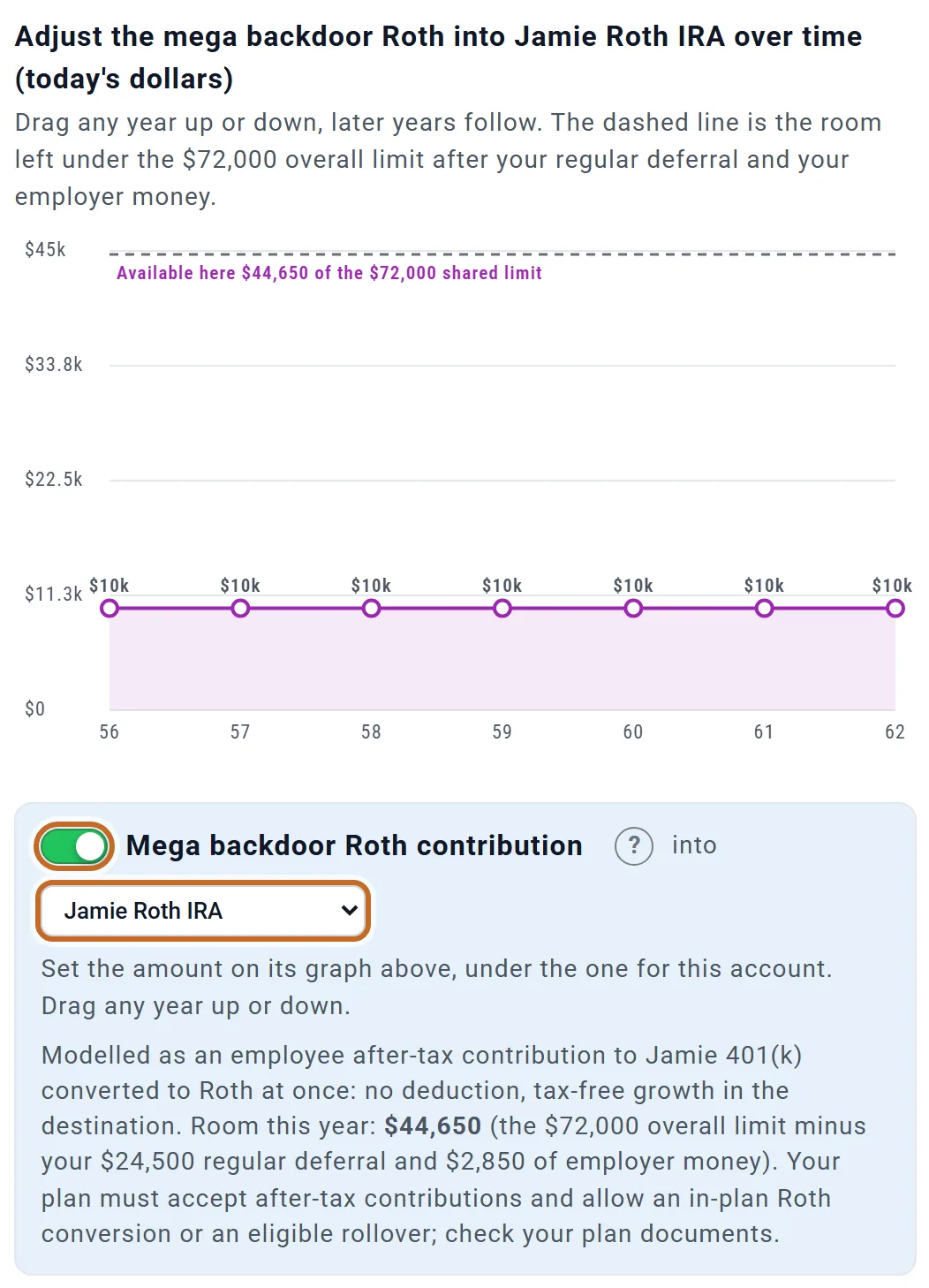
- Under its graph, switch on Mega backdoor Roth contribution.
- Choose the Roth account it goes into (a Roth 401(k), Roth 403(b) or Roth IRA). Until you do, nothing is contributed.
- Set the amount on its own graph, which appears above the card: drag a year, or use the arrow keys. There is no amount box.
Its room is the $72,000 overall limit less your regular deferral and your employer's money: $44,650 for Jamie this year ($72,000 less $24,500 and $2,850). The graph does not go above it. It is not deducted, earns no match, and grows tax-free in the Roth account. A year set to $0 stops it from then on.
Your plan's own after-tax cap and any test refunds are not modelled: check your plan documents. It is not offered with % of salary or Left over.
When contributions stop
- Each of you stops at your own retirement. The last deposit is the month before your Retire at month (see Retiring at different times). Chris retires in June 2030 and saves through May 2030; Jamie keeps saving through February 2033.
- A match stops when that person's saving or pay stops. Employer % of pay follows the salary.
- Works until moves your salary, not your saving. In Simple, if Jamie's salary stopped at 60, Jamie's 401(k) deposits would still run until Jamie retires at 63. A salary that runs past retirement does not extend your saving. In Advanced, a 401(k) in years with little or no pay sends that money to taxable savings instead (see Contribution limits). A % of salary saving stops with the salary.
- If you give your spouse their own Plan End, each person's saving also stops at their death.
- HSA contributions stop at Medicare (65 by default), not at retirement.
Check what goes in
Step 4 of the Contribution Planner, What your contributions do, shows each year's deposits by account, your employer's money and any money a limit refused. Portfolio shows what your savings grow to.
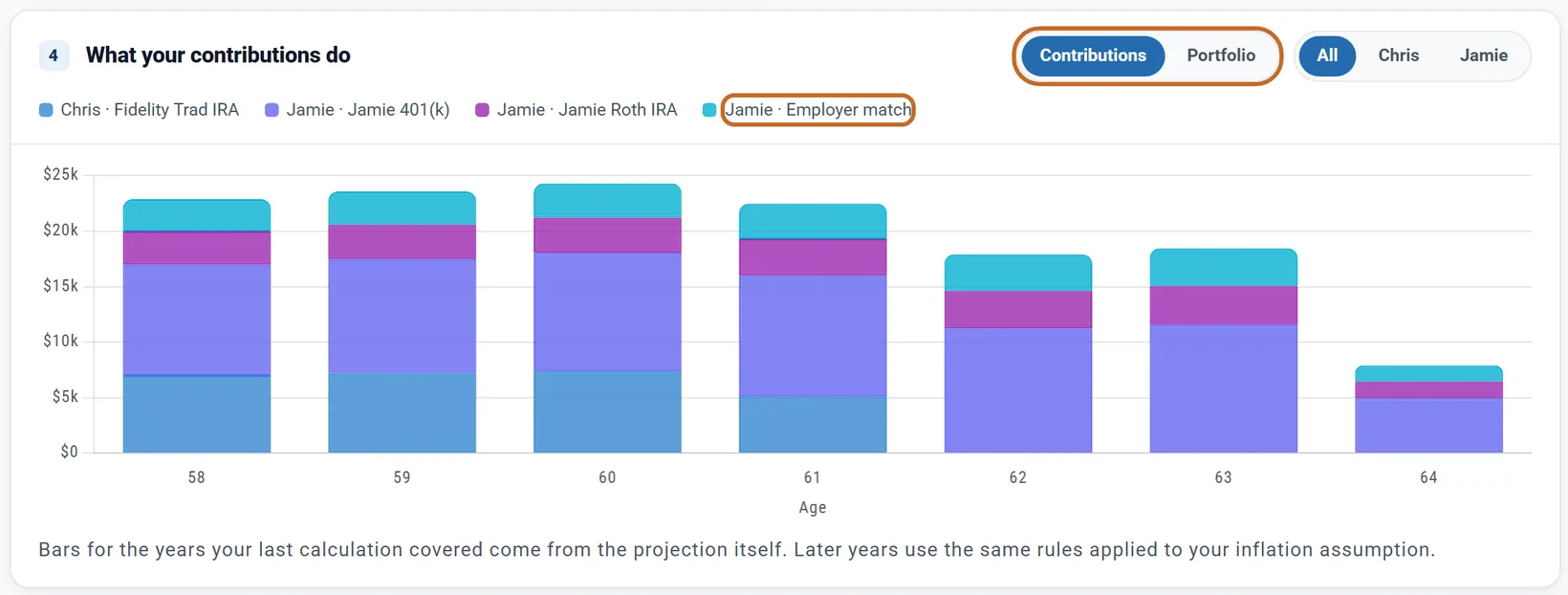
- On the Dashboard, More > Contributions draws the same deposits, with an Open Contribution Planner button. Planner+
- Click a year on a Dashboard chart: the Data Summary's Contributions & Growth > Contributions lists each person and account.
On a Preview account
- Open to everyone: the Retirement Contributions box in Simple and Advanced, How much do I need to save? (Use included), and on the planner: the first card, typing a row's amount, dragging its line (one amount that grows by your yearly increase), Set to $0 on a plain row, Fill limits first, Split evenly and Step 4.
- Planner+: changing the order, Fill to limit, Same every year, amounts set year by year, Start age and Stop after age, and the mega backdoor Roth. Each locked control says so when you point at it. Rules already on a plan keep working. The Dashboard's Contributions chart is blurred. Planner+
- Employment Income shows a Planner+ note.
Outside the US
- Canada: Advanced applies the RRSP limit (18% of that person's pay when Employment Income models it, up to $33,810 in 2026, shared with a group RRSP and pension plans), the TFSA's $7,000 and the FHSA's $8,000. RRSP room ends after the year you turn 71. Carry-forward room is not tracked. Amounts by year and Fill to limit work as in the US. Simple does not apply the dollar limits, but it does stop RRSP deposits after the year you turn 71: that money goes to your Non-Registered account.
- UK: the pension annual allowance and the ISA and Lifetime ISA allowances apply in Simple and Advanced: pension money above the allowance goes to cash, ISA money above it to your taxable savings (a GIA). Amounts by year are not available; your amounts apply for every working year.
- Australia and elsewhere: contribution caps are not applied.
- The Roth catch-up rule, the mega backdoor and the IRA income limits are US only. Employer contributions work in every country and go to pre-tax savings; in the UK they count toward the annual allowance. Payroll taxes: see Where to enter your income.
What the planner does not model
- The income limits on deducting a traditional IRA and on paying into a Roth IRA. The planner shows a Deduction limit or Income limit chip on the row, but deducts or deposits the full amount.
- SEP IRA and solo 401(k) limits.
- Two workplace plans at unrelated employers: one plan, with one overall limit, per person.
- The IRS's rounding of future limits.
- A Roth catch-up in a 457(b).
- Vesting and employer true-ups.
- A plan's own after-tax cap and refunds for the mega backdoor.
- Canadian carry-forward room, the FHSA lifetime cap and Australian super caps.
For the full list of what the planner includes and leaves out, see the Learning Library article What ReadyAimRetire Models.