


 Continue with Google
The order, every month
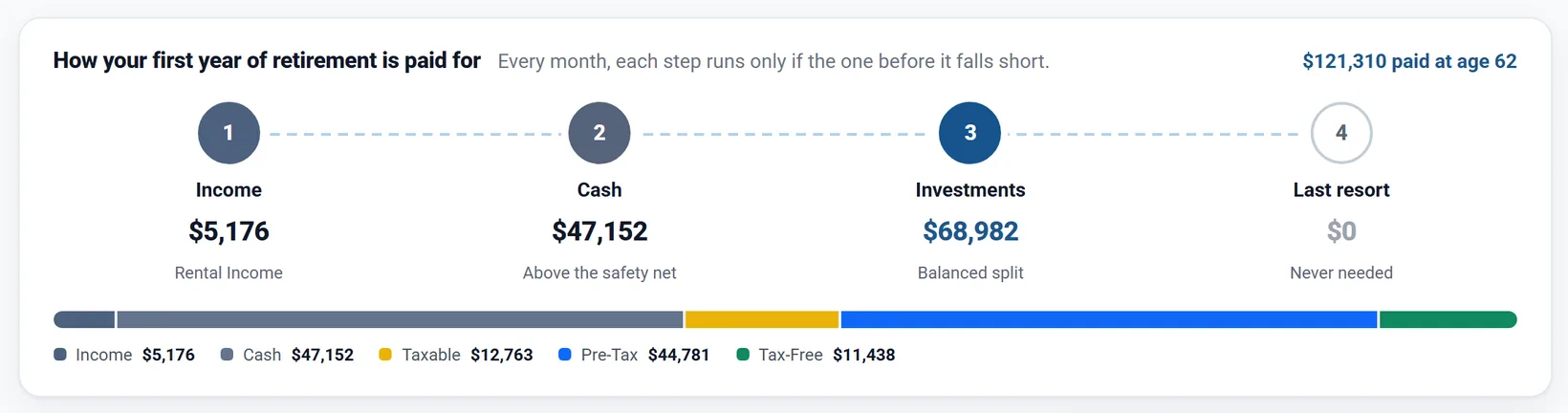
Every month of retirement, your spending is paid in four steps. Each step is used only if the one before falls short:
- Income. Social Security, pensions, annuities, rent from a rental, Retirement Income, Other Income and any salary.
- Cash. By default, cash above your minimum balances is spent before any investment is touched.
- Investments. Your pre-tax, tax-free (Roth) and taxable accounts, in the order your withdrawal strategy sets. The plan withdraws enough to cover the tax those withdrawals cause.
- Last resort. Cash below your minimum balances, only once the investments cannot pay the month. After that, any spending that cannot be paid is shown as a shortfall.
Income left over after a month's spending lands in cash. The Withdrawal Planner shows these four steps for your first year of retirement. For Chris and Jamie, from June the year Chris turns 62:
- All your cash accounts (checking, savings, CDs, money market, the Master Cash Account) form one pool. You cannot pick which one pays.
- Before you retire, if your Employment Income falls short of your spending, the gap comes from cash first, whatever your cash choice. The cash choices start at retirement.
- With the spending mode Using the 4% Rule, or with Make withdrawals in addition to other income on, the plan withdraws its set amount whatever cash it holds: the cash step, the cash choices and minimum balances do not apply.
Simple or Advanced
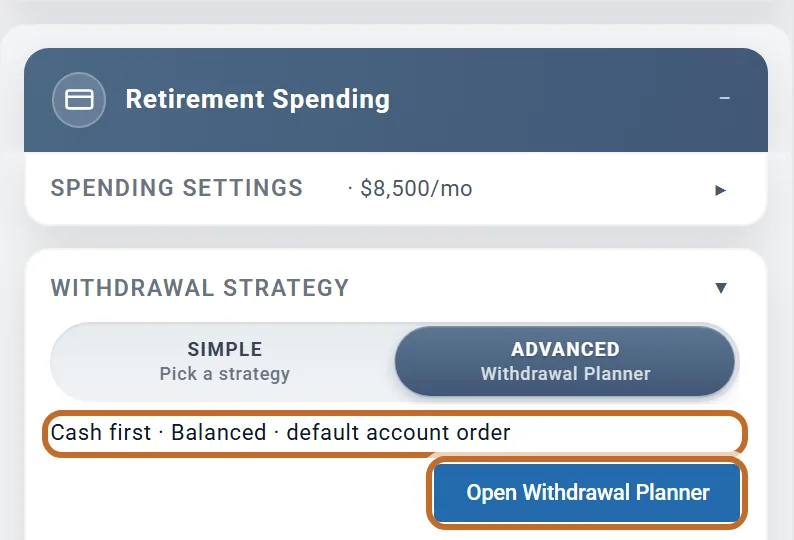
The settings live in the Retirement Spending box, section Withdrawal Strategy. New plans start in Simple:
- The switch: Simple (pick a strategy) or Advanced (the Withdrawal Planner).
- The line that says cash goes first.
- Whose accounts are used last (see Whose accounts are used first).
Simple has a Strategy: dropdown (the seven strategies) and Apply RMDs (Yes or No). It always spends cash first.
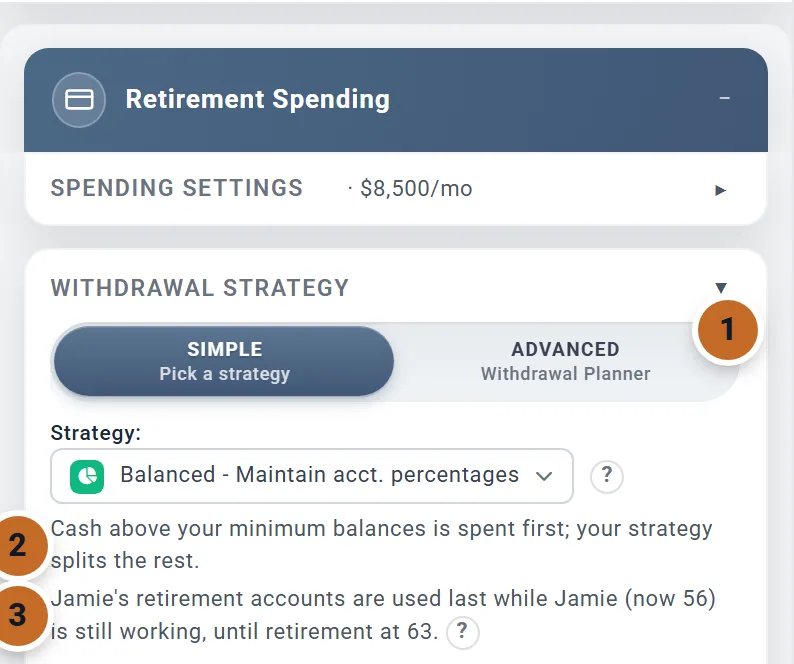
Choose Advanced to use every setting on this page. The box then shows a one-line summary ("Cash first · Balanced · default account order") and Open Withdrawal Planner. You can also open the planner from Withdrawals in the left menu.
The planner saves as you go; there is no Save button. Going back to Simple keeps your Advanced settings for later.
Still used in Simple: your strategy, Find the best option, Apply RMDs, each cash account's minimum balance, Cash that builds up in retirement, Extra Withdrawals and anything the Optimizer manages. Not used in Simple: the cash choices, the custom mix, reinvesting unused RMDs and the account order within a bucket. On a Simple plan the planner says so at the top and dims those controls:

When your cash gets spent
In Advanced, the planner's Cash accounts card ("Choose when your cash gets spent.") has three choices:
- Spend cash first (the default): cash above your minimum balances pays before investments are touched.
- Hold cash in reserve: investments pay from day one. Cash is used only if they run out.
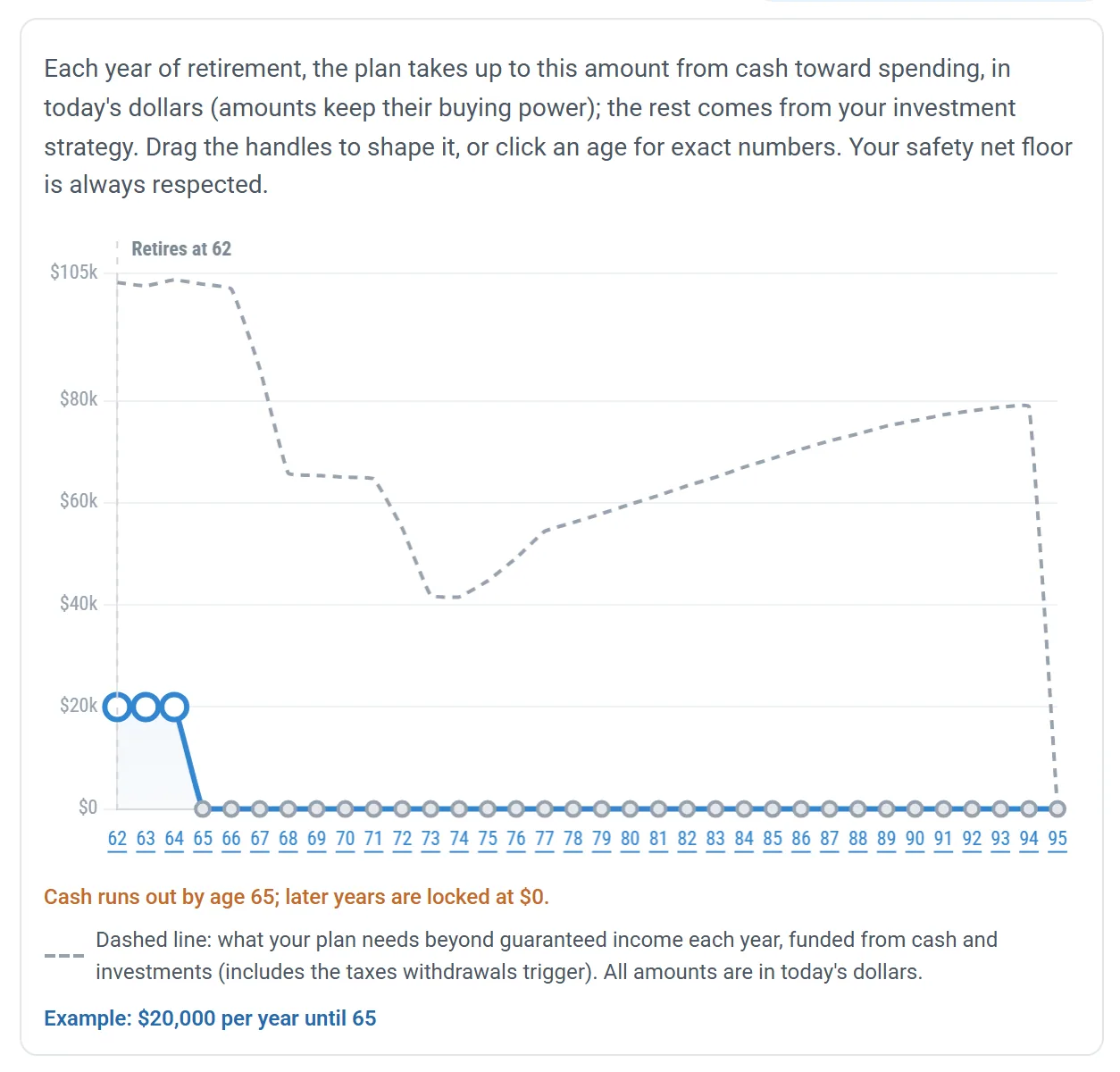
- Custom amounts Planner+: draw how much cash may be used each year, for example to bridge the years before Social Security.
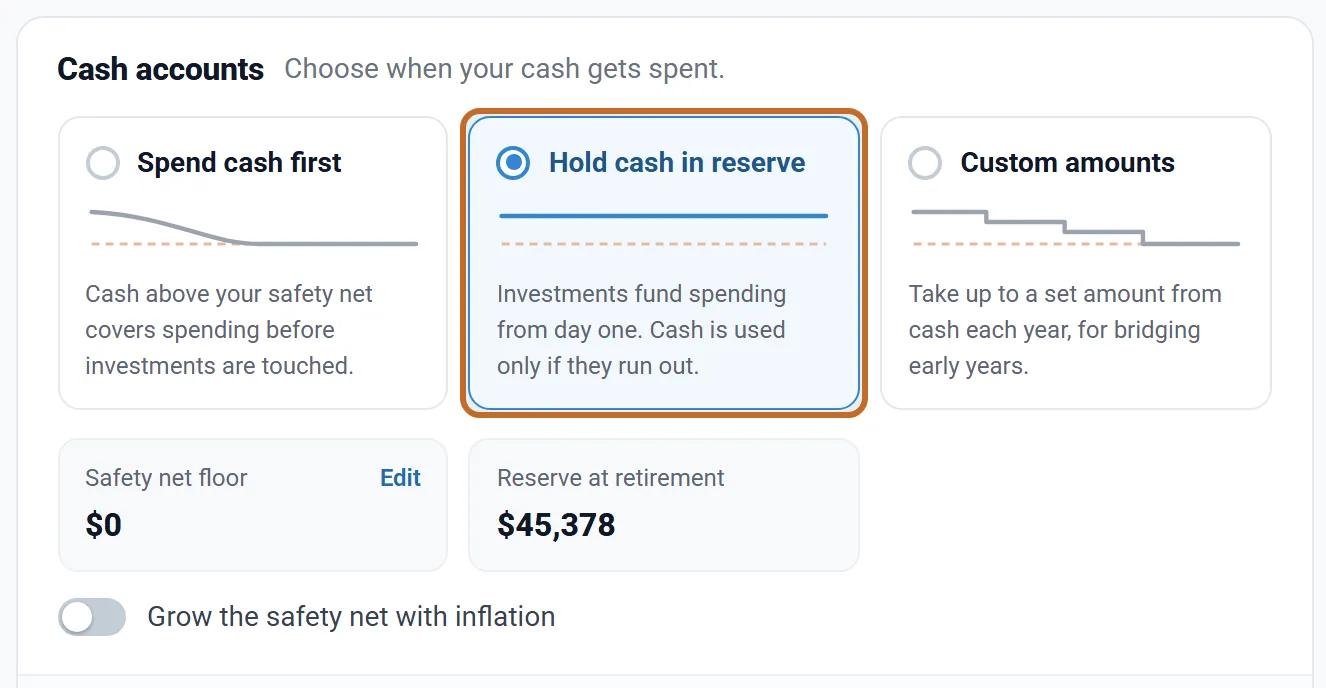
With Hold cash in reserve the four steps change order: investments pay before cash.
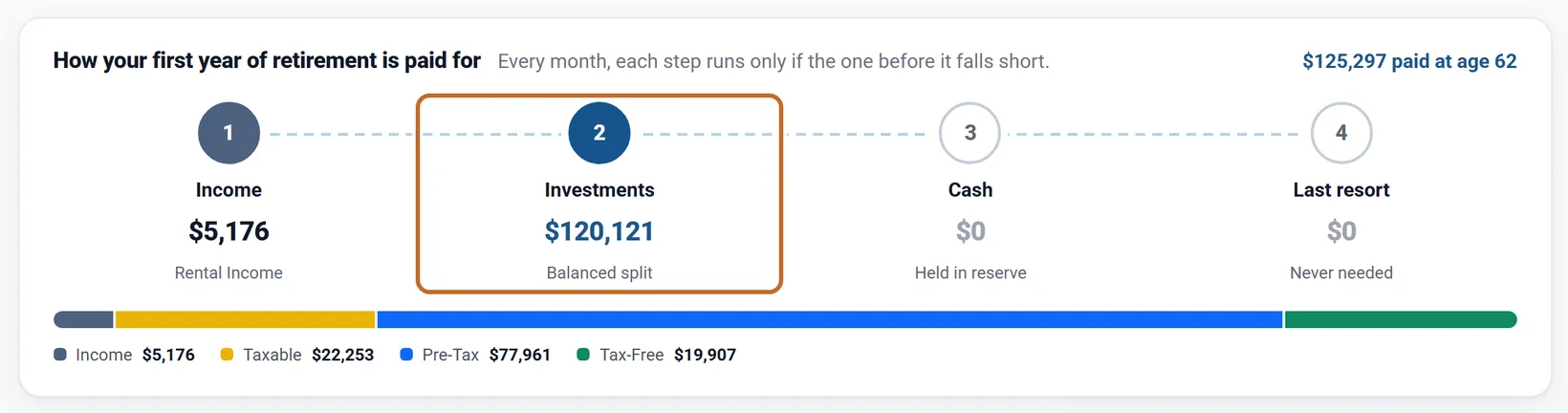
Holding Chris and Jamie's $45,000 of cash cost them about $207,000 of savings at 94 and saved about $34,000 of lifetime tax: selling investments instead of spending cash leaves less invested, and their cash earns less than their investments. The planner's right-hand panel shows the change against the plan you opened the page with.
Custom amounts
A graph from your retirement to the end of your plan. Each year's point is the most cash the plan may use that year, in today's dollars (the amounts keep their buying power); the plan never takes more than it needs beyond income. Drag a point, or click an age to type a number. The dashed line is what your plan needs beyond guaranteed income each year. Once cash above your minimums runs out, later years are locked at $0.
Keep a minimum in cash
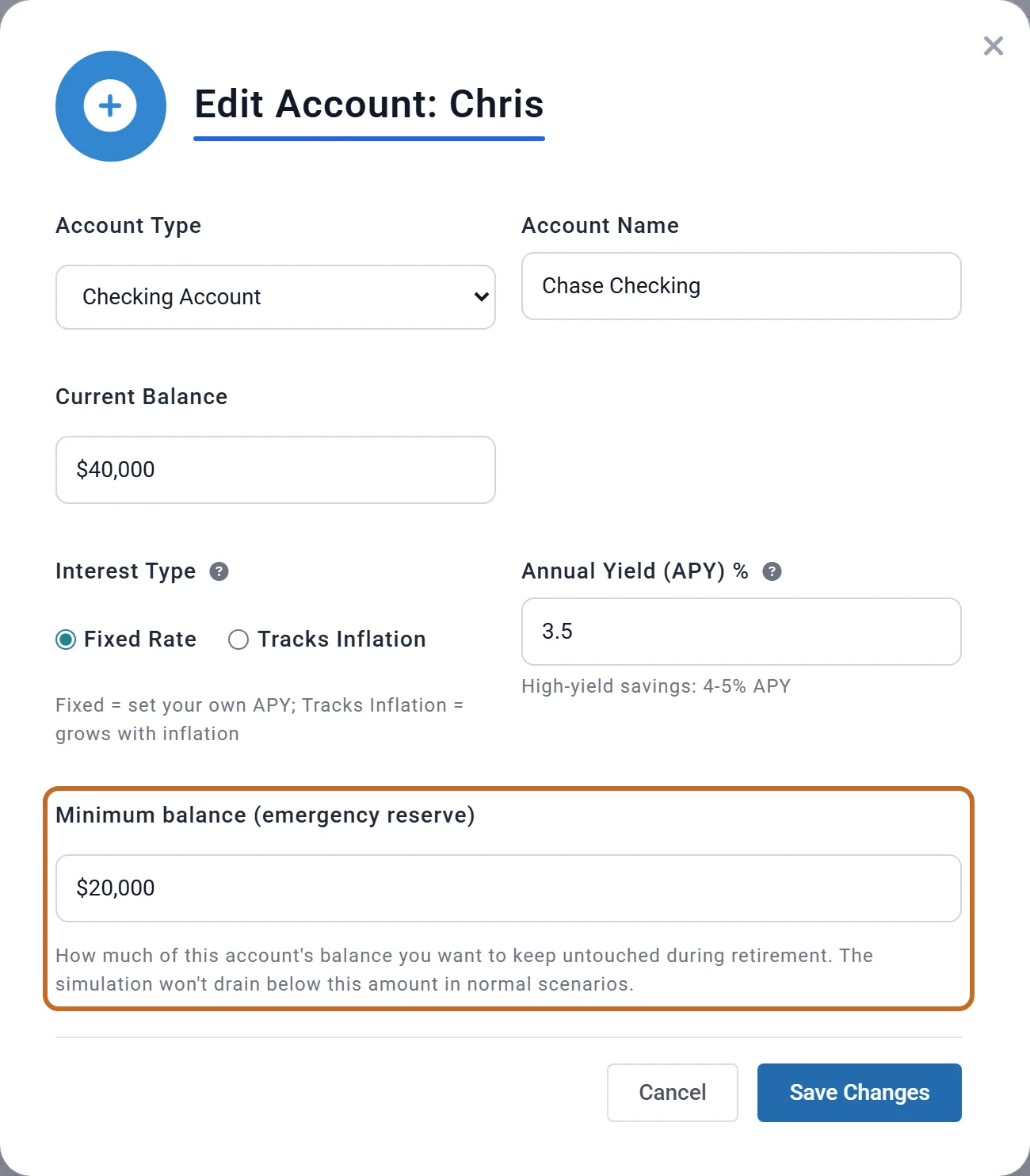
To keep an emergency fund, give a cash account a minimum balance. It works in Simple and Advanced, with every cash choice. Planner+
- On Accounts & Assets, edit the cash account.
- Enter Minimum balance (emergency reserve).
- Choose Save Changes.
The plan never spends below the total of your minimums (the planner calls it the Safety net floor) until your investments run out. Extra Withdrawals and college costs respect it too.
- It is a fixed dollar amount. In Advanced, Grow the safety net with inflation keeps its buying power.
- It protects that amount, not the account: with Spend cash first, cash above it is still spent first.
- The 4% Rule mode and Make withdrawals in addition to other income do not keep it.
Cash that builds up
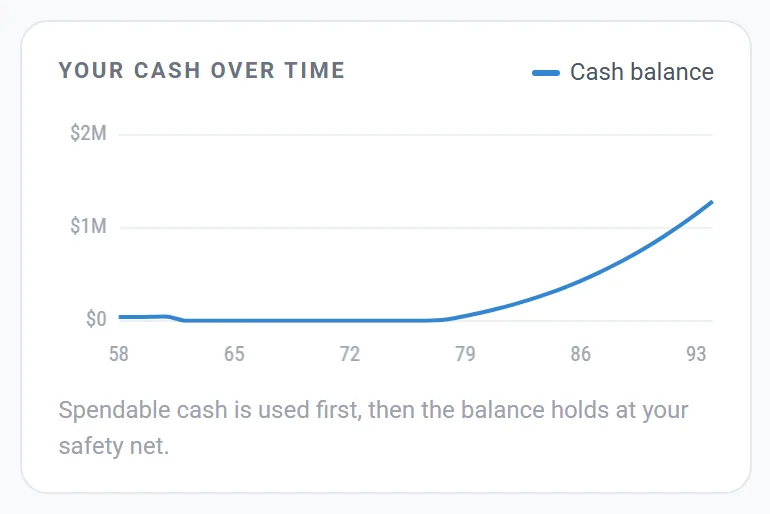
Required minimum distributions (RMDs) larger than your spending, and income you do not spend, land in cash. In Chris and Jamie's plan cash is spent at 62, then from about 77 it grows every year, passing $1 million at 92.
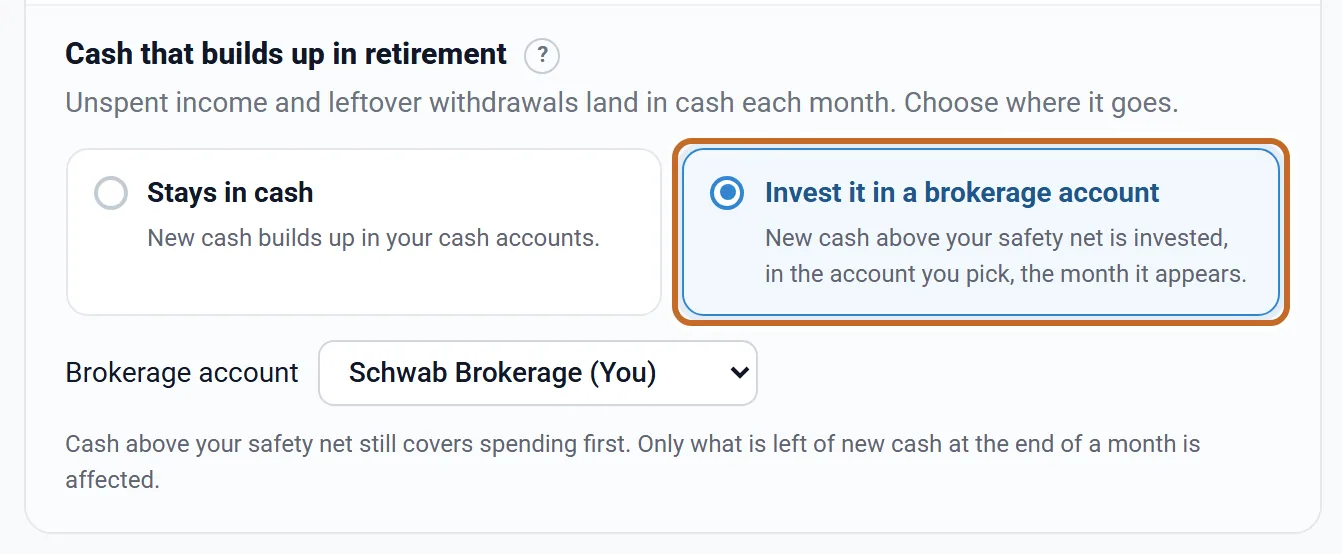
Invest it in a brokerage account moves each month's new cash above your minimums into the brokerage account you pick, from your first month of retirement. It works in Simple and Advanced. The cash you carry into retirement and your minimums are never moved, and the move itself is not taxed (the money was taxed already). For Chris and Jamie, $1,004,976 is invested in Schwab Brokerage over retirement.
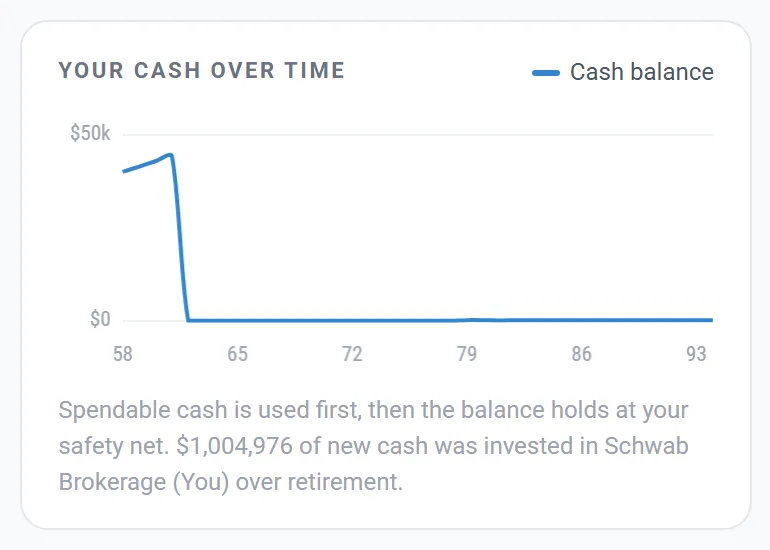
It is not used in the 4% Rule or "withdrawals on top" modes, nor once your investments are used up. Only taxable accounts are offered; do not pick a 529 plan.
The order of your investment accounts
The planner's Investment accounts card ("The order your three tax buckets are drawn from.") offers seven presets, the same as the Simple dropdown:
- Balanced (the default): every withdrawal is split in proportion to each bucket's balance.
- Six fixed orders, such as Taxable → Pre-Tax → Tax-Free (marked "Common practitioner default"): the first bucket pays until it is empty, then the next.
Find the best option runs your plan with each preset and shows each one's ending balance, ranked first by whether the plan lasts, then by what your savings would be worth after tax (pre-tax money counted after your Estate tab's Tax-Deferred Rate, 25% unless you change it). Nothing changes until you pick an option or choose Use the best option.
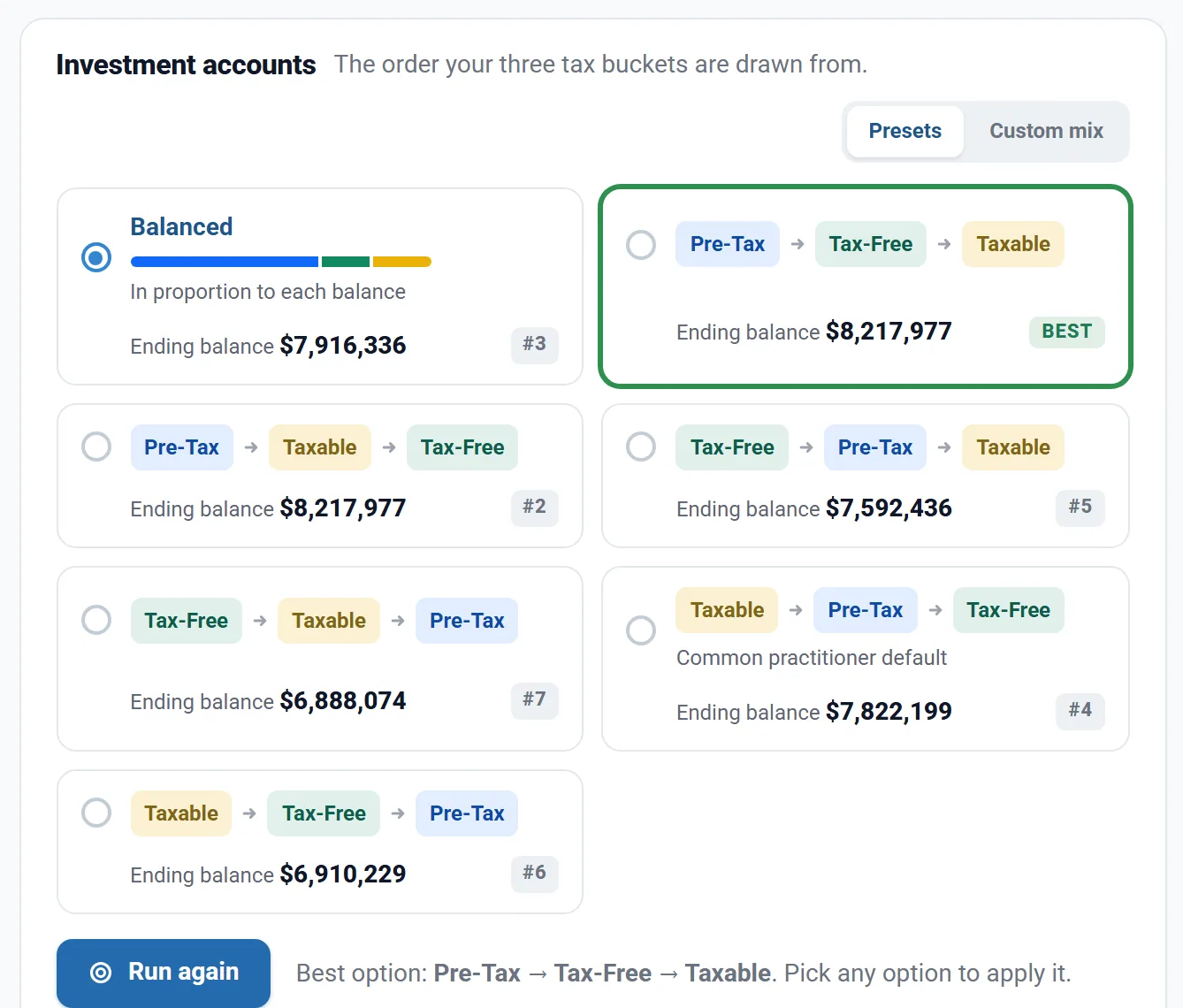
For Chris and Jamie, drawing pre-tax money first ends about $200,000 higher than Balanced.
- Custom mix Planner+: three sliders (Taxable, Pre-Tax, Tax-Free) that add to 100%. Every withdrawal is split by them; when a bucket runs out, its share goes to the others. Find the Best Mix tests other splits. Going back to Presets keeps your sliders, and choosing Custom mix again uses them.
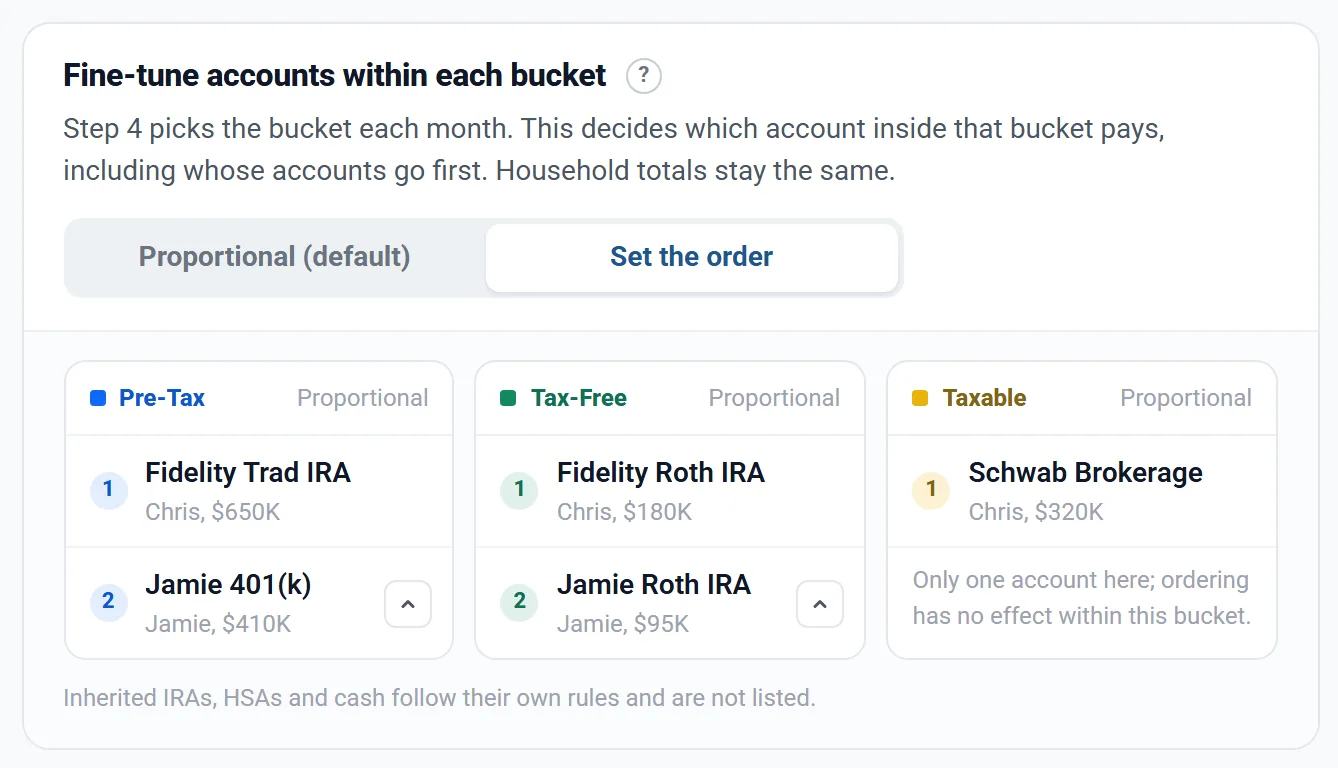
- Fine-tune accounts within each bucket (shown when a bucket holds two or more accounts): Proportional (default), or Set the order Planner+ to drain one account before the next. A bucket you have not reordered still pays in proportion to balance: it shows each account's share instead of a number, and an arrow gives it an order. Extra Withdrawals and College costs taken from a bucket follow its order too. Inherited IRAs, HSAs and cash follow their own rules and are not listed.
- On a Preview account, a custom mix, Custom amounts of cash or an account order already on your plan keeps working; changing it needs Planner+.
Whose accounts are used first
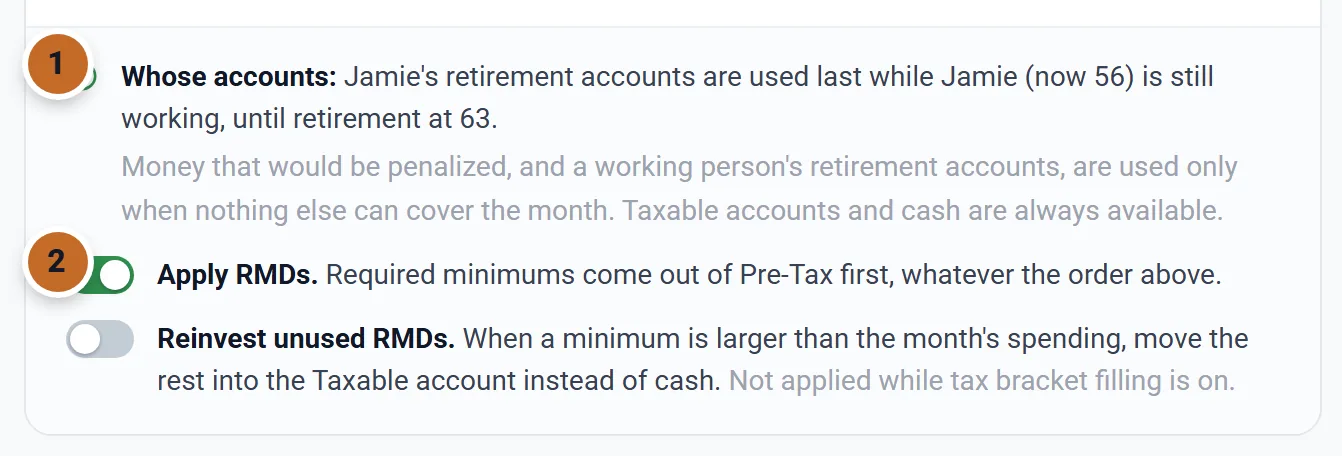
This is automatic, in Simple and Advanced. Within each step the plan uses money you can reach without a cost first: cash, taxable accounts (whoever owns them), and the retirement accounts of someone who has retired.
- Someone still working: their pre-tax and Roth accounts are used only when nothing else can cover the month, until their own Retire at age. Jamie's accounts are not touched while Chris is retired and Jamie works, to 63.
- Under 59½ US: pre-tax money and Roth earnings wait too, because of the 10% penalty (Roth contributions do not). This follows Apply the 10% early-withdrawal penalty to pre-59½ withdrawals in the Taxes box, which is on by default. For a 401(k) or 403(b) left at 55 or later, tick Rule of 55 applies to this account on the account. A 457 Plan never carries the penalty, at any age, with nothing to tick.
- Used last, not never: if nothing else can pay the month, protected accounts are used, the retired person's penalized money first. Required minimums are always taken.
Required minimums, and the money you do not spend
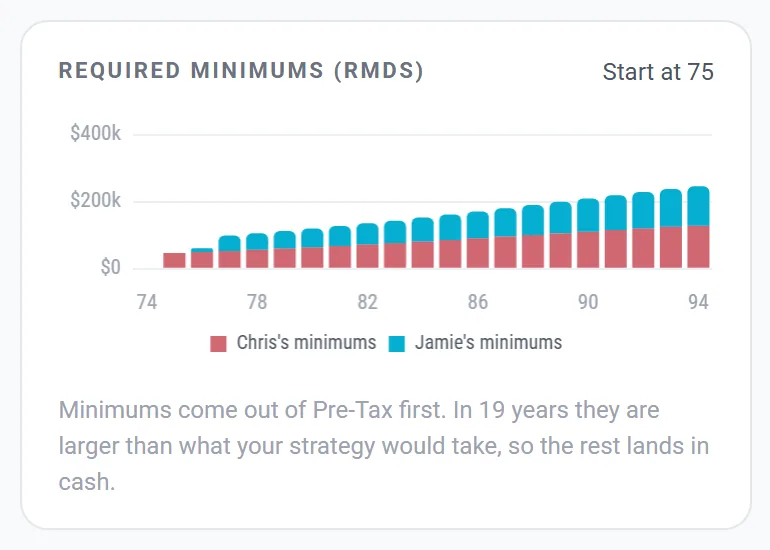
US Required minimum distributions start at 73 if you were born from 1951 to 1959, and at 75 if you were born in 1960 or later, each person from their own pre-tax accounts. Chris and Jamie both start at 75.
- Minimums come out of pre-tax accounts first, whatever your order. The switch is Apply RMDs, on by default.
- A minimum larger than the month's spending is still withdrawn and taxed. What is left lands in cash; for Chris and Jamie that happens in 19 years.
- To invest it instead: Reinvest unused RMDs (Advanced only; it moves the rest into the taxable bucket, not while tax bracket filling is on), or Invest it in a brokerage account (Simple or Advanced, into the account you pick).
The Learning Library article Required Minimum Distributions explains when yours start and what you can do about them, with your plan's own numbers.
Tax moves come first
Roth conversions and bracket filling are set in the Optimizer. The planner's Tax moves card shows them ("Moves made for tax reasons happen before your withdrawal strategy splits the rest."), with Manage in Optimize →.
- When extra withdrawals fill a tax bracket, the plan does not spend cash first in those months: it withdraws the month's whole need from your accounts, and the extra builds up in cash.
- While the tax moves steer withdrawals, the Investment accounts card says "Filled first by the tax moves above; your strategy below splits the rest.", and Find the best option has little to compare.
- A Roth conversion is a move into your Roth, not spending.
Take a set amount from one account
Use Extra Withdrawals (Add > Expenses > Extra Withdrawals, up to six cards). It is extra spending on top of your regular spending, or a move between accounts:
- Name it, set Start age and End age (Chris's ages; the end age is included) and the Amount.
- Open More options for Lump sum once per year and its Month. If you start at your age today and that month has passed this year, the first one comes next year.
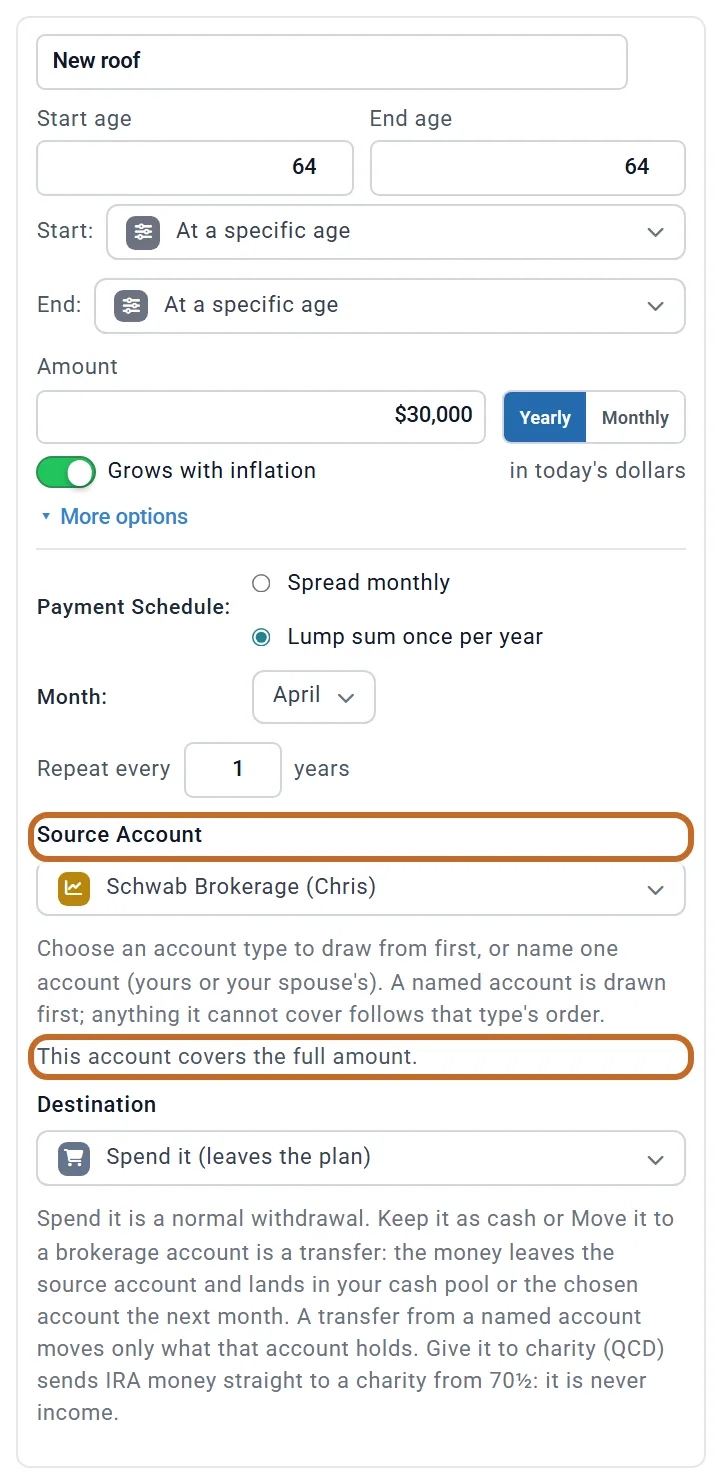
- Pick the Source Account: Auto, an account type first, or one of your or your spouse's investment accounts.
- Pick the Destination: spend it, keep it as cash, or move it to a brokerage account.
A named account pays first; a line under it says whether it covers the amount, and anything it cannot cover comes from your other accounts. Here a new roof at 64, $30,000 in today's dollars ($36,816 when it is paid), comes entirely from Schwab Brokerage. A move to cash or to a brokerage account is different: it takes only what the named account holds.
- Auto (cash, then your withdrawal order) takes cash above your minimums first, then follows your withdrawal strategy: an order such as Taxable, then Pre-Tax, then Tax-Free uses up one kind of account before the next, a custom mix splits the rest by your mix, and Proportional takes each kind in proportion to its balance. Inside each kind, an account order you set on the Withdrawal Planner decides which account pays. By balance (cash, then all accounts) always takes every account in proportion to its balance. Neither follows your cash choice: to keep cash out, pick an account type or an account.
- With Grows with inflation on, as on a new card, the amount is in today's dollars and rises with prices; off, it is in the dollars of the year it is paid (see Spending and your budget).
- It is taxed like any withdrawal from that kind of account, including the 10% penalty on pre-tax money before 59½ (US).
- When a card draws retirement money before 59½, the card itself says so after each run: a line headed Early withdrawal penalty gives the dollars and the ages. The Coach and the alerts under the Dashboard chart say it too, for example "Extra Withdrawal 1 (New roof) triggers early-withdrawal penalties". Draw it from a taxable account, or start it at 59½, to avoid it (US).
- There is no way to say "pay my regular spending from this account": the nearest tools are your strategy, the account order within a bucket, Custom amounts from cash, and Extra Withdrawals.
Your withdrawal rate, year by year
Your withdrawal rate is what your savings paid in a year (spending, the costs beside it and the taxes, less your other income) divided by your savings at the start of that year. Savings means cash, investments, HSAs and inherited IRAs, not your home. A required minimum you did not spend, and a Roth conversion's tax, do not count.
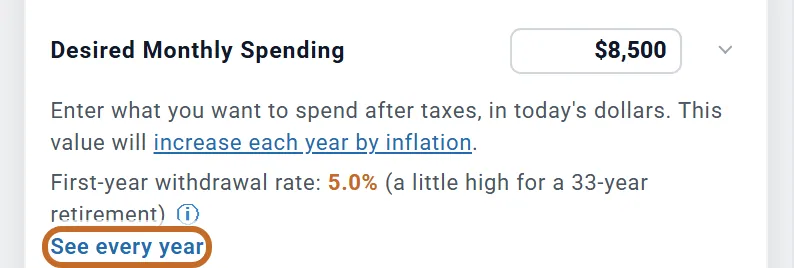
The Retirement Spending box shows your first year under the amount: Chris and Jamie's is 5.0%, "a little high for a 33-year retirement". The range it is judged against moves with the length of your retirement. See every year opens the chart.
The chart (Dashboard, More > Withdrawal Rate) Planner+ shows every year against the 4% guideline and the rate that would last the years left, with a summary underneath.
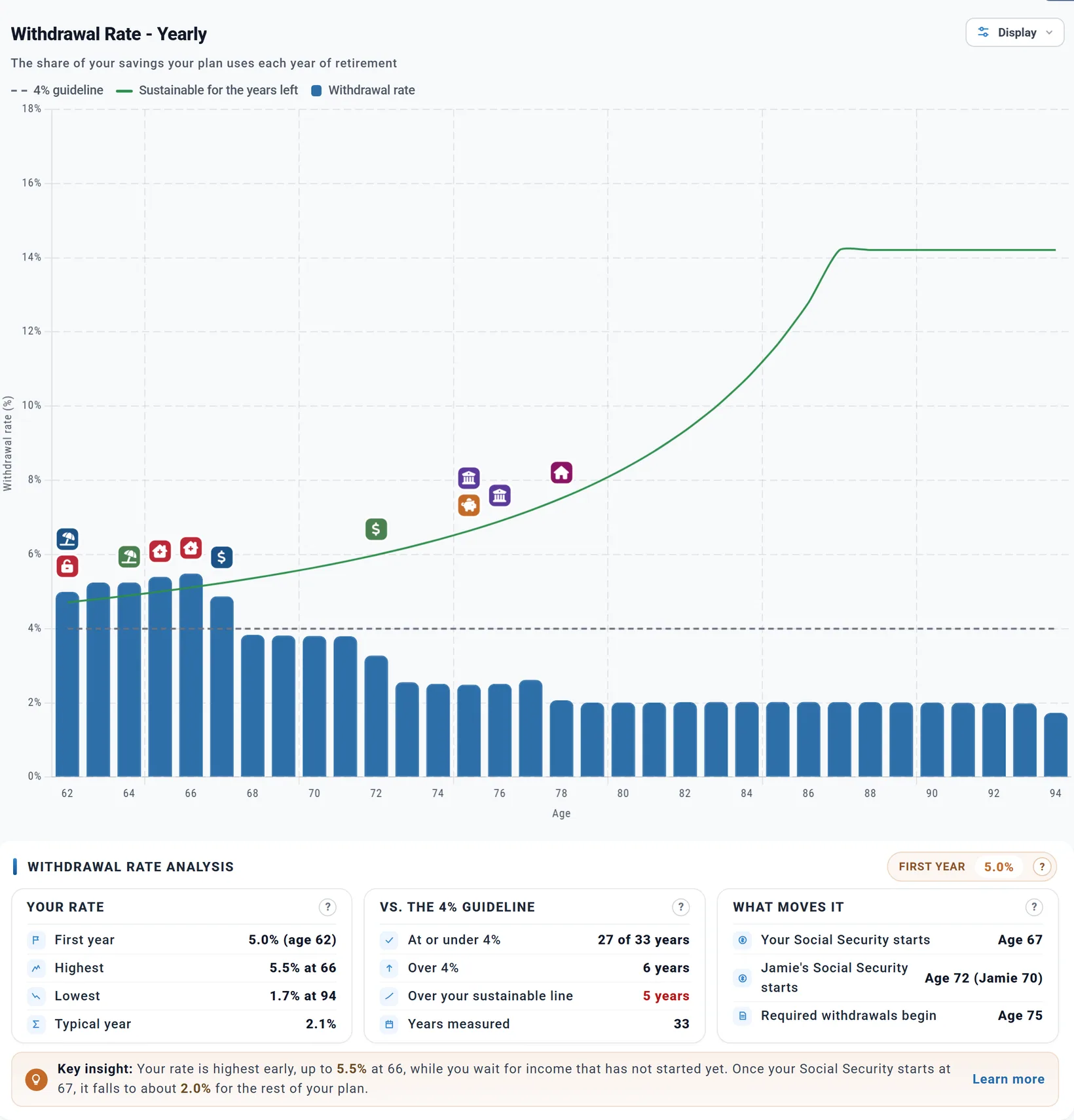
Their rate is highest in the years before Social Security starts (Chris's at 67), and is about 2% in the later years.
Before you retire. When your plan models your working years' spending (Employment Income with a budget or a monthly amount) and your pay does not cover it, as when one of you has retired and the other still works, the chart starts with those years too, in lighter bars: what your savings paid, with your pay counted as income. Only the years that draw on savings without a break up to your retirement show, and the summary lists them as While working. Your first retirement bar is still the first-year rate in the Retirement Spending box.
The Learning Library article Your Withdrawal Rate explains where the 4% comes from, and why your rate is supposed to move.
Before 59½: 72(t) payments US
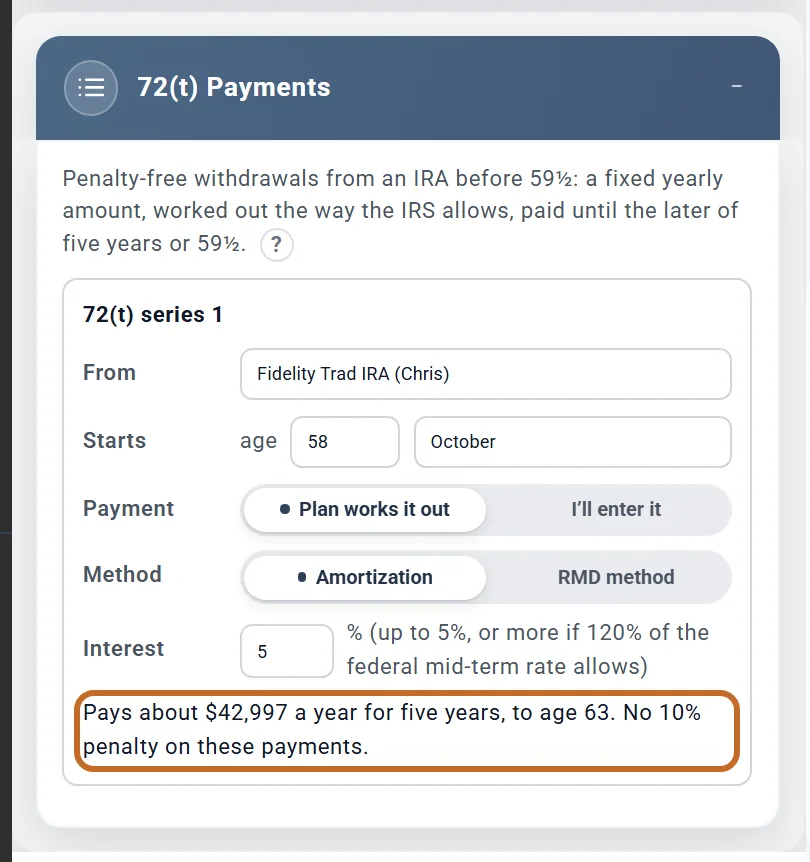
A 72(t) series takes a fixed yearly amount from an IRA before 59½ with no 10% penalty, until the later of five years or 59½. Add it from Add > Tax Planning > 72(t) Payments (up to two series). Planner+
- From: a traditional, rollover or SEP IRA of either of you.
- Starts: the owner's age and month, on or after their retirement and before 59½.
- Payment: Plan works it out, with the Method and Interest rate, or I’ll enter it (for a series already under way).
The payments count as income; what you do not spend lands in cash. While the series pays, the IRA is locked: no other withdrawals, Roth conversions or Extra Withdrawals from it.
The Learning Library article Getting to Your Money Before 59½ covers the 10% penalty, the other ways around it, and where your plan stands.
See it on the charts
On the Dashboard, the Withdrawals chart Planner+ shows each year's withdrawals by source: From Cash, RMDs, each kind of account, the HSA for health care, and one band for each Extra Withdrawal. Its choices above it switch between Per bucket and Per account.
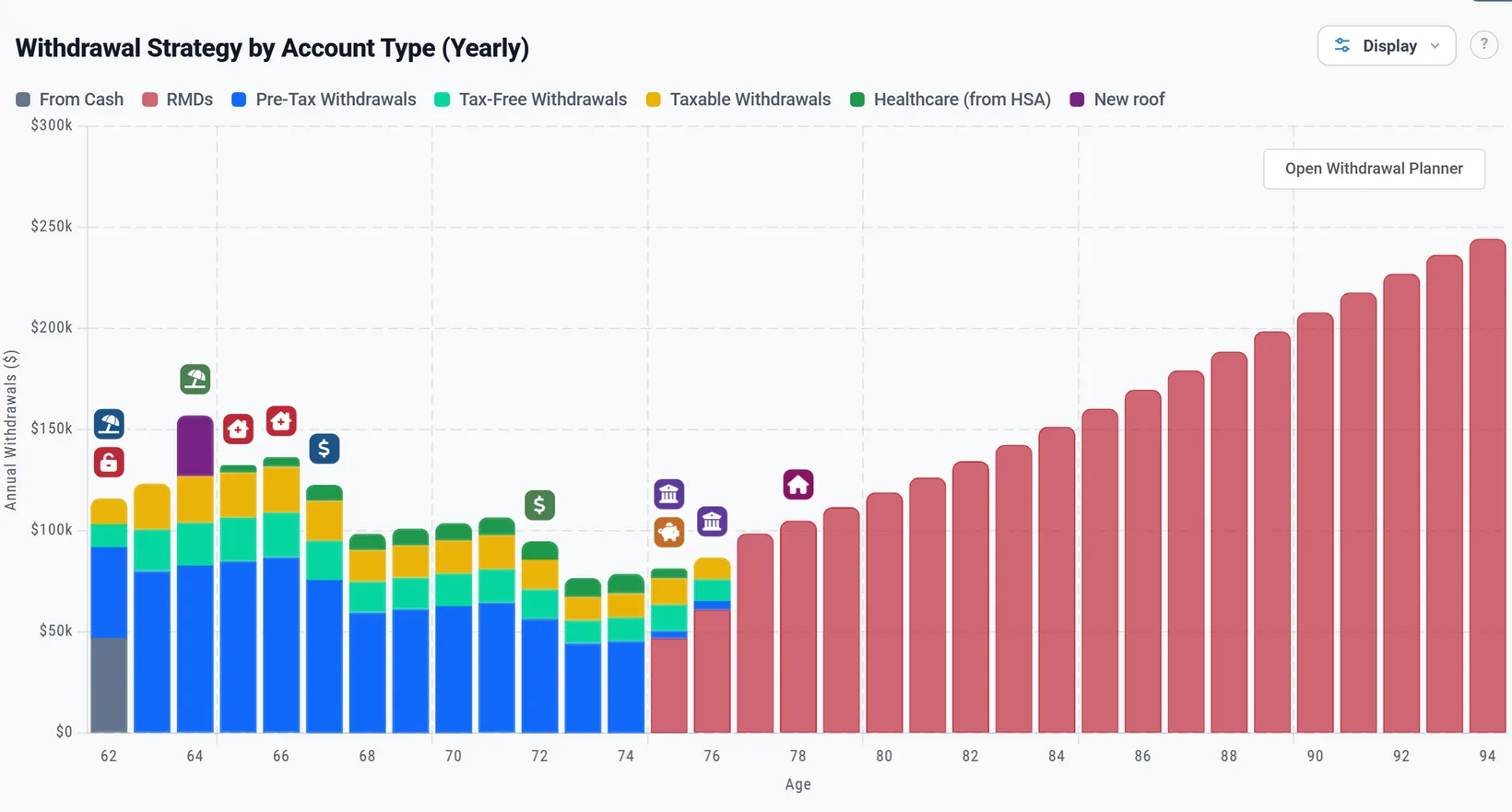
- The planner's right-hand panel tells the same story for your whole plan: your first-year rate, the balance at the end, lifetime taxes, withdrawals and taxes each year, required minimums and your cash over time, each change compared with the plan you opened the page with.
- More > Cash Balance Planner+ draws your cash and your safety net floor.
- In Per bucket, money a withdrawal pays as the 10% early-withdrawal penalty is its own band, Early-Withdrawal Penalty, and its tooltip says whose penalty it is. (US)
What the planner does not do
- You cannot choose which cash account pays: cash is one pool.
- You cannot tell the plan to pay your regular spending from one named account in certain years.
- Protecting a working spouse's accounts is automatic; there is no setting to pool or split them differently.
- If a 72(t) series would break, the plan prevents what it controls and warns you; it does not model the penalty recapture.
For the full list of what the planner includes and leaves out, see the Learning Library article What ReadyAimRetire Models.