


 Continue with Google
What these settings decide
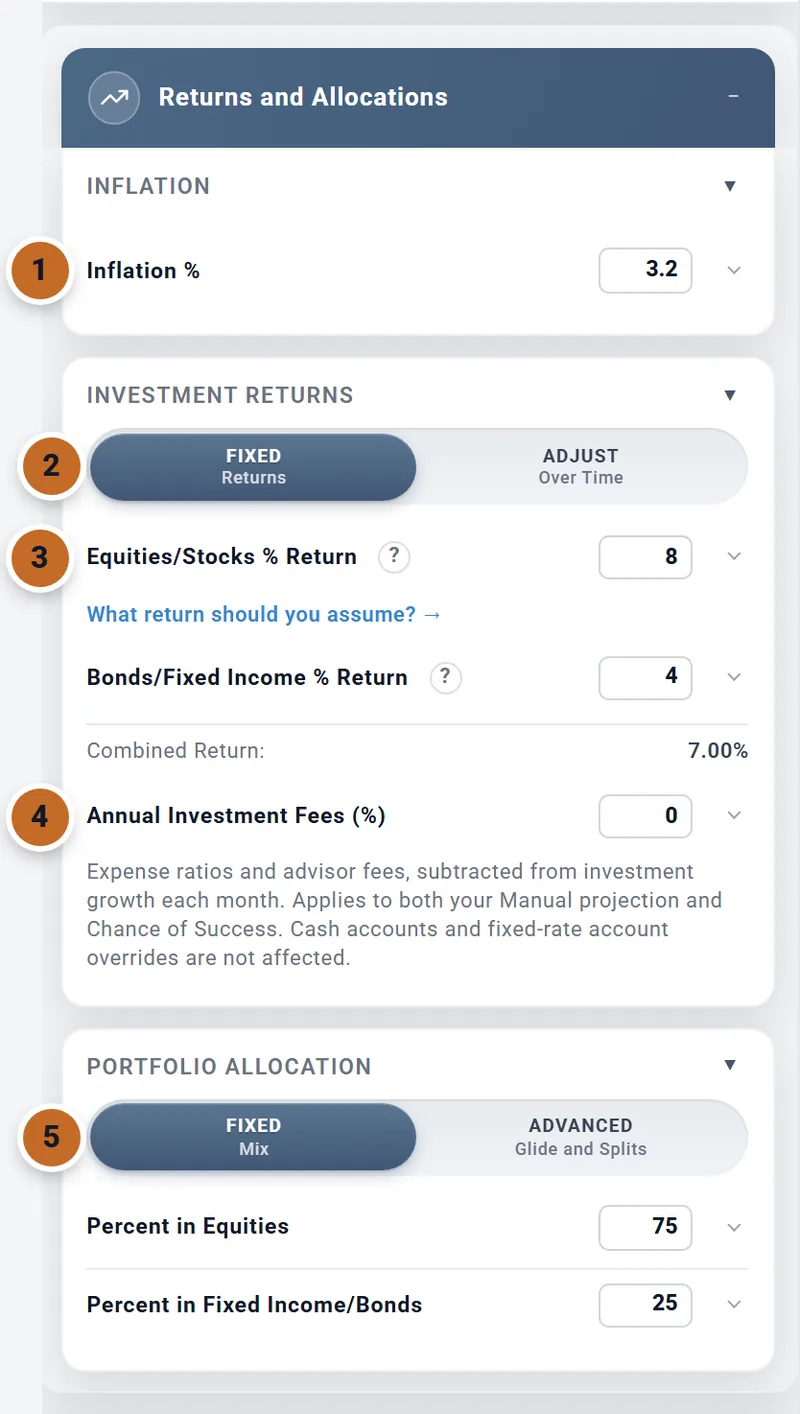
The Returns and Allocations box holds the planner's guesses about the future: how fast prices rise, how fast your investments grow, what you pay in fees, and how your money is split between stocks (equities) and bonds (fixed income). It is in every plan, and these few numbers move your results more than almost anything else you enter.
- Inflation %: how fast prices rise.
- Fixed Returns or Adjust Over Time: one stock return for every year, or a different one for each age.
- Equities/Stocks % Return and Bonds/Fixed Income % Return.
- Annual Investment Fees (%).
- Fixed Mix or Advanced (Glide and Splits): your split between stocks and bonds.
A new plan starts at 3.2% inflation, 8% for stocks, 4% for bonds, no fees and 75% in stocks. With those, Chris and Jamie have $2.29 million when Chris retires at 62 and $7.92 million at 94.
- Your projection uses all of them. The Dashboard, the Summary and every page except Chance of Success show one projection: the same stock return, bond return and inflation every year. Each month your money grows at the blend of the two returns, as if it were kept at your mix every month.
- Chance of Success uses market history instead for returns and inflation, and keeps your mix and your fees. See In Chance of Success.
Inflation
Inflation % (0 to 10%) is one rate for every year of your projection. It grows:
- your spending and every amount you enter in today's dollars (see After tax, in today's dollars), and budget rows whose rate is Global;
- tax brackets, once a year;
- Social Security's raise each January;
- a cash account set to Tracks Inflation.
Some things have their own rate instead: a pension rises by the increase set in its box, healthcare rows and the HSA box's healthcare costs rise at 5% unless you change them (see What you budget), and a home grows at its Annual Appreciation %.
One point more inflation (4.2%) leaves Chris and Jamie's savings at retirement as they were and lowers what is left at 94 from $7.92 million to $6.38 million: everything they buy costs more each year.
There is no switch for historical inflation. Your projection always uses Inflation %; Chance of Success always uses each period's own inflation.
Stock and bond returns
With Fixed Returns chosen, enter the average yearly return you expect from each:
- Equities/Stocks % Return (0 to 15%): the stock part of your investments.
- Bonds/Fixed Income % Return (0 to 10%): the rest of your investments.
Enter returns before inflation, the plain return a fund would advertise. The planner applies your inflation separately, so do not subtract it yourself. The "?" beside each return says so, with your own numbers:
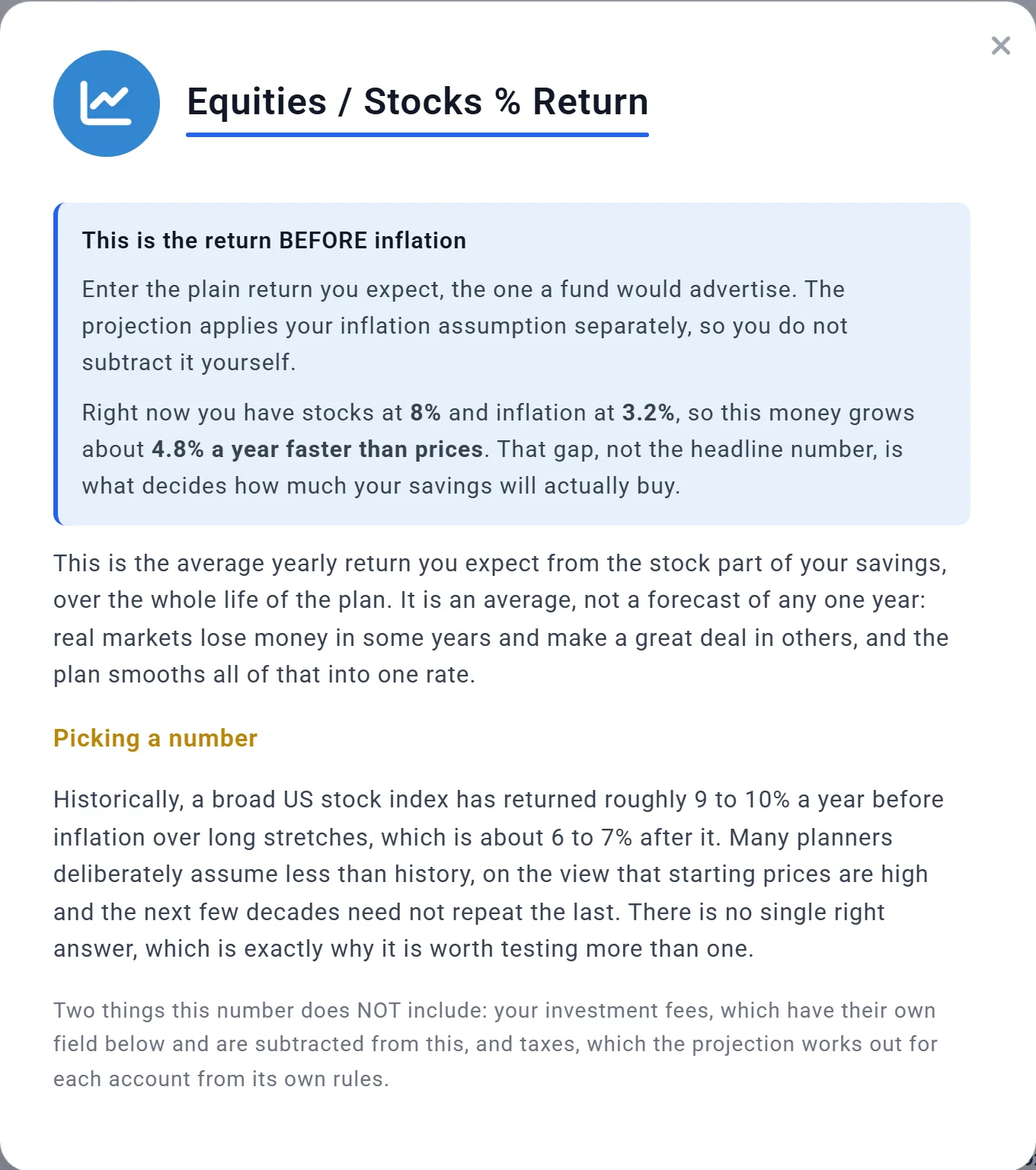
- Combined Return: under the two returns is the blend at your mix, less fees: 8% x 75% + 4% x 25% = 7.00%.
- For help choosing, follow What return should you assume? to the Learning Library article What Return Should You Assume?, which re-runs your plan at six returns and finds the lowest one it survives.
- Where are dividends? Inside these returns: a return is growth plus dividends and interest. For a taxable account, the account's Investment income (dividends & interest) setting decides how much of that growth is paid out and taxed each year (see Settings on an account that belong to your plan).
One point less for stocks (7%) lowers Chris and Jamie's savings at 94 from $7.92 million to $5.61 million. Their Chance of Success does not move: it never reads this number.
Investment fees
Annual Investment Fees (%) (0 to 3%) is what your funds and any adviser charge each year. The planner takes it off your stock and bond growth every month, in your projection and in Chance of Success. Combined Return: then says "after fees".
- It does not touch cash, which earns its own rate, or an account you gave a Fixed rate or No growth (see Account exceptions).
- A 1% fee lowers Chris and Jamie's savings at 94 from $7.92 million to $4.80 million.
Returns that change over time
An average return hides the order of good and bad years. A crash just before or just after you retire does more harm than the same crash later, because you are spending from savings while prices are low. To test that, choose Adjust Over Time in Investment Returns.
- You now set the stock return for each age, from today to your Plan End. The bond return stays one number, and fees still apply.
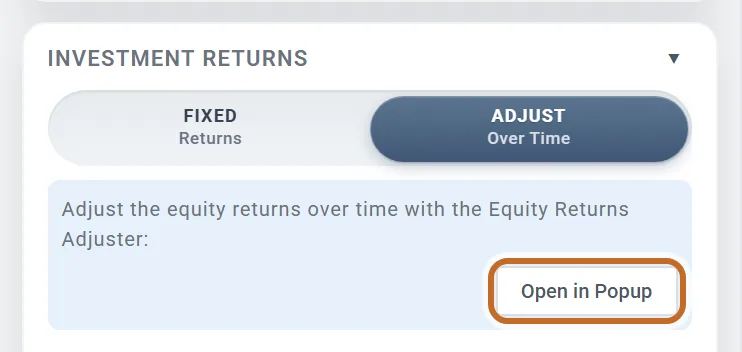
- The box shows View Returns Adjuster (the tab under the chart) and Open in Popup (a window).
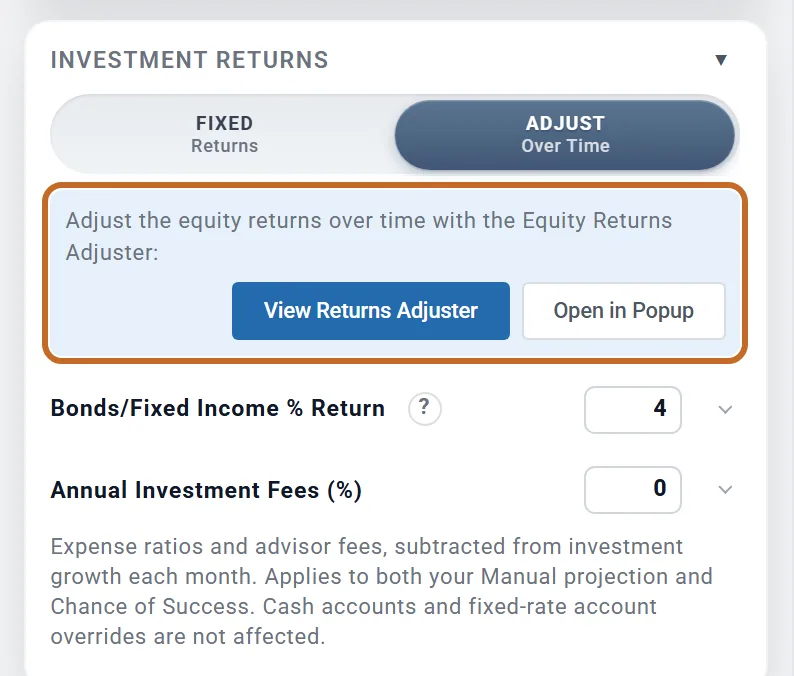
Choosing it opens the Equity Returns Adjuster tab under the Dashboard chart, on a window at least 1200 by 800 pixels (on a smaller one, see On a smaller window):
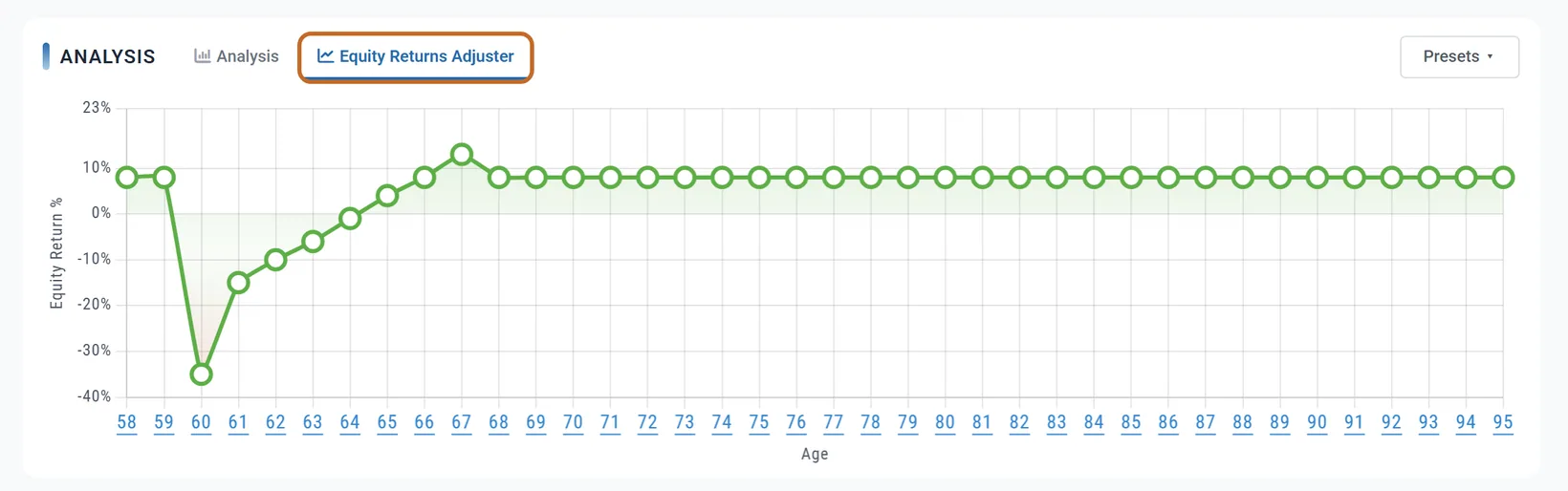
- Drag a point up or down. Every later age moves by the same amount, so a curve keeps its shape.
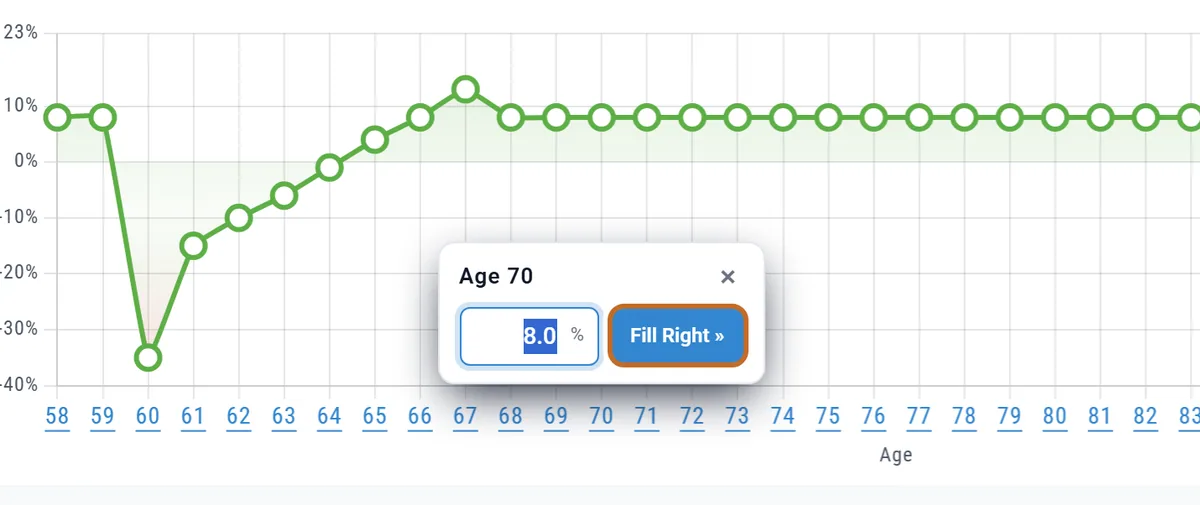
- Type an exact value: click an age under the chart, enter the return, and choose Fill Right » to give the same value to that age and every age after it.
Presets
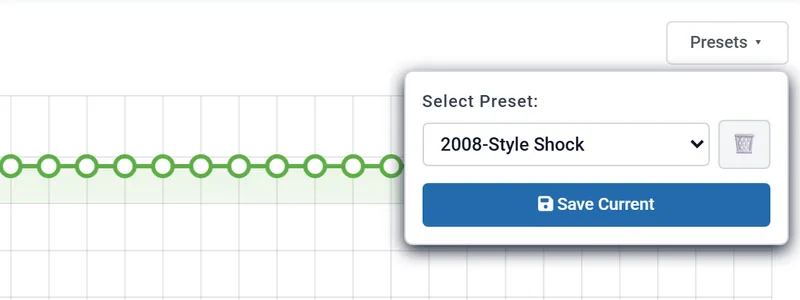
Presets at the top right of the tab opens Select Preset:. Every preset counts from today's age, not from your retirement, and is built around the stock return you had under Fixed Returns:
| Preset | What it does to the stock return |
|---|---|
| Normal (Smoothed Average) | Your return, one point higher or lower at random each year. |
| Bad Early Returns | The first seven years from -5% rising to 1%, then above your return, easing back to it. |
| Lost Decade First | Ten years of 0 to 2% (random), then above your return, easing back. |
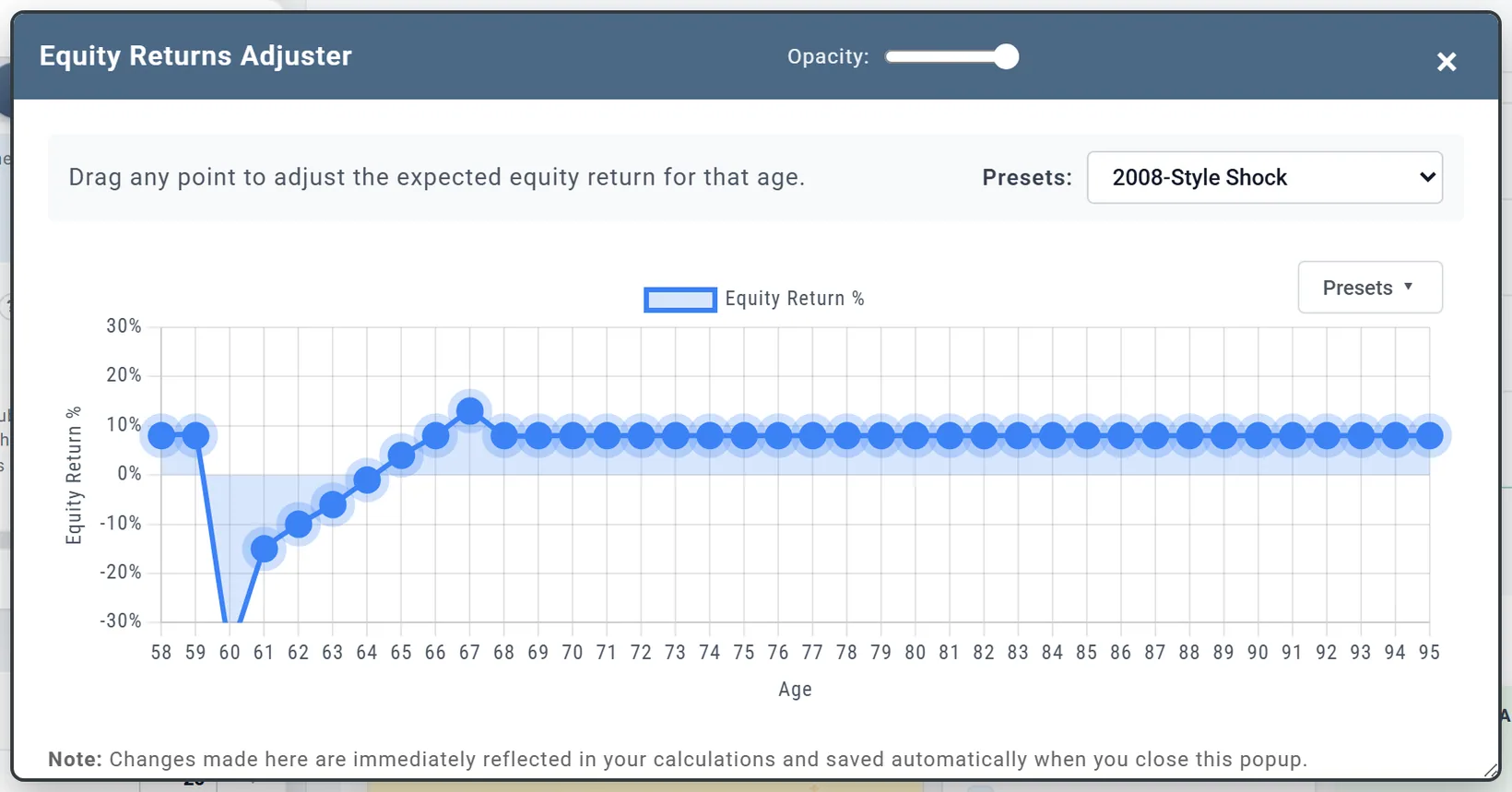
| 2008-Style Shock | Two normal years, then -35% and -15%, a six-year recovery, then your return. |
| Strong Early / Weak Later | 3 to 5 points above your return for the first half of the plan, 2 to 5 below it for the second. |
| Fixed 4% to Fixed 12% | Every year at that rate, in half-point steps. |
- Your own presets: shape a curve, then Save Current and give it a name. It is kept with your account, so every plan offers it; the bin deletes one.
- Normal and Lost Decade First draw new numbers each time you choose them.
- To go back to one return, choose Fixed Returns. The curve is kept for next time.
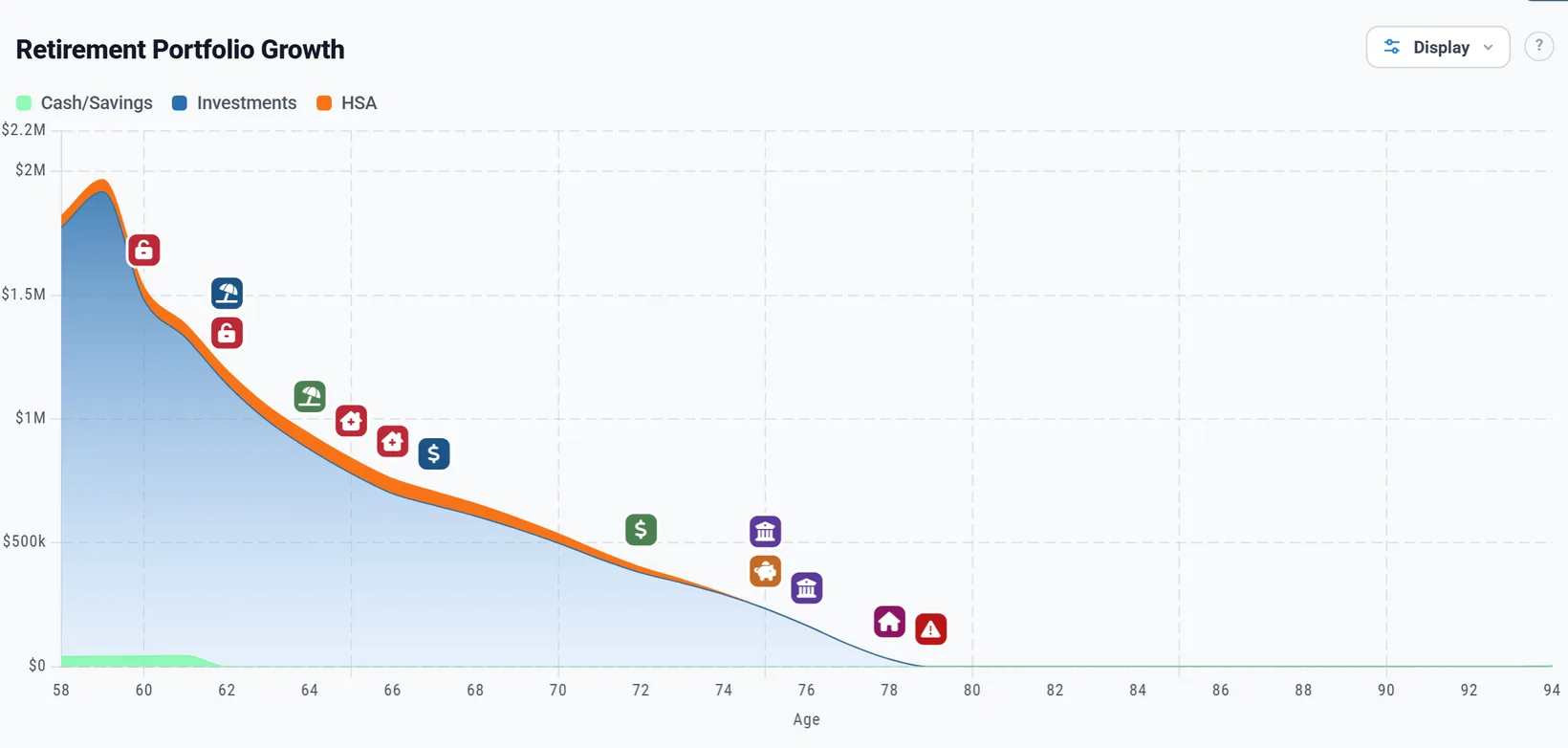
For Chris, 58 today, the 2008-Style Shock's crash lands at 60 and 61, the two years before retirement. Their savings at retirement fall from $2.29 million to $1.38 million, and they run out at 79 even though returns are back to 8% from 68. Bad Early Returns leaves $3.27 million at 94 instead of $7.92 million.
Your investment mix
The Portfolio Allocation section sets how your investments are split between stocks and bonds:
- Fixed Mix: one split for the whole plan. Percent in Equities and Percent in Fixed Income/Bonds always add up to 100. At 60/40 instead of 75/25, Chris and Jamie have $5.96 million at 94 instead of $7.92 million: less in stocks grows more slowly in a steady projection.
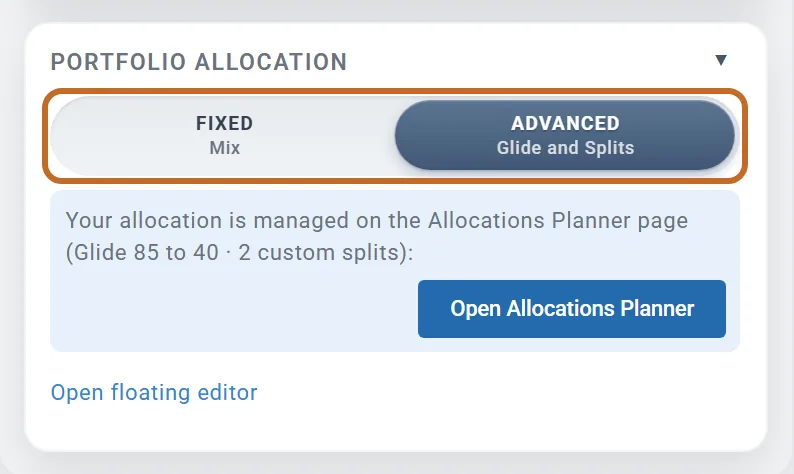
- Advanced (Glide and Splits): a mix that changes with age (a glide path), or a different mix for each kind of account (asset location). Choosing it opens the Allocations Planner page.
In Advanced the box shows what is set, here "Glide 85 to 40 · 2 custom splits", with Open Allocations Planner and, for a glide path, Open floating editor. If some accounts have their own growth, a line says so: "1 account exception still applies."
Choosing Fixed Mix again switches the glide path and asset location off without asking. They are kept, and come back when you choose Advanced.
The Allocations Planner
Open it from Allocation in the left menu, or Open Allocations Planner in the box. It saves as you go ("Changes saved automatically") and has three tabs:
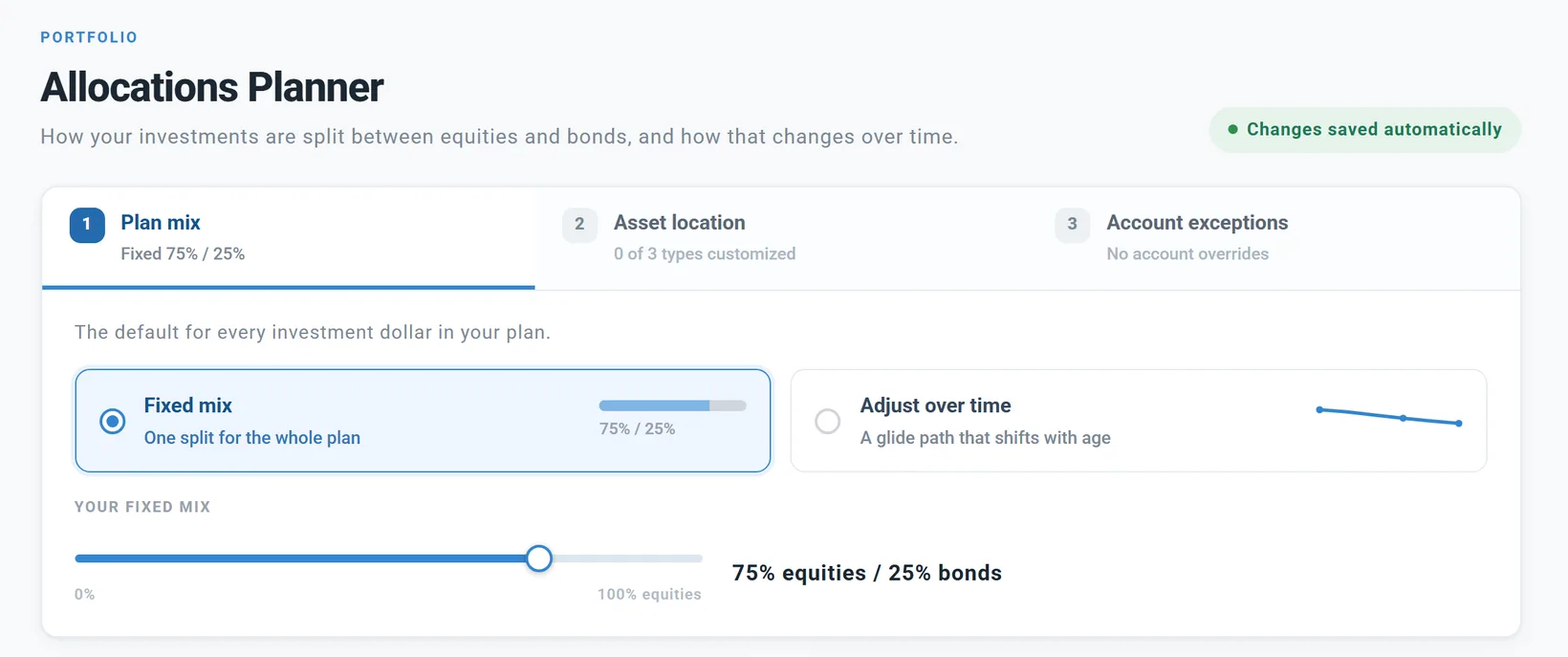
- Plan mix: Fixed mix (the same slider as the box) or Adjust over time (see A glide path). It is the mix for every investment dollar that has no mix of its own.
- Asset location: a different mix for pre-tax, Roth and taxable accounts. Planner+
- Account exceptions: single accounts set differently.
Two cards below show the result as you change things:
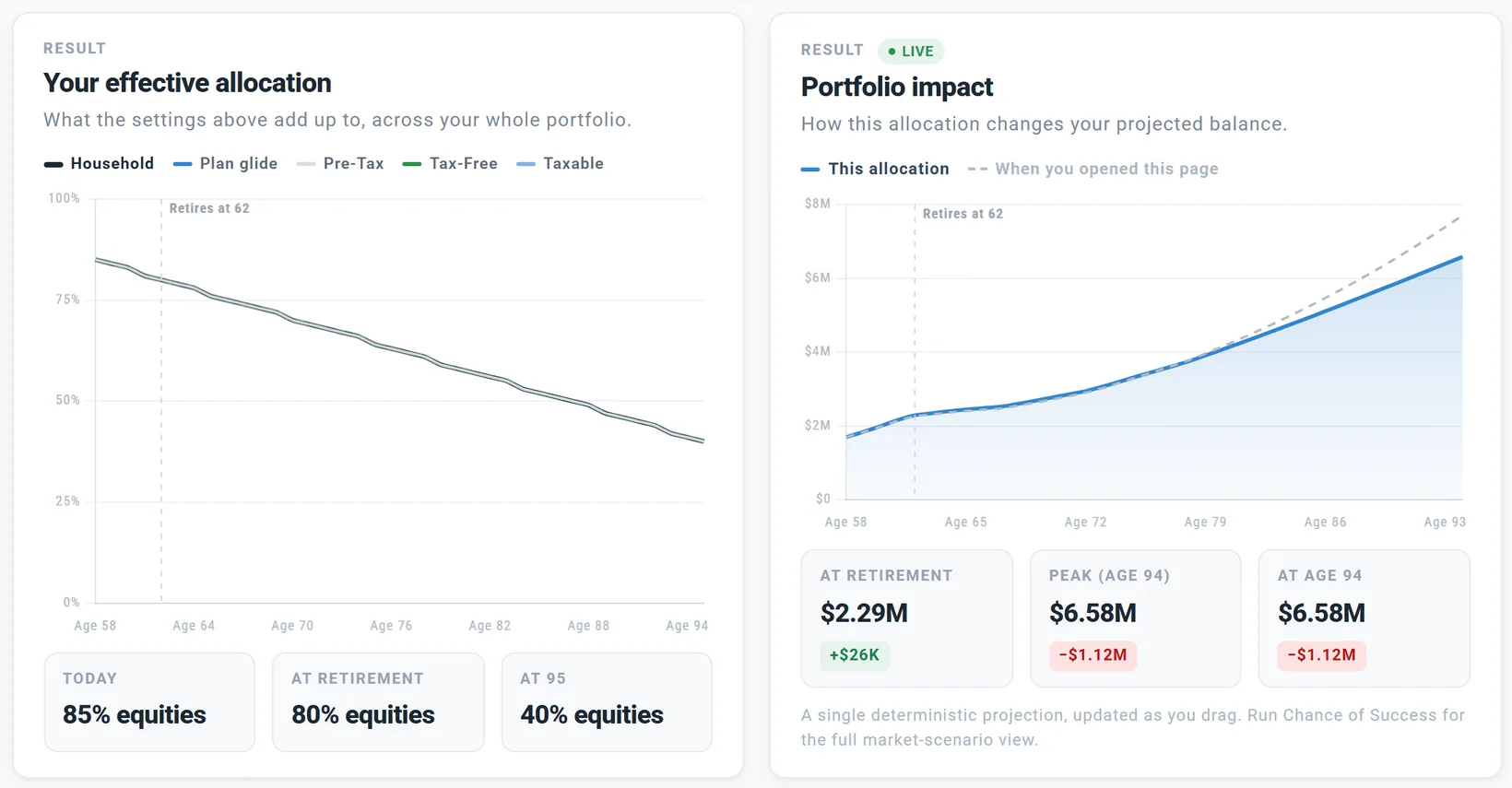
- Your effective allocation: your share in stocks by age. The bold Household line weighs each kind of account by how much money is in it.
- Portfolio impact: your savings by age, against a dashed line for the plan as it was When you opened this page. It is your projection, not Chance of Success.
A glide path
A glide path is a mix that changes with age, usually from more stocks while you are younger to more bonds later. On the Allocations Planner, choose Adjust over time:
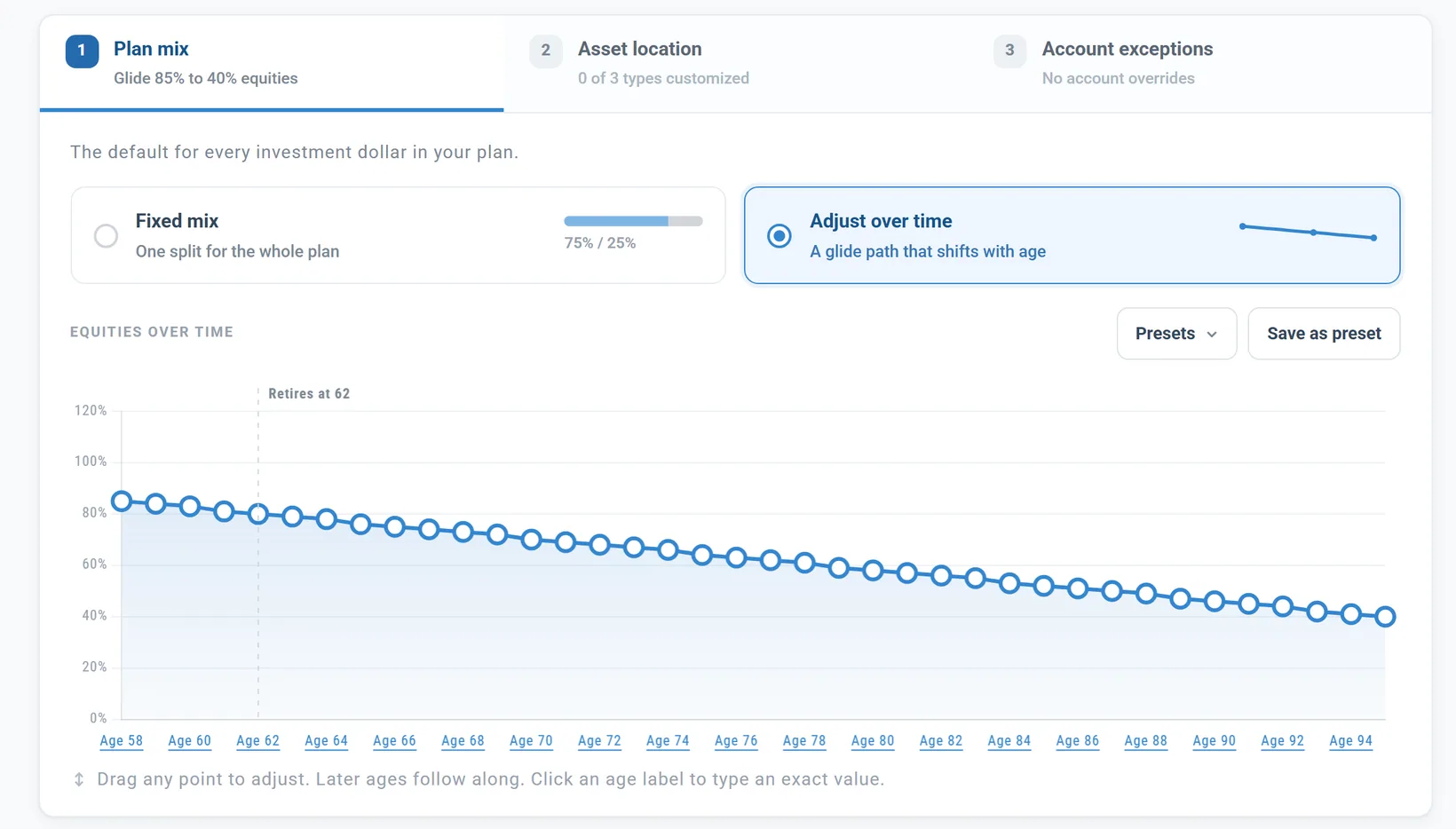
- The curve has one point per age, from today to your Plan End. Drag a point (later ages follow), or click an age to type a value.
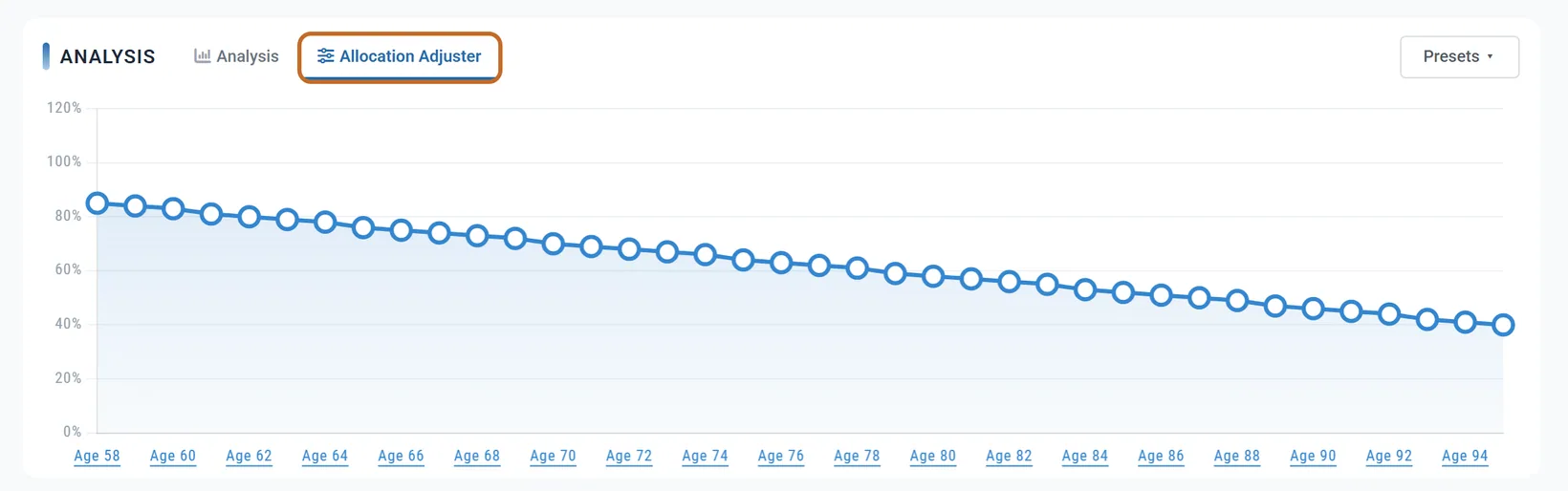
- Presets, here, on the Allocation Adjuster tab under the chart or in the floating editor: fixed mixes from Conservative 30/70 to All Equity, and five glide paths, each a straight line from today to Plan End: Aggressive to Conservative (90% to 30%), Growth to Balanced (80% to 50%), Balanced to Conservative (60% to 30%), Target Date Style (85% to 40%) and Rising Equity (40% to 70%). Save as preset keeps your own curve with your account.
- The glide path counts in Chance of Success too.
With Target Date Style, Chris holds 85% stocks at 58, 80% at retirement and 40% at 95. Their savings at 94 are $1.12 million lower than with a fixed 75/25: fewer stocks mean less growth in a steady projection. Whether fewer stocks help when markets fall depends on the plan; for Chris and Jamie this glide path scores a little lower in Chance of Success too (see In Chance of Success).
Asset location
Asset location means holding different investments in different kinds of account, for example bonds in your pre-tax accounts and stocks in your Roth. On the Allocations Planner, tab Asset location has a row for Pre-Tax, Tax-Free and Taxable, each with Inherit plan, Fixed mix or Adjust over time. Planner+
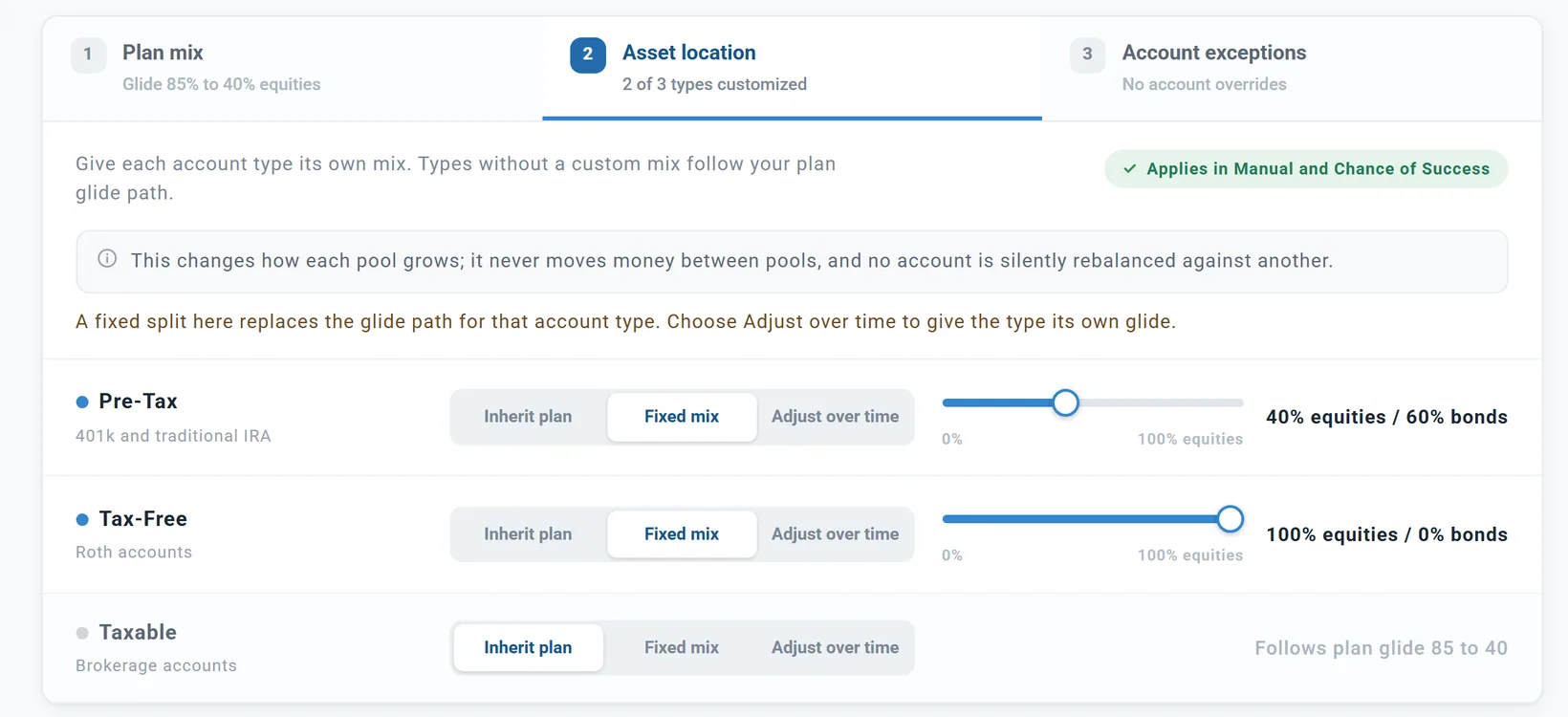
- Each kind of account grows at its own mix. Money is never moved between them, and no account is rebalanced against another.
- One mix per kind of account covers both of you.
- A Fixed mix here replaces the glide path for that kind of account; choose Adjust over time to give it a glide path of its own.
- It counts in your projection and in Chance of Success.
In the example above, Chris and Jamie's whole portfolio is 59% stocks today, 58% at retirement and 67% at 95, because their Roth money grows faster and becomes a larger share.
Account exceptions
One account can grow differently from the rest of its kind, for example a stable value fund or a single stock. Set it on Accounts & Assets: edit the account and change Growth from Default (inherit plan) to Custom mix (equities / bonds), Fixed rate or No growth. Planner+ See Settings on an account that belong to your plan.
- The Allocations Planner's Account exceptions tab lists them, with Manage accounts to change them.
- A custom mix counts everywhere. A fixed rate and no growth count in your projection only; in Chance of Success that account grows like the rest of its kind.
- Fees are not taken from an account with a fixed rate or no growth.
On a smaller window
The Equity Returns Adjuster and Allocation Adjuster tabs under the chart appear only while your browser window is at least 1200 pixels wide and 800 high. Many laptop screens are smaller once the browser's own bars are counted (1366 by 768, for example). There, use:
- Returns: Open in Popup in the box (View Returns Adjuster is hidden). The window works like the tab, except that you drag points rather than type them; choose a scenario in Presets: at its top.
- Mix: the Allocations Planner page, at any size, or Open floating editor in the box for a glide path.
- Both windows have an Opacity: slider so you can watch the chart behind, and can be dragged by their title bar. Each change is saved as you make it.
What these settings do not touch
- Cash. Each cash account earns the rate its Interest Type sets: a fixed yield, or Tracks Inflation. No fees. See Cash and the Master Cash Account.
- Your HSA. It grows at 5% a year, in your projection and in Chance of Success, whatever your mix. To change that, add the HSA (Health Savings Account) box (Tax Planning in the Add box) and set its Annual Growth Rate. US
- A TIPS Ladder IRA grows at the real yield set in its TIPS Ladder box, plus inflation, until the ladder's last payment. US
- Your home, rentals and other assets grow at their own Annual Appreciation %.
- Accounts with their own growth (see Account exceptions).
In Chance of Success
Chance of Success replays your plan through real market history since 1871 (see What Chance of Success does). It uses some of these settings and replaces the rest with history:
| Setting | In Chance of Success |
|---|---|
| Inflation % | Not used: each period's own inflation |
| Stock and bond returns, and the Equity Returns Adjuster | Not used: each period's own returns |
| Annual Investment Fees (%) | Used |
| Your mix, glide path and asset location | Used |
| An account's custom mix | Used |
| An account's fixed rate or no growth | Not used: it grows like the rest of its kind |
Chris and Jamie pass every trial whatever they change here, so the Chance of Success page's example is used: at $12,000 a month their projection runs out at 93 and 91 of 119 trials stay funded (76%).
- One point less for stocks: the projection runs out at 87; still 91 of 119.
- One point more inflation: the projection runs out at 85; still 91 of 119.
- A 1% fee: the projection runs out at 86; 80 of 119 (67%).
- A fixed 60/40: the projection runs out at 88; 84 of 119 (71%).
- Target Date Style: the projection runs out at 92; 89 of 119 (75%).
So the two numbers can move apart: Why it differs from the Dashboard and The projection and Chance of Success explain why both are right.
Careful with cautious assumptions
Each careful guess makes sense on its own. Stacked, they can make a sound plan look short. Chris and Jamie with 7% for stocks, 4.2% inflation and a 1% fee, all at once: their savings stop growing at retirement and are down to $1.51 million at 94, from $7.92 million.
- Change one assumption at a time and watch what it does.
- Your projection is only as good as its guesses; Chance of Success does not depend on your return and inflation guesses, so look at both.
- A late Plan End and high spending stack the same way (see Step 6: Taxes and assumptions).
Preview accounts and Planner+
Everything in the Returns and Allocations box works on a Preview account: inflation, returns, fees, the Equity Returns Adjuster, the mix and a glide path, including the Allocations Planner's Plan mix tab. Two things need Planner+: Planner+
- Asset location. On a Preview account its buttons are greyed out and a note says "Per-account-type allocation is a Planner feature. Your current splits stay active; upgrading unlocks editing."
- An account's own growth (Account exceptions). Growth already set keeps working.
The Portfolio chart shows the effect on a Preview account; Account %, Allocations by Account and Portfolio Returns are blurred.
Outside the US
- The box works the same in every country, in your plan's currency.
- Switching a plan to Canada or the UK moves starting values you never changed: 3.2% inflation becomes 2.5% and 8% for stocks becomes 7.5% (see Set your plan to Canada and Set your plan to the UK).
- Asset location's rows keep their US names (Pre-Tax, Tax-Free, Taxable, with US examples). They are your plan's three kinds of account: in Canada, Registered, Tax-Free and Non-Registered. Canada
- Chance of Success uses US market history and US inflation in every country.