



 Continue with Google
How income works in the planner
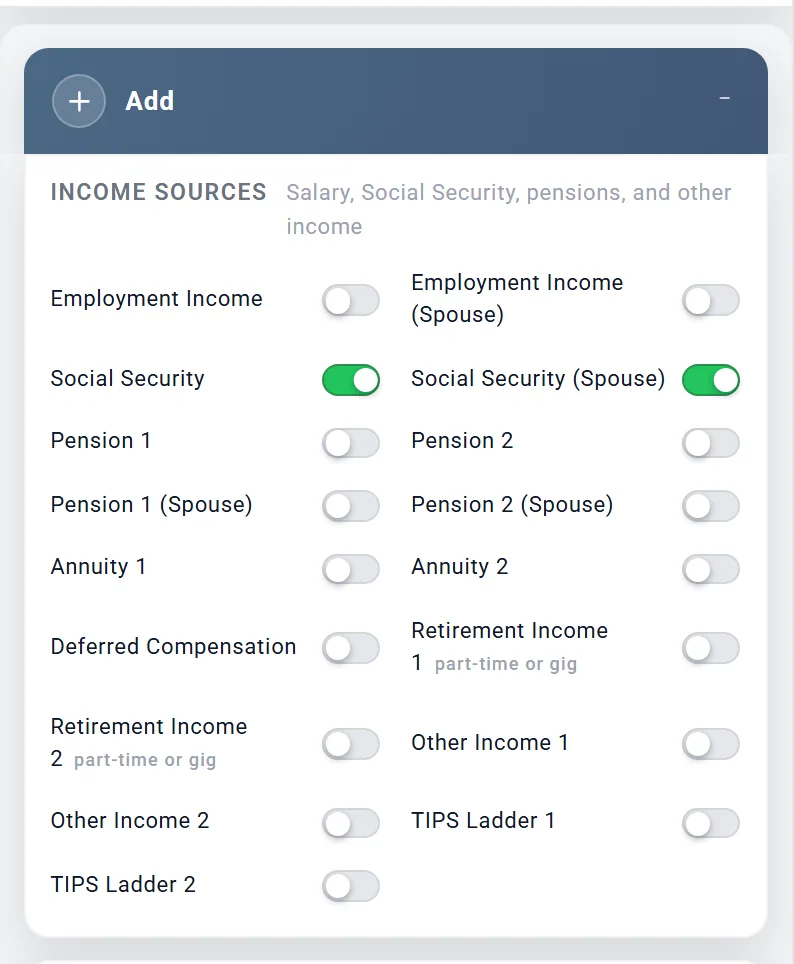
Every kind of income has its own box. A new plan starts with none of them switched on, so the planner assumes no income at all until you add it. This page shows which box each kind of income belongs in, and how to set it up.
- Go to the Add box near the bottom of the settings panel (or choose Add in Jump to).
- Under Income Sources, switch on the box you need. Your spouse's own boxes appear once Include spouse is on in your profile.
- The new box appears below the Add box, not where you clicked. Choose it in Jump to to go straight there, and fill it in.
One-time amounts, such as an inheritance, are under One-Time Events further down the same box. Rent is entered with the property on Accounts & Assets.
The planner works out the tax on every kind of income for you, each year. There is nothing to enter in the Taxes box for it.
Which box for each kind of income
Find your kind of income in the first column. Taxes are for the United States; other countries are further down.
| Kind of income | Where to enter it | Whose ages | How it is taxed |
|---|---|---|---|
| Your salary | Employment Income | Yours; it stops at Works until | Income tax, plus Social Security and Medicare tax |
| Your spouse's salary | Employment Income (Spouse) | Your spouse's | The same, on their own pay |
| Self-employment income, as your main work | Employment Income, with This salary is self-employment income ticked | The earner's | Income tax plus self-employment tax, half of which is deducted from your income |
| Part-time, gig or consulting work after you retire | Retirement Income 1 or Retirement Income 2 | The person in Who earns it | Income tax; self-employment tax only when This is self-employed income is ticked |
| A bonus or stock pay while you work | Other Income 1, with Tax Treatment set to Wages or bonus | The person in Who receives it | Like a salary: income tax, Social Security and Medicare tax |
| Profit from an S corporation you own (a Schedule K-1) | Other Income 1, with Tax Treatment set to Business profit (K-1); a salary the business pays you goes in Employment Income | The person in Who receives it | All of the profit as income tax, whether or not it is paid out; only the share in Paid out to you (%) reaches your spending money. No Social Security or Medicare tax, and the qualified business income deduction is taken (US) |
| Social Security | Social Security and Social Security (Spouse) | Each person's own | Up to 85% is taxed federally; each state has its own rule (California does not tax it) |
| A pension from work | Pension 1 or Pension 2; your spouse's in Pension 1 (Spouse) or Pension 2 (Spouse) | The owner's | Income tax on all of it; some states exempt government pensions |
| An annuity, owned now or planned | Annuity 1 or Annuity 2 | The Primary's | All of each payment if it was bought with pre-tax money; otherwise the taxable portion you enter |
| Deferred compensation | Deferred Compensation | Each person's own | Income tax when paid; no Social Security or Medicare tax |
| Rent from a property | The property, on Accounts & Assets | The owner's | Rent less costs and mortgage interest, as income; it also counts toward the 3.8% net investment income tax |
| A tax-free payment, such as VA disability | Other Income 1, with Tax Treatment set to Tax-free | The person in Who receives it | Not taxed |
| Trust income, royalties, alimony from before 2019 | Other Income 1, Fully taxable or Partially taxable | The person in Who receives it | Income tax on the taxable share |
| An inheritance or other windfall | One-Time Benefits, under One-Time Events | The Primary's | Not taxed when it arrives |
| An inherited IRA | An Inherited IRA account on Accounts & Assets | The account owner's | What you take out is taxed as income |
| A TIPS ladder | TIPS Ladder 1, held in a TIPS Ladder IRA account (see TIPS ladders) | The account owner's, or calendar years with By year | Each year's payout is taxed as a pre-tax withdrawal |
Interest and dividends are not entered as income. The planner estimates them from your taxable accounts.
Whose age each box uses
The planner calls the first person in your plan the Primary, and the second your spouse. Every age you type into a box is someone's age, and it is not always the person you might expect:
- Your spouse's ages: Employment Income (Spouse), Social Security (Spouse), Pension 1 (Spouse) and Pension 2 (Spouse), an Other Income 1 or Other Income 2 your spouse receives, and a Retirement Income 1 or Retirement Income 2 your spouse earns.
- The Primary's ages: everything else, including both annuities and the One-Time Benefits.
- "At retirement" means the Primary's retirement, even in your spouse's boxes. To start something when your spouse retires, choose At spouse's retirement. In the Retirement Income boxes the two choices carry your names, for example At Chris's retirement and At Jamie's retirement.
So for your spouse's part-time work, choose your spouse under Who earns it in the Retirement Income box (see gig work below).
Today's dollars, or the amount when it is paid?
This decides what number to type. Some boxes keep up with inflation for you; others pay exactly what you enter.
- In today's dollars, rising with inflation: your salary (while Tracks inflation is on), Social Security and a TIPS ladder. Enter what the income is worth now.
- Paid as you enter it: pensions, annuities, Retirement Income and Other Income. They grow only by the yearly increase you set in the box, so enter the amount you expect in the first year it is paid.
- Rent is today's rent, growing by the property's Rent Appreciation %.
- A One-Time Benefit arrives as the amount you enter.
Your salary, and a spouse who keeps working
- Switch on Employment Income in the Add box. Planner+
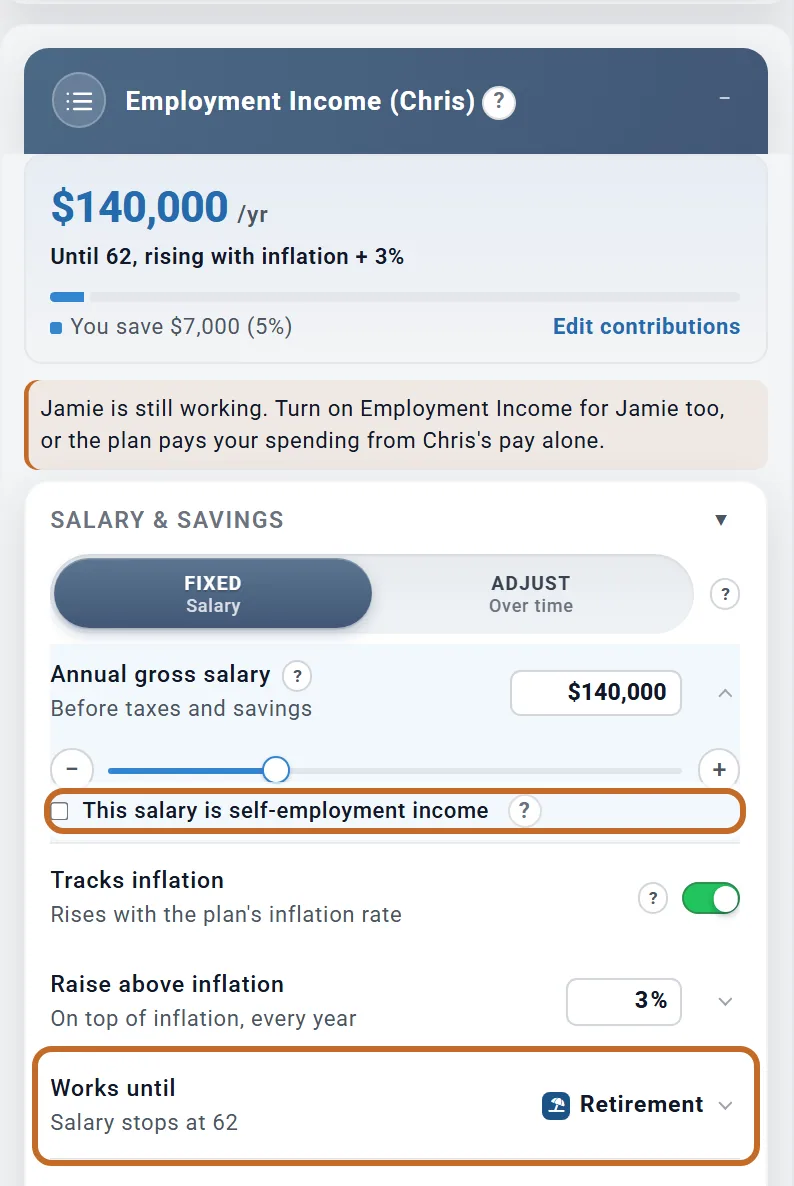
- Enter Annual gross salary: your yearly pay before taxes and before anything is saved from it. Fixed keeps one salary; Adjust lets you set it year by year.
- Leave Tracks inflation on to keep your pay level with prices, and add any Raise above inflation.
- Works until is your retirement unless you change it. Your pay stops there.
- Self-employed? Open the salary row and tick This salary is self-employment income (US plans).
What you save from your pay is set in the Retirement Contributions box, not here.
To step down before you retire (part-time from 60, say) or take a year off, choose Adjust and Open graph: set each year's pay in today's dollars, and $0 for a year with no pay. Keep your Retire at age where it is. Retiring earlier and entering the later pay as Retirement Income would start your withdrawals and stop your saving early, and that pay would carry no Social Security or Medicare tax.
Your spouse keeps working after you retire
- In your spouse's profile, set Retire at to the age they stop, and Retire in to the month.
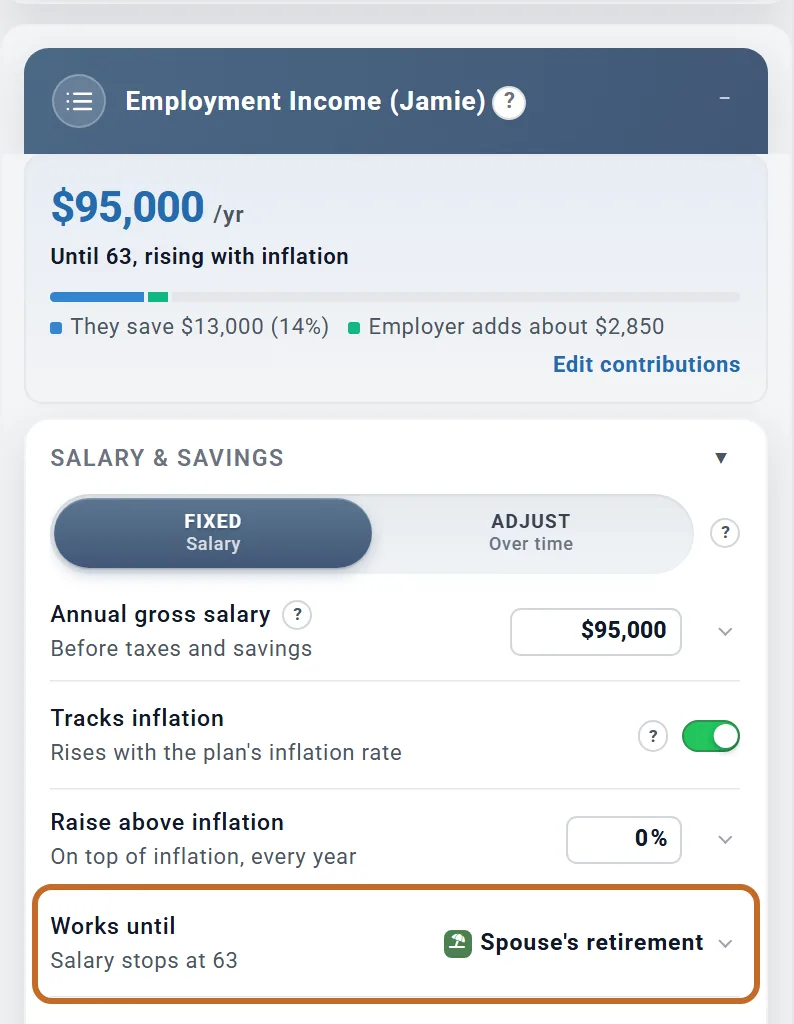
- Switch on Employment Income (Spouse). Its Works until reads Spouse's retirement, so the pay stops when they retire.
- Switch on your own Employment Income too, with your salary.
While your spouse works, their pay goes toward the household's spending first, and the plan draws only the rest from savings. Their own retirement accounts are left alone.
Chris retires at 62 and Jamie keeps working for 33 more months. With both salaries entered, the plan takes $65,508 from savings over those months. With no salaries entered, it takes $286,817.
Part-time, gig or consulting work
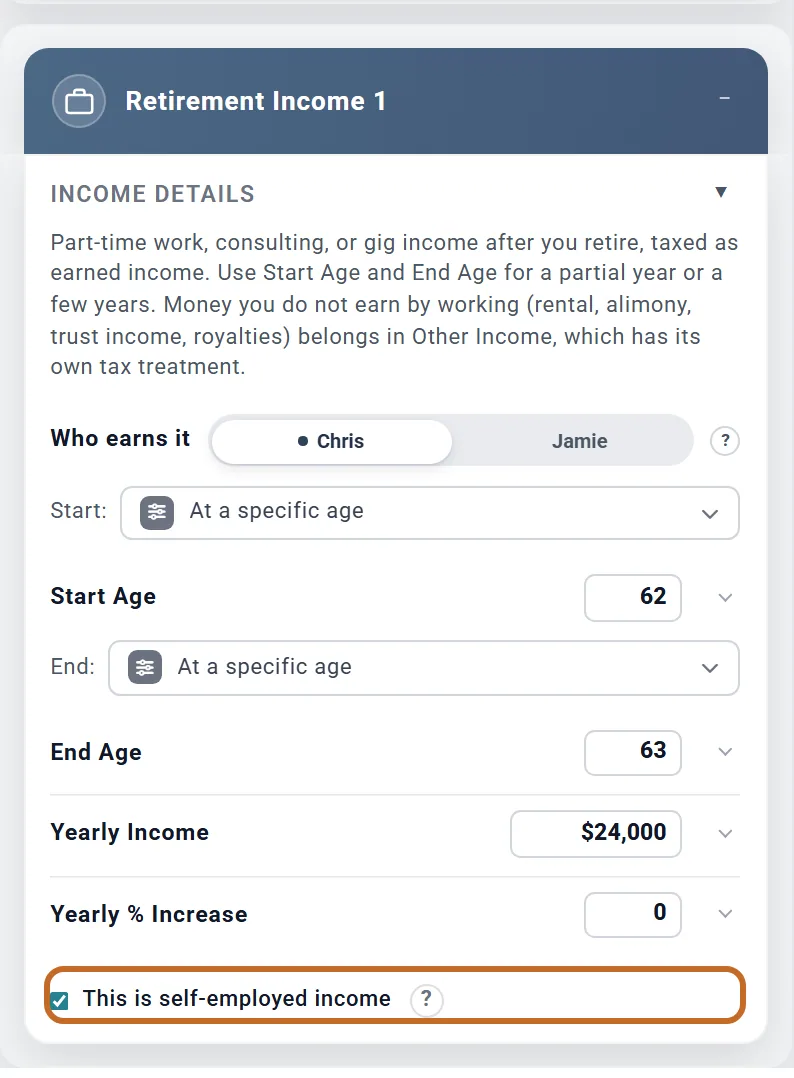
- Switch on Retirement Income 1 (it is marked "part-time or gig" in the Add box). Planner+
- Set Start Age and End Age. The income runs through the whole year of the end age.
- Enter Yearly Income: what you expect to earn in the first year. It grows only by Yearly % Increase.
- For freelance, 1099 or gig work, tick This is self-employed income (US and UK plans).
Chris plans to consult from 62 to 63 for $24,000 a year: $2,000 a month for 24 months, until Chris turns 64. With the tick, the planner adds about $283 a month of self-employment tax.
- Your spouse's gig work: once your spouse is on the plan, the box has Who earns it. Choose your spouse: Start Age and End Age are then your spouse's ages, the income is taxed as your spouse's earnings (their own self-employment tax with the tick), and it stops at your spouse's death. Left on the Primary, it runs on the Primary's ages as before.
- Self-employment before you retire, as your main work, goes in Employment Income with its self-employment tick.
- An employee part-time job: leave the tick off. The planner then charges no Social Security or Medicare tax on it, although a real employer would withhold 7.65%.
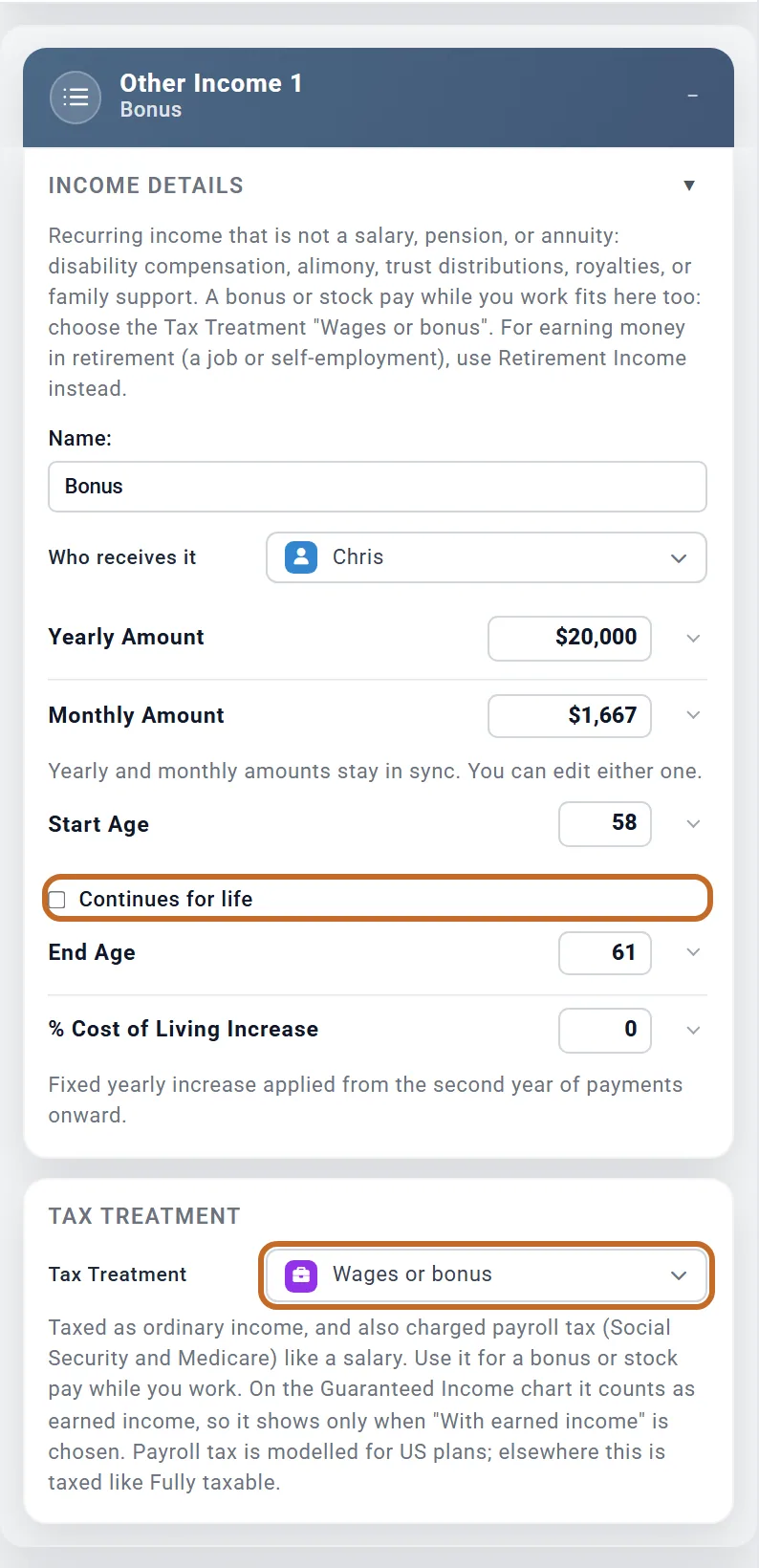
A bonus or stock pay while you work
Keep a bonus or RSUs out of your salary, so they do not raise your employer match or the savings you set as a share of pay.
- Switch on Other Income 1. Type a Name, such as "Bonus", and choose who receives it.
- Enter Yearly Amount. Start Age starts at today's age.
- Untick Continues for life, then set End Age to your last working year: the year before you retire. Other Income runs through the whole year of its end age.
- Under Tax Treatment, choose Wages or bonus.
Chris's $20,000 bonus is paid as $1,667 a month until Chris retires at 62, with about $128 a month of Social Security and Medicare tax on top of income tax.
For one large vesting, use the same box with Start Age and End Age the same: it is spread over the 12 months from that birthday, and taxed.
Disability and other tax-free income
- Switch on Other Income 1, name the payment, and choose who receives it.
- Under Tax Treatment, choose Tax-free for VA disability compensation or alimony from a divorce finalized after 2018. For a payment that is partly taxed, choose Partially taxable and enter the Taxable Portion (%).
- If the payment rises each year, set % Cost of Living Increase. It does not follow inflation by itself.
Tax-free income is paid to you but never added to your taxable income, so it does not push up your tax bracket or your Medicare premiums.
A pension
- Switch on Pension 1 (yours) or Pension 1 (Spouse). Planner+
- Set Starting Age first: a new pension box can start at your age today. The line under Pays shows the month the first payment arrives.
- Enter the Monthly Amount (or Yearly Amount) of the first payment.
- Choose how it rises: % per year for a percentage that compounds, or $ per year for the same dollar raise every year, set in Increase per year.
- Choose how long it Pays: For life, Until age (a bridge that stops at a birthday) or Fixed years.
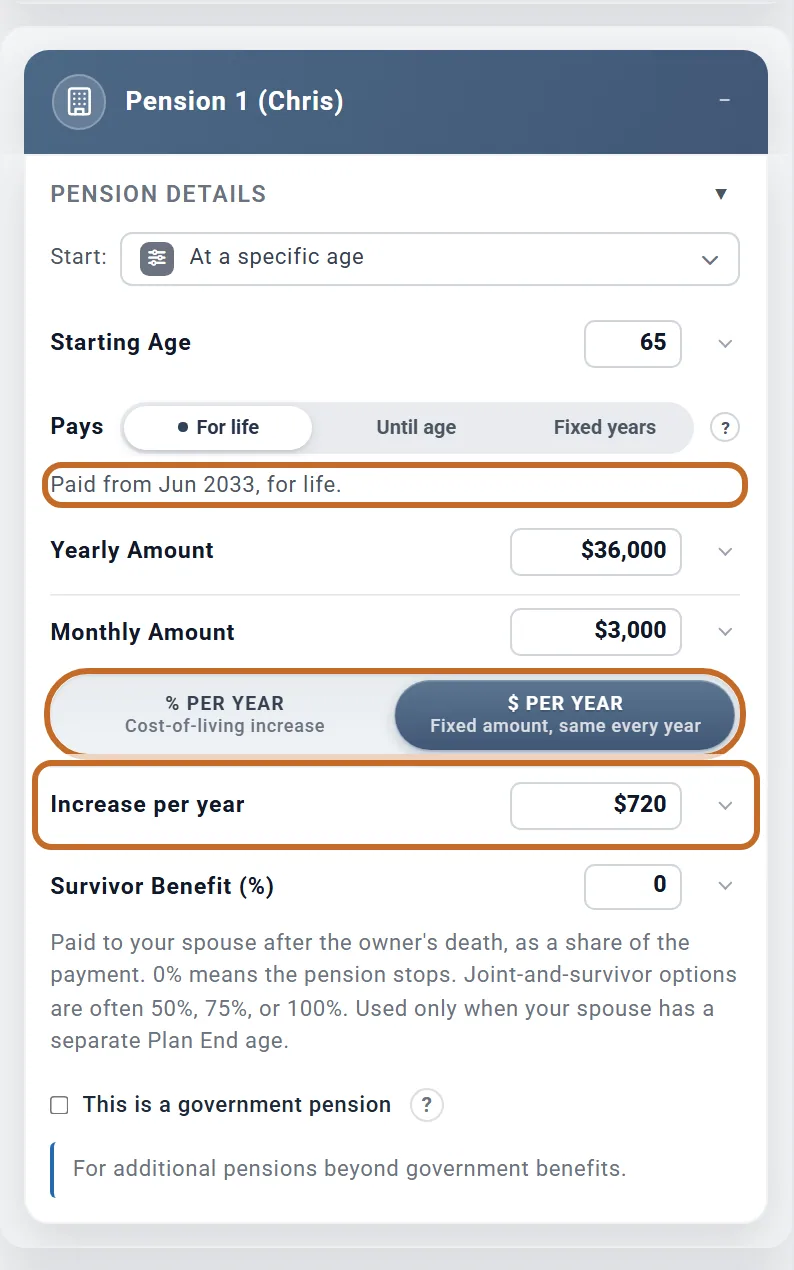
Chris's pension starts at 65, in June 2033, at $3,000 a month with a fixed raise of $720 a year: $36,000 in its first year, $36,720 in the second and $37,440 in the third. With % per year at 2% instead, the monthly payment would go from $3,000 to $3,060 and then $3,121.20. Raises come on the anniversary of the first payment.
- Already being paid: set Starting Age to the age it began and enter today's payment. The box says "Already being paid, so enter today's payment."
- A pension that drops at an age: enter the part that stops as a second pension, with Until age. With Until age set to 67, Chris's pension would read "Paid from Jun 2033 to May 2035 (2 years)": it stops on Chris's 67th birthday.
- Survivor Benefit (%) is what your spouse keeps after the owner's death. It is used only when your spouse has a separate Plan End in their profile.
- This is a government pension: tick it for a federal, state or local government pension. It changes state tax only, in the states that treat those pensions differently.
A pension that starts after your spouse stops work
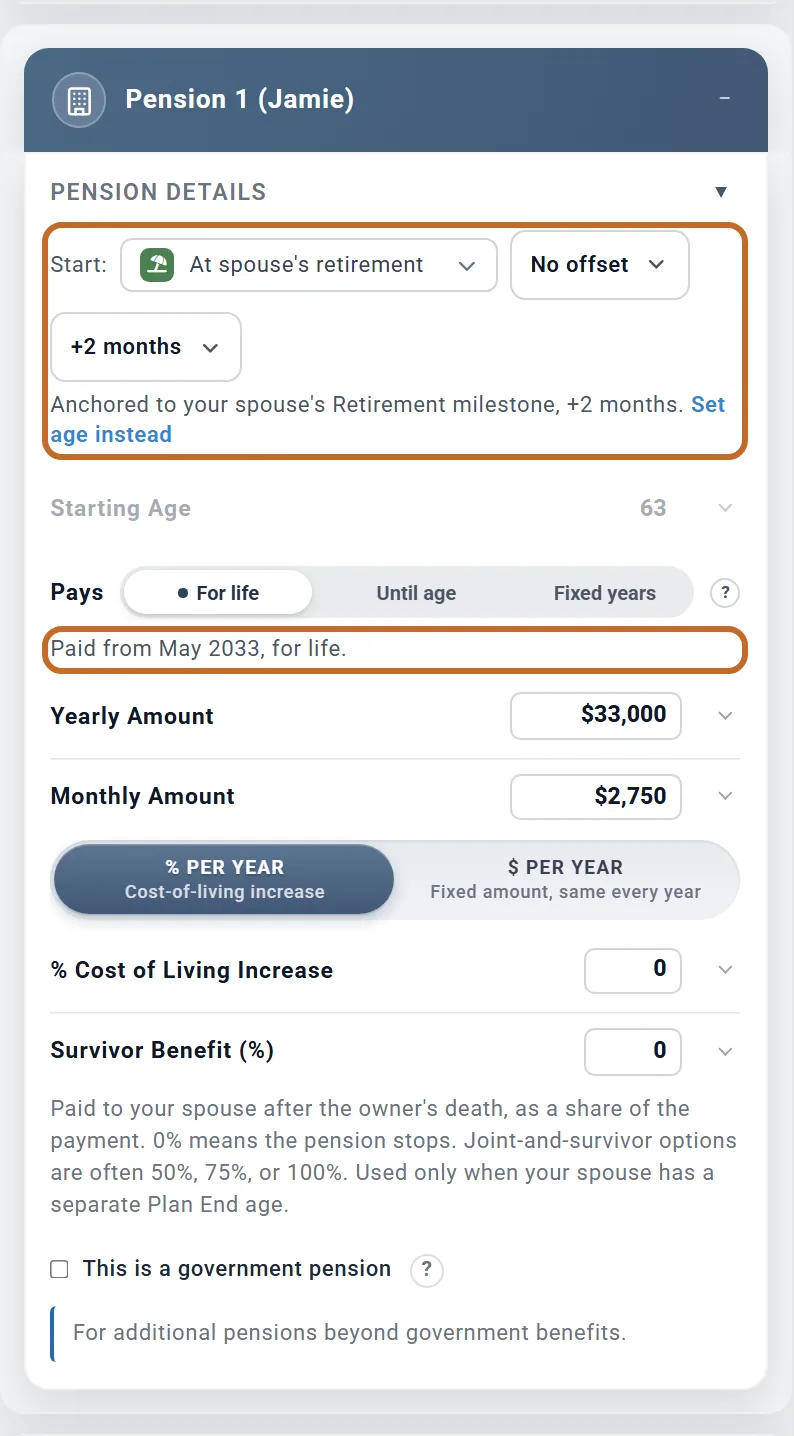
Jamie retires at 63, in March 2033, and the pension starts two months later.
- In Jamie's profile, set Retire at and Retire in.
- Switch on Pension 1 (Spouse) and enter the Monthly Amount.
- Set Start to At spouse's retirement, leave the years on No offset, and choose +2 months.
The box confirms it: "Paid from May 2033, for life." If Jamie's retirement month changes, the pension moves with it.
Remember that At retirement in your spouse's box would mean the Primary's retirement.
An annuity
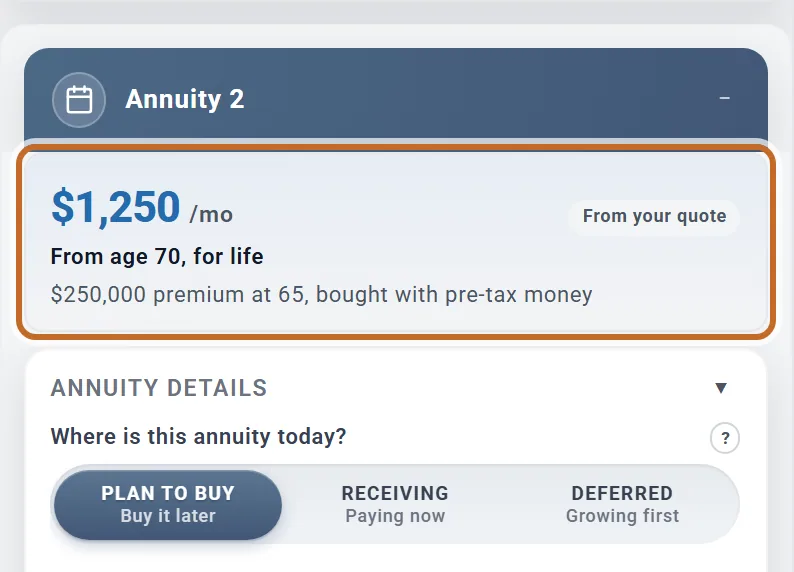
Switch on Annuity 1. The first question in the box is Where is this annuity today?. Planner+
One that already pays you
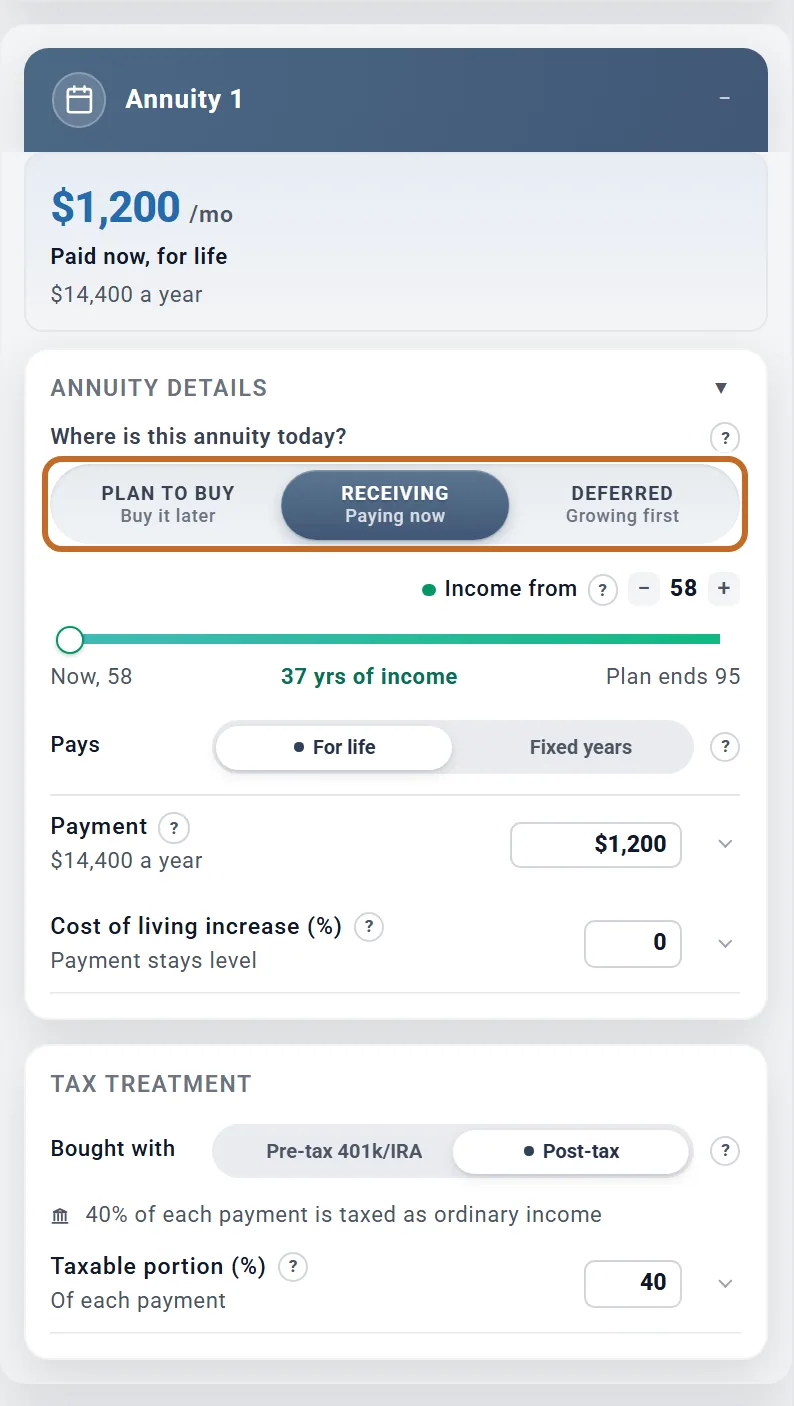
- Choose Receiving. Nothing is taken from your accounts.
- Set Income from to your age today (the box then says "Paid now"), and enter the Payment from your contract, per month.
- Under Bought with, choose Pre-tax 401k/IRA if it was bought inside an IRA or 401(k): every payment is then taxed. Otherwise choose Post-tax and enter the Taxable portion (%) from your 1099-R.
One you plan to buy
Choose Plan to buy. The Purchase amount leaves your accounts at the Buy at age, and the payments start at Income from.
One that is still growing
Choose Deferred for a deferred annuity you own, and enter its value today, what you paid in and its growth rate. One held in an IRA is Bought with Pre-tax 401k/IRA: its value then counts toward your required minimum distributions until it pays.
Annuities follow the Primary's ages.
Deferred compensation US
A nonqualified deferred compensation plan (NQDC, or a 409A plan) holds pay you chose to receive later. It pays you after you leave the employer, on the schedule you elected, and you cannot draw it earlier. It is not an account: enter it in its own box, not on Accounts & Assets. A government 457(b) is different: it is an account, added as a 457 Plan.
- In the Add box, under Income Sources, switch on Deferred Compensation.
- Under How do you want to enter the balance?, choose Balance when you leave the employer and enter the Vested balance at separation, or Current balance + growth until then and enter today's Current vested balance and its Growth until separation (%/yr). Enter only the vested part: the planner has no vesting schedule.
- Age you leave the employer starts at your Retire at age. Left there, you leave in your retirement month, and it moves when your retirement does.
- Choose the Payout: Annual installments (set Number of annual installments, 5 to start) or Lump sum.
- Payout start age is when the payments begin. It cannot come before you leave.
Your spouse's plan has its own fields in the same box: tick My spouse also has a deferred comp plan (it shows once Include spouse is on). Their ages and their own retirement apply.
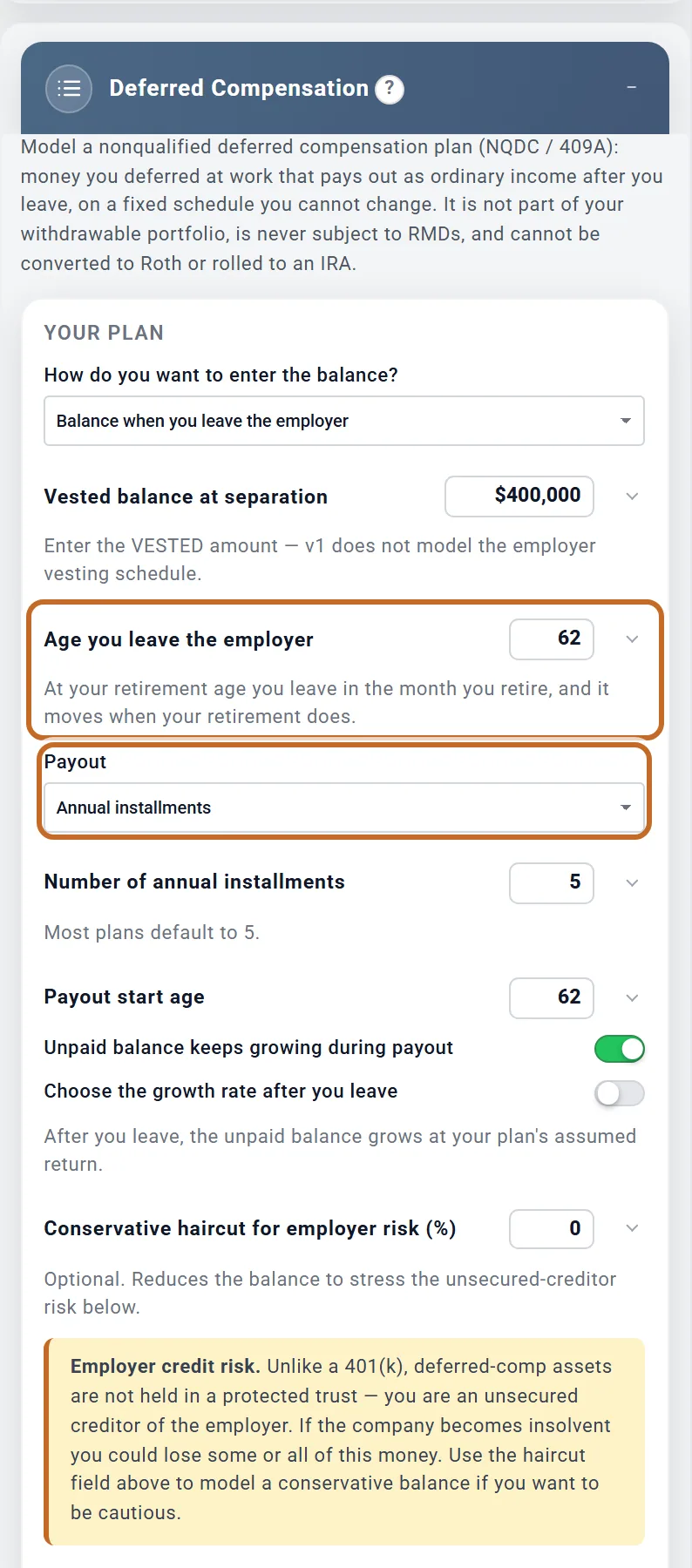
Chris expects $400,000 vested when leaving at retirement, at 62, paid in five yearly installments. The first payment comes in June 2030, as $6,667 a month for 12 months: $80,000. Each year the planner pays the unpaid balance divided by the years left, and the rest keeps growing at the plan's assumed return (7% a year for Chris and Jamie), so the payments rise: $85,600, $91,592, $98,003 and $104,864, $460,059 in all.
- A lump sum is paid in one month and taxed in that one year: $400,000 in June 2030, with $78,564 of federal income tax that year.
- Unpaid balance keeps growing during payout off pays the same amount each year: $80,000 five times.
- Choose the growth rate after you leave sets your own rate for the unpaid balance. Left off, it grows at your plan's assumed return, or, with Current balance + growth until then, at the rate above.
- A later Payout start age lets the balance grow until then: leaving at 62 with payments from 65, Chris's first year would be $98,003.
- Conservative haircut for employer risk (%) lowers the balance, to test what happens if the employer cannot pay it all (the money is not protected the way a 401(k) is). At 20%, Chris's first year would be $64,000.
How the payments are taxed
- Each payment is ordinary income in the year it is paid, federal and state, with no Social Security or Medicare tax. Spreading it over several years can keep more of it in lower brackets.
- It is not in your withdrawal order: no required minimum distributions, no 10% early withdrawal penalty at any age, and it cannot be converted to Roth or rolled into an IRA.
- In retirement each payment pays your spending first, like a pension, so the plan takes less from your accounts.
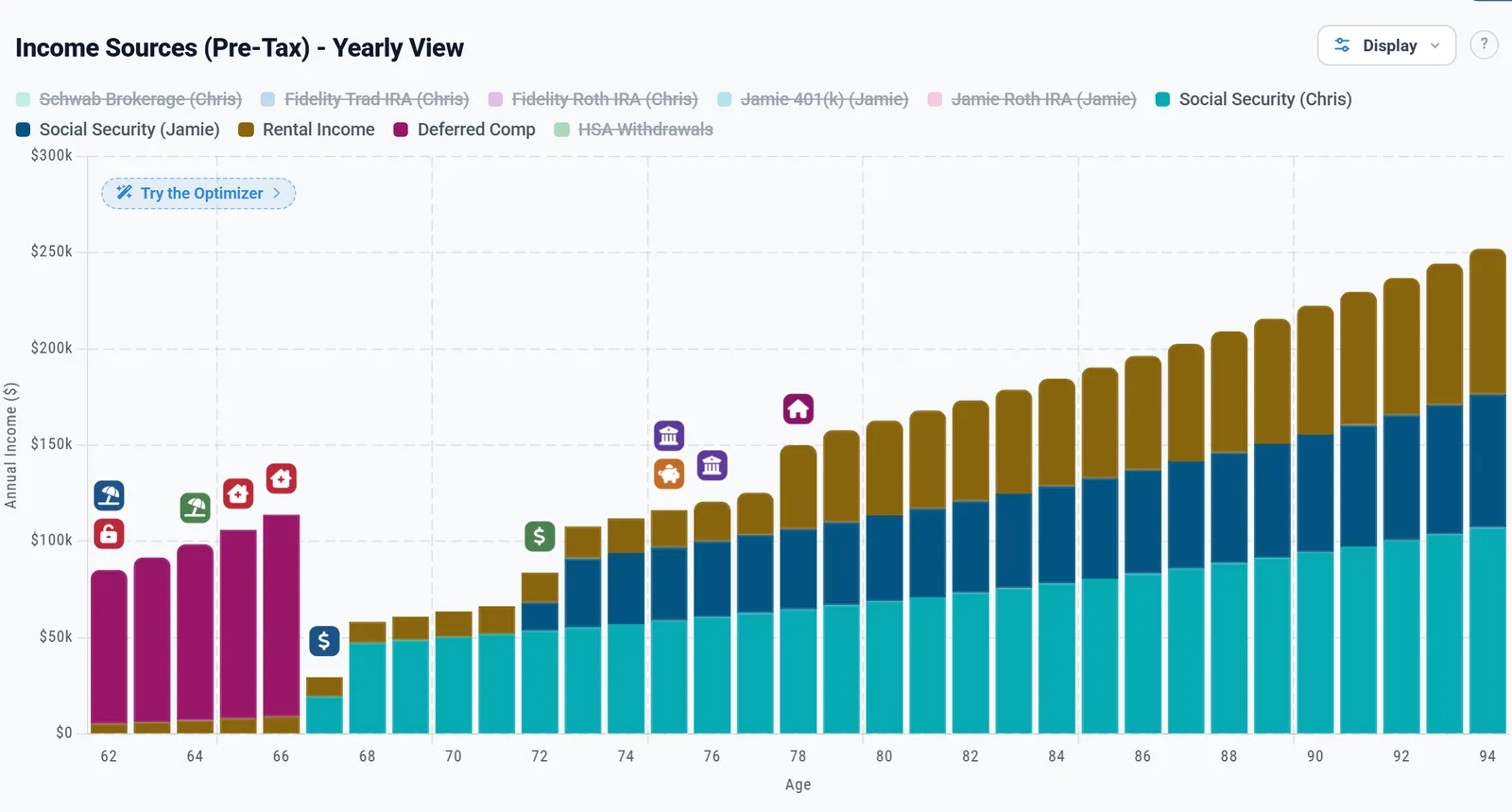
The payments show on the Income chart as Deferred Comp. The unpaid balance counts in your net worth (the Net Worth chart's Deferred Compensation (NQDC)): from today with Current balance + growth until then, from the month you leave with Balance when you leave the employer.
A TIPS ladder US
A TIPS ladder is a set of Treasury Inflation-Protected Securities that mature one year after another, giving you an income that keeps up with prices. The planner models one you already own inside an IRA. It has its own page: TIPS ladders. In short:
- In the Add box, under Income Sources, switch on TIPS Ladder 1.
- Give the ladder its own account: the box's Add a TIPS Ladder IRA button opens the account form with the type TIPS Ladder IRA chosen. Enter the ladder's value today as its balance. Adding an account needs Planner+. Planner+
- Choose how it Pays: Same each year (one amount between two ages) or By year (an amount for each calendar year, which you can import from tipsladder.com).
What the planner does with it
It sets the account aside, grows it at inflation plus the ladder's real yield, and pays each year's amount, raised with inflation, as a taxed pre-tax withdrawal that counts toward your required minimum distribution. Nothing is paid before the Primary retires. See What the plan does with each year.
Rungs that differ each year
For a ladder with larger rungs early, years with no bond maturing, or rungs that rise, set Pays to By year and choose Import a CSV file to read tipsladder.com's Funded years file or a two-column spreadsheet. See Pays: By year and Import your ladder from a file.
An inheritance or other windfall
- In the Add box, under One-Time Events, switch on One-Time Benefits. The box holds up to six benefits; give each one a name so you remember what it is for.
- Set Age received (the Primary's age) and Month received, and the Amount.
- Choose where it goes under Goes into: Taxable suits inherited cash or investments. Pre-tax adds it to your pre-tax accounts, where it is taxed later, as you withdraw it, and Roth (in a US plan) to your Roth accounts.
The planner adds it without income tax, which is right for an inheritance of cash or investments. An inherited IRA is different, because what you take out of it is taxed: add it as an Inherited IRA account on Accounts & Assets. A home or rental sale is set on the property, not here.
Testing what-ifs with your plans walks through an inheritance step by step, with screenshots.
Rent from a property
- Open Accounts & Assets. Under Real Estate Assets, add the property as a Rental Property, or click the pencil on one you have.
- Enter Monthly Rent as it is today, the Occupancy Rate %, and how fast the rent rises (Rent Appreciation %), then its costs and its mortgage.

For Elm St Rental, $3,200 a month at 92% occupancy is $2,944 of rent a month. After property tax, insurance, upkeep and $1,125 of mortgage interest, $927 a month is taxed as income. After the full mortgage payment of $1,910, about $142 a month is left as cash.
Enter rent only with the property. Entering it in Other Income as well would count it twice.
Check your income on the chart
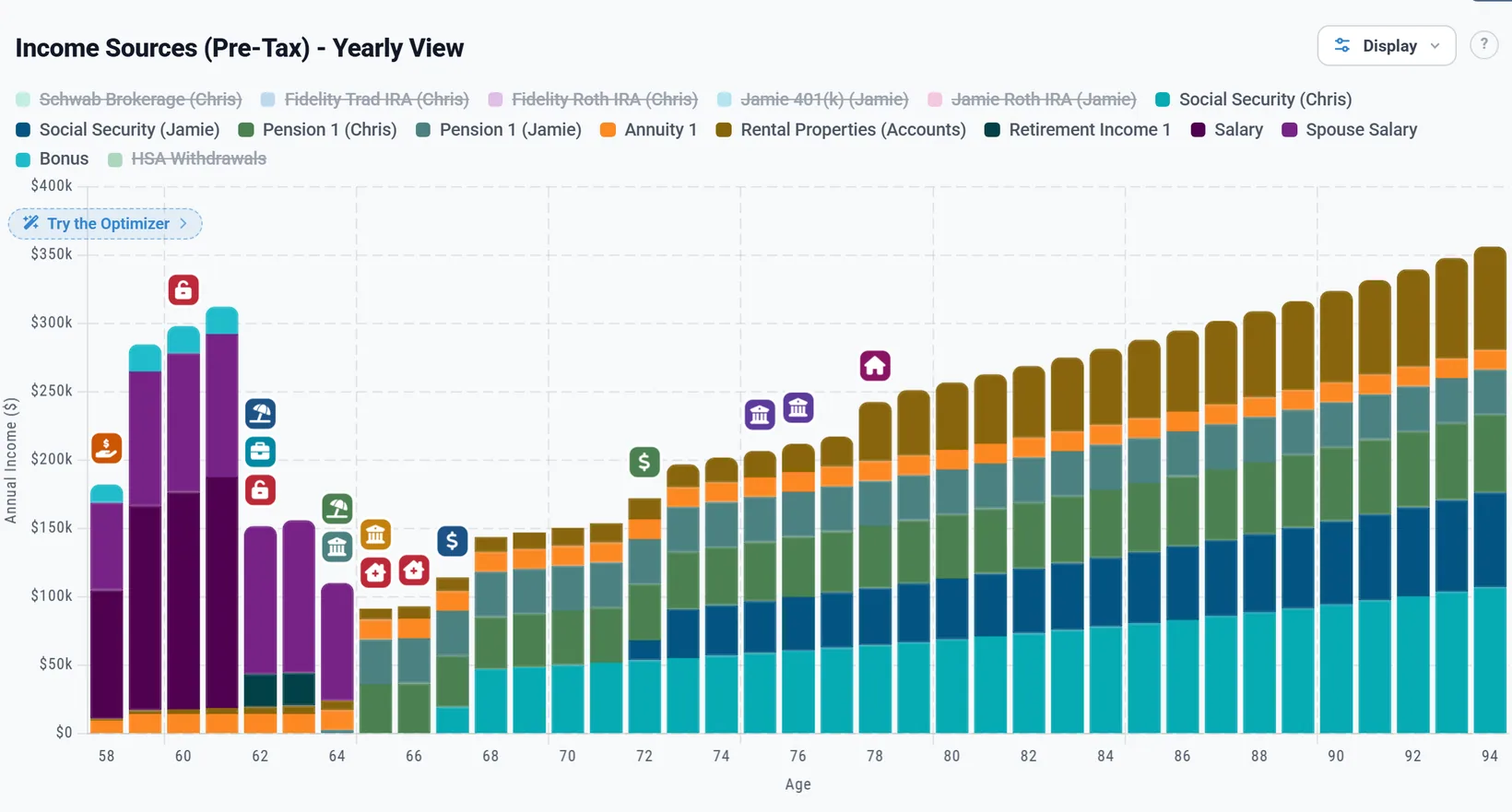
On the Dashboard, click the Income tab above the chart. Each source has its own colour, so you can see that each starts and stops when you meant it to. Click a name in the legend to hide it. The More menu also has a chart for several kinds of income on their own, such as pensions or rental income.
In Canada, the UK and Australia
- Government pensions: in place of Social Security, the Add box offers CPP/OAS in Canada, State Pension in the UK and Age Pension in Australia. Enter the amounts from your government statement or forecast, in today's money.
- Workplace pensions: outside the US the Add box also has Defined Benefit Pension 1 and 2, for a final salary or career average pension. They run on the Primary's ages.
- Payroll taxes: Employment Income takes CPP and EI in Canada and National Insurance in the UK. In the UK, ticking This is self-employed income on Retirement Income charges Class 4 National Insurance instead.
- In Australia, Germany, the Netherlands and Ireland a salary pays income tax only, with no social insurance contribution (Australia's Medicare levy is part of its income tax).
- US only: Social Security, Deferred Compensation, TIPS ladders, and the self-employment tick on Employment Income. Wages or bonus and Business profit (K-1) are taxed like Fully taxable outside the US.
What the planner does not model
- The Social Security earnings test. The box warns you when you claim before your full retirement age while still earning.
- Social Security and Medicare tax on an employee part-time job entered as Retirement Income.
- The qualified business income deduction on self-employment, rental or REIT income (it is figured on a K-1 profit in Other Income), and the self-employed health insurance deduction.
- An S corporation owner who does not work in the business (a passive owner can owe the 3.8% investment income tax on the profit), a K-1 loss, and distributions above your basis in the stock.
- Depreciation on a rental: rent is taxed net of its costs and mortgage interest only.
- Pensions, annuities, Retirement Income and Other Income rise only by the fixed increase you set; none of them can follow inflation.
- A One-Time Benefit is never taxed, so a taxable windfall belongs in Other Income for one year.
- An annuity keeps paying after the first death in the plan, even one that would stop when its owner dies.
- The Additional Medicare Tax on a couple's joint pay: the 0.9% is charged on each person's own pay above $200,000 (the line employers withhold at, never raised), not on joint pay above $250,000. (US)
For the full list of what the planner includes and leaves out, see the Learning Library article What ReadyAimRetire Models.