



 Continue with Google
When an advisor manages some of your accounts Planner+
Many advisors charge a percent of the money they manage each year, often about 1%. If yours manages only some of your accounts, such as two IRAs at one brokerage, put that percent on those accounts and nowhere else. Each investment account has its own Advisor fee (% a year).
The plan then:
- takes the fee out of that account every month, in your projection and in Chance of Success;
- leaves your other accounts alone;
- shows each account's growth rate after its fee on Accounts & Assets;
- adds an Advisor fees card to the Summary: what the fees take over your plan, and your plan beside the same plan without them.
The pictures on this page are from an example couple, Pat and Sam, both 60 and retiring at 63, with $1.5 million invested. An advisor manages $700,000 of it at 1%: Pat's $400,000 rollover IRA and Sam's $300,000 IRA. Pat's 401(k), Roth IRA and their joint brokerage account are self-managed.
Put the fee on an account
- Open Accounts & Assets.
- Point at the account's row and choose the pencil (Edit) at its end. The account's window opens, such as Edit Investment Account: Pat.
- Under Plan settings, below Growth, type the percent into Advisor fee (% a year): 1 for 1%. It takes 0 to 3%, in steps of 0.05.
- Choose Save Changes. Do the same for each account the advisor manages, including your spouse's.
As you type, the line under the field says what that is in dollars, such as "About $4,000 a year on today's balance." for Pat's $400,000 IRA at 1%. Leave the field empty for no fee.
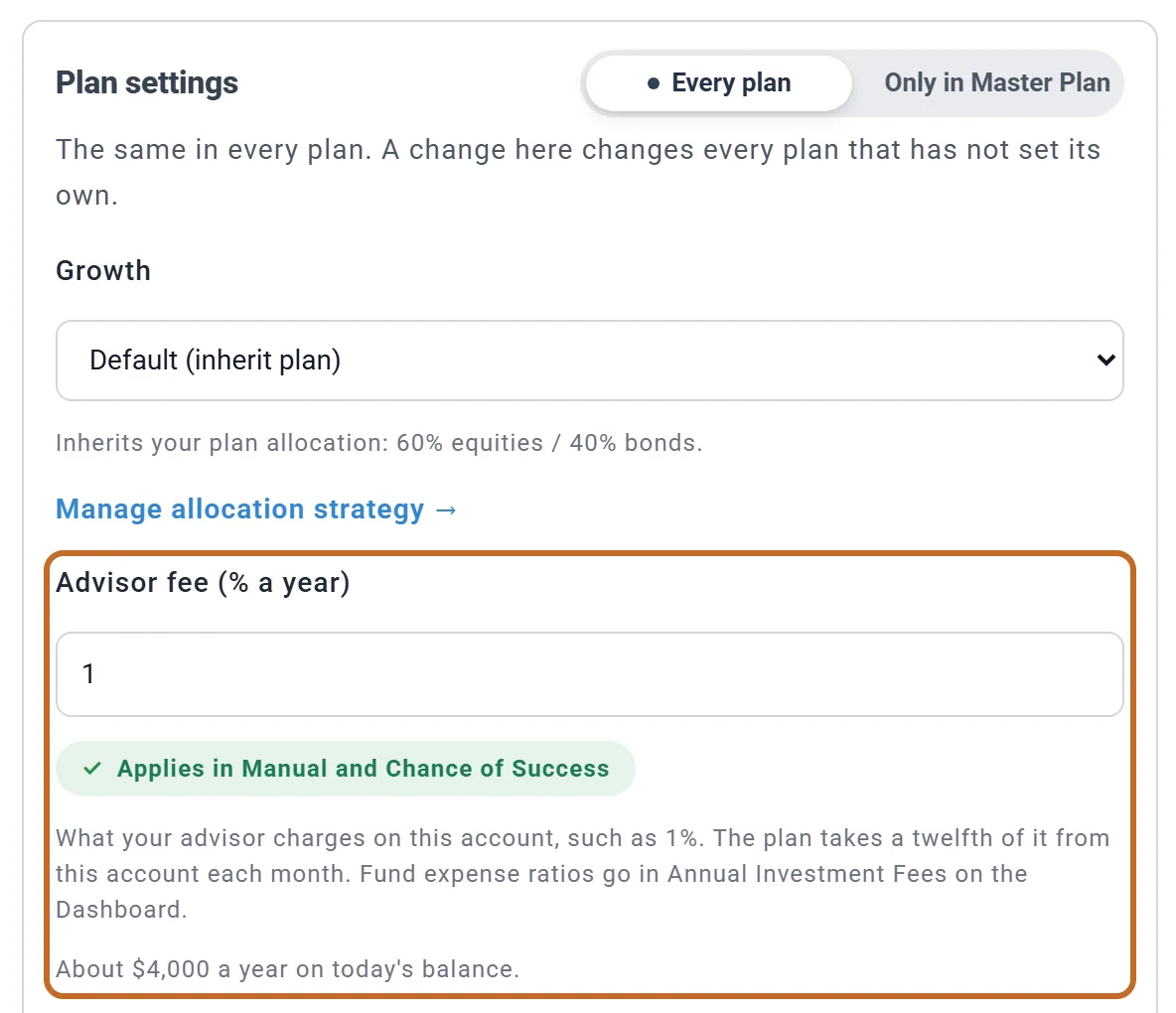
The field shows on investment accounts whose money is pre-tax, Roth or taxable: IRAs, 401(k)s and other workplace plans, Roth accounts, brokerage accounts, and in Canada RRSPs and TFSAs. It also shows on an Inherited IRA or Inherited Roth IRA. It does not show on cash accounts, an HSA or a TIPS Ladder IRA, or on an inherited account a spouse treats as their own: that money counts as the spouse's own, so enter it as their own account to give it a fee.
How the plan charges it
- A twelfth each month, inside the account. A 1% fee takes about 0.083% of the account's balance every month, so the dollars follow the balance: more as the account grows, less as you draw it down, nothing once it is empty. It comes off in good months and bad, as an advisor's bill does.
- On top of the account's growth. Whatever Growth says (the plan's mix, the account's own mix, a Fixed rate or No growth), the fee comes off that, and off Annual Investment Fees (%) too (see Advisor fee or Annual Investment Fees?).
- In your projection and in Chance of Success. Every historical trial charges it the same way.
- Only where you put it. Accounts without a fee grow as before. The plan never moves money between accounts to even them out.
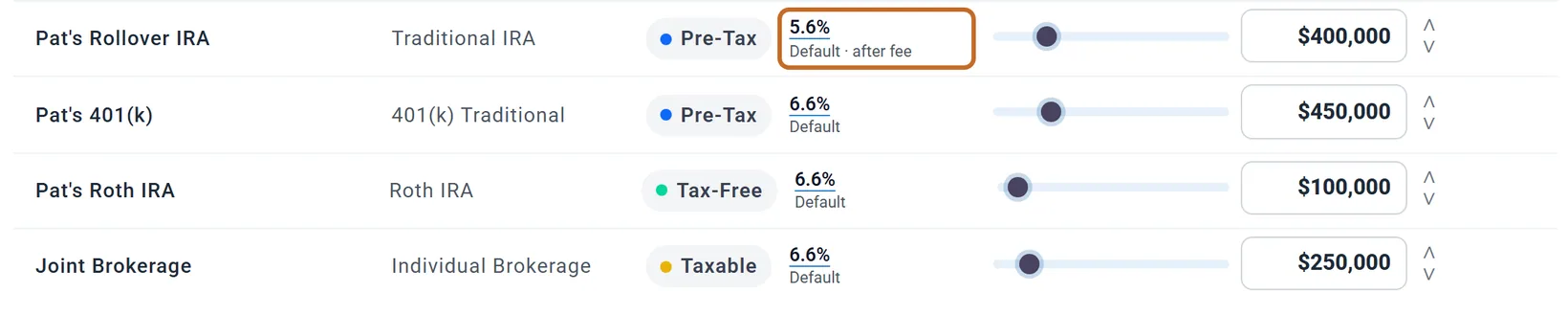
The Growth column on Accounts & Assets shows each account's rate after its fee, marked "after fee". Click the rate to see the fee taken off it (Advisor fee on this account).
Advisor fee or Annual Investment Fees?
The planner has two places for fees, and they add up:
- Annual Investment Fees (%), in the Portfolio Returns box on the Dashboard, is what your funds charge (their expense ratios), on all your investments. See Investment fees.
- Advisor fee (% a year), on an account, is what an advisor charges on that account, on top of the fund fees.
So keep your fund fees in Annual Investment Fees, and leave the advisor's part out of it. If one advisor manages all of your money, either place works: the advisor fee on every account, or the advisor's percent added to Annual Investment Fees. Only the advisor fee shows on the Advisor fees card.
What the fees cost: the Advisor fees card
A plan with an advisor fee on any account gets an Advisor fees card on the Summary, across the page after the Coach.
- The large figure is what the fees take over your whole plan, in today's dollars or future dollars as the Summary's switch says. The line under it names each account and its fee.
- The table sets your plan beside the same plan without the advisor fees: your savings at your Plan End age and your Chance of Success, with the fees and without them. When either plan runs out of money, a Your money row says at what age.
- The note under it (when your plan lasts) gives the difference in savings: what the fees take, plus the growth that money would have earned. Annual Investment Fees are in both plans.
- Edit on Accounts opens Accounts & Assets.
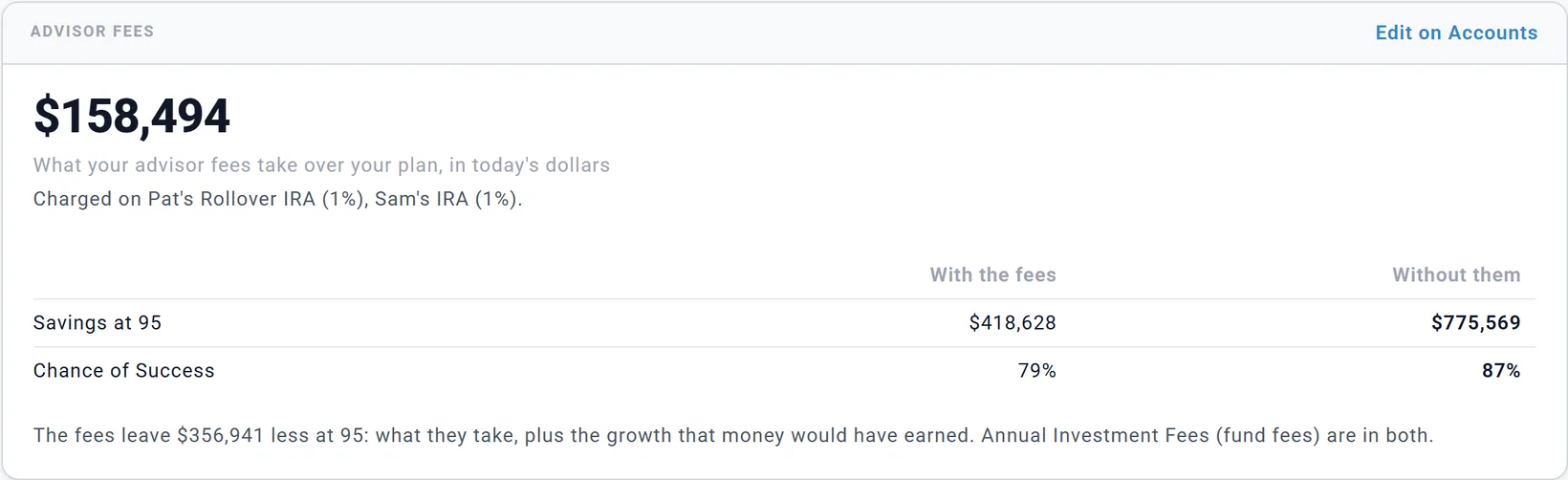
For Pat and Sam, the 1% on $700,000 comes to $158,494 in today's dollars over the plan. With the growth that money would have earned, it leaves $356,941 less at 95 ($418,628 instead of $775,569), and their Chance of Success is 79% instead of 87%. Whether the advice is worth that is your call; the card puts a number on it.
The plan without the fees is worked out when the card shows (a few seconds the first time) and is never saved. The card needs Planner+.
Other places you see it
- Key Metrics, in Retirement Plan Analysis below the Dashboard chart, adds Lifetime advisor fees (Pat and Sam: $158k in today's dollars), the same total as the card. See Below the chart: Retirement Plan Analysis.
- The summary panel beside the Portfolio chart lists Advisor Fees under Special Items for each year: what the fees took that year. It is already out of Investment Growth, not a second charge.
- The account's growth on Accounts & Assets: "after fee", as above.
Every plan, or only in one plan
Like the other Plan settings on an account, the fee is the same in every plan unless the switch at the top says "Only in" and the plan's name (see An account's Plan settings). That lets you test leaving the advisor:
- Make a copy of your plan (see Make a what-if plan).
- In the copy, open each managed account, set the switch to Only in the copy, clear Advisor fee (% a year) and choose Save Changes. Change anything else you would do on your own, such as the account's mix.
- Compare the two plans side by side (see Compare plans side by side).
For the fee alone you do not need a copy: the Advisor fees card already shows your plan without it.
Taxes on the fee US
An advisory fee is not a tax deduction: the deduction was suspended in 2018, and federal law has since made that permanent. The planner does not deduct it anywhere.
Where the money comes from still matters. A fee taken from inside a traditional IRA or 401(k) is paid with money that was never taxed, and it is not a withdrawal, so no tax is due on it. A fee taken from a brokerage account is paid with money you already paid tax on. The plan handles both on its own: the fee simply leaves the account it is charged on.
A flat-fee or hourly planner
The advisor fee is a percent of an account. A planner you pay a flat yearly fee or by the hour, and not from an account, is a cost like any other: put it in your budget as an expense (see What to include). If the advisor bills a fixed amount but takes it from an account, work out the percent it comes to on that account today and enter that.
Planner+ and UK plans
- Changing an advisor fee needs Planner+, like the account's other Plan settings. On a Preview account the field says so, and a fee already set keeps working. The Advisor fees card needs Planner+ too.
- In a UK plan the field is not available yet. The window says to use Annual Investment Fees on the Dashboard, which covers all your accounts.
What the planner does not model
- Tiered fees (such as 1% on the first $1 million and less above it): enter the blended percent your advisor's statement shows for each account.
- A fee billed from a different account than the one it is charged on: the plan takes it from the account itself.
- A fee that changes over the years: each account has one rate for the whole plan. Use a plan copy to test a lower one.
- A fee on cash, an HSA or a TIPS ladder, or in a UK plan (see above).