



 Continue with Google
What Your Taxes shows
Your Taxes is a page inside the Summary tab that lists every tax your plan shows, year by year: income tax, payroll tax while you work, property tax, Medicare premiums (US) and the surcharges and penalties that start at thresholds. It uses the same projection as the Dashboard and redraws after every change. Planner+
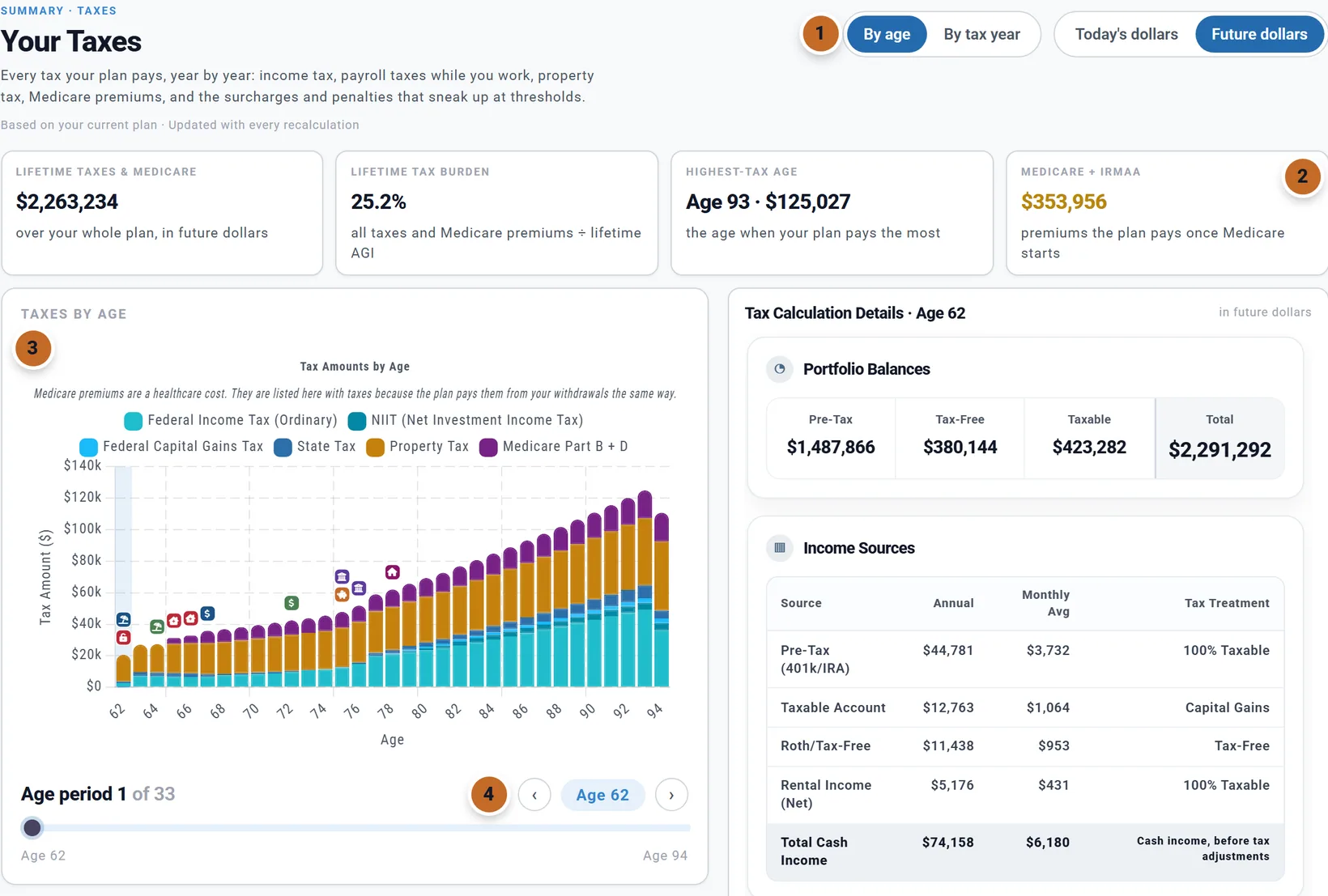
Rows start at the first year of retirement. With Employment Income on, your working years are listed too; without it they are not, because the plan does not model your pay or its tax then.
For the ideas behind the figures, read the Learning Library article How Taxes Work in Retirement.
How to open it
There is no Taxes tab: open the page from any of these.
- The Summary card Lifetime taxes & Medicare ("Lifetime taxes" outside the US): Open Your Taxes →.
- The Summary card Income thresholds (US): Open the Your Taxes report →.
- The Dashboard's Taxes chart: Open the Your Taxes report.
- Charts & Data with the Taxes chart picked: View your Tax Overview.
- The Learning Library article "How Taxes Work in Retirement".
The bar at the top shows the way back to where you came from. Leaving the Summary tab closes Your Taxes.
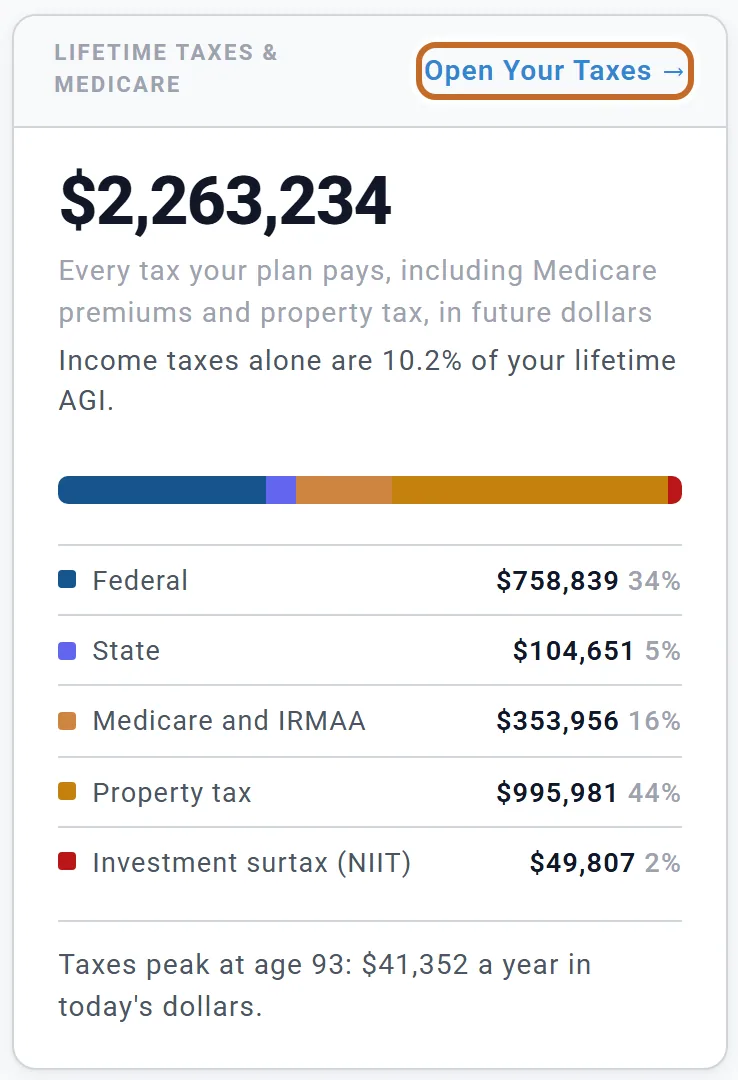
The figures at the top

- Lifetime taxes & Medicare: every tax over the whole plan: federal, state and local, NIIT, the early-withdrawal penalty, payroll tax, Medicare and IRMAA, marketplace premiums, and property tax.
- Lifetime tax burden: all those taxes divided by your lifetime AGI (taxable income outside the US). It is not the same as the Effective Tax Rate in a year's details (see one year's details).
- Highest-tax age (or Highest-tax year): the year your plan pays the most.
- Medicare + IRMAA (US): the Medicare Part B and D premiums and any IRMAA surcharge, from each person's Medicare start.
If your plan has no US state yet, a line says "Tax estimates are less accurate until you add your state". The state is set under Location in your profile, not in the Taxes box.
The chart and picking a year
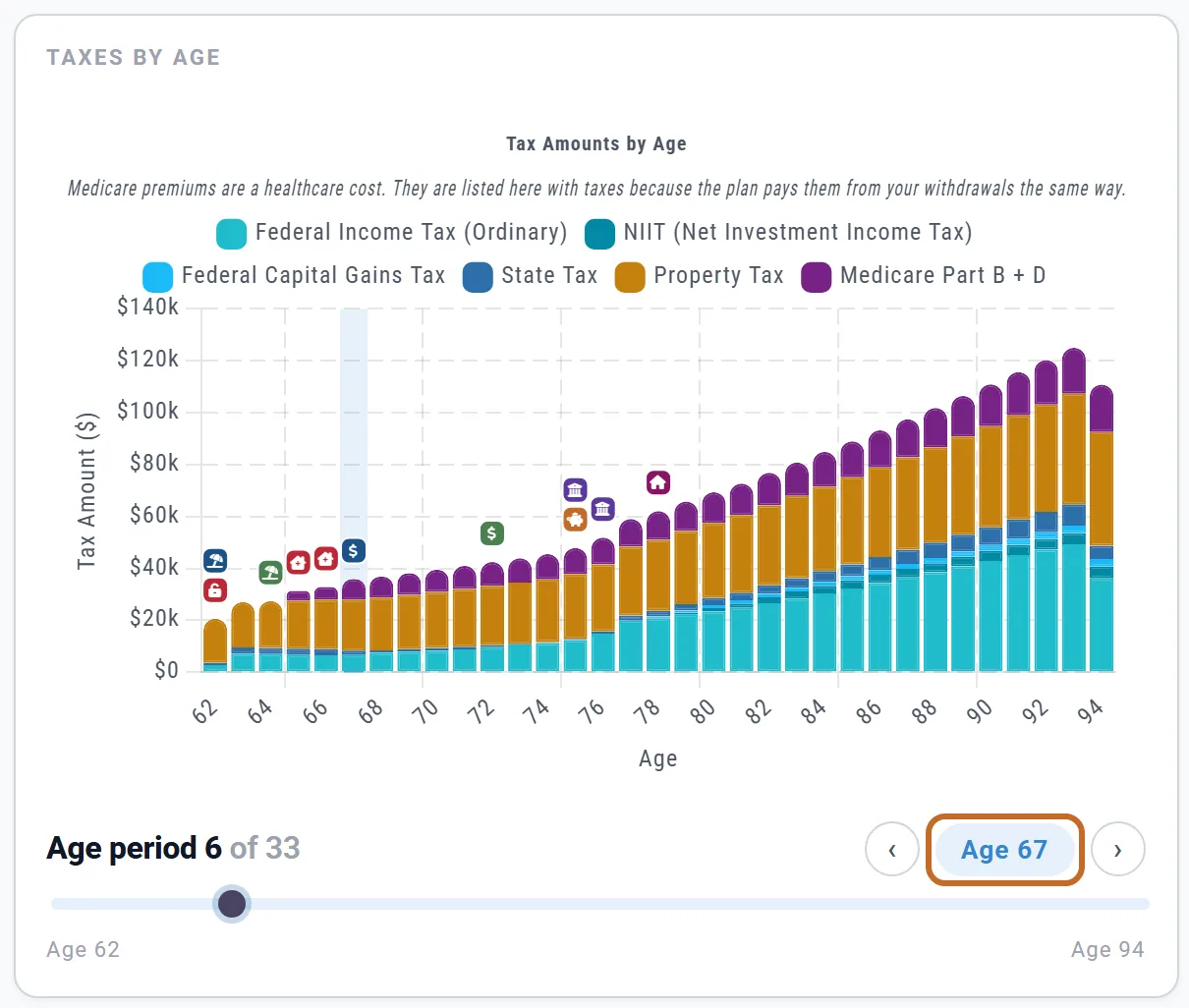
The chart is the Dashboard's Taxes chart: each bar is a year's taxes by kind (federal, state, capital gains, property tax, payroll, Medicare and others, each shown only when it has a value). The small badges are events in your plan, such as retirements, Social Security and Medicare.
Pick a year three ways: click its bar, use the ‹ › buttons beside the year, or drag the slider under the chart. Everything below the chart follows the year you pick.
Today's or future dollars
The Today's dollars / Future dollars switch at the top is the app-wide one: flipping it here flips the Dashboard and the Summary too. The year's details say which you are looking at. The Lifetime tax burden does not move, because it divides one future-dollar total by another. See Reading your results.
By age or By tax year
By age (the default) runs each row from one birthday to the next, so a row usually spans two tax years. By tax year runs January to December (April to March in the UK) and shows each year's own return: use it for anything you compare with a tax return.
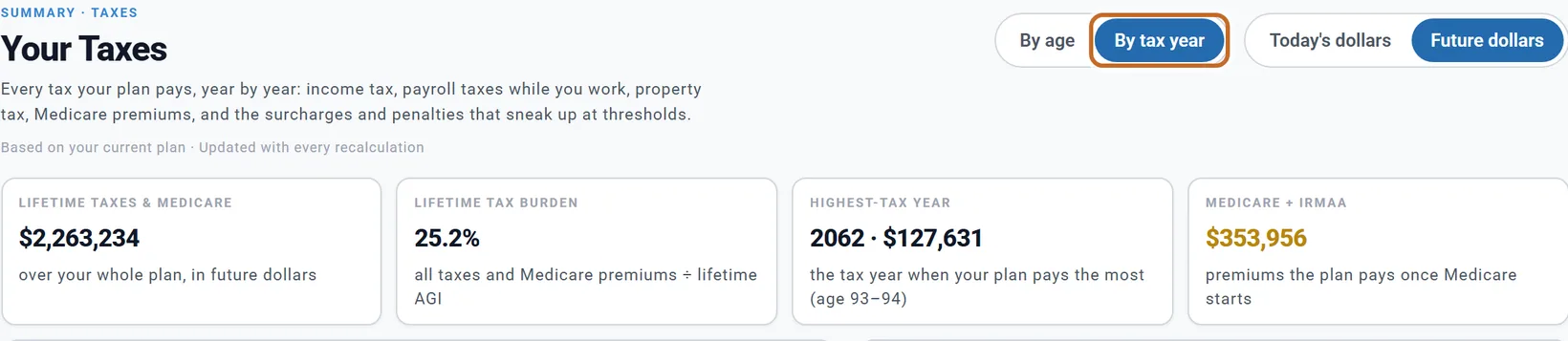
- It is the same setting as By age / By year on the Dashboard and in Charts & Data, kept in your browser, not saved with the plan.
- The first and last tax years are part years (your plan starts this month); the page says how many months they cover.
- In By age, a row spans two tax years, so its deduction, taxable income and brackets are worked out on one month's income for a full year, and the details say so. In By tax year, a full year's details are that year's own return.
One year's details
Tax Calculation Details show how the year's tax was worked out, in this order:
- Portfolio Balances and Income Sources: what came in, with how each kind is taxed. "Total Cash Income" is the money you received, before tax.
- How We Calculate Your AGI, including how much of your Social Security is taxable (up to 85%; the plan works it out).
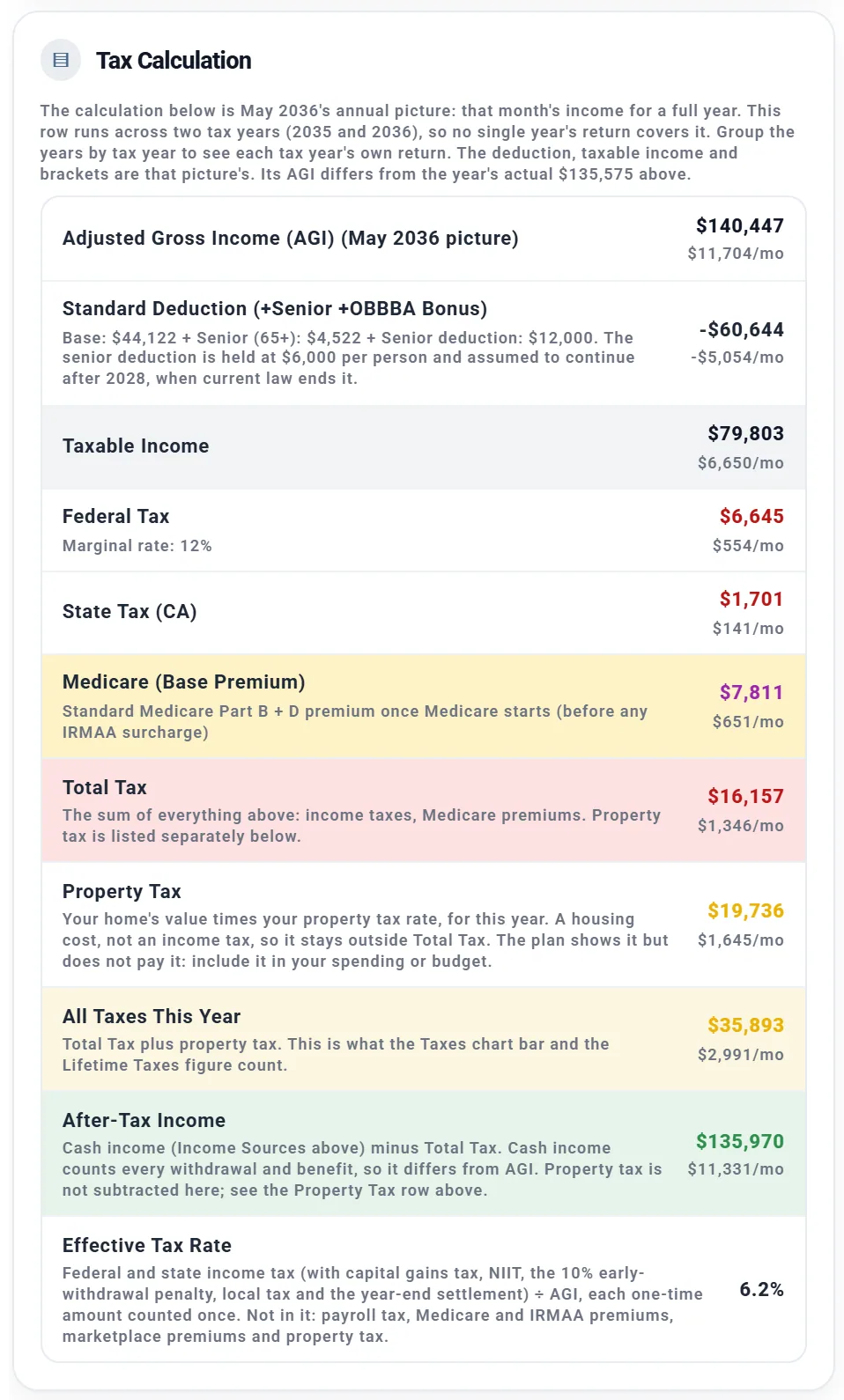
- Tax Calculation: AGI, the standard deduction, taxable income, federal tax with your marginal rate, then state tax and the rest that apply.
Reading the bottom of Tax Calculation, for Chris's 67:
- Total Tax: income taxes and Medicare premiums, $16,157.
- Property Tax: $19,736, outside Total Tax (shown, not paid).
- All Taxes This Year: the two together, $35,893: what the chart bar counts.
- After-Tax Income: cash income less Total Tax.
- Effective Tax Rate: income tax divided by AGI, 6.2%. Payroll tax, premiums and property tax are not in it, so it is lower than the lifetime burden.
Under the card a strip adds it up: "Total Tax above $16,157 + Property tax $19,736 = All taxes this year $35,893".
Federal Tax Bracket Analysis shows how much of your taxable income falls in each bracket, and the tax on it.
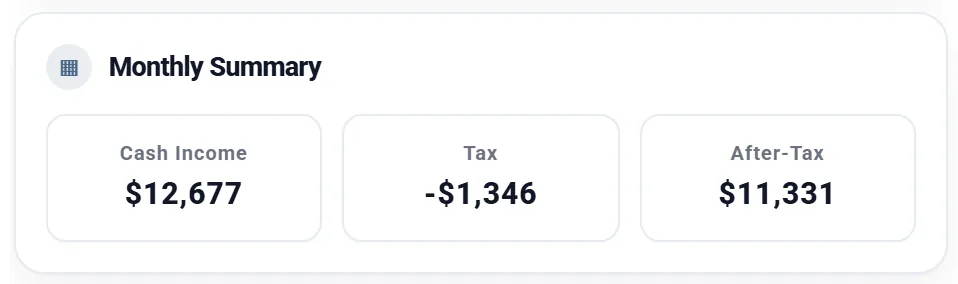
Monthly Summary then puts the year per month: cash income, tax, and what is left after tax ($12,677, $1,346 and $11,331 at 67).
The year's printed parts always add up to the printed totals.
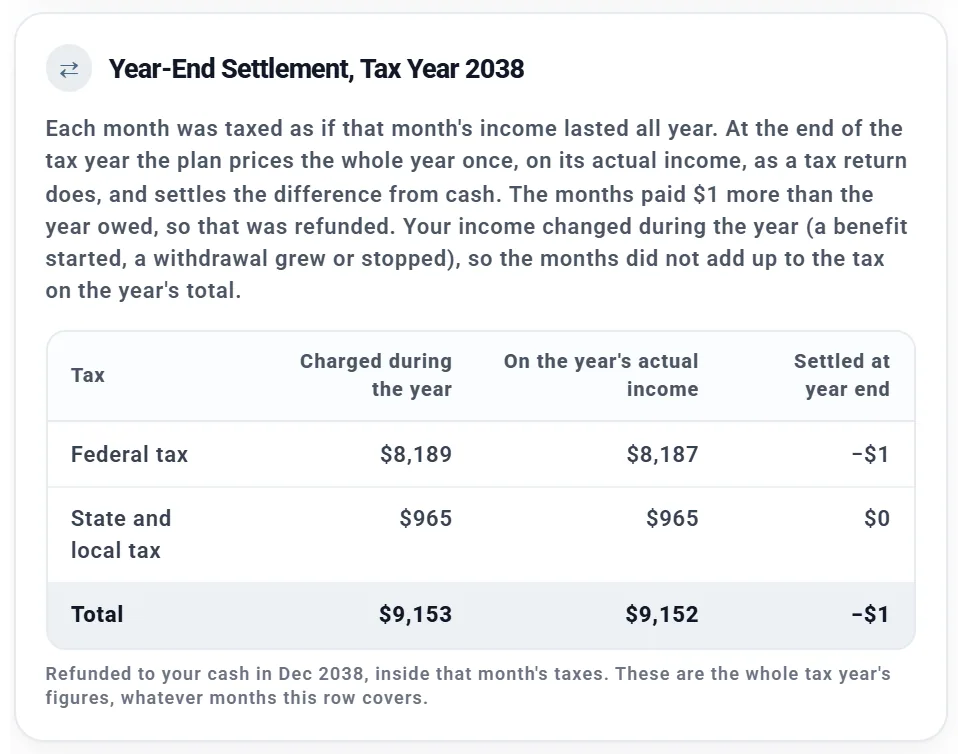
Year-end settlements, the premium tax credit and IRMAA
- Year-end settlement. Each month is taxed as if that month's income lasted all year. At the end of each tax year the plan prices the whole year once, on its actual income, and pays or refunds the difference from cash, like a tax return. A small settlement is normal: Chris and Jamie's 2038 settled with a $1 refund.
- Premium tax credit US: with marketplace cover before Medicare, the credit is settled the same way, once a year. See Health care costs.
- IRMAA US: Medicare surcharges are set from your income two years earlier. In a year with a surcharge the details name the income it was priced on.
By income source
By income source shows which income caused your tax, for the Selected year or your whole Lifetime. Each source's tax includes what it pushed onto other income in higher brackets.
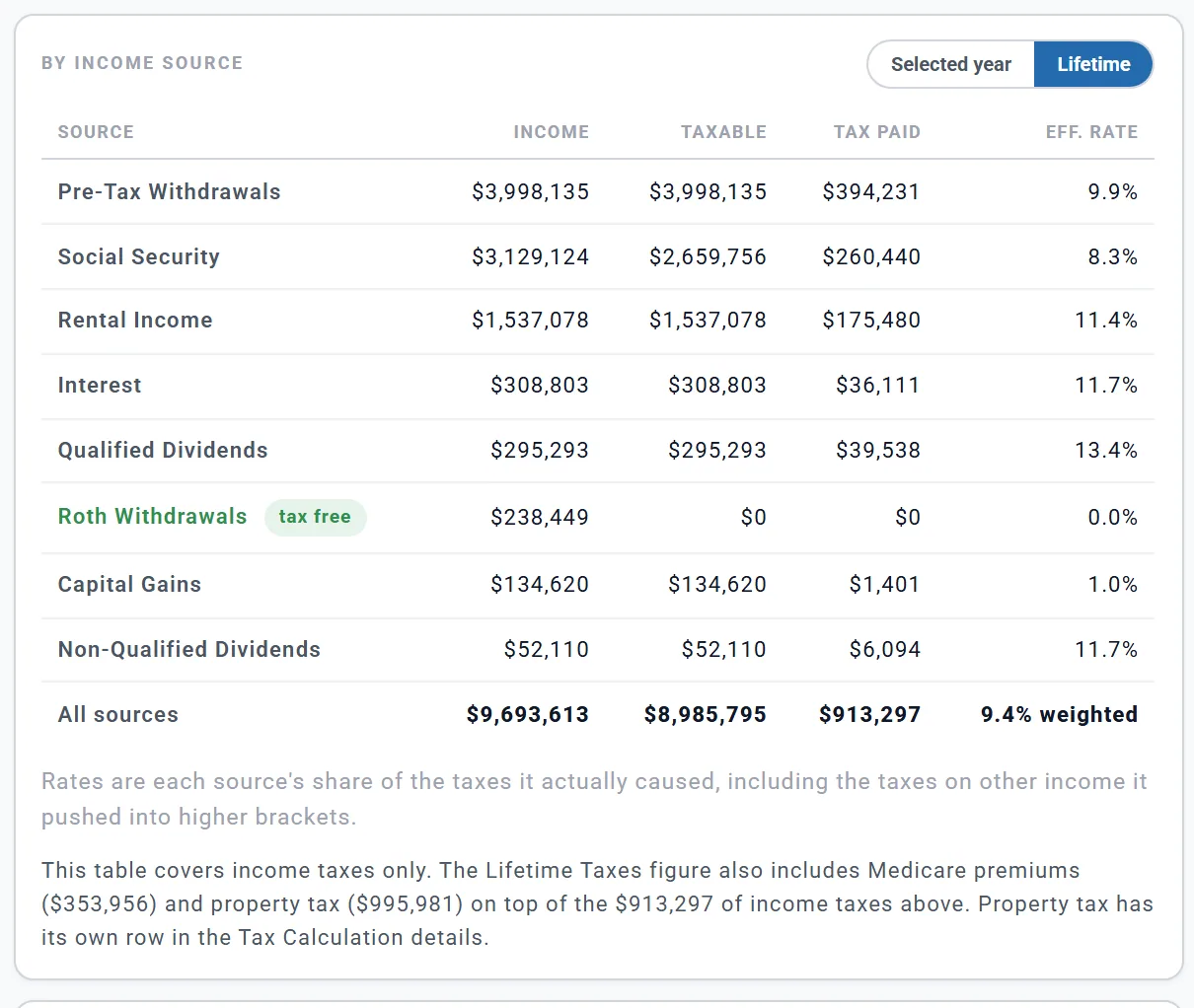
The table covers income taxes only, so its total is smaller than the lifetime figure; the note under it names the rest.
Tax milestones and Worth a look
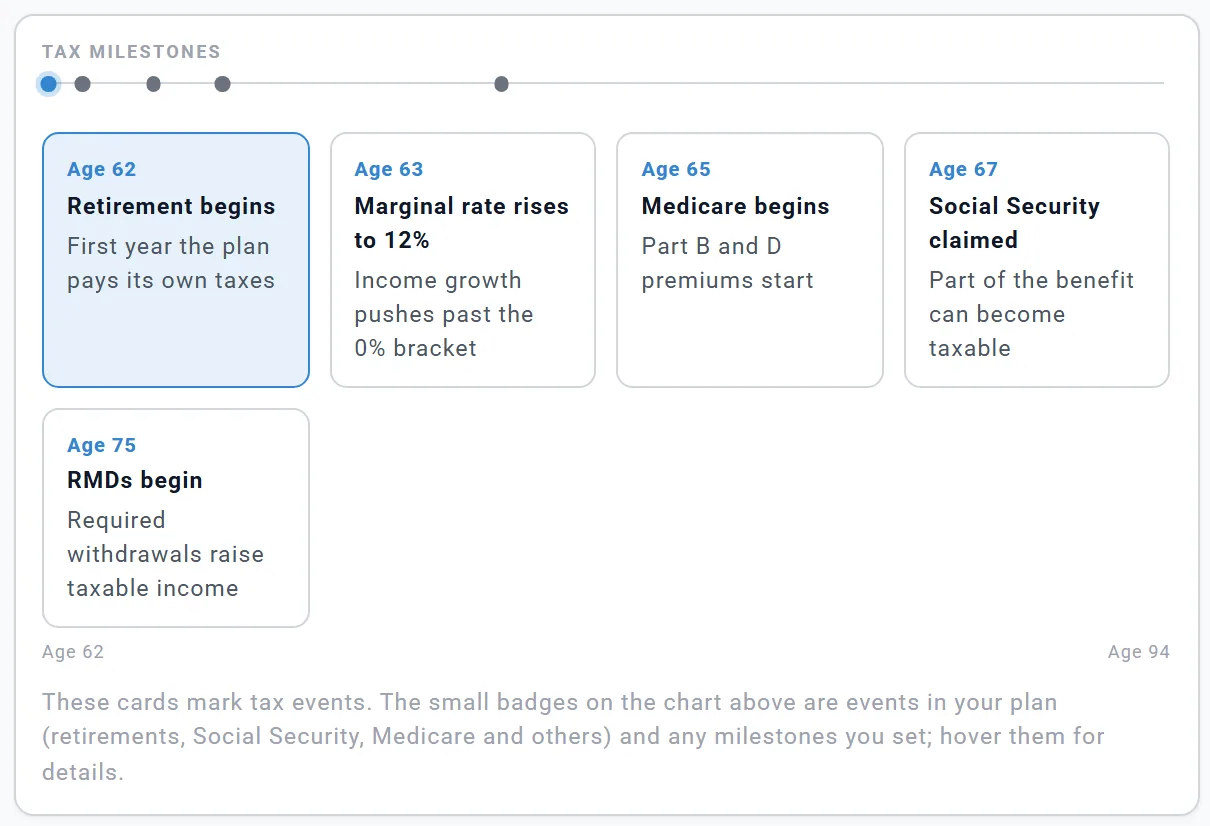
Tax milestones marks up to five tax events, earliest first, such as retirement, Medicare, Social Security, RMDs or a rise in your marginal rate. Click one to jump to its year.
Worth a look shows the first two suggestions the planner has for your plan, each with a link to act on it. Not all of them are about tax.
Which taxes the planner works out
| Tax | How the plan handles it |
|---|---|
| Federal income tax US | 2026 brackets and standard deduction (with the 65+ amounts), raised each year by your plan's inflation |
| Capital gains and qualified dividends | 0%, 15% or 20% federal |
| Social Security | Up to 85% taxable, worked out for you |
| State and local tax | An estimate from your state (and city or county where it has one) |
| NIIT (3.8%) | Yes |
| 10% early-withdrawal penalty | Before 59½, unless you switch it off in the Taxes box |
| Payroll tax | On pay, with Employment Income on |
| Medicare and IRMAA | Charged as a cost from each person's Medicare start |
| Marketplace premiums | With the Health Care box's marketplace cover on |
| Property tax | Shown for your home but not paid; a rental's comes out of its rent |
- US State tax follows your state's own rules for retirement income. Pennsylvania, for example, does not tax pensions, Social Security, or IRA and 401(k) withdrawals after 59½; Illinois does not tax pensions, IRA and 401(k) withdrawals or Social Security.
- Switch the 10% penalty off only for an exception the planner does not model, such as disability. The Rule of 55 and 72(t) payments are already in the planner (see 72(t) payments).
The Taxes box
The Taxes box is always in the settings panel.
- Filing Status: a new plan starts at Single; a couple usually wants Married Filing Jointly. See Filing status.
- Your state is not here: it is under Location in your profile.
- Taxable Gains (%): the share of each brokerage withdrawal that is gains. Once a taxable account has a cost basis, this is replaced by "Capital gains come from the cost basis on your taxable accounts."
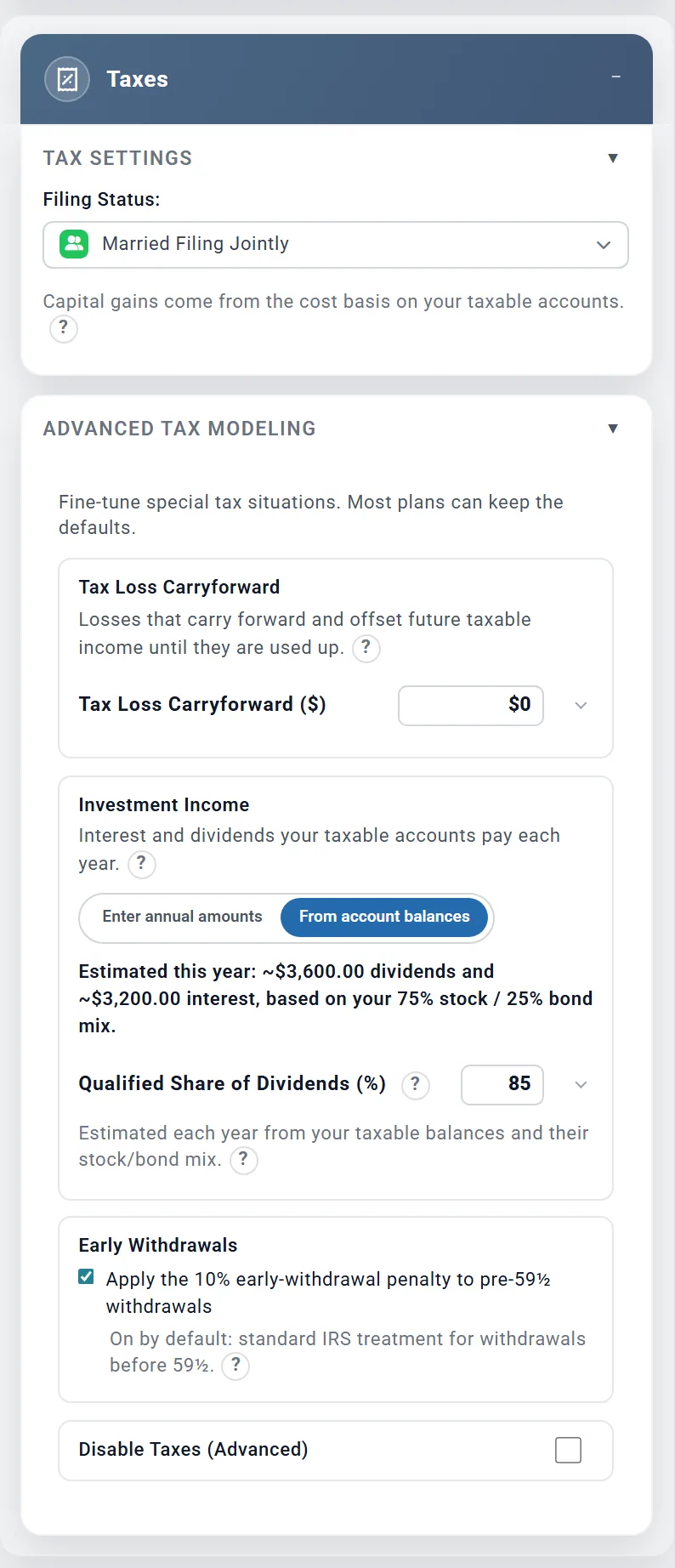
- Advanced Tax Modeling: the settings below. Most plans keep the defaults.
Nothing in the Taxes box needs Planner+.
Advanced Tax Modeling
- Tax Loss Carryforward: capital losses you can carry forward today, from your last tax return. The plan uses them against your gains, and up to $3,000 a year against other income, until they are used up.
- Investment Income: the interest and dividends your taxable accounts pay each year. They are taxed
every year, but the money stays invested in the account: it is part of the account's growth, not cash to
spend.
- From account balances (the starting choice in the US and Canada) estimates them from your taxable balances and their mix: about 1.5% a year of dividends on the stock part, and interest at your bond return on the bond part. Qualified Share of Dividends (%): (85 to start) is the part taxed at the lower capital gains rates.
- Enter annual amounts: type yearly interest and dividends yourself. Outside the US and Canada this is the only choice.
- Early Withdrawals US: with Apply the 10% early-withdrawal penalty to pre-59½ withdrawals ticked (the starting choice), the plan charges the 10% penalty on pre-tax money, and Roth earnings, taken before 59½, except where it models an exception (the Rule of 55, 72(t) payments). Untick it only for an exception the plan does not model. See Whose accounts are used first.
- Medicare IRMAA Lookback US: shown when your first Medicare premiums depend on income from before the plan starts. Enter that year's income as Pre-retirement MAGI, or leave it blank to let the plan estimate it. See Higher incomes and IRMAA.
- Disable Taxes (Advanced): the plan works out no tax at all, and in the US no Medicare premiums or IRMAA either, so budget those yourself while it is on. Every result becomes a before-tax picture: use it only to see the plan without tax.
What the planner does not model
- Itemized deductions (mortgage interest, state and local tax, charity): the standard deduction only.
- The alternative minimum tax, qualified charitable distributions, and US estate or inheritance tax.
- State credits and local elections: state tax is an estimate.
- Future changes in tax law, apart from the senior deduction assumed to continue after 2028 and the UK thresholds frozen through 2030-31.
- Quarterly estimated payments: taxes are worked out month by month and settled each year.
- Tax on the interest your cash accounts earn, in Australia, Germany, the Netherlands and Ireland: there it is added to your cash untaxed. In the US and Canada it is taxed as income the month after it is paid, and in the UK as savings income (see Planning in the UK).
For the full list of what the planner includes and leaves out, see the Learning Library article What ReadyAimRetire Models.
Canada, the UK and other countries
- Canada: the top figure is "Lifetime taxes" (no Medicare card); provincial tax, CPP and EI contributions, federal credits and the OAS recovery tax appear in each year's details.
- UK: tax years run from April ("2031/32"); National Insurance replaces payroll tax; Filing Status is Individual only. Interest on cash is savings income: its 0% starting rate and Personal Savings Allowance show as bands of their own in each year's details.
- US only: Medicare and IRMAA, marketplace premiums, NIIT, the early-withdrawal penalty and the Income thresholds card.
- Australia, Germany, the Netherlands and Ireland show "(limited support)" in the country list. Germany, the Netherlands and Ireland are in Tax-Only Mode: income tax is worked out, but the state pension is not, so enter yours in a Pension box. The "?" beside the country says what is covered.
- Other Country: the plan charges one flat rate on all taxable income, the Estimated Tax Rate (%) in the Taxes box (25 to start with).
City and county income tax US
In eleven states (Alabama, Delaware, Indiana, Kentucky, Maryland, Michigan, Missouri, New Jersey, New York, Ohio and Pennsylvania) your profile shows Locality (city/county) tax under Location once you choose the state. Pick your city or county, such as New York City, Detroit or a Maryland county, and the plan adds its tax with its own rules. Maryland starts on its statewide average. If yours is not listed, choose Custom (enter your own rate), enter the Custom Rate (%): and what it Applies To: (all income, wages only, or retirement income only). Other / None adds nothing. In each year's details it has its own line, beside your state tax.
On a Preview account
The four figures at the top stay readable; everything below them is blurred under "Unlock Your Taxes". The Summary cards that open the page are blurred too, but the Learning Library's link still opens it. The Taxes box works on every account. Planner+