


 Continue with Google
What a Roth conversion does
A Roth conversion moves money from a pre-tax account (a traditional IRA, 401(k), 403(b) and the like) into a Roth account. You pay income tax on it now; later, qualified withdrawals from the Roth are tax-free. US
The amount you convert counts as ordinary income in that calendar year, for federal tax and for your state's tax (California taxes it; a few states exempt it). What paying that tax now can buy you later:
- Smaller required minimum distributions. Each RMD is your pre-tax balance divided by a life-expectancy factor, so a smaller pre-tax balance means smaller forced withdrawals. Roth accounts have no RMDs for you.
- Lower tax in later years, when Social Security, RMDs and other income stack up.
- Less tax for your heirs. Pre-tax money is taxed when they take it out; Roth money is not.
- A cushion for the survivor. After the first death, the survivor files as single from the next January, with narrower brackets. The planner's advisory says "Roth conversions completed earlier may reduce this exposure."
What the extra income can cost in the year you convert, besides the tax itself:
- More of your Social Security can become taxable that year.
- Medicare's IRMAA surcharge looks back two years, so a conversion at 63 or later can raise your premiums two years on (see Health care costs).
- Before 65, it can cost you an ACA marketplace subsidy if you buy coverage there.
A conversion does not count toward a year's RMD: in an RMD year the plan still takes the full minimum.
See also Roth conversion in the glossary, and the Learning Library article How Taxes Work in Retirement for how a year's tax is worked out. Outside the US there are no Roth conversions: see In Canada and the UK.
Where you set it up
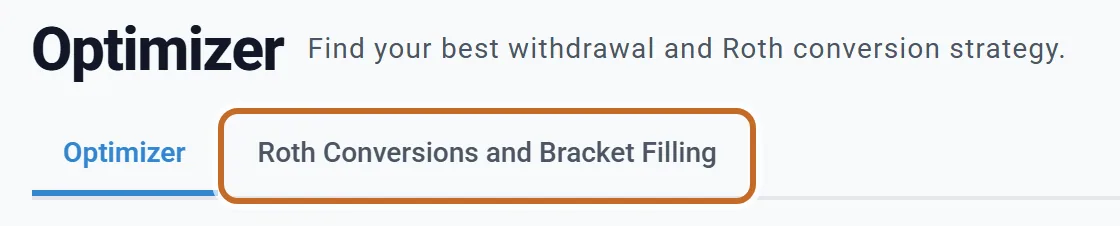
Roth conversions are set on the Optimizer tab, sub-tab Roth Conversions and Bracket Filling. The tab opens on its Optimizer sub-tab (the search, see The Optimizer) until your plan has conversions; click the second sub-tab.
On a new plan the page is off: ROTH CONVERSIONS is on None and the status reads OFF.
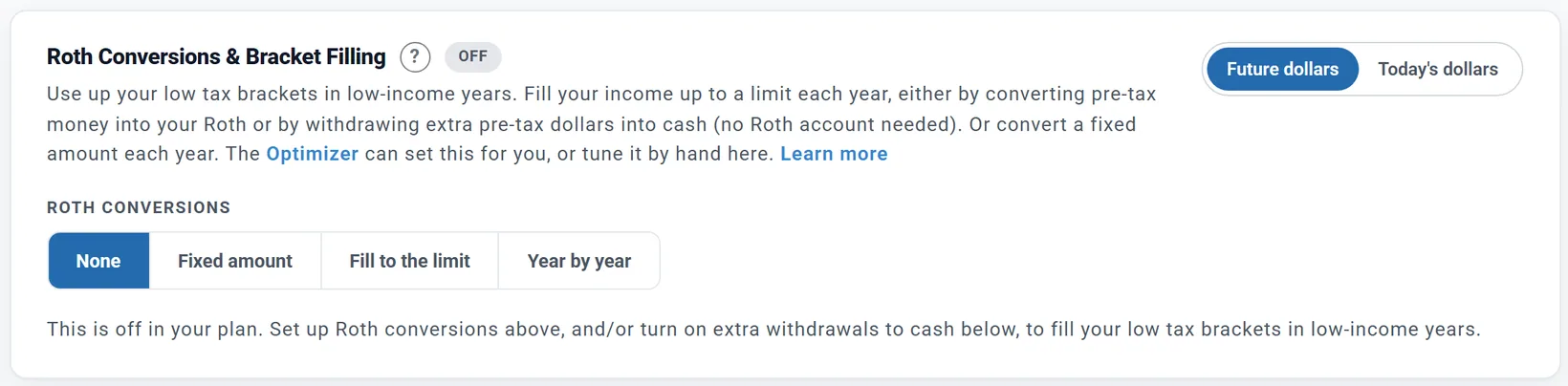
- You do not need to switch anything on first. Choosing Fixed amount, Fill to the limit or Year by year switches Roth Conversions on in Add > Tax Planning for you, and adds the box.
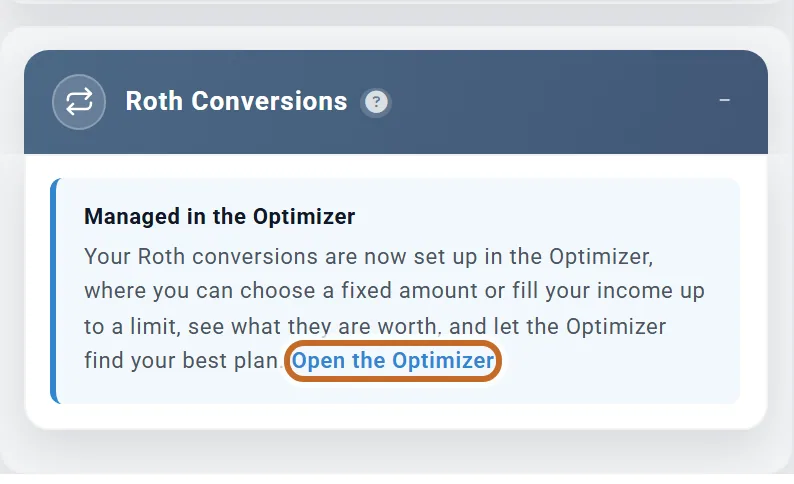
- The Roth Conversions box in the settings panel has no settings of its own. It says Managed in the Optimizer, and Open the Optimizer takes you straight to the sub-tab. Its "?" opens How Roth Conversions Work.
- Two more ways in: the Optimizer box's Edit Roth & bracket filling button, and the Withdrawal Planner's Tax moves card, Manage in Optimize →.
- It saves as you go. Buttons and dropdowns take effect when you click them, sliders when you let go. There is no Apply or Save button on this page, and opening it changes nothing.
- To pause conversions, choose None. Switching Roth Conversions off in Add deletes the plan's conversion settings (switching it back on in the same visit brings them back; after a reload they are gone).
- The page, its charts and its cards work on every account, Preview included.
Convert the same amount each year
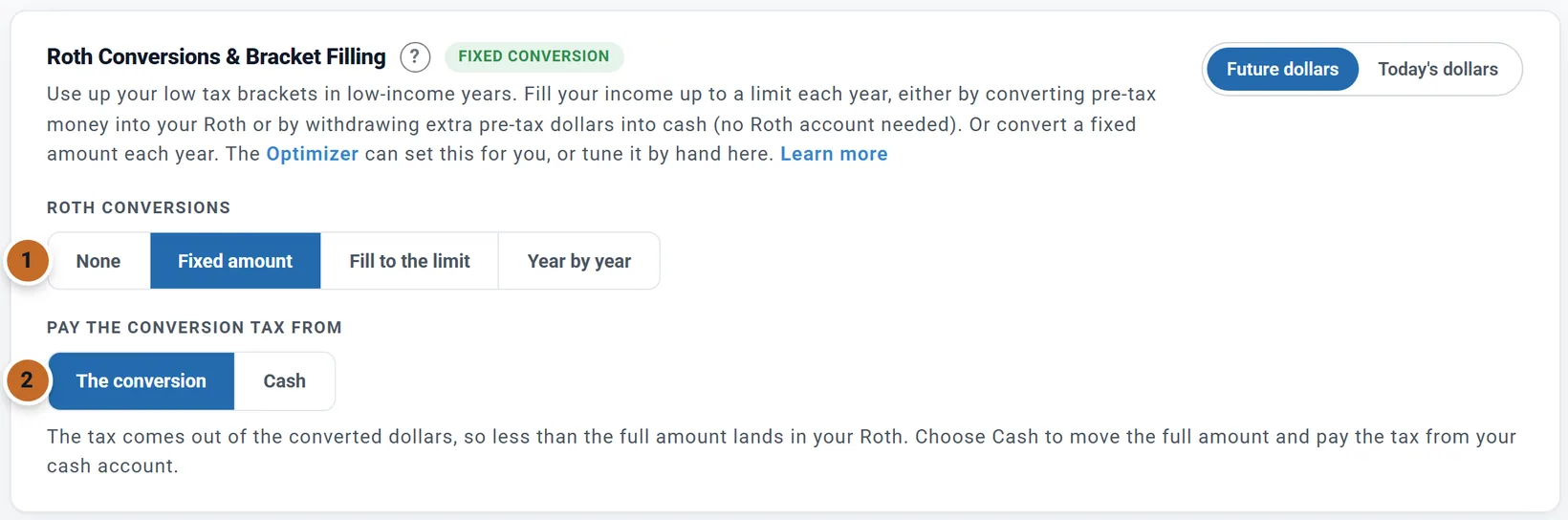
- Under ROTH CONVERSIONS choose Fixed amount (1). The status reads FIXED CONVERSION and PAY THE CONVERSION TAX FROM appears (2, see Paying the tax).
- In the card Fixed-amount Roth conversions, drag CONVERT EACH YEAR. It moves in $1,000 steps and starts at $50,000 the first time.
- Under CONVERSION WINDOW, set Start age and End age. The label beside it names the years that will convert.
Chris and Jamie's first try: $50,000 a year, Start age 62 and End age 74. The label reads "Ages 63 to 74 (2031 to 2042)": Chris's first conversion is the January of the year Chris turns 63 (see Which years convert).
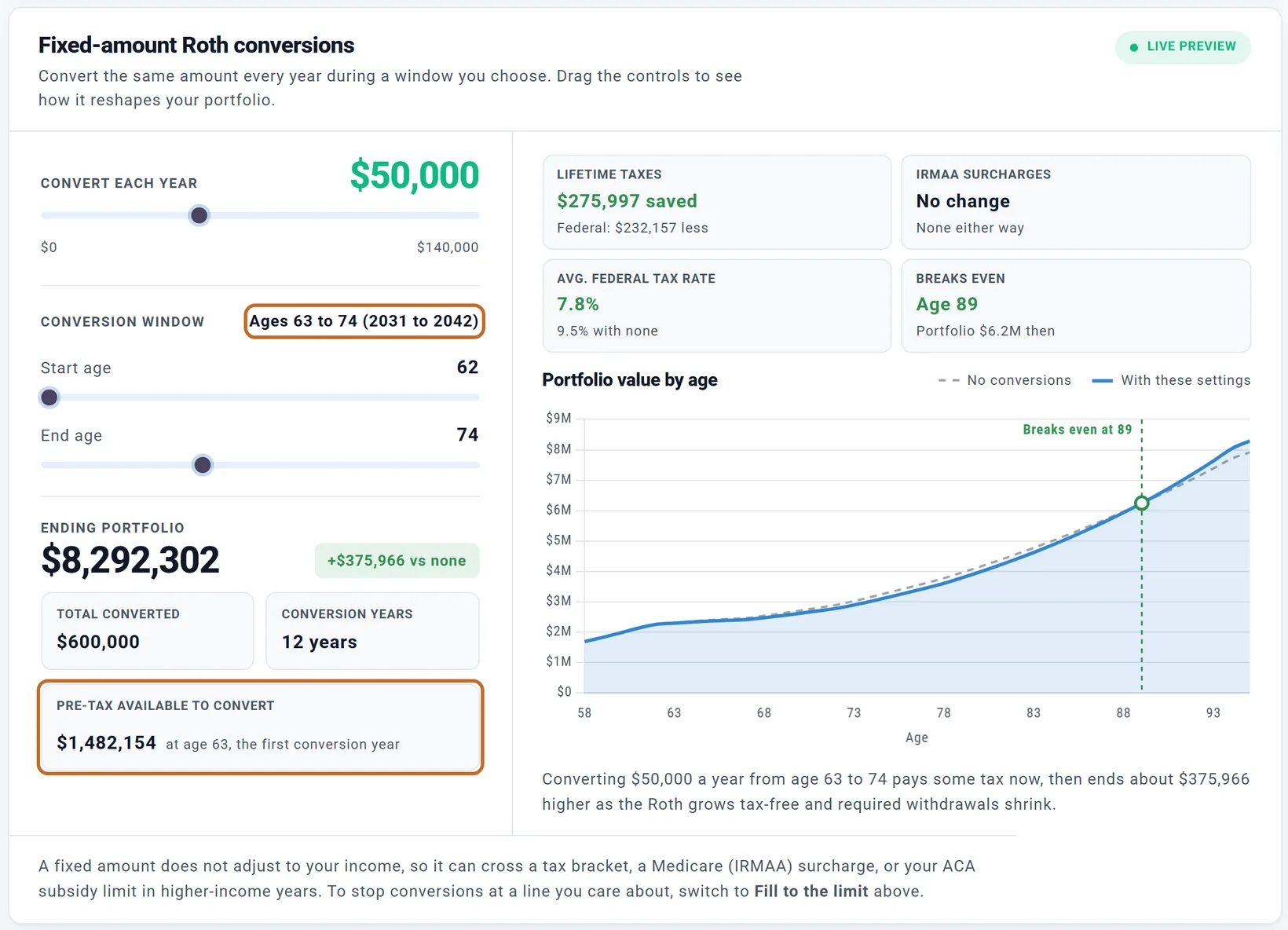
Under the sliders: ENDING PORTFOLIO and its difference "vs none", TOTAL CONVERTED, CONVERSION YEARS, and PRE-TAX AVAILABLE TO CONVERT (the pre-tax money in the first conversion year). The chart compares your plan with no conversions and with these settings.
Above the chart, four figures follow the sliders as you move them, each compared with no conversions: LIFETIME TAXES (every tax the plan pays, saved or added, with the federal part under it), IRMAA SURCHARGES (Medicare surcharges avoided or added), AVG. FEDERAL TAX RATE (lifetime federal tax divided by lifetime income, with the rate with no conversions under it) and BREAKS EVEN: the age from which the portfolio with conversions stays above the portfolio without, and what it is worth then. The chart marks that age. Conversions pay their tax up front, so the line with conversions usually starts below and can take many years to catch up.
- The same dollars every year. A fixed amount does not grow with inflation. (The limits in Fill to the limit do.)
- Never more than you have. A conversion is never larger than the pre-tax money left that year. When the amount cannot convert in full, an amber note says so. The slider's top end grows with your pre-tax money and with the amount you set.
- It does not watch your income. A fixed amount can cross a tax bracket, an IRMAA line or the ACA subsidy limit in a year when other income is high. To stop at a line, use Fill to the limit, or a Constraint.

Fill up to an income limit
Instead of a set amount, convert just enough each year to bring your income up to a line you choose: the top of a tax bracket, for example.
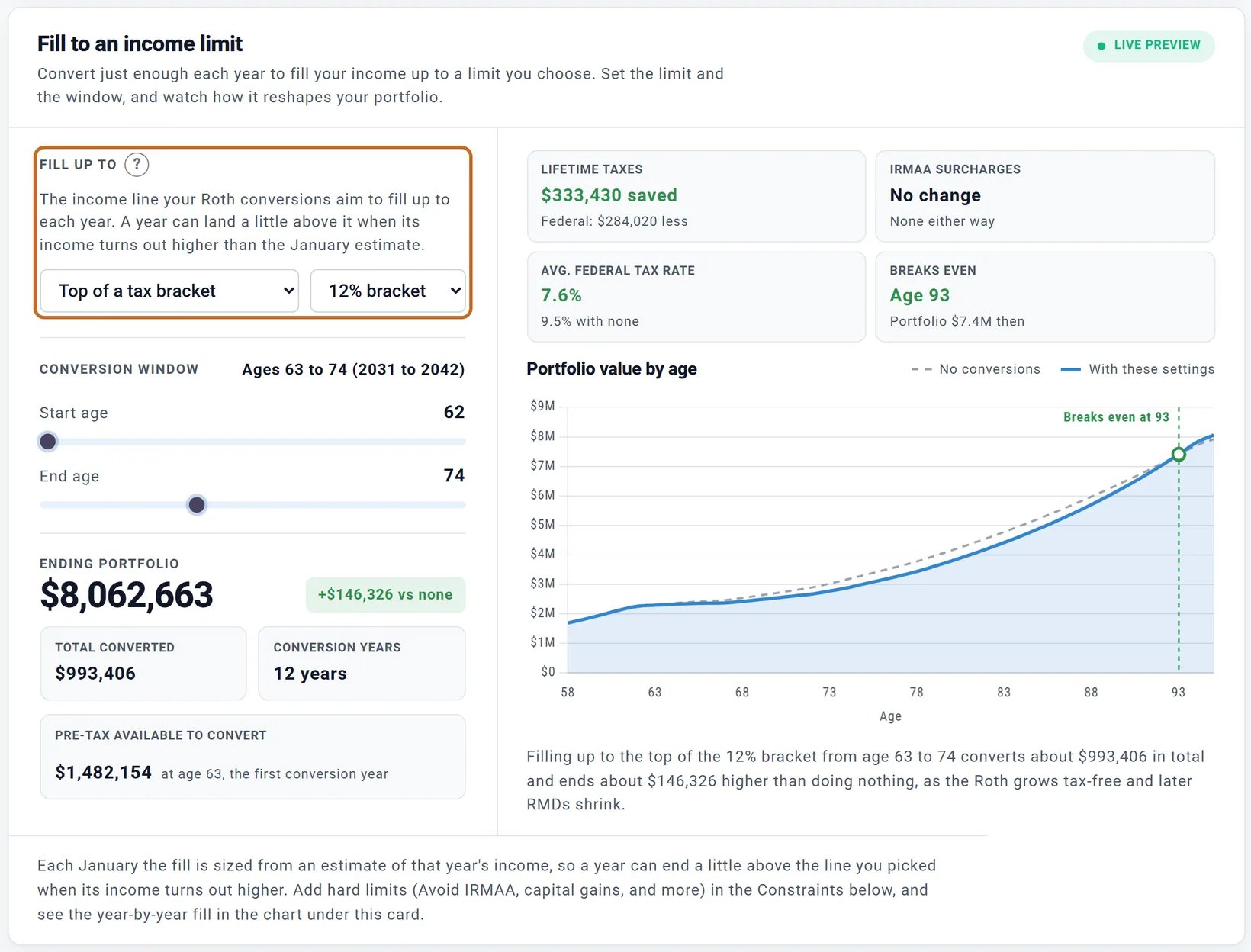
- Under ROTH CONVERSIONS choose Fill to the limit. The card Fill to an income limit appears and the status reads FILLING TO A LIMIT.
- Under FILL UP TO pick the line. The first time, it is the top of the 12% bracket.
- Set the CONVERSION WINDOW as for a fixed amount.
| FILL UP TO | What it fills to |
|---|---|
| Top of a tax bracket | The top of the 10% bracket, 12% bracket, 22% bracket or 24% bracket. The line is on your income before deductions: the top of the bracket plus your standard deduction (with the extra amount from 65). |
| IRMAA threshold | Below 1st surcharge, or Stay in tier 1 to Stay in tier 4: the income line for a Medicare surcharge tier. |
| ACA subsidy limit | Listed when some years of your plan fall before 65. A percent of the poverty level (400 to start) for your household size from the Health Care box; the fill aims about 2% under it. |
| Custom AGI amount | An amount you type, in today's dollars ($100,000 to start). |
How it works:
- Each January the plan estimates that year's other income (Social Security, pensions, rent, RMDs, the withdrawals your spending needs, interest and dividends) and converts the room left under the line. If your other income already reaches the line, that year converts nothing.
- Every line rises each year with your plan's inflation, so it stays realistic over a long plan.
- The line is an aim, not a wall. Because the room is planned from the January estimate, a year's final income can land a little either side of the line, for example when the year's withdrawals turn out larger than estimated. On Chris and Jamie's plan, each year of the 12% fill ends between about $3,000 and $11,000 past the top of the 12% bracket, and that part is taxed at 22%.
For Chris and Jamie, filling the 12% bracket from 63 to 74 converts $993,406: $61,283 the first year, rising to $98,149 at 72 as the line rises with inflation.
An older plan whose conversions fill a limit of their own shows "These conversions fill their own income limit" instead, with Manage these conversions here, which brings them onto this card.
Set each year on its own (Year by year)
When you want a different amount in different years (more before Social Security starts, nothing in a year with a big one-time income, up to the 22% line in some years and the 24% line in others), set each year yourself on a chart of your income.
- Under ROTH CONVERSIONS choose Year by year. The status reads YEAR BY YEAR and the card Year-by-year Roth conversions appears.
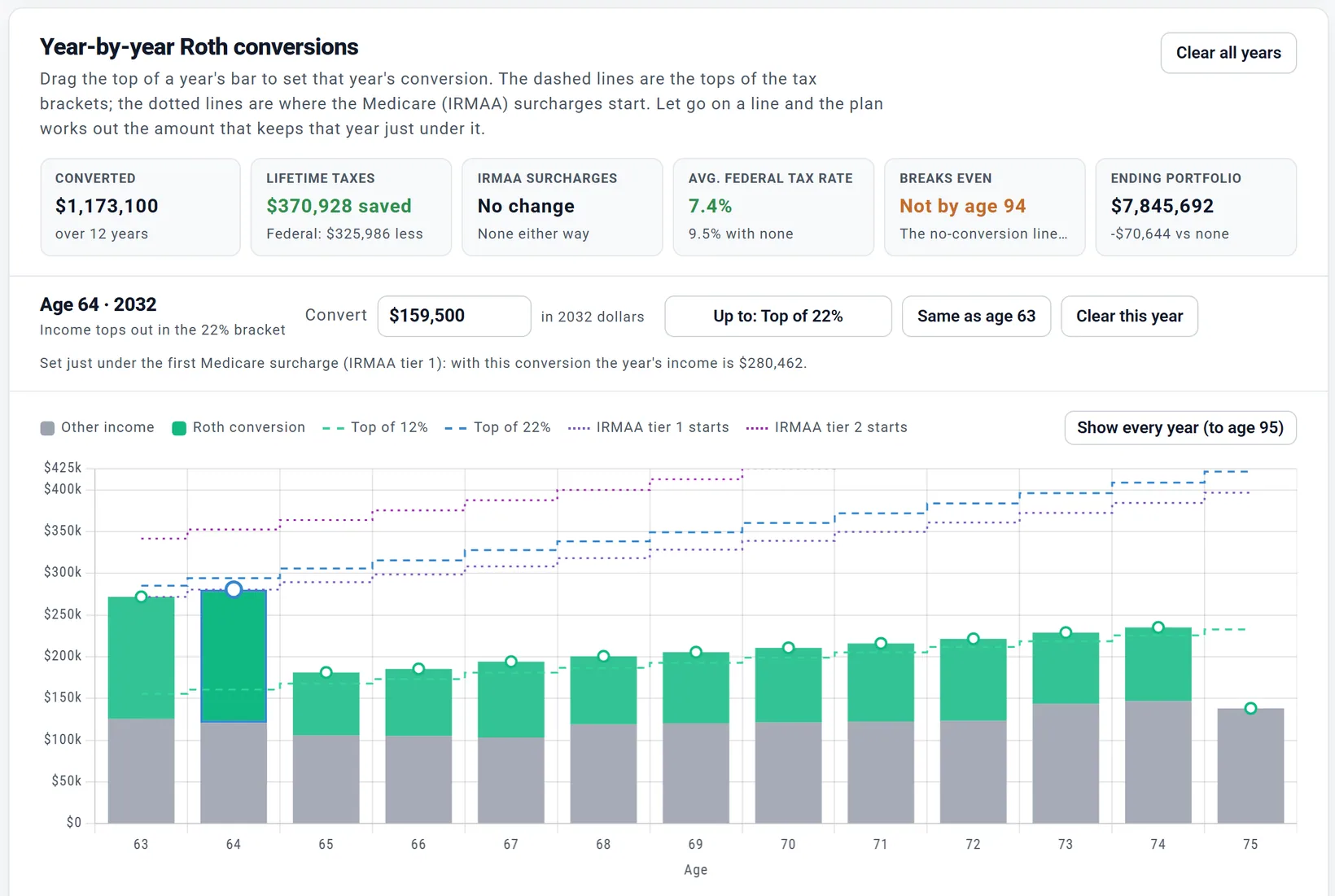
- Each year is a bar: its income as the tax return counts it (MAGI, the figure the AGI Tracker shows and Medicare's IRMAA is set on). Green is that year's conversion (Roth conversion), gray is everything else (Other income). The dashed lines are the tops of the tax brackets (Top of 12%, Top of 22% and up); the dotted lines are where the Medicare (IRMAA) surcharges start (IRMAA tier 1 starts, IRMAA tier 2 starts).
- Drag the top of a year's bar up or down to set that year's conversion. Near a line it snaps to it. When you let go, the plan recalculates and the rest of the page follows.
Chris and Jamie chose Year by year after filling to the top of the 12% bracket, so each year started at that fill ($61,300 at 63, the fill rounded to $100). Then, earliest year first, Up to: IRMAA tier 1 starts at 63 and again at 64 set those years just under the first IRMAA line: $146,200 and $159,500, which bring the two years' income to $271,694 and $280,462, against lines of $271,778 and $280,475. The tiles show what that does: $370,928 less lifetime tax than no conversions, more than the 12% fill saves, but an ending portfolio $70,644 below no conversions, and BREAKS EVEN reads "Not by age 94" (see Less tax is not always more money).
- It starts from your plan. The first time you choose it, each year starts with what your plan converts now: switching from Fill to the limit gives you that fill, year by year, to adjust. Your years are kept if you switch to another choice and back.
- The year you picked. Click a bar, or use the Left and Right arrow keys, to pick a year. The row above the chart shows it: type an amount in Convert (in that year's own dollars), or use the buttons to go up to the next line, use the same amount as the year before, or Clear this year. Clear all years removes every year. With the chart focused, Up and Down change the year by $1,000 (Shift: $10,000), and Page Up and Page Down move it just under the next line.
- Just under a line, for real. Converting adds more than the conversion to a year's income: paying its tax from savings can mean drawing more from pre-tax accounts, and more of your Social Security can become taxable. So when you let go of a bar on a line, or use Up to, the plan works out the amount that keeps that year at or just under the line once everything is counted, and the row says what the year's income comes to.
- Work from the earliest year. A conversion can raise the years after it too (the savings that paid its tax are not there for later spending, so later years can draw more from pre-tax accounts), never the years before. Setting years from the first one forward means each year you set stays where you put it.
- Never more than you have. A year can convert at most the pre-tax money there is that January. If you set more, the row says how much converts.
- Capital gains are in the bar. They stack on top of ordinary income, so a year at a bracket line can still have some room left in that bracket. (Fill to the limit fills the bracket from ordinary income alone.)
- The years that matter most. The chart shows the years up to the first one with a required minimum distribution, and any year with a conversion; Show every year shows the rest.
- What your years change. At the top of the card, CONVERTED and the same figures as the other cards (LIFETIME TAXES, IRMAA SURCHARGES, AVG. FEDERAL TAX RATE, BREAKS EVEN) plus ENDING PORTFOLIO; under the bars, Portfolio value by age with and without your years. Both update each time the plan recalculates.
- IRMAA lines only where they count. A year's income sets your Medicare premiums two years later, so the IRMAA lines show only for years that are close enough to Medicare.
- Today's dollars. The chart follows the Future dollars / Today's dollars choice at the top of the tab. What you set is always in each year's own dollars (what the plan converts that January).
- Your Constraints limit a year by year amount as they limit a fixed amount, and extra withdrawals can fill the room above your conversions.
Which years convert
The years that convert are not always the ages you set. In detail:
- Once a year, in January. Each conversion is made in January and counted as income through that calendar year (one twelfth a month), and taxed in that year.
- An age means the calendar year you turn it. Start age 63 converts in the January of the year you turn 63, whatever your birthday month.
- The Primary's ages. The window runs on the Primary's ages (Chris's here), even for money in the spouse's accounts. There is no window on the spouse's ages.
- Not before retirement, unless Employment Income is on. Conversions start in the first January at or after the Primary's retirement month. Chris retires in June 2030, the year Chris turns 62; that January is before the retirement, so the first conversion is January 2031, the year Chris turns 63. That is why Start age 62 shows "Ages 63 to 74".
- Not in your plan's first calendar year unless the plan starts in January: that year's January has gone by. Start age cannot be set to an age whose January is past.
The label next to CONVERSION WINDOW and CONVERSION YEARS count only the years that convert, so go by the label, not the Start age slider.
- With Employment Income on (for either of you), the working years open: Start age can go down to the first age with a January left in the plan, and a fill counts the salary. For Chris, with Employment Income on, the same settings read "Ages 62 to 74 (2030 to 2042)", and Start age goes down to 59 ("Ages 59 to 74 (2027 to 2042)").
- The first window. The first time you choose a mode, the window runs from your retirement age (at least 60) to the year before your RMDs begin (at most 75): 62 to 74 for Chris.
Which accounts convert
- The pre-tax accounts of both of you convert, split in proportion to each person's pre-tax money. Each person's share lands in their own Roth.
- You cannot pick one account to convert from. To keep an account out, set its Availability to Never available for withdrawals: those accounts are never converted. (Locked until an age does not keep it out.)
- Inherited IRAs are never converted. An IRA paying 72(t) payments is not converted while they run, and a TIPS ladder's account is not converted through its last rung.
Paying the tax: from the conversion or from cash
Once conversions are on, PAY THE CONVERSION TAX FROM offers two choices.
The conversion (the default)
"The tax comes out of the converted dollars, so less than the full amount lands in your Roth." What is held back is the planner's estimate of the federal tax on the conversion:
- For Fixed amount, a flat share of the conversion: 12% unless your plan stored another rate.
- For Fill to the limit, the extra federal tax the conversion causes.
The year's real federal and state tax is then worked out with the conversion in your income, and any difference, state tax included, is paid the way your other taxes are: from your withdrawals.
Chris and Jamie's $50,000 in 2031: $6,000 is held back and $44,000 reaches their Roth. Their federal tax that year is about $7,900 higher than with no conversion, and their California tax about $3,400 higher; the part not held back comes from their withdrawals.
Cash

- The full amount moves to your Roth. The tax is taken from your cash in the conversion January, as much as cash can pay without going below your minimum balances. The rest is paid the way your other taxes are.
- The conversion itself is never made smaller to fit your cash.
- A note under the choice says which conversion years cash covers in full, in part or not at all, by age and year: for Chris and Jamie, part of the tax in 2031, 2032 and 2034, none in the other years.
- Cash pays this tax even when the Withdrawal Planner holds cash in reserve (see When your cash gets spent).
Chris and Jamie spend most of their cash in their first year of retirement, so cash pays only $1,544 of 2031's tax and almost nothing after. The full $50,000 still reaches their Roth each year, and their ending portfolio is $391,917 above no conversions instead of $375,966.
The Optimizer also tries the other choice on the strategy it finds, and tells you if it does better (see The Optimizer).
Bracket filling with extra withdrawals
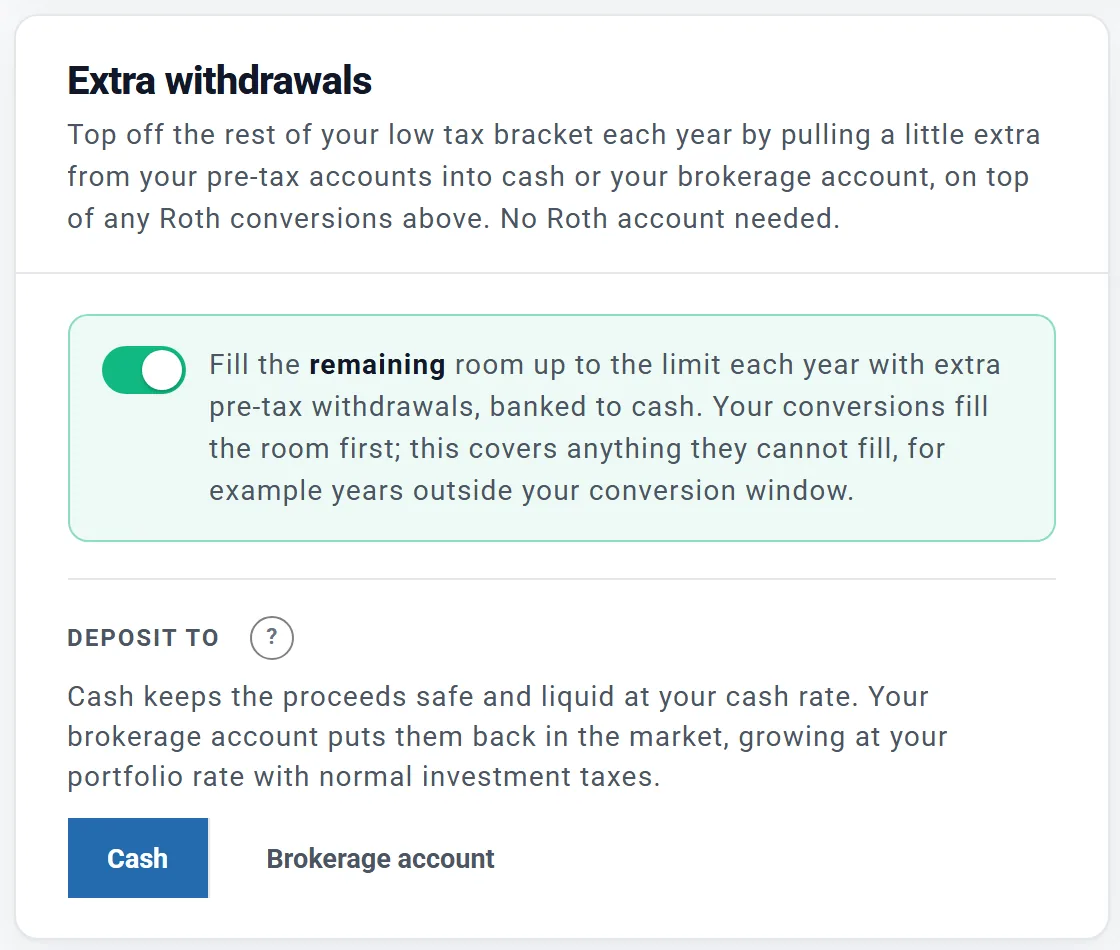
The second way to fill a low bracket needs no Roth account: take a little extra from your pre-tax accounts each year, pay its tax at the low rate, and keep the money. The card is Extra withdrawals to cash, or Extra withdrawals when you have a brokerage account.
- Its switch fills "the remaining room up to the limit each year". With Fill to the limit, your conversions fill the room first and this covers the rest, for example the years outside your conversion window. With Fixed amount or None, the card gets its own FILL UP TO once it is on.
- DEPOSIT TO: Cash, or Brokerage account to keep the money invested. In a spending mode other than Monthly Expenses there is no choice: the money goes to your brokerage account.
- They run in retirement years only, even with Employment Income on.
- They fill about 95% of the room, and skip a year when the fill would be under $100 a month.
- While they fill a bracket, the plan does not spend cash first in those months (see Tax moves come first).
- If no year has room left, the card says so: your income already reaches the limit.
Hard limits: the Constraints
The Constraints card appears once conversions or extra withdrawals are on: "Hard limits on the income this strategy adds." All four are off to start; each has a "?" with the details.
- Capital gains bracket (0% rate or 15% rate): stops before your income pushes long-term gains and qualified dividends into a higher rate. Acts only in years with such gains.
- Avoid NIIT: keeps income under the 3.8% net investment income tax line ($200,000 single, $250,000 joint; these never rise with inflation). Acts only in years with investment income.
- Avoid IRMAA surcharges, with a tier: from the year the Primary turns 63 (the two-year look-back to 65). Hidden when FILL UP TO is already an IRMAA threshold.
- Preserve ACA subsidies: stops about 2% below the subsidy limit in years someone is on marketplace coverage before 65. Hidden when the fill already aims at the ACA limit, or no year falls before 65.
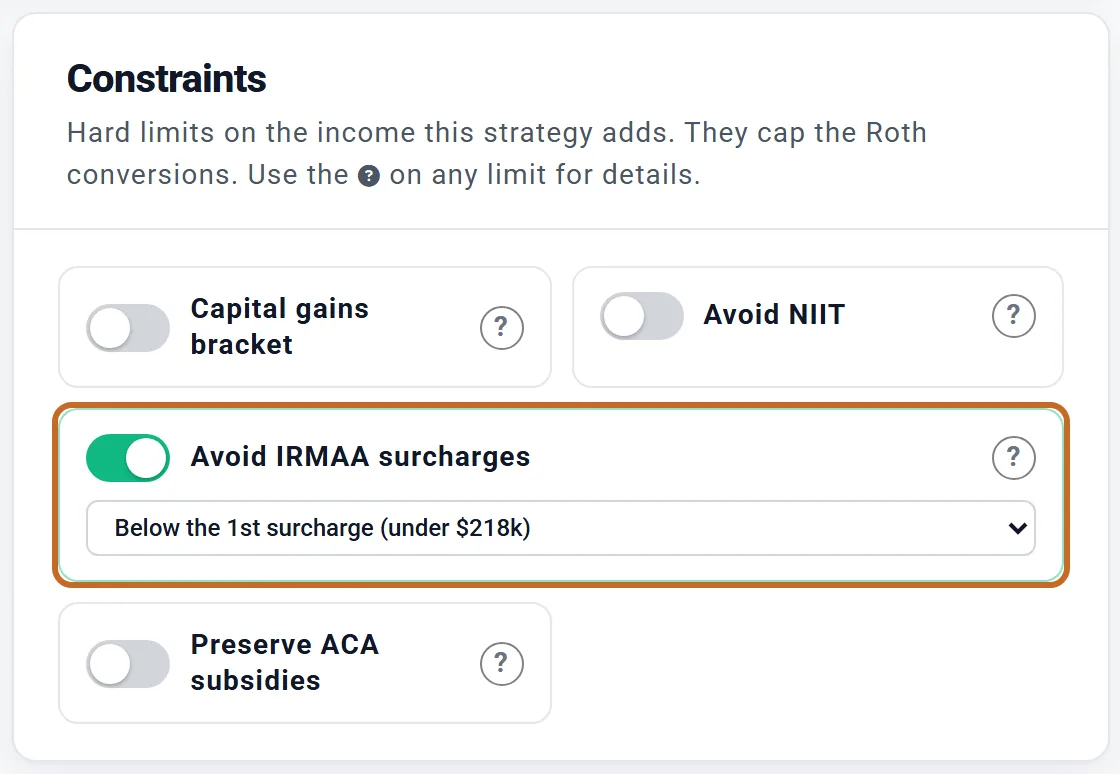
- The tier list shows today's lines for your filing status, for example "Below the 1st surcharge (under $218k)" for a married couple; the plan raises them with inflation.
- When several apply, the lowest line wins.
- They only limit what the strategy adds. If your other income already crosses a line, the strategy adds nothing that year; it never lowers income you already have.
See what it is worth
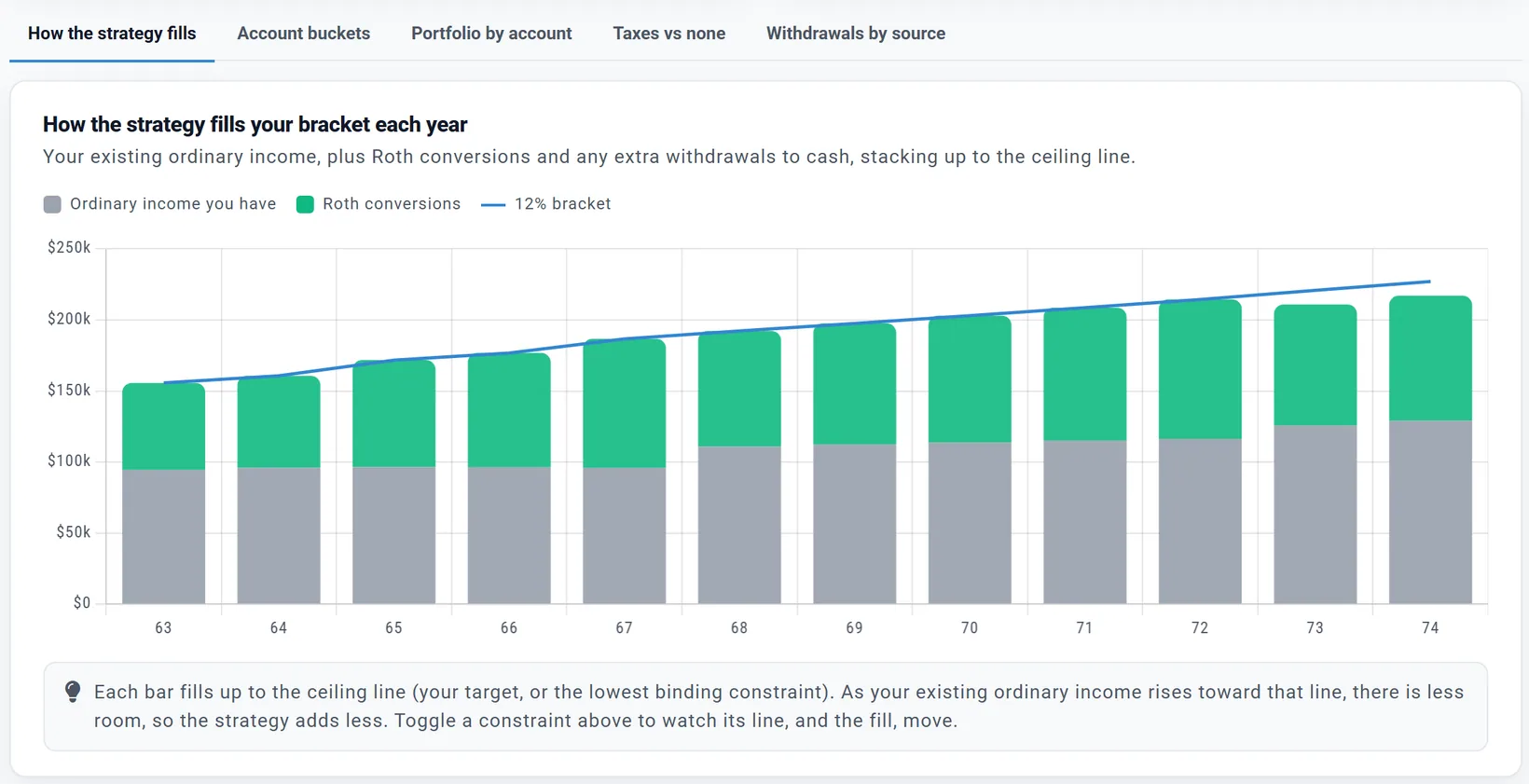
Each card's chart, Portfolio value by age, the four figures above it and its ENDING PORTFOLIO compare your plan with the same plan and no conversions. With the sliders where your plan has them, the figures are the ones in the outcome cards below. The break-even counts pre-tax money in full, before the income tax still owed on it; counting that tax, as AFTER-TAX ESTATE below does, conversions break even sooner. Below the cards, five chart tabs: How the strategy fills (Where income lands for a fixed amount on its own), Account buckets, Portfolio by account, Taxes vs none and Withdrawals by source.
Then the outcome cards, which compare against the same plan with no conversions or bracket filling:
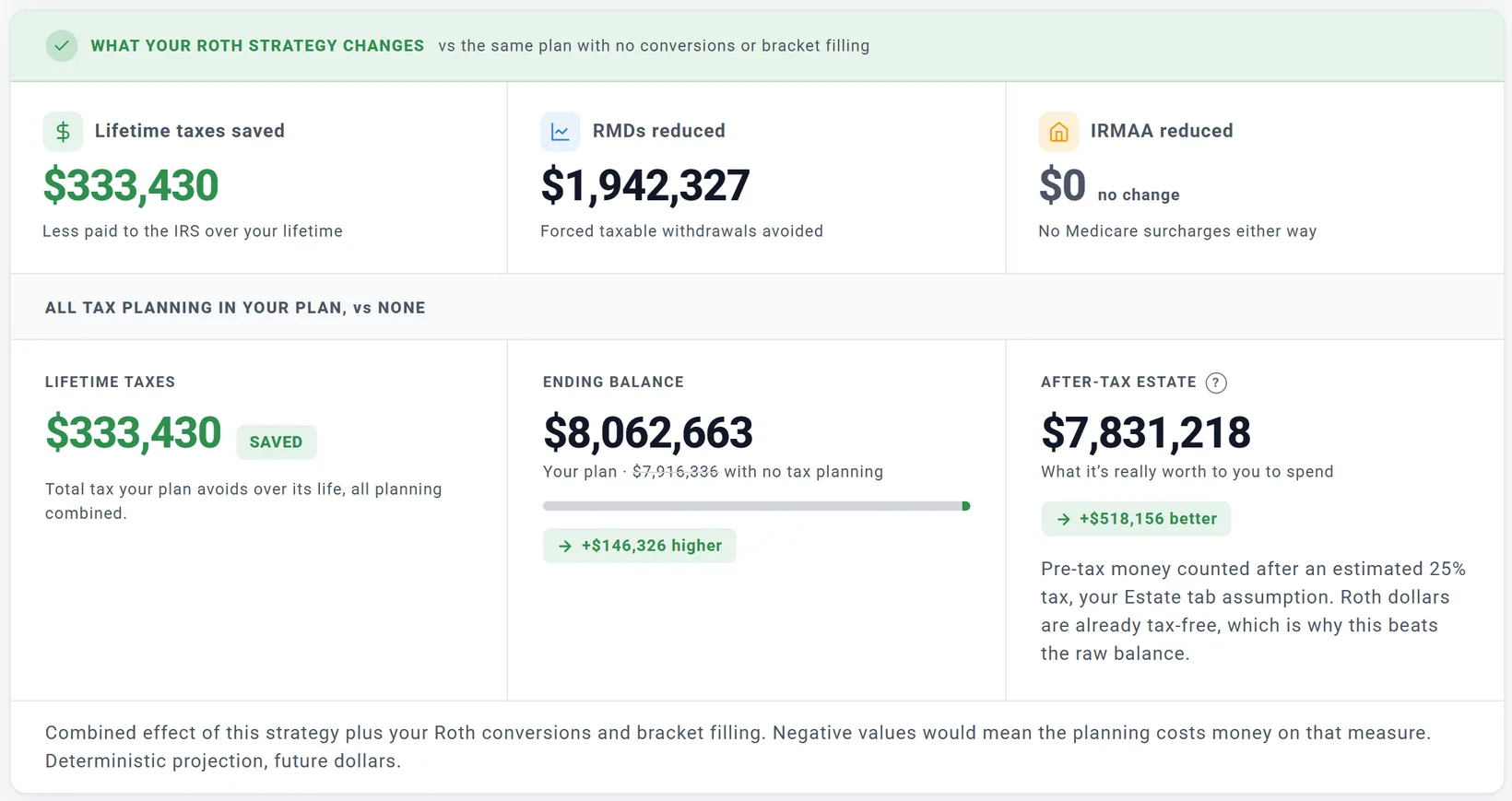
- Lifetime taxes saved, RMDs reduced and IRMAA reduced: what the strategy changes. (For a fixed amount alone, the cards are WHAT YOUR ROTH CONVERSIONS CHANGE.)
- AFTER-TAX ESTATE counts the pre-tax money left at the end after the tax your heirs will pay on it, at your Estate tab's Tax-Deferred Rate (25% unless you change it), and Roth money in full. The card names the rate: "Pre-tax money counted after an estimated 25% tax, your Estate tab assumption." For Chris and Jamie's 12% fill it reads $7,831,218, $518,156 better than no tax planning: more than the $146,326 the raw ending balance gains, because less of what is left still owes tax.
- All of them come from one projection at fixed returns, not from Chance of Success. Check your Chance of Success after a change.
- They are in future dollars unless you pick Today's dollars at the top right of the Optimizer tab (the same choice as the Dashboard's). The amount you type to convert stays in each year's own dollars, because that is what the plan converts.
Less tax is not always more money
LIFETIME TAXES adds up every year's tax. In future dollars a dollar paid at 63 counts the same as a dollar paid at 90, although the dollar paid at 63 is worth more and also gives up the growth it would have had. Pick Today's dollars at the top of the tab to count each year at its own prices: the tax paid in the conversion years then weighs more than the tax saved decades later, and a plan that saves tax in future dollars can pay more in today's dollars. Look at the ending balance and the after-tax estate too. Three settings on Chris and Jamie's plan (future dollars):
| Setting | Converted | Lifetime taxes | Ending balance |
|---|---|---|---|
| $50,000 a year, 63 to 74 | $600,000 | $275,997 less | $375,966 higher |
| Fill to the top of the 12% bracket, 63 to 74 | $993,406 | $333,430 less | $146,326 higher |
| Fill to the top of the 22% bracket, 63 to 74 | $1,521,360 (the pre-tax money runs out at 69) | $389,042 less | $944,373 lower |
Filling the 22% bracket pays the least tax over their lifetime but leaves them $944,373 less at the end, and $341,098 less after tax (the AFTER-TAX ESTATE card, at the 25% rate). The planner does not pick for you here; the Optimizer can search for the best setting.
The per-year plan
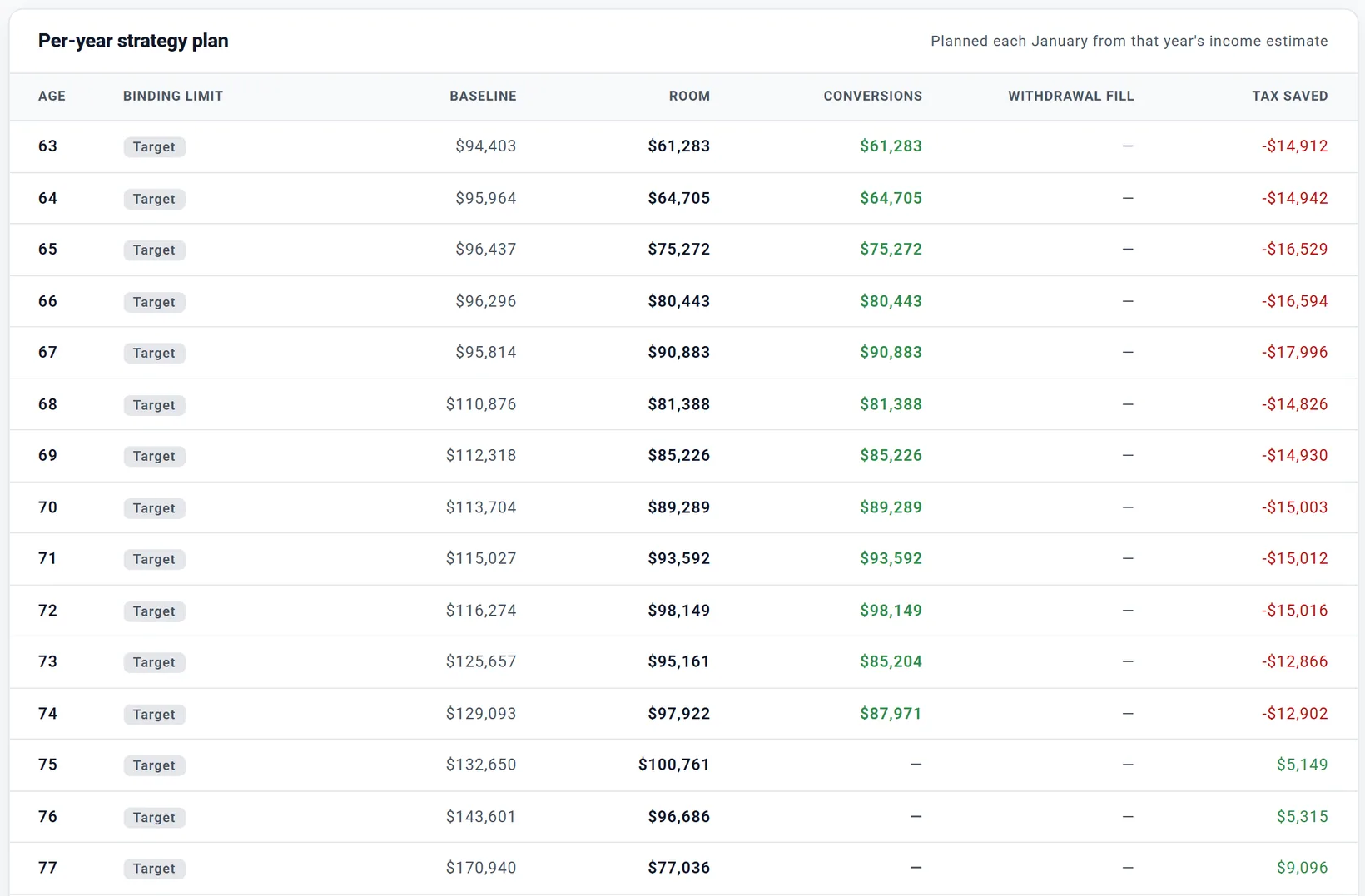
- BINDING LIMIT: the line that set the year's room (your target, or a constraint).
- BASELINE and ROOM: the income the plan expected without the strategy, and the space left under the line.
- CONVERSIONS and WITHDRAWAL FILL: what was converted, and, with extra withdrawals on, how much more the year draws from pre-tax accounts than the same plan without the strategy (a dash when they are off).
- TAX SAVED compares each year with the same plan without the strategy: red (more tax) in the conversion years, positive later, as the smaller RMDs pay off. Chris and Jamie pay $13,000 to $18,000 more a year from 63 to 74, then save from 75.
- Below it, 5-year rule tracking lists each year's conversion, with a warning if the plan takes converted money out of a Roth within five years and before 59½.
Where conversions show in your results
On the Dashboard, More > Roth Conversions Planner+ (listed while Roth Conversions is switched on in Add) draws each year's Conversion Amount, Net to Roth Account and Tax on Conversion.
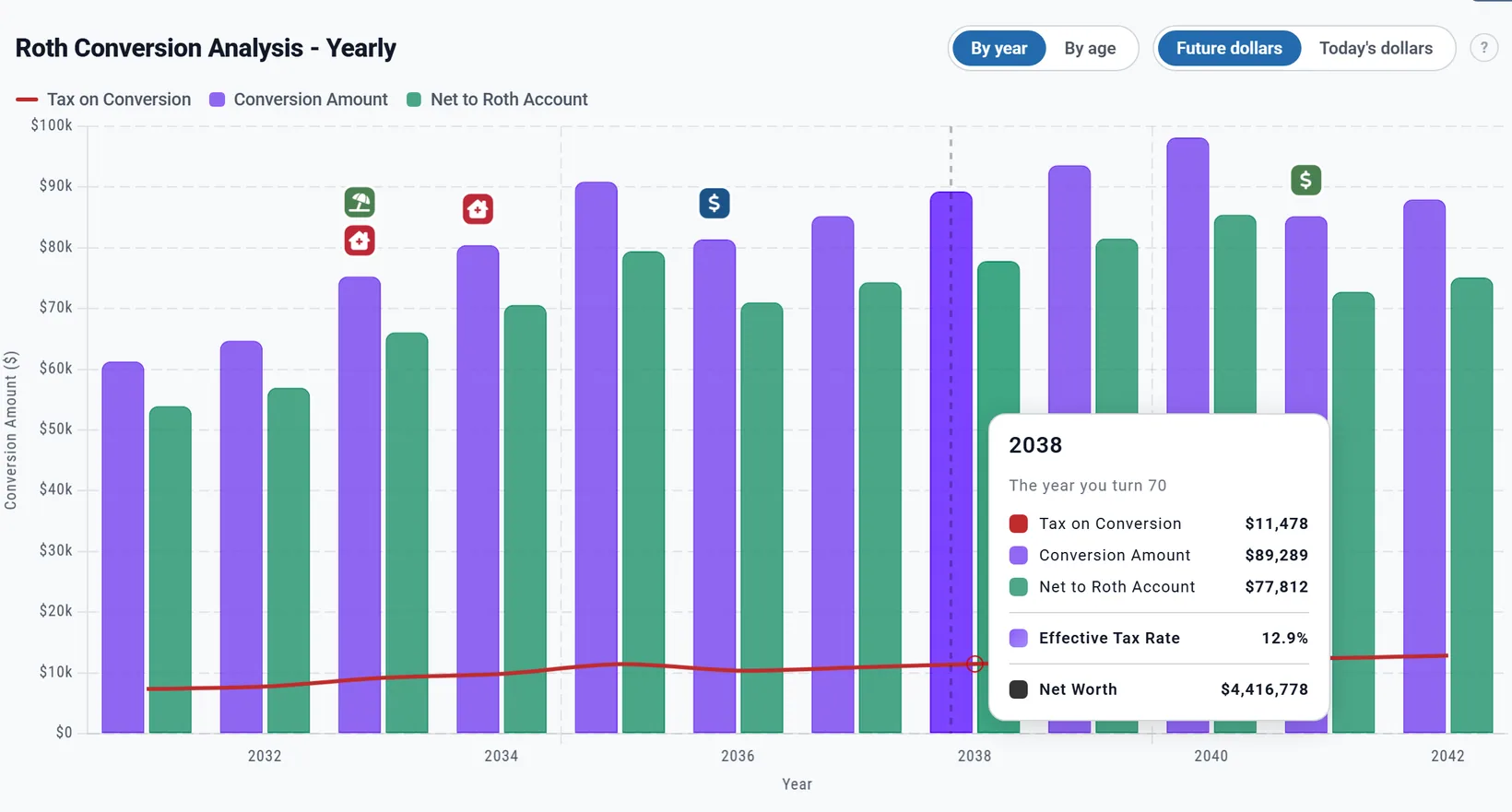
- Each bar is a calendar year, in By age and By year alike; the control only changes the caption.
- Tax on Conversion is the tax held back (or paid from cash), not the conversion's whole effect on your taxes, and the tooltip's Effective Tax Rate is that share (for a fixed amount, the flat rate held back: 12.0% unless your plan stored another). For the whole effect, use Taxes vs none on the Optimizer page, or Your Taxes.
- The Withdrawals chart Planner+ stacks a Roth Conversions band on top: money moved into your Roth, not spent.
- The AGI Tracker Planner+ draws each year's bracket and IRMAA lines, rising with inflation (IRMAA lines only for years whose income sets a Medicare premium). Your AGI also counts dividends and gains, so a correct fill sits a little above its line (Chris and Jamie's 12% fill reads $206,933 at 67 against a "22% Bracket" line of $180,973). Check a fill on the Optimizer page's How the strategy fills chart.
- The Data Summary has Roth Conversions > Conversion Amount and Conversion Taxes, and on Charts & Data Planner+ a Roth Conversions figure explains that year's conversion.
On Your Taxes Planner+, By income source has a Roth Conversions row: the tax the conversions caused, including the tax on other income they pushed into higher brackets (see Your Taxes).
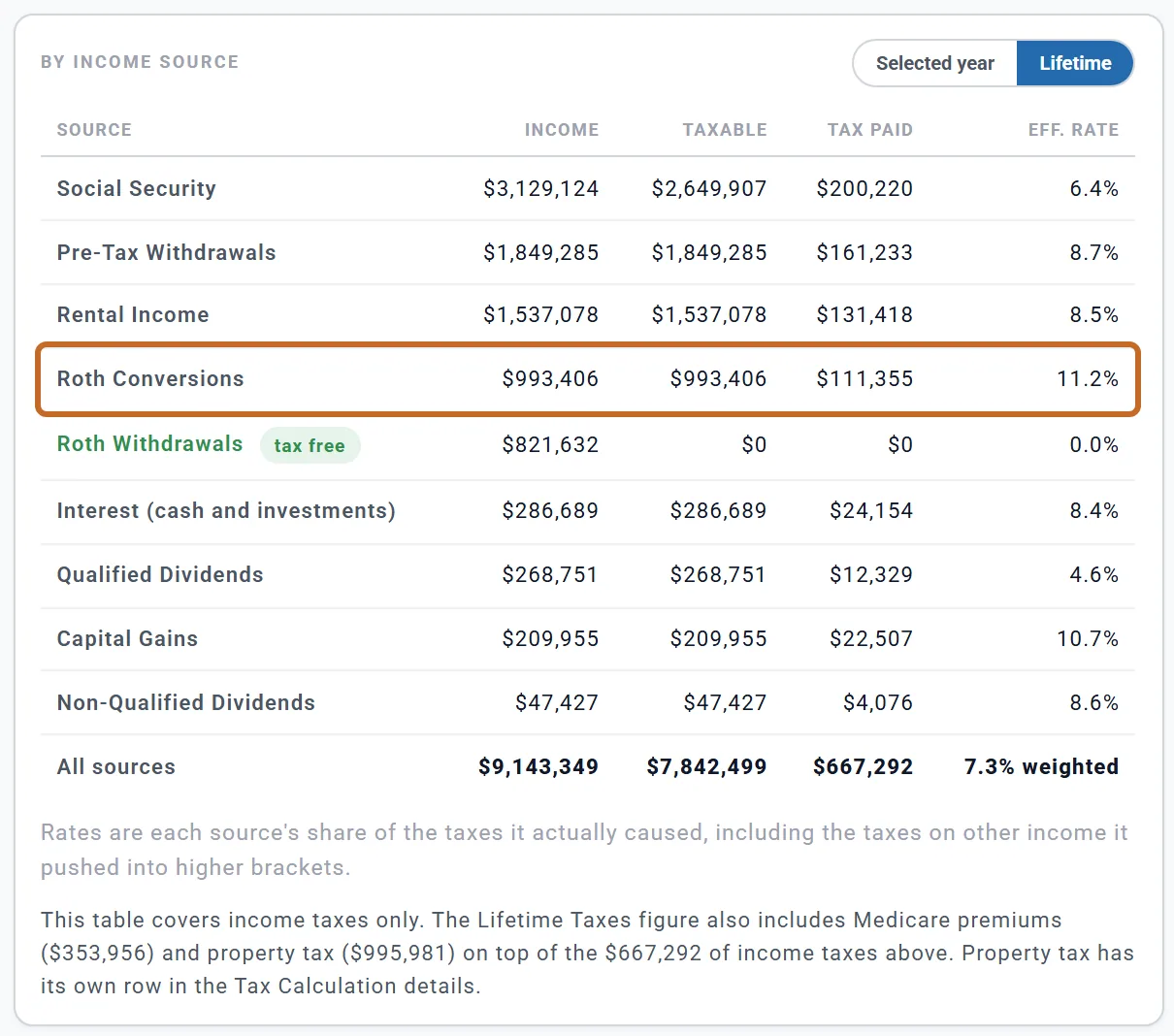
See By age or by year and today's dollars for how the charts count.
If the Optimizer set it up
The Optimizer sub-tab searches conversion settings, bracket filling and withdrawal orders for you (see The Optimizer). Nothing changes until you choose Apply this strategy, which asks Apply this strategy? with a table of each Setting, Your plan today and After applying: "Your current settings will be replaced and the plan recalculated."
- Apply strategy writes the conversion choice (switching Roth Conversions on if needed), the extra withdrawals and limits, and the withdrawal order, then opens Roth Conversions and Bracket Filling.
- It moves Start age up to the first age that converts, so after Apply the slider and the label agree.
- There is no undo button. To go back by hand: choose None under ROTH CONVERSIONS, switch extra withdrawals off, and set your withdrawal order on the Withdrawal Planner (see The order of your investment accounts).
In Canada and the UK
There are no Roth conversions outside the US. The sub-tab is Bracket Filling, and Add > Tax Planning lists only the Optimizer. The card, Bracket filling (Canada) or Bracket filling (the UK), fills a lower bracket with extra RRSP / RRIF (Canada) or pension (UK) withdrawals in your lower-income retirement years, moved to cash.
- FILL UP TO: off; in Canada the top of the 14% or the 20.5% federal bracket; in the UK the top of the 20% basic-rate band, or toward the higher-rate band (stopping at the £100,000 allowance).
- Automatic caps: in Canada the OAS clawback caps the fill once your OAS starts; in the UK the fill stops at the £100,000 personal-allowance taper.
- FILL WINDOW: Start age and End age (at first, your retirement age to the end of your plan). The biggest benefit is usually in the years before CPP / OAS and RRIF minimums, or before your State Pension.
- Results: ENDING PORTFOLIO against no fill, FILL YEARS, TOTAL EXTRA WITHDRAWN, and a table Per-year extra withdrawals.
- For a couple, each of you fills to your own band, from your own accounts.
- The money goes to cash, never into a TFSA or ISA.
- Canada: pension income splitting is in the Taxes box (Apply pension income splitting (Canada)), not on this card, and the fill's sizing ignores it. UK: the fill counts pension withdrawals as fully taxable when sizing, though 25% is tax-free, so it fills a little under the line.
In Australia and other countries, bracket filling is not available yet; the page says so.
What the planner does not model
- No conversion in the plan's first calendar year unless the plan starts in January.
- Conversions are decided once a year, in January, from an estimate; they are not adjusted later in the year.
- You cannot choose which pre-tax account converts, except by locking one. In real life, converting from a 401(k) you still contribute to may need an in-plan conversion or a rollover first.
- The five-year rule is tracked and warned about, but the planner is stricter than the IRS: converted dollars taken out of a Roth before 59½ are charged the 10% penalty like earnings, even after five years. Only contributions (the Past contributions you enter on a Roth account, plus what the plan adds later) come out without it, while the Taxes box's early-withdrawal penalty is on. Early retirers planning a conversion ladder should allow for this.
- Brackets and thresholds grow with your plan's inflation rate, not with future IRS announcements.
- Your heirs' taxes are only one assumed rate, your Estate tab's Tax-Deferred Rate (25% unless you change it), used by the Optimizer and the Estate tab alike; their 10-year rule is not modelled.
For the full list of what the planner includes and leaves out, see the Learning Library article What ReadyAimRetire Models.