


 Continue with Google
Set your plan to Canada
Every new plan starts in the United States, so change the country first (see Getting started):
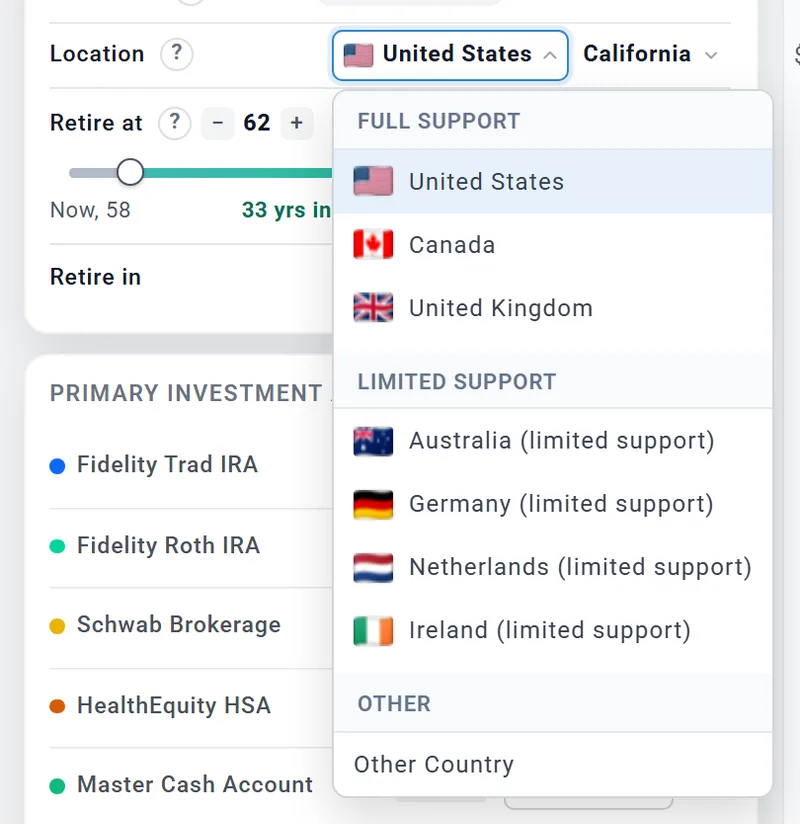
- In your profile box, find the Location row.
- Open the first dropdown and choose Canada, under Full Support.
- Choose your province or territory in the second dropdown. It starts on Ontario (or the province this plan used before). Every province and territory is in the list.
Anyone can change the country, on any account. The ? beside Location opens How Canada Is Supported, a short summary of what is modelled.
What the switch does
If you hold US account types, the planner first shows Switch to Canada? with each account and the Canadian type it will become. Nothing changes until you choose Switch to Canada. Cancel (or a click outside the box) leaves your plan in the United States. With no account to relabel, the switch happens at once.
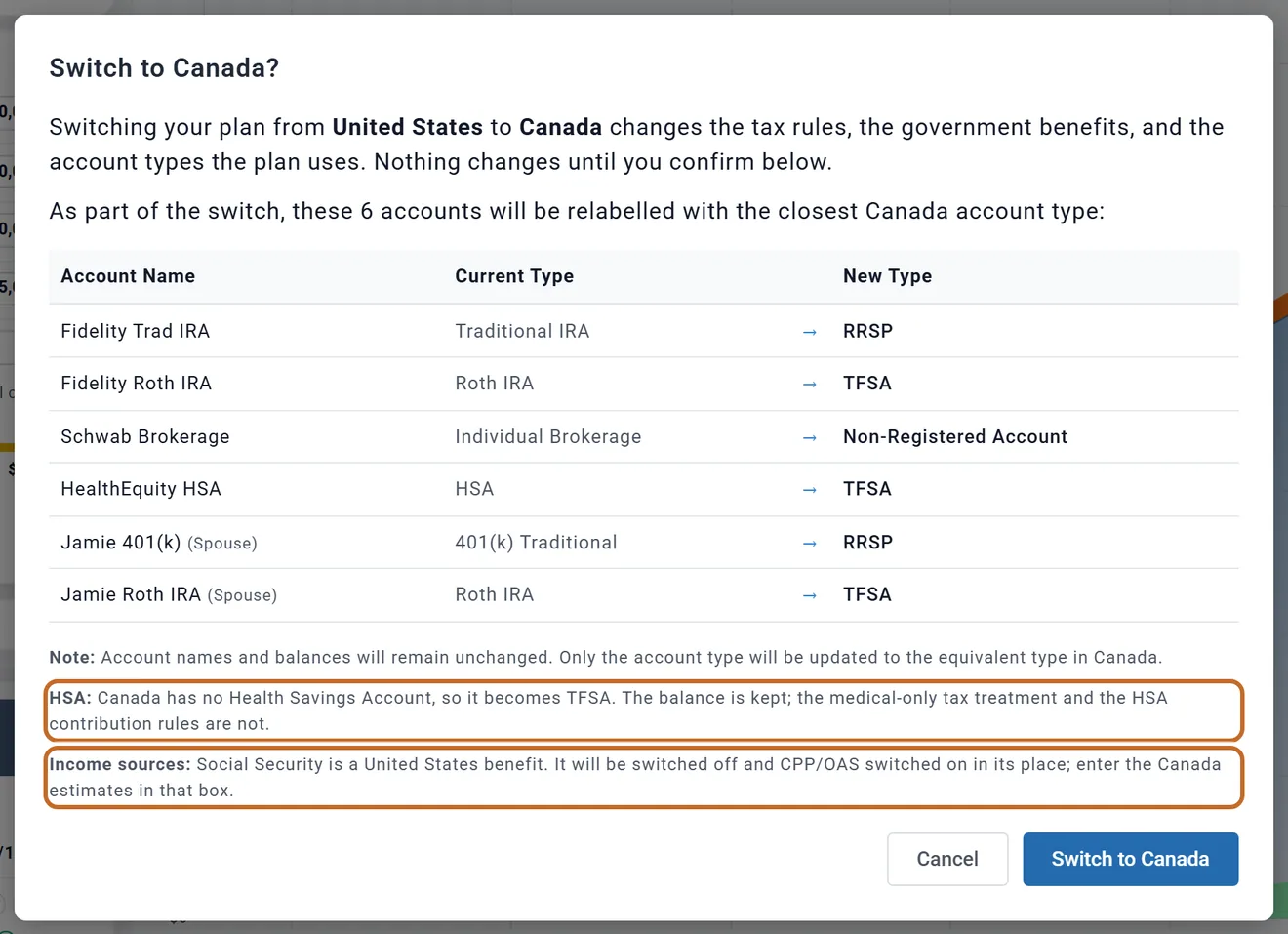
- Accounts: 401(k), 403(b), 457 and traditional, SEP, SIMPLE and rollover IRAs become RRSP. Roth accounts and an HSA become TFSA. An individual brokerage account becomes a Non-Registered Account, a joint one Joint Non-Registered, a 529 a RESP. Inherited IRAs are not listed and keep their US type.
- Income: Social Security is switched off and CPP/OAS switched on (and CPP/OAS (Spouse) for a couple). Defined Benefit Pension 1 and Defined Benefit Pension 2 appear in the Add box.
- US-only boxes are switched off and hidden: see What you will not see. What they held is kept with the plan and comes back if you return to the US.
- Taxes box: Filing Status: offers Single/Individual and Married/Common-Law (a married US plan becomes Married/Common-Law). Dividend amounts you typed for the US are cleared.
- Required minimums: the switch turns Apply RRIF on.
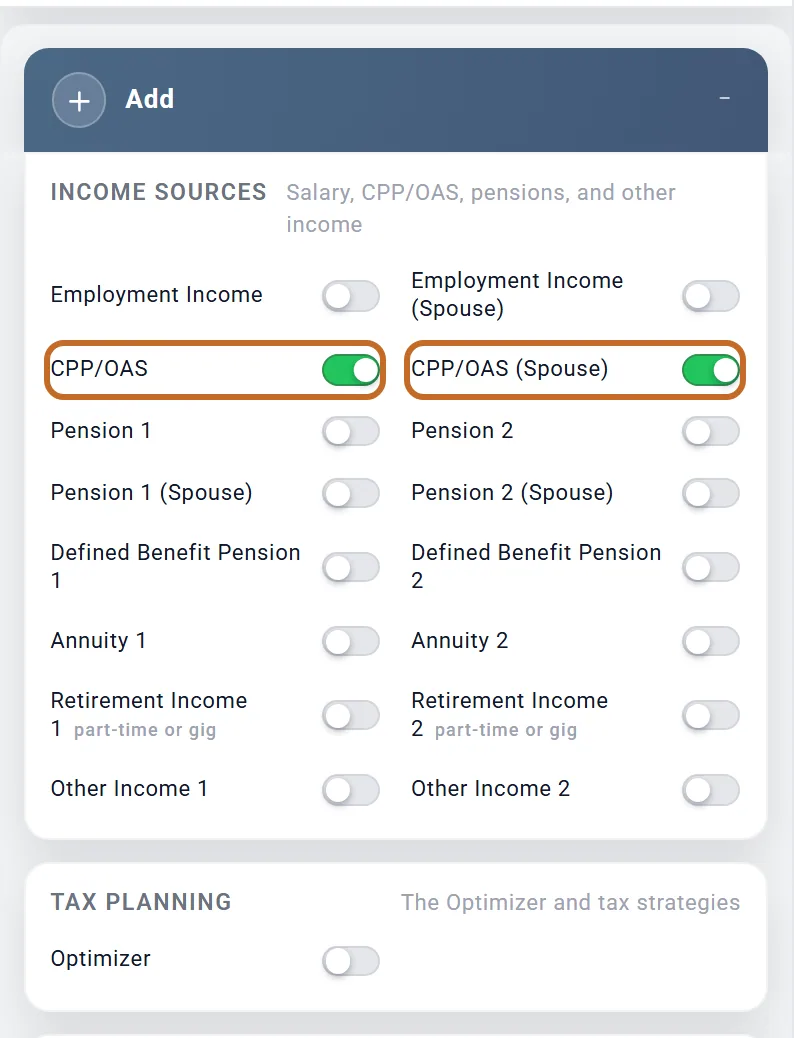
After the switch, the Add box's Income Sources list CPP/OAS for each of you, and Tax Planning lists only the Optimizer.
Some starting values move too, but only the ones you never changed from the US starting value: inflation 3.2% becomes 2.5%, stocks 8% become 7.5% (bonds stay at 4%), and spending of $5,800 a month becomes $3,500. Values you set yourself stay. For Chris and Jamie, inflation and stocks moved; their $8,500 of spending and Chris's retirement at 62 stayed.
Your accounts: Registered, Tax-Free and Non-Registered
On Accounts & Assets the Canadian types come in three groups, and the planner calls the three buckets Registered, Tax-Free and Non-Registered everywhere:
- Registered Accounts: RRSP, RRIF, LIRA, LIF, Group RRSP, DCPP and PRPP. Every withdrawal is taxed as income.
- Tax-Free Accounts: TFSA and FHSA. Withdrawals are not taxed and do not count toward the OAS recovery tax or the Guaranteed Income Supplement's income test.
- Non-Registered Accounts: Non-Registered Account, Joint Non-Registered, RESP, RDSP, Crypto Wallet (taxable) and Trust Account. Only the gain part of a withdrawal is taxed, at the 50% inclusion rate: from the account's cost basis if you entered one, else the Taxable Gains (%) in the Taxes box.
Cash, your home, rentals, other assets and debts work as in the US. Adding an account needs Planner+. Planner+
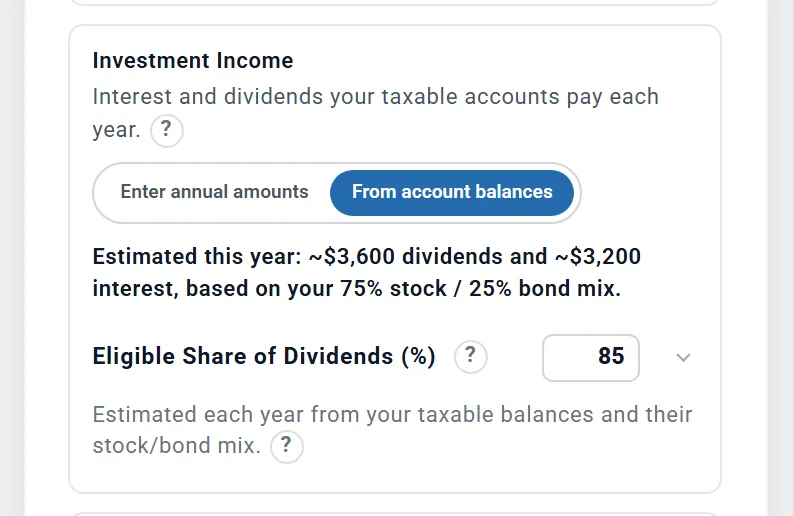
Non-Registered money also pays interest and dividends, taxed each year. The Taxes box's Investment Income card (under Advanced Tax Modeling) estimates them From account balances unless you choose Enter annual amounts (Eligible Dividends ($/yr), Non-Eligible Dividends ($/yr), Taxable Interest ($/yr)).
Eligible Share of Dividends (%) says how much of the estimate is eligible Canadian dividends, which get the gross-up and the federal dividend tax credit. There is no provincial dividend credit.
- LIRA and LIF are not locked in the plan, and LIF maximums are not modelled. To hold one back, use the account's Availability setting.
- A RESP is not a 529. It is treated like any Non-Registered account: a College box does not draw it as tax-free education money, and RESP grants are not modelled.
- Rent from a property your spouse owns is taxed on your spouse's return. A main home's whole gain is exempt.
CPP, OAS and the Guaranteed Income Supplement
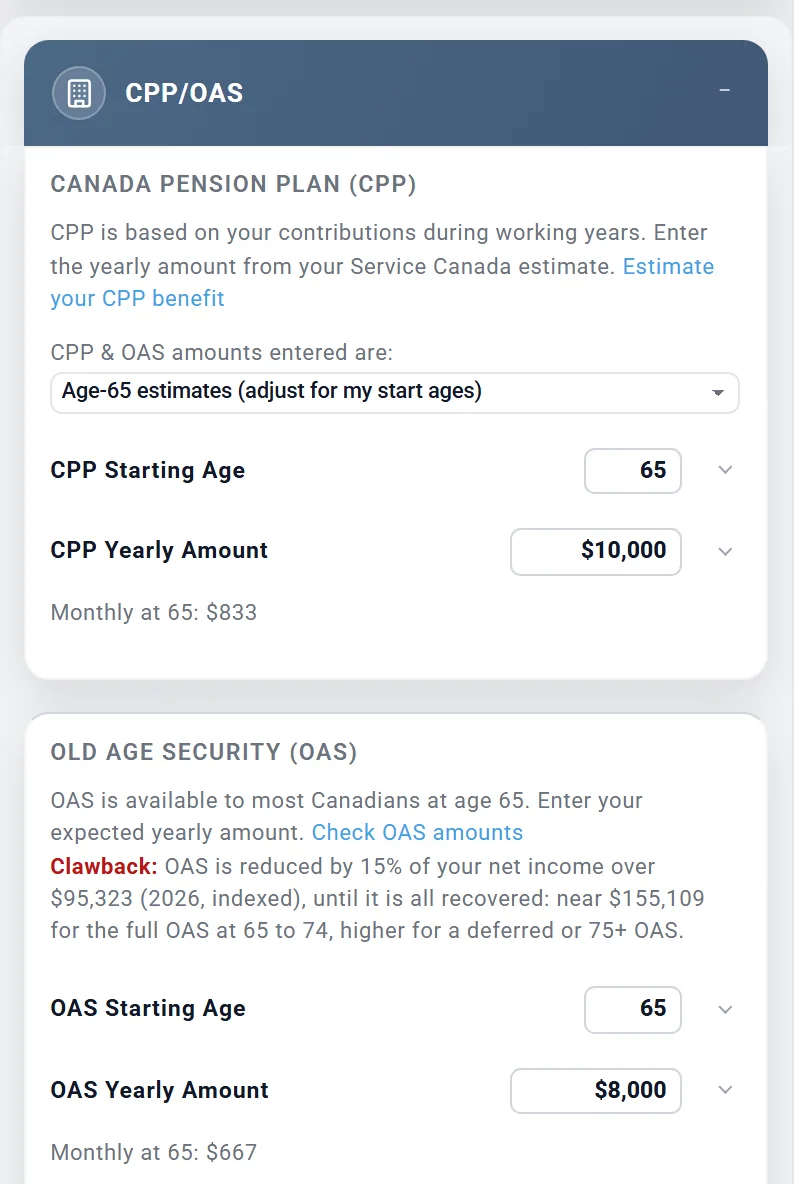
Your government pensions go in the CPP/OAS box, one for each of you. Enter each yearly amount from your Service Canada estimate and choose your start ages (CPP 60 to 70, OAS 65 to 70). The full guide is Canada: CPP and OAS.
- Quebec: there is no separate QPP box. Enter your QPP amount in the CPP fields; with Quebec as your province, the CPP start age goes to 72.
- OAS recovery tax: the box says whether your plan meets it. It is worked out on each person's own net income (see How your taxes are worked out).
- Guaranteed Income Supplement: added by itself, tax-free, for anyone 65 or older on OAS whose income is low enough. It has no setting. Chris and Jamie's income is too high for it. Its income test counts last year's RRSP and RRIF withdrawals, and this year's CPP, pensions, rent, interest and dividends, the taxed part of annuities and Other Income, and pay above the earnings exemption. TFSA withdrawals and capital gains do not count.
- When one of you dies, their CPP and OAS stop. There is no survivor pension and no CPP sharing.
How your taxes are worked out
The planner works out a Canadian return for each year, federal and provincial:
- Federal: the 2026 brackets of 14%, 20.5%, 26%, 29% and 33%, less non-refundable credits at the lowest rate: the Basic Personal Amount, the Age Amount from 65 (smaller as income rises), the Pension Income Amount (up to $2,000 of eligible pension income), the dividend tax credit, credits on CPP and EI contributions and employment income, and the spouse amount.
- Provincial: your province's own brackets, Basic Personal Amount, Age Amount and Pension Income Amount. Ontario adds its surtax, the Ontario Health Premium (inside Ontario's tax, not a line of its own) and its tax reduction. Quebec gets the 16.5% federal abatement and its own age and retirement income amounts.
- Later years: each January the brackets, the Basic Personal Amount, the Age Amount and the OAS threshold rise with your plan's inflation. The $2,000 pension amount does not.
- Tax year: the calendar year. Each full year is priced again on its actual total at year end.
To see one year's return, open Tax Details (on Charts & Data, choose the Taxes chart and the button on a row; see Reading your results). For a couple its totals add your two returns together, and its bracket panel shows a table for each of you. In 2041, the year Chris turns 73:
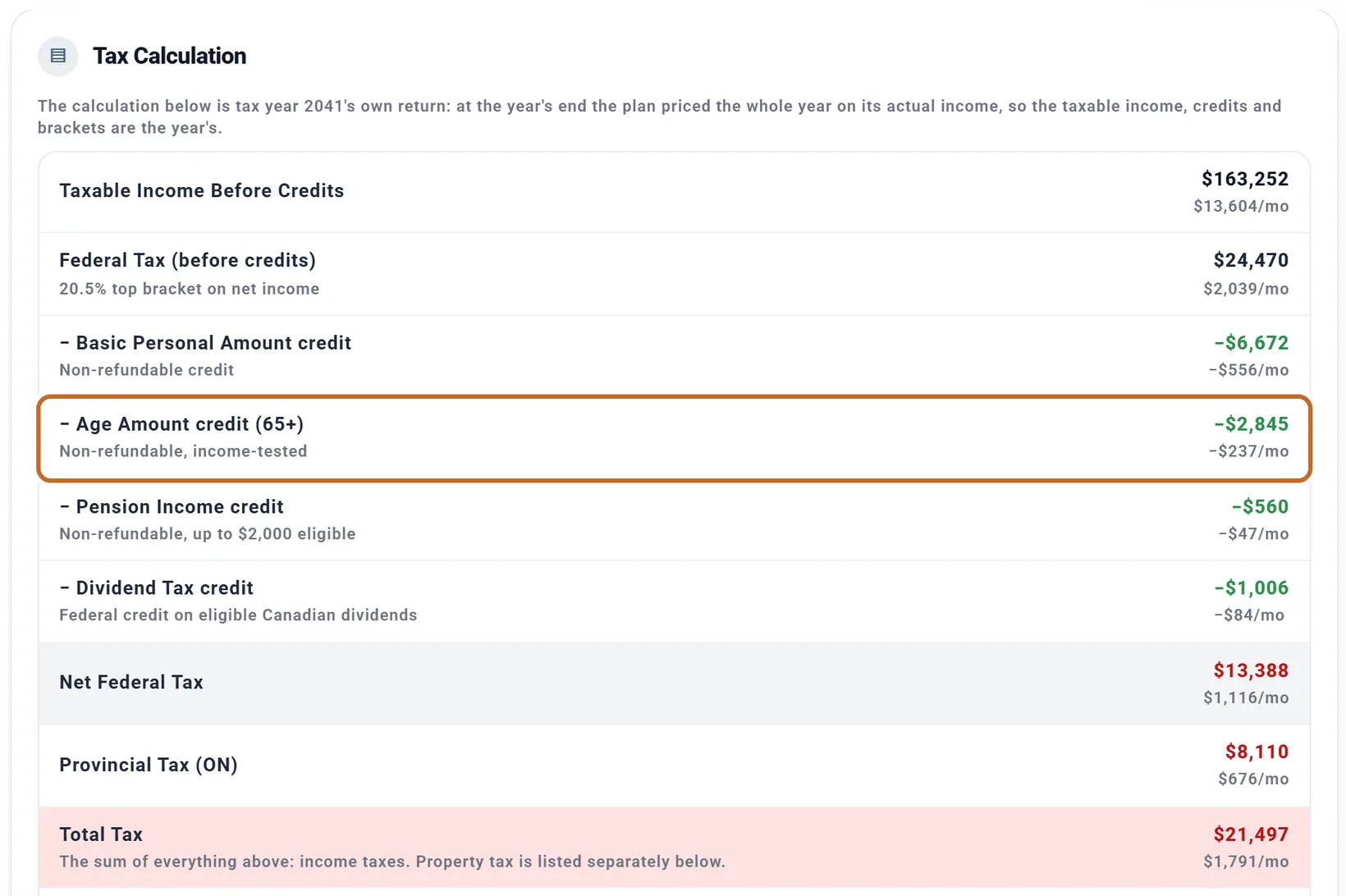
Tax Details also notes that provincial tax is an estimate, and shows the pension income split for the year (see Couples).
The OAS recovery tax
- 15% of each person's own net income above $95,323 (2026, rising with inflation), up to that person's OAS.
- It is reported beside your income tax, not inside Total Tax, and comes off your after-tax income. Tax Details shows it as OAS Clawback (Recovery Tax): with each person's OAS; the Taxes chart as a band, "OAS Recovery Tax".
- Chris and Jamie never reach it as entered. In a test with $150,000 a year of other income for Chris from 65, at 72 the recovery tax took all of Chris's OAS and none of Jamie's: each person is tested on their own income.
Payroll on your pay
With Employment Income on, the plan takes CPP (5.95% between $3,500 and $74,600 of pay, plus the second CPP contribution of 4% up to $85,000) and EI (1.63% up to $68,900), in 2026 figures. In Quebec QPP replaces CPP. Tax Details shows them as "CPP + EI Contributions". Retirement Income pays neither. The self-employment tick is US only: self-employed CPP is not modelled.
Couples: two returns and pension income splitting
With Include spouse on, each of you files your own return, with your own Basic Personal Amount, credits and OAS recovery tax.
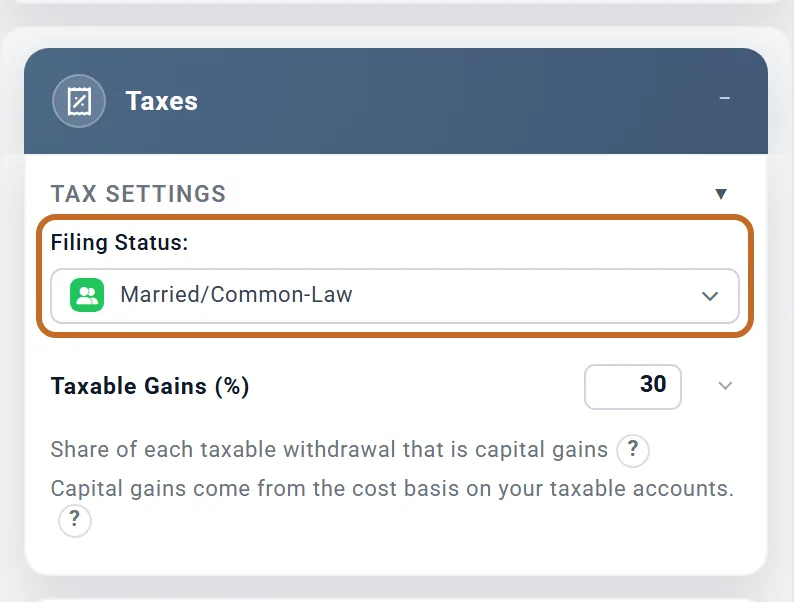
Filing Status: does not change any number for a couple: Chris and Jamie's plan comes out the same to the dollar with Single/Individual or Married/Common-Law. With no spouse in the plan and Married/Common-Law chosen, the box notes that only your own income, accounts and benefits are modelled.
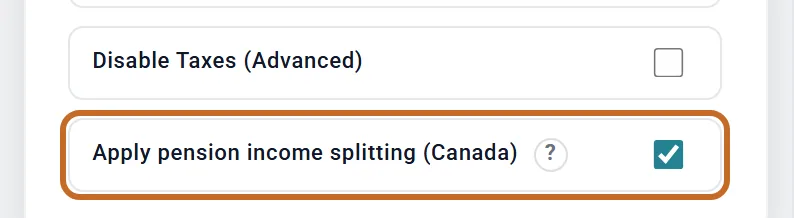
Apply pension income splitting (Canada) is in the Taxes box under Advanced Tax Modeling, on for new plans. With it on, the plan moves up to half of one spouse's eligible pension income to the other, choosing the split for you: it evens out your incomes, and when the OAS recovery tax is in play it tries other splits and keeps the one with the least income tax and recovery tax together.
- Eligible: Pension 1 and 2 and Defined Benefit Pension payments at any age, and Registered (RRSP / RRIF) withdrawals once the spouse moving them is 65 by December 31.
- Never split: CPP, OAS, wages, rent, Retirement Income, Other Income and capital gains.
For Chris and Jamie, 2041's split moves $30,988 of Chris's RRIF withdrawals to Jamie's return. Over their plan, switching splitting off adds about $82,000 of income tax (in future dollars). The Optimizer also tries your plan with and without it (see The Optimizer).
- Annuities, the Defined Benefit Pensions and deferred compensation sit on the Primary's return; Pension 1 and 2 (Spouse) on the spouse's. A Non-Registered account's gains, interest and dividends go on its owner's return.
- Other Income goes on the return of the person in Who receives it.
- In the year one of you dies, the survivor claims the spouse amount and splitting covers only the months you were both alive. From the next January the survivor files alone.
More on couples: Planning as a couple.
Saving: RRSP, TFSA and FHSA limits
In Advanced contributions, each person's deposits are capped at the CRA limits, rising each year with your plan's inflation:
- RRSP: $33,810 in 2026, or 18% of that person's pay when Employment Income models it. A Group RRSP, DCPP and PRPP share the same room. RRSP contributions stop after the year that person turns 71.
- TFSA: $7,000. FHSA: $8,000.
- Money over a limit goes to that person's Non-Registered account. A RRIF, LIRA or LIF never takes new contributions.
- Employer contributions need a workplace account such as a Group RRSP or DCPP; the Employment Income box warns when you hold none.
Carry-forward room, TFSA room given back after a withdrawal, the FHSA's lifetime cap, the pension adjustment and spousal RRSPs are not tracked, so your real room may be higher. The Contribution Planner, year-by-year amounts and Fill to limit work as in the US: see Saving before you retire.
RRIF minimums and withdrawals
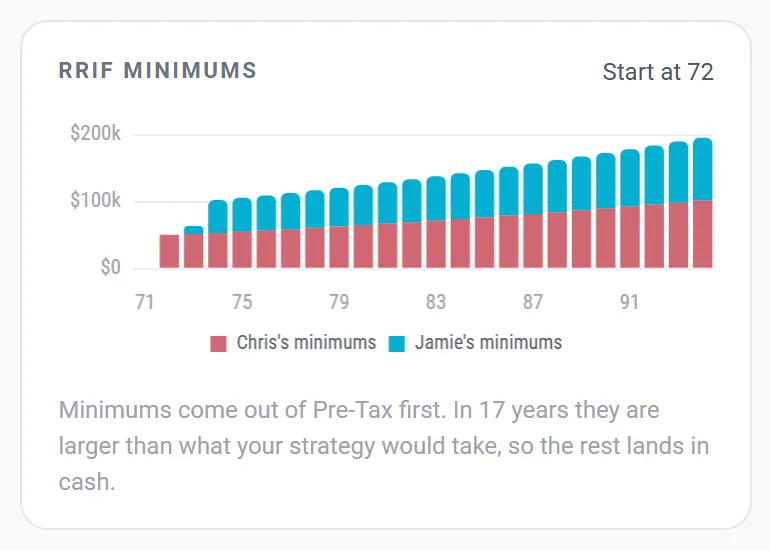
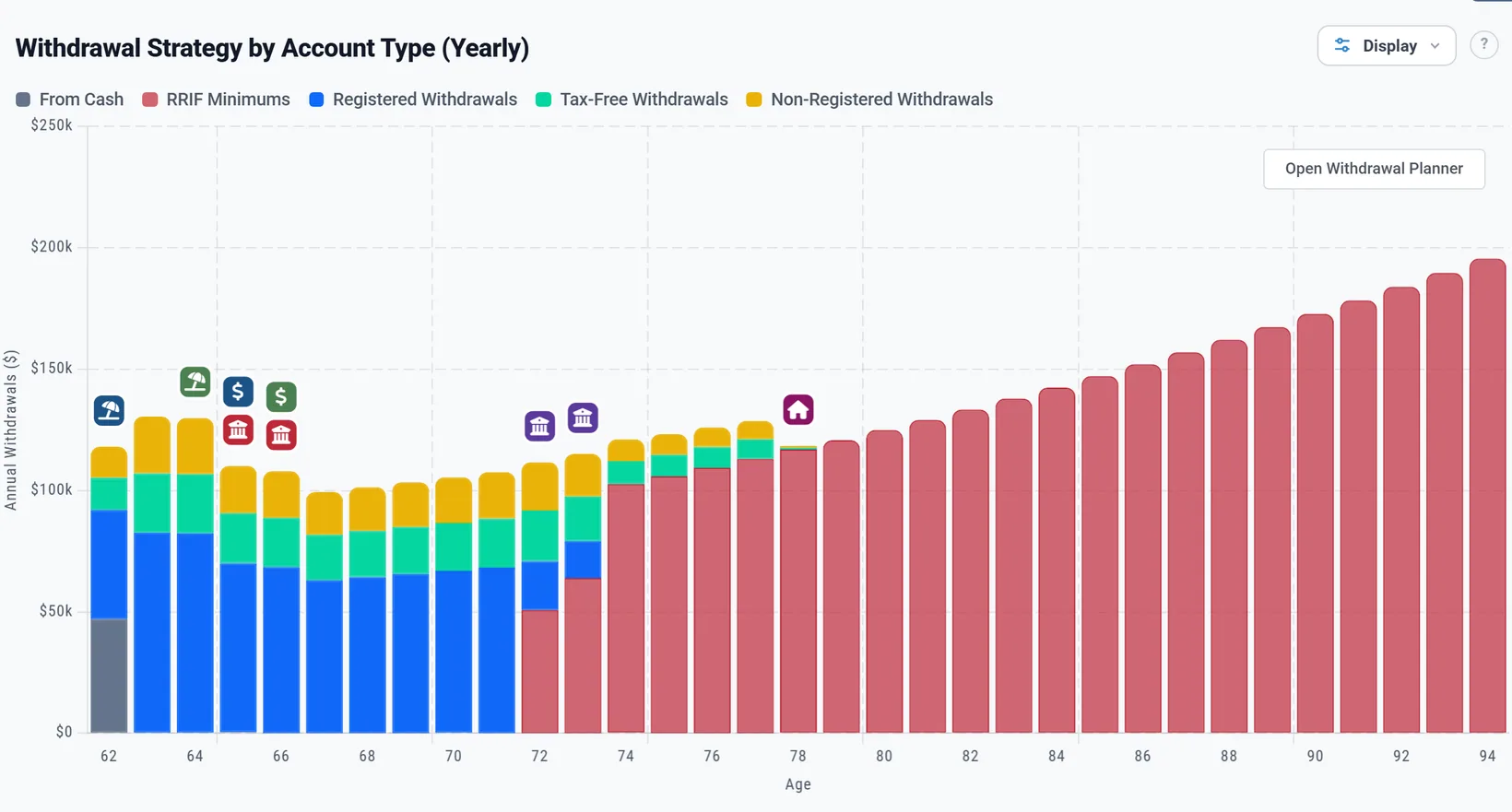
The plan does not model converting an RRSP to a RRIF. It treats every Registered account as a RRIF from 72: minimum withdrawals start in the month each person turns 72, on their own age and their own Registered balances, at 5.28% in the first year and rising each year to 20% from 96.
- The switch is Apply RRIF in the Retirement Spending box (Withdrawal Strategy, Simple), and Apply RRIF minimums. on the Withdrawal Planner in Advanced. Minimums come out of Registered money first, whatever your order.
- Chris's minimums start in June 2040, the month Chris turns 72, and Jamie's in March 2042, the month Jamie turns 72.
- A minimum bigger than your spending is still withdrawn and taxed; the rest lands in cash. The planner's RRIF minimums card says how often: in 17 of Chris and Jamie's years.
- Still working at 72? The minimum is taken while you work only in the Monthly Expenses spending mode. In Monthly Income and Using the 4% Rule, minimums wait until you retire: with Chris working to 74, Chris's first minimum came at 72 in Monthly Expenses and at 74 in Monthly Income.
- No withholding is taken from RRSP or RRIF withdrawals: the plan charges each year's real tax instead.
- A RRIF minimum based on a younger spouse's age is not modelled.
Everything else works as in Where your spending money comes from: the order, cash first, the seven strategies (their names still say Pre-Tax, Tax-Free and Taxable) and whose accounts are used last. For a couple, a working person's retirement accounts are used only when nothing else can pay the month. There is no 59½ rule, no early-withdrawal penalty and no 72(t) in Canada.
To draw extra Registered money in low-income years, use bracket filling in the Optimizer (the top of the 14% or 20.5% federal bracket): see In Canada and the UK.
On a Canadian plan, the Learning Library article Required Minimum Distributions covers RRIF minimums: when yours start, and what you can do about them.
At a death, and the Estate tab
- The first death: the survivor takes over the late spouse's Registered balances as their own. That year's RRIF minimum is the late spouse's; from the next January, the survivor's own. The late spouse's CPP and OAS stop.
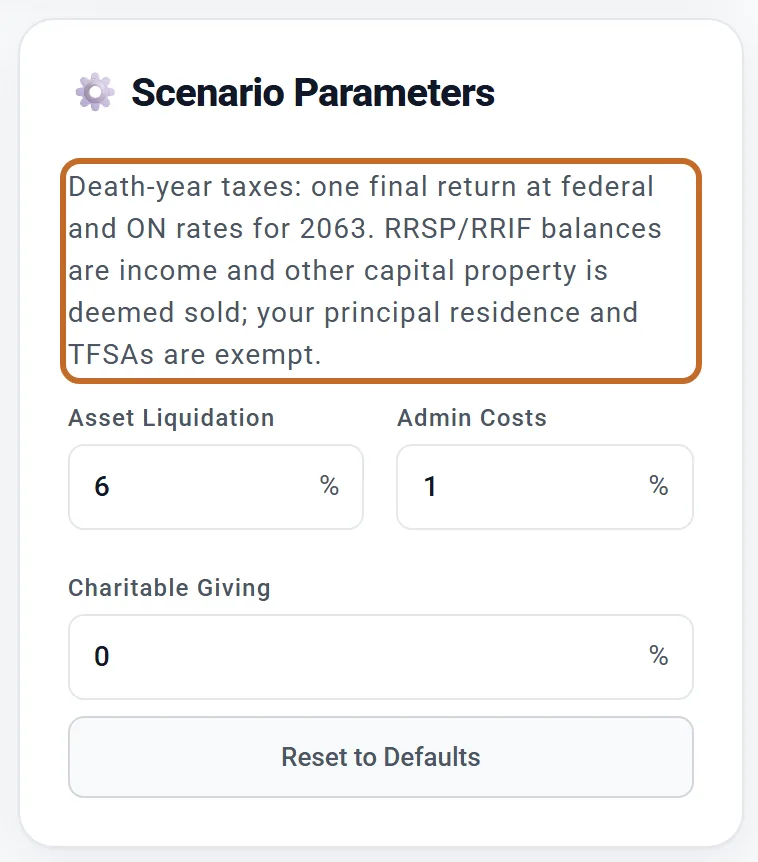
- Plan end: the Estate tab prices the death-year tax as one final return, with the planner's own Canadian tax rules.
On the final return, RRSP and RRIF balances count as income and other capital property is treated as sold. Your principal residence and TFSAs are exempt. There is no step-up in cost basis in Canada, so its switch is hidden.
Probate fees, such as Ontario's estate administration tax, are not worked out: only Asset Liquidation and Admin Costs apply. If the tax rules cannot load, the tab shows two rates to fill in instead, RRSP/RRIF Tax Rate and Deemed Gains Tax Rate.
What you will not see in a Canadian plan
- Boxes: Social Security (both), Deferred Compensation, TIPS Ladder 1 and 2, Roth Conversions, HSA, 72(t) Payments and Health Care. There are no marketplace, Medicare or IRMAA costs: put your health costs in your spending or budget (see Health care costs).
- Taxes: no state or local tax (your province instead), no NIIT, no 10% early-withdrawal penalty and no IRMAA.
- Charts: no Social Security, IRMAA, Roth Conversions, TIPS Ladder or Healthcare & HSA chart; the RMDs chart is RRIF Min.
- Summary: no "How you compare" or "Income thresholds" cards.
- Progress: no Progress item in the left menu, and no link to it on Accounts & Assets.
- Learning Library and Coach: the Social Security, IRMAA, early-withdrawal and health insurance before Medicare articles are hidden, and so are the US Coach cards. The Required Minimum Distributions article answers for RRIFs, and the Coach counts down to your RRIF minimums.
Reading your results in Canada
Amounts show with "$" and are Canadian dollars. Charts and tables use the Canadian words: the three buckets, Provincial Tax, OAS Recovery Tax, CPP + EI, and one CPP and one OAS band for each of you on Guaranteed Income.
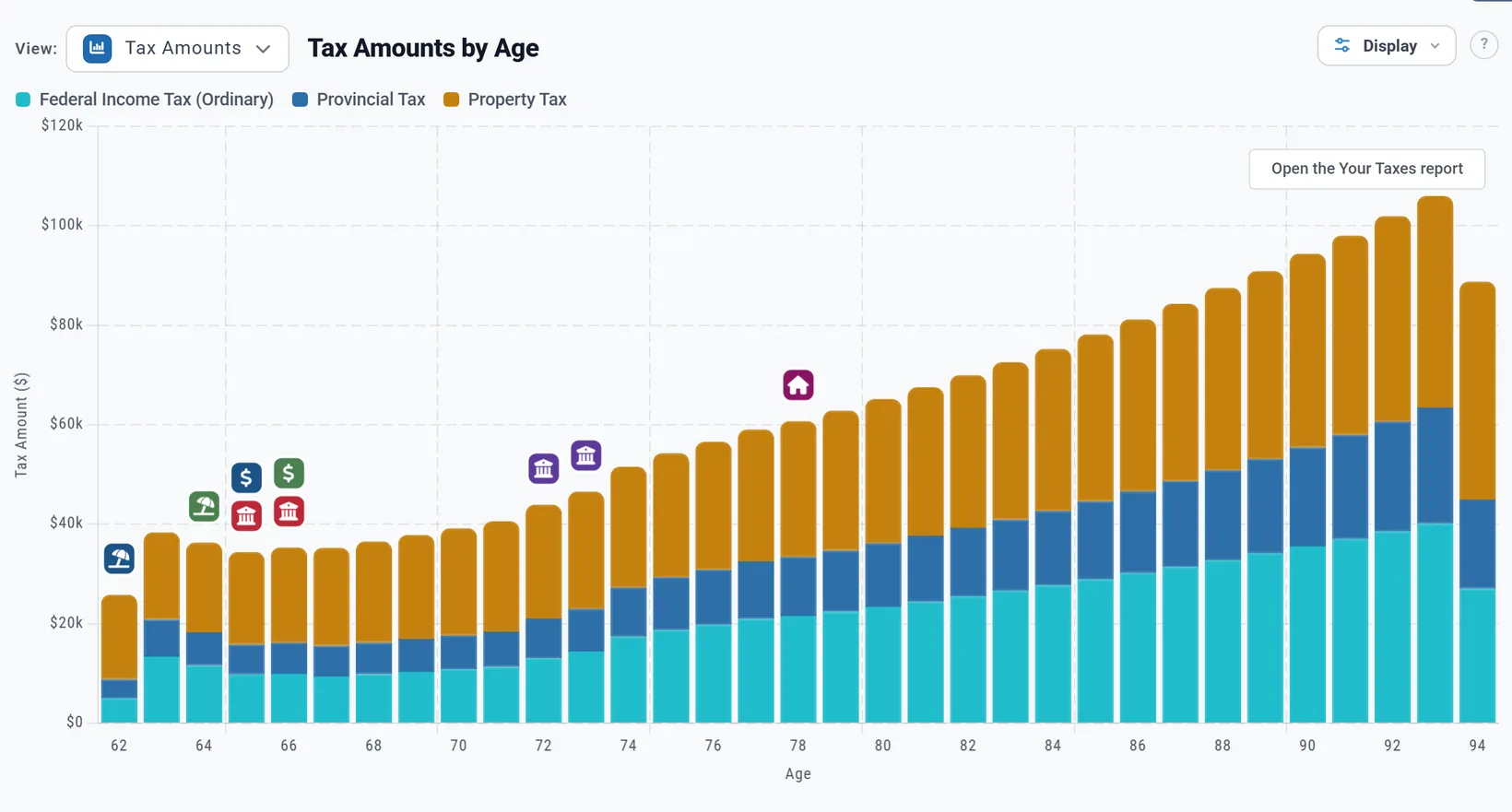
- Years: a tax year is the calendar year, so By year runs January to December.
- Your Taxes: the top figure is "Lifetime taxes" and there is no Medicare card (see Your Taxes).
- Chance of Success uses US market history and US inflation, and says so in a note. Guardrails check each January (see Chance of Success).
- Milestones work the same; conditions are checked each January, and a condition on your savings counts your Registered, Tax-Free and Non-Registered accounts (see Milestones).
- More: Dashboard charts and the Summary and Coach in other countries.
On a Preview account
- Changing Location and your province works on every account.
- The CPP/OAS boxes work on every account, amounts included. So do Defined Benefit Pension 1 and 2.
- Pension 1 and Pension 2: the amount needs Planner+. Planner+
- Adding an RRSP, TFSA or any account needs Planner+. Planner+
- The Estate tab, Your Taxes below its top figures, and the Dashboard charts other than Portfolio are blurred. Planner+
- The Contribution Planner: viewing it, its first step and typing amounts work; the order, Fill to limit and year ranges need Planner+ (see Saving before you retire). Planner+
- The Optimizer and bracket filling work on every account.
What the planner does not model in Canada
- Converting an RRSP to a RRIF as a step, a RRIF minimum on a younger spouse's age, and the January 1 balance rule (each year's minimum runs birthday to birthday on the current balance).
- LIRA and LIF lock-in and LIF maximums.
- Spousal RRSPs, the Home Buyers' Plan, RRSP carry-forward room, TFSA room given back after a withdrawal, and the FHSA's lifetime cap and qualifying withdrawals.
- RESP and RDSP grants and bonds, and RESP education withdrawals.
- Provincial dividend tax credits (so dividend tax runs a little high), QPIP and Quebec's lower EI rate, and province-specific deductions beyond the amounts above.
- Self-employed CPP.
- CPP survivor and death benefits, CPP sharing, and OAS residence rules (you enter the amount).
- Withholding tax on RRSP and RRIF withdrawals, and probate fees.
- Canadian market history in Chance of Success.
- Currency conversion when you change country.
For the full list of what the planner includes and leaves out, see the Learning Library article What ReadyAimRetire Models.